How to mass apply for jobs on LinkedIn (without bot-submit mistakes)
Want to mass apply for jobs on LinkedIn, fast—but safely? Learn why bot submissions go wrong and how JobWizard’s autofill-first workflow helps you submit only after review.
Free Chrome extension
Find someone to refer you — automatically
JobWizard spots employees at your target companies who can refer you, right from the job page.
If you’re searching for how to mass apply for jobs on linkedin, you’re probably trying to increase volume without burning out.
The catch: many “mass apply” approaches rely on bots that submit for you, and that’s where problems start—wrong screening answers, mismatched resumes, spam-filter friction, and a reputation you can’t take back. The safer path is review-first autofill: fill fast, check carefully, and submit yourself.
Why “mass apply” tools that submit for you backfire (and cost you real opportunities)
When you use an auto-submit “bot” to mass apply for jobs on LinkedIn, the risk isn’t just errors—it’s that you won’t see them until after the damage is done.
Here’s what commonly goes wrong when a bot submits for you without your final review.
- Screening questions get answered wrong because the bot guesses based on a profile snapshot instead of the job’s exact requirements.
- Your resume details can drift from the role (job-specific skills, titles, dates, or emphasis) when the “best match” logic picks the wrong content for that particular posting.
- Employer-side quality and spam filters can trip when submissions look repetitive, incomplete, or not aligned to the job description—especially at higher volume.
- You can harm credibility with companies you actually want if you submit inaccurate or mismatched information because you weren’t reviewing before submission.
Even if a tool claims to automate the process, the underlying trade-off is the same: you lose the final checkpoint where you can confirm that the application truly represents your background for that job.
Instead of optimizing “submission speed,” optimize “review speed.” That’s the difference between applying a lot and applying effectively.
How to mass apply for jobs on LinkedIn the safer way: autofill first, submit yourself
The safer way to move fast is to separate filling from submitting.
JobWizard supports a autofill + review-before-submit workflow: the user is on the application, JobWizard autofills repetitive fields, and you review and submit the application yourself.
That approach matters because many fields are easy to replicate (formatting, contact blocks, standard experience summaries), while other parts need a human check (role-specific answers, EEO/sponsorship/salary/custom questions where accuracy is critical).
- Open each job’s application page so you’re working with the actual questions and required fields for that posting.
- Autofill repetitive fields quickly to reduce manual typing and cut down on copy/paste errors.
- Review before you submit—especially screening questions and any custom prompts that tie directly to the job.
- Submit yourself after you confirm the details match your experience and the employer’s requirements.
This is also where “mass apply” strategies become realistic. You’re still increasing throughput, but you’re doing it by removing busywork—not by letting automation decide what to send.
JobWizard usage in the real world: 720,000+ applications submitted and 600,000+ autofill sessions run through JobWizard. On average, it autofills ~18 repetitive fields per application (typically 11–23). About ~65% of those applications are on Workday, where it saves the most time.
Those numbers reflect the “autofill + review” model: quick completion of repetitive sections, then your final check before submission—not blind auto-submit.
What to fill automatically vs. what you must verify on LinkedIn applications
You can move fast without risking accuracy if you treat your application like two layers: repetitive inputs and role-critical answers.
Use the checklist below to decide what to trust to autofill and what to scrutinize before clicking submit.
Good candidates for autofill
- Contact and baseline identity fields that rarely change between roles.
- Consistent profile-derived sections (where the wording and data are stable).
- Repeatable formatting fields that are easy to get wrong when you’re rushing (addresses, dates, standard entries).
Always verify before submit
- Screening question responses that map to the job’s specific requirements.
- Sponsorship/salary/EEO/custom prompts (these are often employer- and posting-specific).
- Any role-specific work history details where the “closest” match might be wrong for that exact job.
- Proofread the summary you’re sending to ensure it still reflects the role you’re applying to—not just your overall experience.
If you’re trying to apply at scale, the biggest quality lever isn’t “more automation.” It’s making sure every application you submit is internally consistent and aligned to the posting.
When LinkedIn “mass apply” becomes too much: how to keep quality high
Applying more is only helpful if each application stays credible.
Here’s what to watch for when you increase volume and rely on autofill.
- Stop if you notice repeated mismatches (for example, the same screening answers don’t fit multiple roles).
- Match your emphasis to the job: if the posting emphasizes a specific domain, confirm your application reflects that—not just your general background.
- Use volume to test targeting: if a set of roles gets ignored, refine which jobs you apply to next rather than just applying to more of the same.
- Keep your submission rhythm sustainable: if you can’t review carefully, slow down. Review is the quality gate.
And if you’re thinking, “I’ll just send more applications,” consider pairing volume with better signal: referrals.
Even when you’re using a fast autofill workflow, referrals can help you stand out without risking inaccurate bot-style submissions.
Boost your LinkedIn job search with referrals (without losing review control)
For many job seekers, the best alternative to pure volume is mixing applications with targeted networking.
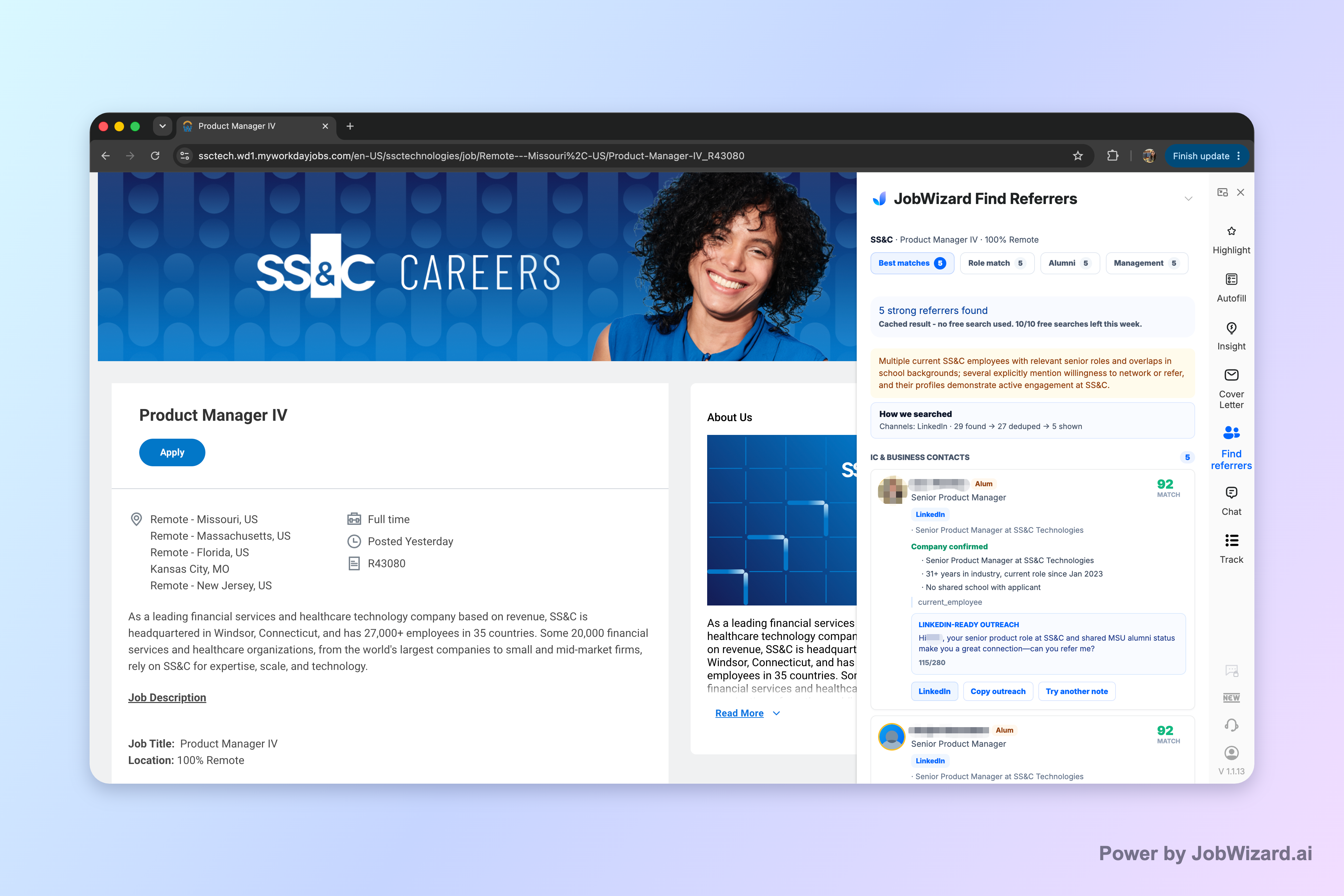
JobWizard’s Referral Finder organizes relevant employees by match type, including role and alumni context, and prepares an outreach draft the user can review and personalize.
That matters because networking isn’t just “extra”—it’s a way to improve relevance while keeping your communications accurate and truthful.
Before you contact anyone, remember these limits:
- Don’t assume contact accuracy or guaranteed outcomes—Referral Finder helps you identify leads, but it doesn’t guarantee a referral or a response.
- Add a truthful, specific reason for reaching out and choose whom to contact yourself.
If you’re trying to maximize results from your time, this is a practical pairing: use review-first autofill to submit accurately, then use referrals to increase the chance your effort lands with the right humans.
Ready to apply faster while staying in control? Try JobWizard to autofill repetitive fields on the applications you’re already viewing—then review and submit yourself.
Do this automatically with JobWizard
Skip the manual work — JobWizard's Smart Autofill handles this for you.
FAQ
Is there a safe way to mass apply for jobs on LinkedIn?
Yes—aim for speed without automation that submits for you. Use an autofill-then-review workflow: fill repetitive fields quickly, then personally review and submit so screening questions, work history, and required disclosures match the role.
What goes wrong when bots submit applications for you?
Bot submissions can mismatch resume details, answer screening questions incorrectly, trigger employer spam or quality filters, and create a damaged impression with companies you genuinely want—because the submission happens without your final review.
How does review-first autofill help compared with auto-submit tools?
Review-first autofill reduces the manual typing burden while keeping control. JobWizard fills repetitive fields for applications you’re already on, then you review sponsorship/salary/EEO/custom questions and submit yourself.
Should I use referral outreach as part of my LinkedIn job search instead of only mass applying?
Often, yes. Referral Finder can help you identify relevant employees by match type and prepares an outreach draft you can personalize, but you choose whom to contact and must add a truthful, specific reason for reaching out.
What should I double-check before I click submit on a LinkedIn application?
Before submitting, verify your work history and dates, that screening question answers match the job requirements, that any role-specific experience is correctly worded, and that required disclosures (like EEO-related questions) are accurate for that employer and position.
Next steps: If you want a practical walkthrough for the autofill-first workflow, start with How to Autofill Job Applications (Step-by-Step with JobWizard). For the exact “what goes wrong” angle, read auto apply for jobs: how bot-style submissions go wrong (and smart autofill fixes the damage. If you’re unsure what AI can and can’t do, see Can AI apply to jobs for me? What to expect (and how to stay in control). And if you’re focused on specific engineering roles, check How to Auto-Apply for Software Engineer Jobs Using a Chrome Extension.
Frequently Asked Questions
Find someone to refer you — automatically
JobWizard spots employees at your target companies who can refer you, right from the job page.