Top AI Job Application Software for Bulk Applying—Without Risky Auto-Submit
Looking for top AI job application software for bulk applying? Focus on review-first autofill so you can fill repetitive fields fast and submit yourself—avoiding bot mistakes.
Free Chrome extension
Autofill your next job application
JobWizard is a free Chrome extension that fills applications, tracks statuses, and optimizes your resume.
Top AI job application software for bulk applying sounds like it should mean “set it and forget it,” but the fastest way to get fewer interviews can be the most tempting option: letting an auto-submit bot push wrong answers through screening and employer systems.
The alternative is review-first autofill—where the tool helps you type less, but you still confirm and submit. That’s the difference between “bulk applying” that preserves your credibility and “auto applying” that can accidentally send a sloppy, mismatched application to a job you actually want.
Why “bulk apply” bots backfire (even when they seem fast)
Auto-submit job bots can move quickly—but they also remove your control at the exact moment accuracy matters most.
When a bot submits for you, it has to guess (or blindly reuse) the details that should be carefully tailored. That’s where mistakes happen.
- Wrong answers to screening questions: Many postings ask role-specific details (availability, eligibility, experience level, tool familiarity). If those fields are answered generically—or based on the wrong version of your resume—you can fail screening even if you’re a fit.
- Mismatched resume/profile details: If your current resume differs from the saved profile data the bot used, you may submit inconsistent information (job dates, titles, location, tool keywords, or project scope).
- Employer-side anti-bot or spam filtering: Repeated patterns (same responses, repeated submissions, missing fields that bots “handle” imperfectly) can trigger filters that reduce visibility of your applications.
- Reputation damage with companies you care about: If you later apply elsewhere or interview with the same employer, inconsistent or clearly wrong submissions can hurt first impressions.
None of this means every automation tool is malicious; it’s about trade-offs. The more the tool handles without your direct review, the more you risk submitting content you wouldn’t choose after reading the question.
What to look for in “bulk applying” software you can trust
The right tool should speed up repetitive form-filling while preserving your last-mile control.
If you’re comparing options for “top ai job application software for bulk applying,” prioritize these capabilities and workflows—because they map directly to what goes wrong with bots.
| What you need | Why it matters | What “review-first” looks like |
|---|---|---|
| Autofill of repetitive fields | Cut down the busywork (name, contact, past employers) without skipping your judgment. | Your data fills the detected fields on the job page. |
| Review-before-submit | This is where accuracy is confirmed for screening and custom questions. | You review populated answers and submit yourself. |
| Missing/required field guidance | Prevents “almost filled” applications that fail later or get flagged. | The tool identifies fields that still need attention so you can jump to the right question. |
| ATS support where it counts | Different job boards and ATS platforms structure forms differently. | Coverage varies by employer platform; pick the tool that performs well where you apply most. |
From verified usage in our database, JobWizard supports a review-before-submit workflow used at scale—720,000+ applications submitted and 600,000+ autofill sessions run through JobWizard—helping users fill repetitive fields fast while still reviewing key questions before submitting.
JobWizard as a review-first alternative: fill fast, check carefully, submit yourself
JobWizard helps you move quickly without handing submission control to a bot.
JobWizard’s Smart Autofill uses your saved profile and resume data to fill detected fields on supported application pages. Then the user reviews the populated fields and submits the application themselves. That “you decide at submit time” part is the key safeguard against the kinds of errors that hurt real candidates.
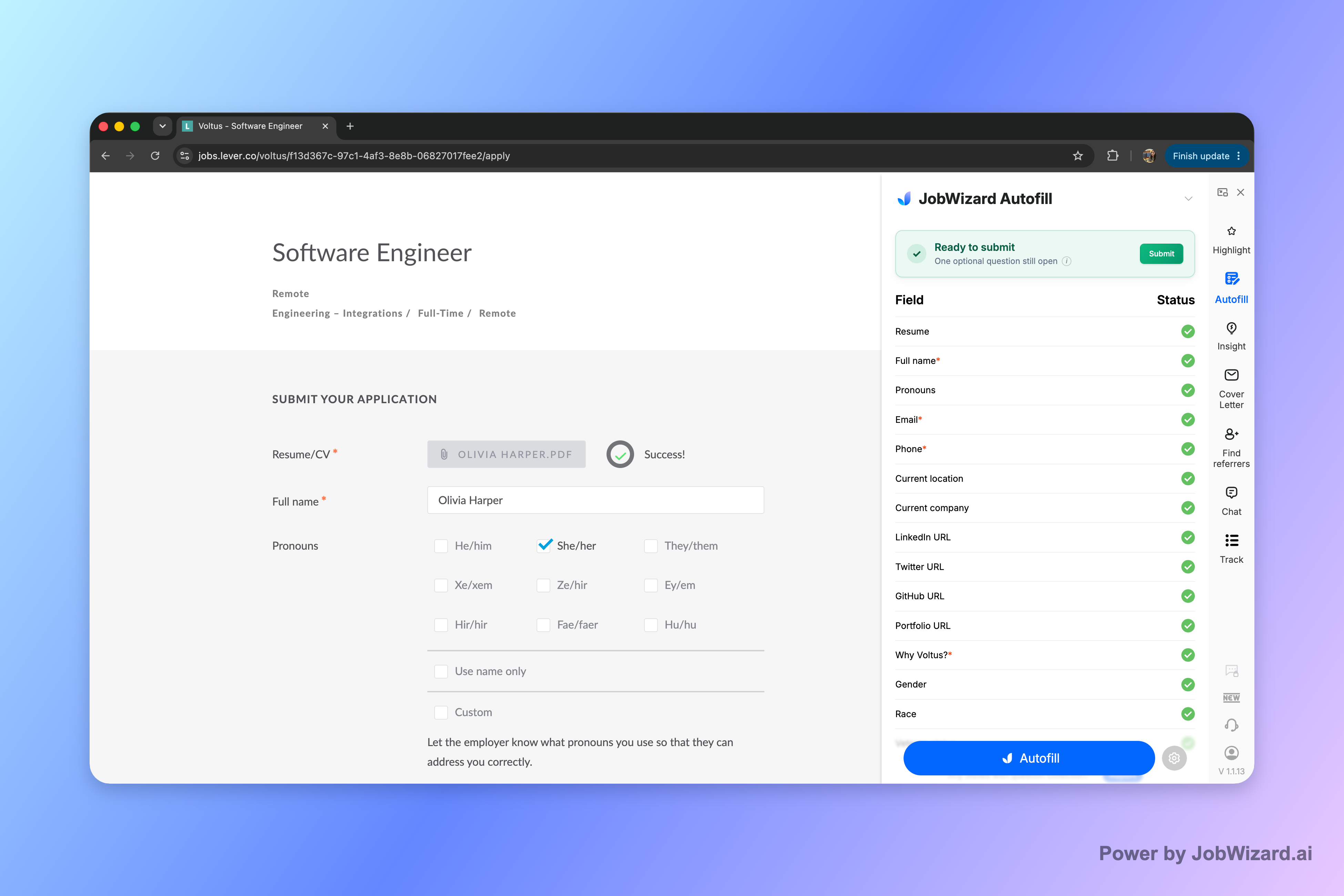
It’s especially relevant on ATS-style workflows where repetitive sections repeat across roles. In our data, about 65% of applications submitted through JobWizard are on Workday, with additional usage on Greenhouse, Ashby, and Lever—so the review-before-submit workflow is a practical fit for many high-volume application pipelines.
Here’s the practical difference versus “bulk apply” auto-submit tools:
- Autofill repetitive fields in seconds so you’re not retyping the same basics job after job.
- Review every populated answer especially screening questions, custom prompts, and anything that could change by role.
- Fix required fields that still need attention—JobWizard can identify when a required field needs attention and let you jump to the matching question.
- Submit yourself to ensure your application matches your real background and preferences.
This approach still supports bulk applying as an efficiency goal: you can fill more applications without the “bot submits for me” risk that leads to wrong answers, mismatches, or suspicious patterns. And because you control the final review, you can tailor the parts that actually decide outcomes.
Tip: If you’re applying to multiple similar roles, keep a “fast tweak” checklist for each application—salary/comp preferences, eligibility/sponsorship, EEO responses, and any role-specific screening question. Autofill handles the rest; you confirm what matters.
Bulk-apply checklist: how to avoid the biggest bot mistakes
Use this submit-yourself checklist to make “bulk applying” safer and more accurate.
Before you hit submit, scan these areas every time:
- Screening questions: availability, authorization/eligibility, years of experience, and any “select the best match” prompts.
- Resume-to-form consistency: dates, titles, location, and the project scope that matches the resume version you used.
- Employer-specific custom fields: anything labeled as required or role-specific (even if the autofill seems to fill it correctly).
- Any “should you answer differently?” items: salary range expectations, work authorization, disability/self-identification sections, and EEO-related questions.
If you want a deeper look at a review-first autofill workflow, see How to Autofill Job Applications (Step-by-Step with JobWizard), then compare broader workflow approaches in Top job application automation software: the review-first alternative to bot auto-submit and Top one click job application tools that speed up autofill—without skipping your review. For a platform-agnostic approach, read Online Job Application Software That Keeps You Fast and in Control (Autofill + Review Workflow).
Bottom line: the fastest bulk-apply strategy isn’t “auto-submit.” It’s autofill + review-before-submit—so you can move quickly while preventing the exact errors that bots introduce.
Do this automatically with JobWizard
Skip the manual work — JobWizard's Smart Autofill handles this for you.
FAQ
Is JobWizard the same as an auto-submit “bulk apply” bot?
No. JobWizard autofills the application fields on the job page and you review every populated answer before you submit. It never submits for you, never mass-applies, and doesn’t apply while you’re away.
What can go wrong when a bot submits job applications for you?
The most common problems are wrong answers to screening questions, mismatched resume/profile details, and triggering employer-side spam or anti-bot filters. It can also damage your reputation with companies you actually want if your submission doesn’t reflect your real background.
How does review-first autofill reduce mistakes compared to auto-submit tools?
It fills repetitive fields quickly using your saved profile/resume data, but keeps you in the final decision loop. If a required field still needs attention, JobWizard can identify it so you jump to the matching question and correct it before submitting.
Which ATS platforms does review-first autofill support best?
JobWizard is commonly used on Workday, Greenhouse, Ashby, and Lever. In our data, Workday is where it tends to save the most time because it saves the user from re-typing repetitive fields during the review-before-submit workflow.
If I want to apply faster in bulk, what’s the safest workflow to use?
Use a review-first workflow: fill the repetitive fields fast with autofill, then pause to verify screening questions, salary/sponsorship/EEO responses, and any custom prompts. Finally, submit yourself—so your applications reflect what you’d be comfortable standing behind.
Ready to apply faster without the bot risk? Try JobWizard’s Autofill on your next application, review every populated answer, and submit yourself with confidence.
Frequently Asked Questions
Autofill your next job application
JobWizard is a free Chrome extension that fills applications, tracks statuses, and optimizes your resume.