Best Auto Apply for Jobs: Why “Bot” Submissions Backfire and What to Use Instead
Searching for the best auto apply for jobs? Learn what goes wrong with bot-style applications (wrong answers, mismatches, spam filters) and how to use JobWizard’s autofill + review workflow instead.
Free Chrome extension
Autofill your next job application
JobWizard is a free Chrome extension that fills applications, tracks statuses, and optimizes your resume.
If you’re searching for the best auto apply for jobs, you’ve probably seen “bot” tools promise effortless applications. The problem: those promises often fail at the exact moment screening questions, resume matching, and employer-side checks kick in.
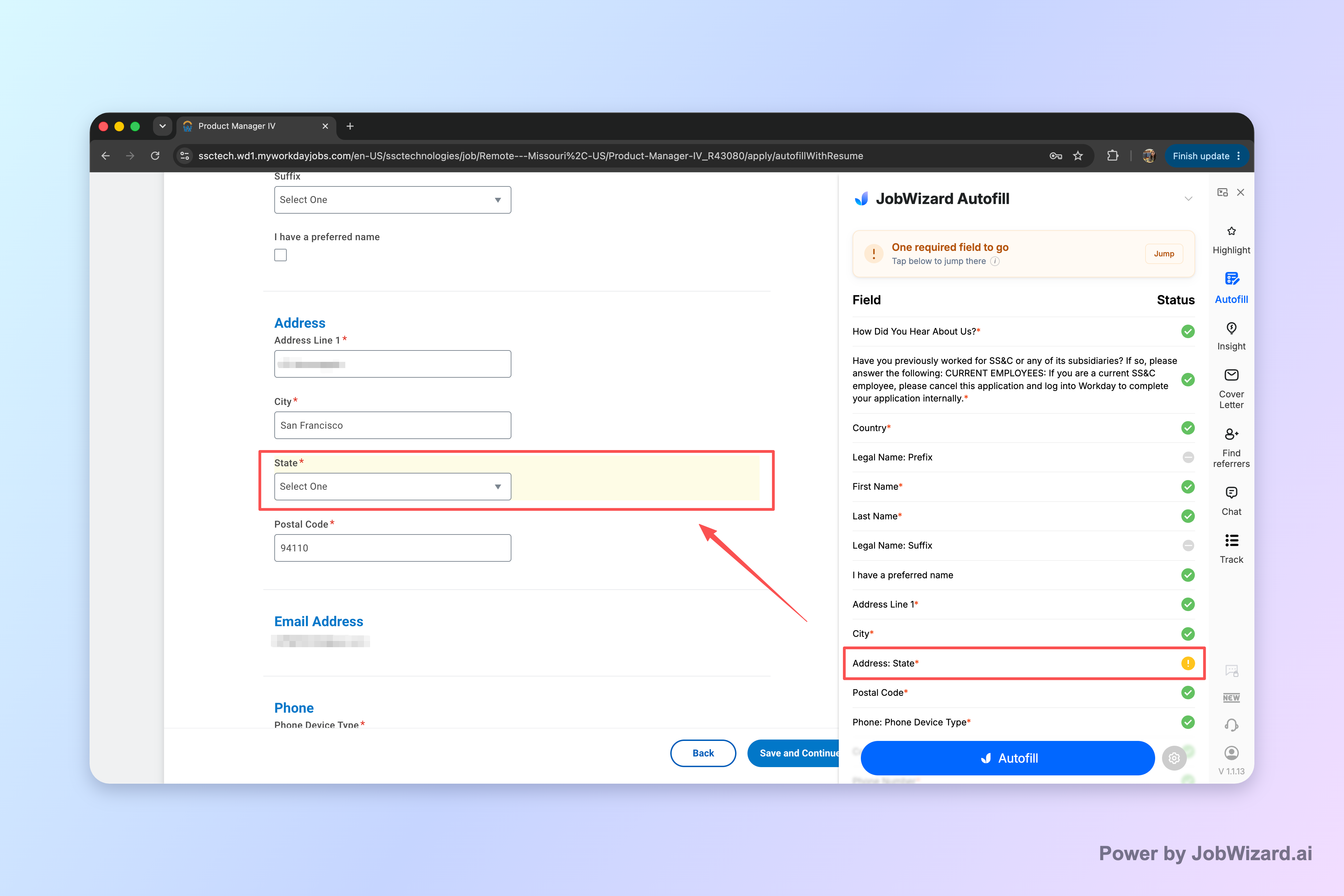
Bot-style auto-apply is where things go sideways—wrong answers, mismatched documents, and even employer spam-filter flags. A better approach is still fast: use autofill + review-before-submit, so you fill repetitive fields in seconds and personally confirm the parts that must be accurate.
How to Autofill Job Applications (Step-by-Step with JobWizard) is a great place to start if you want the full workflow.
Why “bot” auto-apply breaks down at the screening stage
When a tool submits for you, it can’t reliably “know” what the employer expects for that specific application.
Screening questions are the first failure point. Even small differences—an employment eligibility detail, a location preference, a notice period, or “years of experience” phrasing—can turn an otherwise qualified applicant into an automatic rejection.
Here are common ways bot-style auto-apply can misfire:
- Wrong answers to eligibility/screeners because the bot guesses from your resume text or defaults to a generic response.
- Missing custom questions when an application includes role-specific prompts (not all of them are predictable).
- Mismatched resumes when the bot chooses the wrong file or doesn’t align your document to the job requirements.
- Incomplete job history details when optional fields actually become required in certain forms.
- Inconsistent formatting that causes system parsing issues (especially when free-text fields matter).
And it’s not just about getting rejected. If you “spam” a company with inaccurate submissions—especially for roles you genuinely want—you can damage your reputation in a process where hiring teams may see patterns.
Key takeaway: auto-submit tools move fast, but screening accuracy is unforgiving—and that’s where bots often stumble.
If you want a deeper discussion focused on exactly this failure mode, see ai auto apply for jobs reddit: what goes wrong with bot-style submissions (and the safer autofill review workflow).
What employer-side systems and filters can flag when submissions look automated
Even when the content is “mostly right,” automated-looking submission patterns can trigger extra checks.
Many application systems use validation rules, matching logic, and risk controls. If the answers don’t line up—resume vs. screening answers, work authorization vs. eligibility prompts, or inconsistent experience claims—the process can route you to rejection before a human ever reviews your profile.
Employer-side spam filtering is another practical risk. Bots can produce high-frequency, low-variance submissions where dozens (or hundreds) of forms share the same generic responses. Even if the tool doesn’t intentionally do anything “wrong,” the outcome can resemble automated noise.
- Mismatch signals when screening answers don’t correspond to what’s in your resume.
- Form completeness inconsistencies when custom questions aren’t answered in a job-specific way.
- Pattern-based flags when submissions look templated or mass-issued.
This is why your goal shouldn’t be “submit as many as possible without thinking.” Your goal should be “apply faster without sacrificing correctness.”
For an honest, comparative take on matching-focused alternatives, read Jobscan Alternatives for Job Seekers: ATS Matching + Application Workflow Options (Without Blind Auto-Apply).
What to use instead: autofill + review-before-submit (the accuracy-first workflow)
The best path for most applicants is not blind automation—it’s speeding up repetitive form work while you verify the rest.
JobWizard’s workflow is built around autofill you can review before submitting. That means you stay responsible for the answers that must be correct for the specific role and company—sponsorship/eligibility statements, salary expectations (when asked), EEO selections, and custom questions.
JobWizard autofills repetitive fields in the application you’re already on, then you review and submit yourself. This addresses the core bot problem: accuracy during screening and custom prompts.
Concrete example: imagine a job asks, “Are you authorized to work in the country without sponsorship?” A bot that relies on resume keywords may guess, but you can verify in seconds and decide what’s true for your situation—then submit with confidence.
Why this matters for your “best auto apply for jobs” search:
- Less typing, not less accountability: repetitive fields get filled quickly, but screening answers stay under your control.
- Better alignment: you can confirm your resume selection and the job-specific details before sending.
- Fewer “looks automated” risks: because each submission is actually checked by you, not left to a template.
If you’re trying to apply faster across many roles, the workflow is also covered in Best Chrome Extension for Applying to Many Jobs Fast: JobWizard’s Fast Autofill + Review Workflow.
Where JobWizard helps most (and where you still need to be careful)
JobWizard is strongest when the application repeats the same boring fields—while you handle the role-specific and accuracy-critical parts.
In real usage, JobWizard supports a workflow where you review before submitting: 720,000+ applications submitted and 600,000+ autofill sessions have run through JobWizard. Autofill typically fills an average of ~18 repetitive fields per application (often 11–23). Across submitted applications, the most common platform is Workday (~65%), then Greenhouse (~19%), Ashby (~12%), and Lever (~4%).
That distribution matters because repetitive fields are exactly where time is saved—especially on platforms like Workday where the form flow can be consistent across roles.
Still, the “you must review” point isn’t a small caveat—it’s the entire reason an autofill-review approach beats bot-style auto-submit.
Use this checklist every time:
- Scan screening answers for eligibility, notice period, location/work authorization, and experience thresholds.
- Confirm resume/job history alignment with the exact role and seniority level.
- Review custom prompts (often the questions that unlock exceptions or prioritization).
- Re-check any employer-specific formatting that might truncate or transform text.
- Then submit yourself—the workflow is “autofill + review-before-submit,” not auto-submit while you’re away.
Fairness note: other tools can be useful depending on what you’re trying to automate, but if your goal is to avoid the failure modes described above, the key is human verification of screening and custom questions.
Do this automatically with JobWizard
Skip the manual work — JobWizard's Smart Autofill handles this for you.
Quick FAQ: best auto apply for jobs and safer alternatives
Is JobWizard the best auto apply for jobs option?
JobWizard is designed for autofill + review-before-submit—not blind auto-submit. You stay in control: JobWizard fills repetitive fields on the application you’re already on, and you review the screening answers and submit yourself.
What can go wrong when a bot submits for you?
Bot-style auto-submission can submit wrong screening answers, mismatched resumes or job history, incomplete custom questions, and trigger employer-side spam filters. The bigger risk is damaging your reputation with a company you genuinely want.
How is autofill + review different from auto-apply?
With autofill + review, the tool helps with repetitive form fields, but you still verify the details that matter—EEO/salary/custom questions, sponsorship or eligibility text, and any screening prompts that require accuracy.
Will JobWizard submit applications automatically while I’m away?
No. JobWizard never submits by itself, never mass-applies, and never applies while you’re away. It’s built so you can review the autofilled content and submit when you decide.
Which job platforms does autofill help most with?
JobWizard autofill is used most often on Workday (~65% of autofill-through-job submissions), which is where it tends to save the most time—followed by Greenhouse (~19%), Ashby (~12%), and Lever (~4%).
Ready to apply faster without risky bot submissions? Start with How to Autofill Job Applications (Step-by-Step with JobWizard), then use JobWizard’s autofill + review-before-submit workflow to fill in seconds and submit with confidence.
Frequently Asked Questions
Autofill your next job application
JobWizard is a free Chrome extension that fills applications, tracks statuses, and optimizes your resume.