ai auto apply for jobs reddit: what goes wrong with bot-style submissions (and the safer autofill review workflow)
Browsing “ai auto apply for jobs reddit” threads can reveal a recurring theme: bot submissions break screening answers and get flagged. Learn the safer alternative—autofill your application on the job page, then review and submit yourself.
Free Chrome extension
Autofill your next job application
JobWizard is a free Chrome extension that fills applications, tracks statuses, and optimizes your resume.
Job boards move fast, and that’s exactly why the phrase ai auto apply for jobs reddit keeps coming up—people want speed. But the “bot auto-submits while you’re away” approach is where things often go wrong: wrong screening answers, mismatched documents, and submissions that look automated to employers.
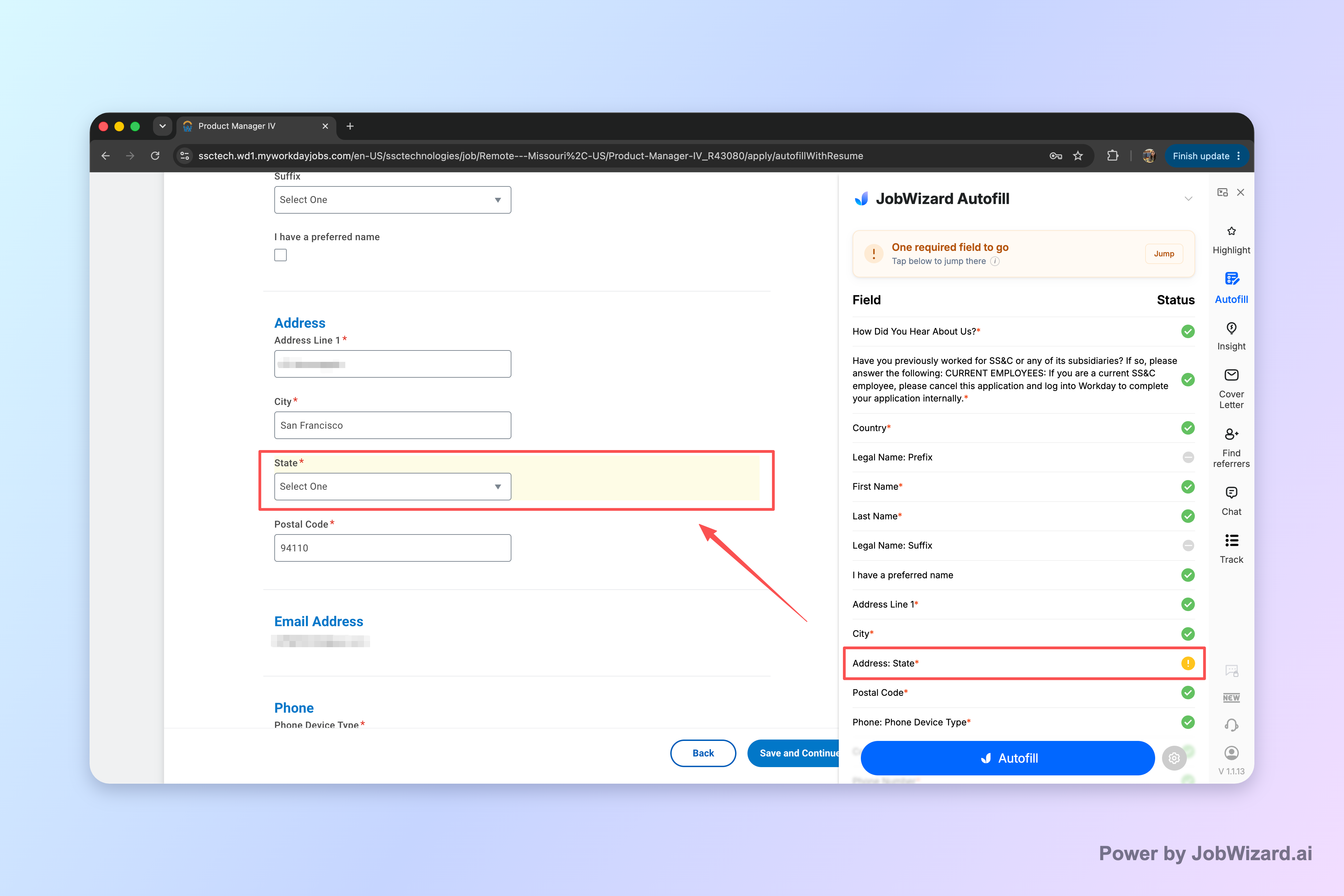
In this guide, we’ll break down the recurring failures that show up in those threads, and then show a safer alternative: autofill the repetitive fields on the job’s application page, review everything that matters, and submit yourself.
Why “ai auto apply for jobs reddit” threads keep warning about bot submissions
When people discuss ai auto apply for jobs reddit, the theme is consistency: bots may fill forms quickly, but they can’t reliably “understand” the nuances of every question the way you can.
Most job applications aren’t just a few text boxes. They include screening questions, eligibility prompts, and custom fields that require truthful, role-specific answers. If a bot guesses—or reuses the wrong template—you don’t just lose time; you can create an accuracy problem an employer will notice.
- Wrong screening answers: “Are you authorized to work?” “Do you have X years?” “Will you relocate?” are often the difference between moving forward and being screened out.
- Mismatched resume vs. application: If the experience summary or job dates don’t align with the role, reviewers may assume the application is low-quality or inaccurate.
- Custom questions get bot-template answers: Many applications ask for job-specific context (projects, tech stack, domain experience). Copy/paste mismatches are easy to spot.
- Employer-side automation defenses: Some organizations rate-limit, flag suspicious submission patterns, or use anti-spam logic. Even if you’re qualified, bot-like behavior can reduce visibility.
Key takeaway: speed is valuable, but when a submission is automated without your review, the risk shifts from “not applying quickly enough” to “applying inaccurately.”
What usually goes wrong when a bot submits for you (with real-world examples)
The common failures aren’t abstract—they show up in concrete moments during the application flow. When you’re reading ai auto apply for jobs reddit posts, the stories often map to the same types of mistakes.
Here are realistic examples of what breaks when you’re not actively reviewing each decision point.
1) Screening questions: correct template, wrong answer
Imagine a bot reuses your last “authorized to work” selection. In reality, that answer changed, or the role asks for a specific work authorization category. Even one incorrect checkbox can end the process before a human ever reads your resume.
2) Resume mismatch: you didn’t notice the wrong document
Many job portals let applicants upload multiple resumes or pick a saved file. A bot that selects the wrong resume can submit a version that’s optimized for a different job family—different titles, different dates, different keywords—creating a credibility gap.
This is especially painful when the recruiter later expects “the version you applied with,” but your details don’t line up with what you intended.
3) Custom prompts: the “generic” answer fails the role test
Job-specific questions are often where employers look for fit. Examples include: “Describe a project where you improved X,” “List technologies you used in production,” or “How do you handle Y?” A bot that uses a generic response—or leaves the field blank—can turn a qualified candidate into a no-match.
4) Eligibility + EEO + sponsorship: the fields that quietly matter
Eligibility and compliance questions are often treated as hard gates. If answers are incomplete, inconsistent, or left default, the application can be deprioritized. And if the portal detects repeated submission patterns, it may throttle or filter.
Even without malicious intent, “automation” can make your application appear low-effort—which is the opposite impression you want when you’re targeting a company you actually like.
How the safer alternative works: autofill first, then you review and submit
The simplest way to avoid the bot-submission failure modes is to keep humans in control of the final truth. With the right workflow, you can still move fast using autofill review before submit.
JobWizard focuses on autofilling application fields while you’re on the job application page, then ensuring you review and submit yourself—no blind auto-submission.
That distinction matters: it’s the difference between “speeding up repetitive typing” and “handing over decisions that require accuracy.”
- Autofill repetitive fields to reduce manual entry on the stuff that’s the same across many applications.
- Review the decisions—screening questions, eligibility items, sponsorship/salary/EEO prompts, and any custom role questions.
- Submit yourself so your final answers reflect you, not a guessed template.
Why this helps (and what it doesn’t do)
Using autofill can reduce the most tedious part of applications—re-entering the same details—while still letting you ensure the content is accurate. In other words, it supports speed without replacing your judgment.
It also doesn’t “guarantee” ATS passage or employer approval. Screening is still screening. But careful review can prevent avoidable self-inflicted errors caused by automation.
Choosing the right tool for the “reddit auto-apply” problem: a fair comparison
If you’re trying to solve the problem behind ai auto apply for jobs reddit threads, pick tools that align with your risk tolerance: speed with your review, or automation that runs without you.
Below is a neutral way to think about trade-offs. (Because products differ, the safest approach is always to verify what “auto” actually means in the tool’s settings and behavior.)
| Workflow style | What it’s optimized for | Main risk when you’re not carefully reviewing | What to look for instead |
|---|---|---|---|
| Blind auto-apply / auto-submit | Maximum throughput | Wrong screening answers, wrong resume selection, incomplete custom questions, bot-like patterns | Require review-before-submit and confirm every decision field |
| Autofill + review-before-submit (recommended approach) | Speed on repetitive form entry | Lower, because you control final answers | Make sure you’re reviewing eligibility/sponsorship/salary/EEO/custom prompts |
| ATS-focused matching tools | Keyword and resume-to-job alignment | Matching suggestions don’t fix application form accuracy by themselves | Use matching to improve your resume, then apply accurately |
For many job seekers, the best practice is “match + autofill + review.” That’s also why it’s useful to explore options designed for ATS matching while still using a review-first workflow.
Related reading: Jobscan Alternatives for Job Seekers: ATS Matching + Application Workflow Options (Without Blind Auto-Apply).
Where JobWizard fits in
If your goal is to avoid the bot-submission pitfalls you see discussed under ai auto apply for jobs reddit, JobWizard’s approach is designed around review-first accuracy. It autofills applications the user is already on, and then the user reviews before submitting.
JobWizard usage across applications and sessions reflects real-world autofill behavior: 720,000+ applications submitted and 600,000+ autofill sessions run through JobWizard. On average, JobWizard autofills ~18 repetitive fields per application (typically 11–23), and the most time-saving coverage is on Workday (where ~65% of submitted applications occur).
Important: those numbers describe autofill + review-before-submit usage—not blind auto-application.
If you want to compare browser-extension style workflows, this may help: Best Chrome Extension for Applying to Many Jobs Fast: JobWizard’s Fast Autofill + Review Workflow.
Do this automatically with JobWizard
Skip the manual work — JobWizard's Smart Autofill handles this for you.
FAQ: Ai auto apply for jobs reddit questions job seekers actually ask
Is an “ai auto apply” bot actually a good idea if you’re job hunting fast?
Often it backfires—wrong or incomplete screening answers, mismatched resume details, and employer-side anti-spam/rules can hurt your chances. A safer approach is to autofill repetitive fields quickly, then review and submit yourself.
What are the most common problems people complain about on “Ai auto apply for jobs reddit” threads?
Typical complaints include inaccurate responses to screening questions, sending the wrong resume/experience, failing required custom fields, and triggering filtering or rate-limiting because submissions look automated. Review-before-submit avoids many of these issues.
How does the safer workflow work in practice?
You use autofill while you’re on the application page, then you review every key item (especially screening/sponsorship/salary/EEO/custom questions) and submit yourself. The goal is speed on repetitive fields without sacrificing accuracy on the decisions employers care about.
Will autofill get me past screening filters or ATS?
Autofill can help you complete forms consistently, but it doesn’t guarantee you’ll “beat” screening or ATS. The best defense is accurate answers and matching your resume to the role—then submit with confidence after review.
If I use a tool, what should I double-check before submitting?
Double-check screening questions and any custom prompts, confirm the resume and work history match the job, verify contact and location fields, and review anything that affects eligibility (sponsorship, salary expectations, EEO, and similar items). Then submit yourself.
Want a faster, safer way to apply? Try JobWizard for autofill + review-before-submit so you can fill repetitive fields in seconds, confirm screening and custom questions yourself, and submit with confidence—especially when you’re targeting platforms like Workday. Start with Can AI Apply to Jobs for Me? The Safer Workflow Is Autofill Review Submit (with JobWizard) and then use JobWizard on the application page.
Frequently Asked Questions
Autofill your next job application
JobWizard is a free Chrome extension that fills applications, tracks statuses, and optimizes your resume.