linkedin auto apply: why bots backfire—and the review-first alternative that still fills fast
Thinking about linkedin auto apply? Bots can answer screening questions wrong and trigger spam filters. Use JobWizard autofill + review instead, then submit yourself.
Free Chrome extension
Find someone to refer you — automatically
JobWizard spots employees at your target companies who can refer you, right from the job page.
Searching for linkedin auto apply usually means you want speed—but the moment a tool submits without you checking, you trade time for avoidable risk. Wrong answers to screening questions, resume/profile mismatches, and employer-side quality or anti-spam filters can all turn a “fast apply” into a rejection you never needed.
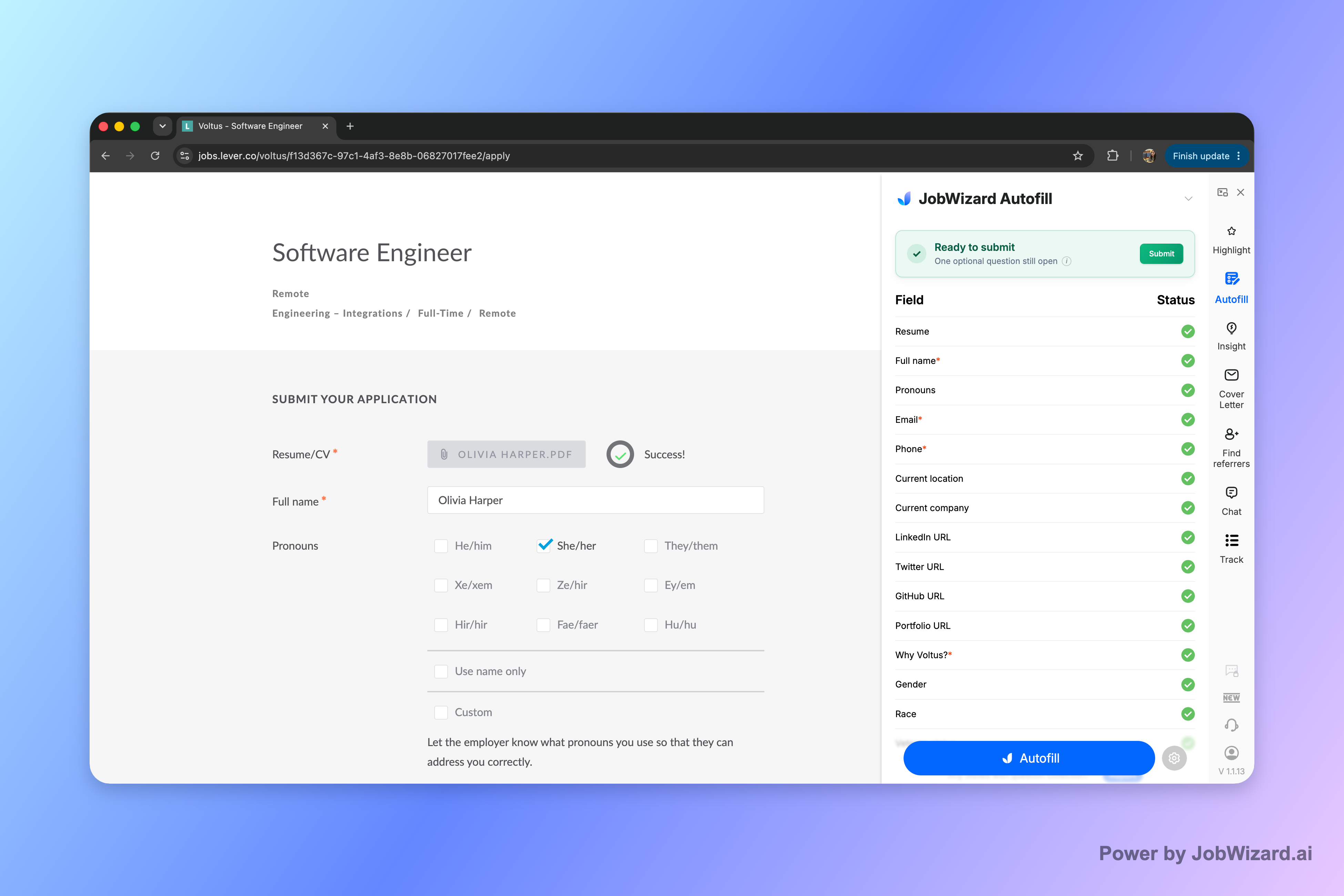
If what you really want is “fill fast, then review,” JobWizard’s Smart Autofill is built for that workflow: it fills detected fields using your saved profile and resume data, and you review everything before submitting.
What goes wrong with linkedin auto apply bots?
Auto-submit bots can make your application look low-quality because the content isn’t actually verified by you in the final moments before submission.
Here are the most common failure modes job seekers run into when a bot handles submission instead of you:
- Screening questions answered incorrectly: A bot may guess, truncate, or mis-map your info to the wrong question—especially when wording differs between employers.
- Resume/profile mismatches: If a role asks for a specific tool, location, tenure, or project type, an automated form-fill can carry over the wrong details from a previous application.
- Employer anti-spam / quality filters: When submissions look repetitive or inconsistent across applications, some systems flag or deprioritize them (even if the job seeker’s intent is legitimate).
- Reputation damage with roles you actually want: Submitting inaccurate answers to a specific company can be harder to undo than a slower, corrected application.
- Blind spots in “optional” fields that aren’t optional: Some forms hide custom questions or require specific phrasing; a bot can miss these if it can’t reliably detect the right field.
Even well-meaning automation can be the wrong match for the last mile of an application—because the last mile is where accuracy matters most.
What “review-before-submit” gets you instead
Fast doesn’t have to mean hands-off. The safer approach is review-before-submit: fill repetitive fields quickly, then confirm the details personally.
JobWizard is designed around that exact idea. Smart Autofill uses your saved profile and resume data to fill detected fields on supported application pages, then you review the populated answers and submit yourself.
- Filling happens while you’re still in control: The extension fills detected fields, but you keep ownership of the final submission.
- Missing or unclear required fields get surfaced: If a required field still needs attention, JobWizard can identify it and let you jump directly to the matching question.
- You stay accountable for the content: Sponsorship, salary, EEO, and custom questions should be checked by you because those answers must be truthful and role-specific.
Bottom line: this approach helps you apply faster without betting your results on perfect automation.
How Smart Autofill works on real application forms
Smart Autofill + a final check is the difference between “workflow speed” and “blind auto-submit.”
When you’re on an application page, JobWizard fills the repetitive fields it detects, using saved profile and resume data. If any required fields need attention, it can identify them so you can jump to the matching question and correct what matters.
What to verify before you hit submit (especially when applying from LinkedIn):
- Screening answers to confirm they match the specific job’s wording.
- Role-specific details (tools, seniority, location, dates, and project focus).
- Any custom questions that may not be auto-detectable.
- Anything with a “truth requirement” (sponsorship, EEO, and other eligibility questions).
Note: JobWizard doesn’t claim universal support for every website or that every field will be instant-perfect—so the final review step is still essential.
Speed plus networking: use the same review-first mindset
Referral building is also faster when you don’t lose accuracy. One way to improve outcomes is pairing careful applications with targeted outreach.
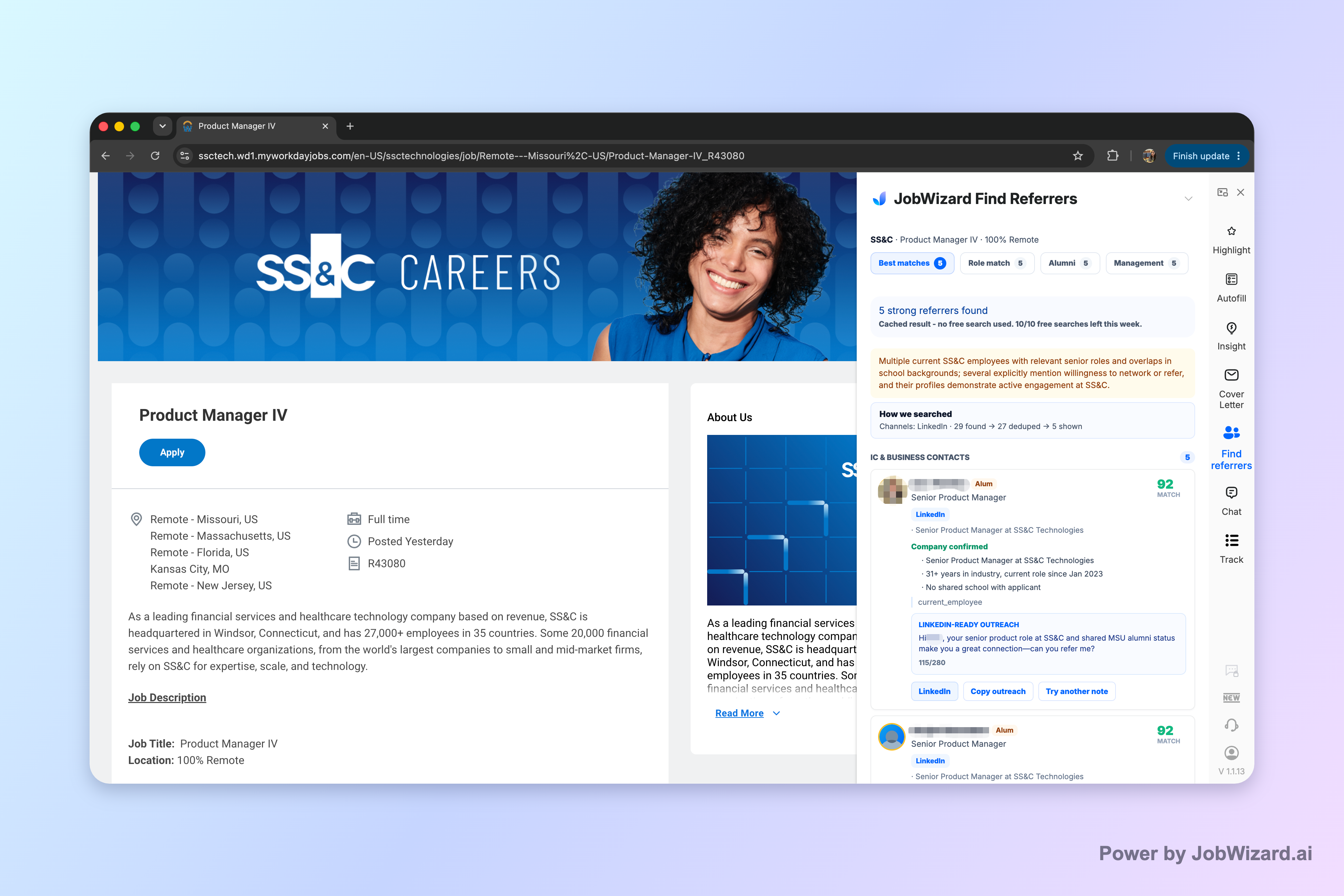
JobWizard’s Referral Finder organizes relevant employees by match type (including role and alumni context) and prepares an outreach draft you can review and personalize. You choose who to contact, and you add a truthful, specific reason for reaching out—so the message stays authentic.
Learn the full review-first autofill flow:
- How to Autofill Job Applications (Step-by-Step with JobWizard)
- Auto-Apply Sites: Why Bots Backfire—and the “Autofill + Review” Way to Apply Fast
- apply bot: what goes wrong with bot submissions—and the autofill + review alternative
- applyall reviews complaints: what goes wrong with auto-submit bots—and how to avoid it with review-first autofill
Across the job market, the winning workflow is usually the same: fill repetitive fields fast, then do one final human check before submitting.
CTA: If you’re applying from LinkedIn and searching for ways to move faster without going “hands-off,” try JobWizard’s Smart Autofill on your next application—review every populated answer, correct anything that needs attention, and then submit yourself.
Do this automatically with JobWizard
Skip the manual work — JobWizard's Smart Autofill handles this for you.
FAQ about linkedin auto apply
Is linkedin auto apply the same as autofill?
No. In practice, “auto apply” often means an extension or bot submits without your active review, while JobWizard fills detected fields and you review the answers before you submit.
What can go wrong if a bot submits my LinkedIn applications?
Typical failure points include wrong answers to screening questions, mismatched resume/profile details, and triggering employer-side anti-spam/quality filters—plus the damage of reaching out with inaccurate info to a role you actually want.
How does JobWizard “Smart Autofill” reduce mistakes?
JobWizard uses saved profile and resume data to fill detected fields on supported application pages, then highlights what still needs attention so you can jump to the matching question and correct it before submitting.
Will referral suggestions or outreach drafts guarantee referrals?
No. Referral Finder organizes relevant employees and prepares an outreach draft for you to personalize, but you choose whom to contact and you add a truthful, specific reason for reaching out.
What’s the safest “speed” approach when applying through LinkedIn?
Fill repetitive fields quickly, then do a final human review of sponsorship/salary/EEO and any custom screening questions—then submit yourself after you confirm everything is accurate.
Frequently Asked Questions
Find someone to refer you — automatically
JobWizard spots employees at your target companies who can refer you, right from the job page.