How to Follow Up on an Email With No Response Without Losing Your Cool
Learn how to follow up on an email with no response with a clear timing plan, a concise message, and a professional tone. Use these steps for job applications, interviews, and other important messages.
Free Chrome extension
Autofill your next job application
JobWizard is a free Chrome extension that fills applications, tracks statuses, and optimizes your resume.
Why a thoughtful follow-up is better than another “just checking in”
A useful follow-up gives the recipient a clear reason to reply. If you are wondering how to follow up on an email with no response, resist sending a second message that only says you are checking in. Briefly remind the person what you need, make one specific request, and keep the tone professional.
Silence has several possible explanations. The recipient may be busy, waiting on information, or have missed your message. A delayed reply does not tell you what happened, so write a follow-up that leaves room for a straightforward answer instead of assuming the worst.
For job seekers, a follow-up is one step in a larger process. The practical guide to tracking job applications with a simple system can help you keep the application, your communications, and the next step together.
When to follow up on an email with no response
Wait long enough to give the recipient a fair chance to respond, then follow up based on the context. For a job application or interview message, a reasonable starting point is about five to seven business days, unless the employer provided a different timeline.
Use the promised timeline as your guide. If someone said they would reply by Friday, wait until that date has passed before checking in. If the message concerns an approaching deadline, follow up sooner only when the timing makes a response necessary.
- After applying: Check the posting for stated response timelines or instructions before emailing.
- After an interview: Follow the schedule the interviewer shared; if they gave no date, wait several business days before asking for an update.
- For a time-sensitive request: State the relevant deadline plainly and ask whether the recipient can respond by then.
- For a general professional request: Allow several business days, then send one concise reminder.
Business days are more useful than calendar days. Weekends and holidays can interrupt normal work schedules, and a quiet inbox is not proof that your message was rejected or ignored.
How to follow up on an email with no response: write a message that is easy to answer
Keep the follow-up in the original thread, add context, and ask one direct question. A recipient should be able to understand your request without searching through a separate email or guessing what you want. This approach works for job applications, interview updates, and many everyday professional messages.
Use a simple four-part structure. Start with a polite greeting, remind the recipient of your earlier message, make a specific request, and close with thanks. If you need help with the opening line, see these examples for how to start a follow-up email that gets read.
- Keep the thread: Reply to your previous email so the context stays visible.
- Give a brief reminder: Name the role, interview, request, or topic in a few words.
- Ask one clear question: For example, ask whether there is an update on the hiring timeline.
- Close courteously: Thank the person for their time and use a professional sign-off.
Example after applying: “Hi Morgan, I’m following up on my application for the Marketing Associate role, which I submitted on October 8. I’m still interested in the opportunity and wanted to ask whether there is an update on the hiring timeline. Thank you for your time, Jamie.”
Example after an interview: “Hi Morgan, I enjoyed speaking with you about the Product Designer role last week. I’m checking in to see whether you can share an update on the next steps or expected timeline. Thanks again, Jamie.”
Example for a work request: “Hi Alex, I’m following up on my note about the revised project brief. Could you let me know whether you’ll be able to review it by Thursday? That will help me plan the next step. Thanks, Taylor.”
For a more detailed job-search sequence, use this reply-ready plan for sending a follow-up email about a job. For post-event outreach, the badge scan follow-up email template offers a context-specific starting point.
How to manage follow-ups without losing track of applications
Record the last contact and the next step for each role so you can follow up deliberately. When several applications are active, a small tracking habit can help you remember when you applied, whom you contacted, and when to check back. Avoid treating a missing update as confirmation that your status changed.
JobWizard’s Activity view shows application status and which JobWizard tools were used for each role. It can give you a place to review where each tracked application stands as you decide what to do next.
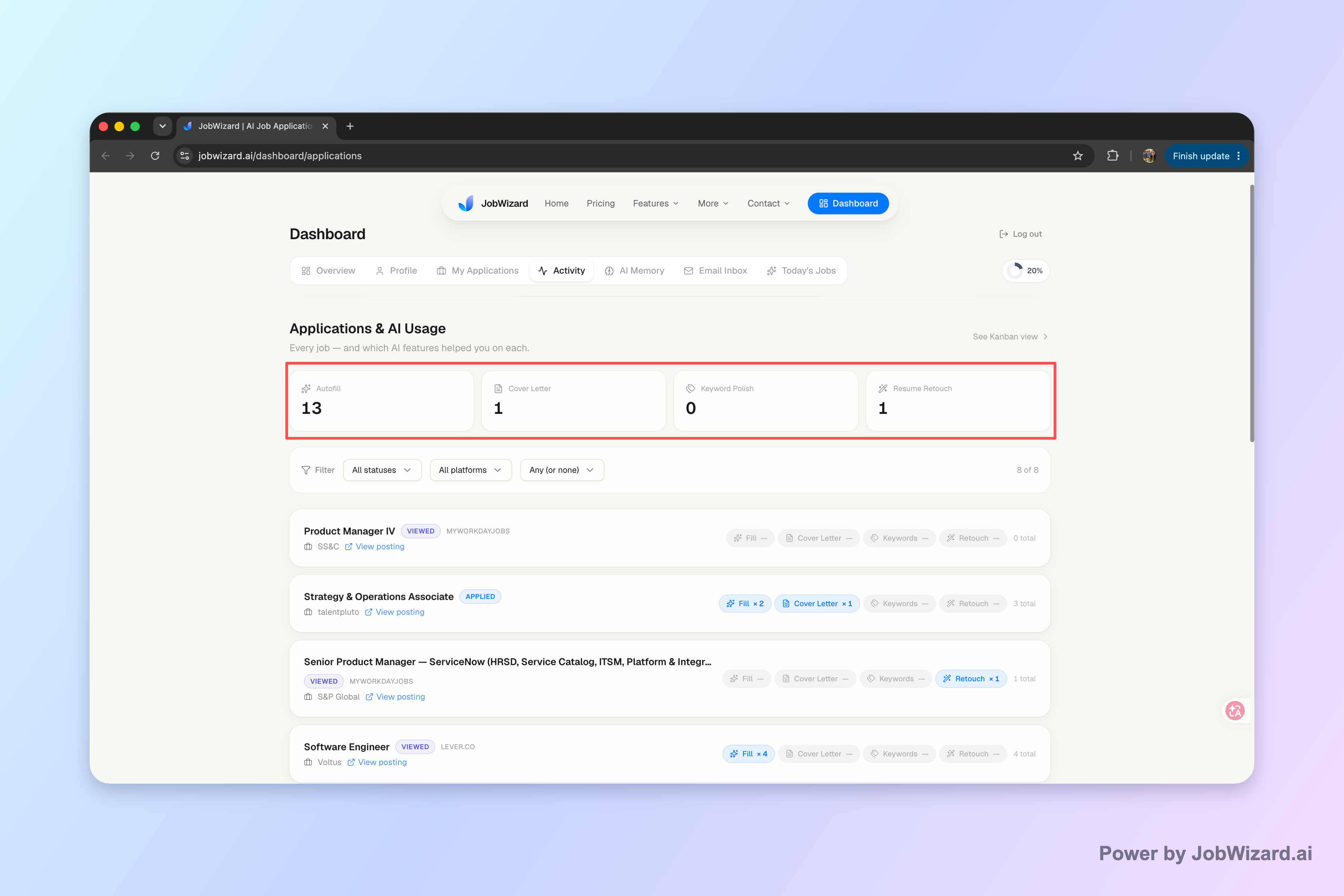
Use the view as a reference, not a guarantee of automatic updates. Check the details available for each application, then decide whether a follow-up is appropriate based on the employer’s instructions and the timing you were given.
- Log the application: Note the role and the date you applied.
- Record outreach: Add when you sent a message and to whom.
- Choose a next step: Set a sensible date to check the posting or consider one follow-up.
- Update the record: Note any reply or status information you receive.
Keep the message and the tracking note aligned. If you have already followed up, record that clearly so you do not accidentally send repeated reminders.
Common follow-up mistakes and what to do instead
A calm, specific message is more professional than repeated pressure or vague wording. The best way to follow up on an email with no response is to make one reasonable attempt, then decide what you will do if the recipient remains silent.
- Sending a string of check-ins: Send one thoughtful follow-up rather than multiple messages in quick succession.
- Writing an accusatory note: Avoid phrases that imply the recipient is ignoring you; you do not know why they have not replied.
- Repeating the entire original email: Include only enough context to identify the request.
- Asking several questions at once: Prioritize the one answer you need most.
- Ignoring stated instructions: If an employer asks applicants not to contact them, respect that request.
If there is still no reply after one follow-up, use judgment rather than a fixed escalation schedule. For a non-urgent job inquiry, continue your search and keep other opportunities moving. A second message may make sense if the deadline is real or you have a meaningful new update, but repeated messages without new context rarely help clarify your next step.
Silence does not require you to pause your job search. Keep notes on your outreach, check for updates as appropriate, and focus on opportunities where you can take an active next step.
Do this automatically with JobWizard
Skip the manual work — JobWizard's Application Tracker handles this for you.
FAQ: how to follow up on an email with no response
How long should I wait before following up on an email with no response?
For a job application or interview message, wait about five to seven business days unless the employer gave you a different timeline. For a time-sensitive request, follow up sooner if the deadline makes that necessary.
What should I say when following up on an email with no response?
Reply in the original email thread, briefly restate your reason for writing, and ask one clear question. Keep the tone courteous and make it easy for the recipient to answer.
How many times should I follow up on an email with no response?
For most job-search messages, send one thoughtful follow-up. If the matter is time-sensitive or you have a legitimate new update, a second message may be reasonable; otherwise, move on rather than sending repeated check-ins.
Should I send a new email or reply to the original message?
Usually reply to the original thread so the recipient can see the context. Start a new thread only when the subject or recipient has changed enough that the original conversation would be confusing.
Keep your applications and next steps in one place with JobWizard’s Activity view. Review application status and the tools used for each role, then decide when a follow-up makes sense.
Frequently Asked Questions
Autofill your next job application
JobWizard is a free Chrome extension that fills applications, tracks statuses, and optimizes your resume.