Follow Up on Email After No Response: A Calm Next-Step Plan
Learn how to follow up on email after no response with a clear timing plan, practical templates, and a way to track your next step during a job search.
Free Chrome extension
Autofill your next job application
JobWizard is a free Chrome extension that fills applications, tracks statuses, and optimizes your resume.
Start with the right follow-up, not another “just checking in”
To follow up on email after no response, make your next message brief, courteous, and easy to answer. In a job search, silence can mean a busy hiring team, a delayed process, or no update yet; it does not tell you which one. A focused follow-up can bring your note back into view without demanding an explanation.
Lead with context and a clear question. Reply in the original email thread when possible, remind the recipient what role or conversation you mean, and ask for one useful next step. For a broader system to organize applications and check-ins, start with How to Track Job Applications: A Practical System (JobWizard + Beyond).
When to follow up on email after no response
Use the timeline the recipient gave you; if there is none, wait about five business days before checking in. This is a practical starting point, not a fixed rule. A hiring process may shift, and a weekend or holiday can make a short wait feel longer than it is.
Let the context determine the timing. An application follow-up differs from a note after an interview or a request for information. Use these guideposts, and adjust them to any instructions in the job posting or earlier correspondence:
- After applying: If the employer has not shared a response window, consider a concise check-in after about five business days, particularly when the posting provides a recruiter or hiring contact.
- After an interview: If the interviewer gave you a date for an update, wait until that date has passed before writing. If no date was provided, allow a few business days after your thank-you note before asking about the timeline.
- After a networking or informational note: Give the recipient time to respond, then send one brief reminder that makes it easy to decline or suggest a better time.
- When a deadline is approaching: State the deadline plainly and ask whether there is an update. Avoid manufacturing urgency if there is no real deadline.
Choose a natural subject line before drafting the message. If you are unsure what to put in the subject field, see Subject Line for Follow-Up Email After No Response: What to Send Next for context-specific options.
Write a follow-up that makes a reply easy
A useful follow-up has four parts: context, a short reminder, one request, and a courteous close. Keep the original thread when it helps the recipient recognize your conversation. If you are starting a new thread, use a clear subject that identifies the role or topic.
Use this adaptable job-application template:
Hi [Name],I’m following up on my application for the [Job Title] role, which I submitted on [date]. I’m still interested in the opportunity and wanted to ask whether there’s an update on the hiring timeline or any additional information I can provide.Thank you,[Your Name]
For an interview follow-up, mention the conversation rather than repeating your résumé. A specific detail can help reconnect the message to the discussion, but keep it short:
Hi [Name],I enjoyed speaking with you about the [Job Title] role and learning more about [specific topic]. I’m checking in to see whether there’s an update on the next steps or expected timeline. I remain interested and would be glad to provide anything else you need.Best,[Your Name]
Make the ask answerable in one sentence. “Do you have an update on the expected timeline?” gives the recipient a clear opening. Avoid a long recap, multiple questions, or language that suggests they have ignored you deliberately.
For more situation-specific wording, compare sample messages before sending. The guide to Sending a Follow-Up Email After No Response Sample: A Reply-First Template + Timing That Gets Seen provides a reply-first template and timing ideas. If you have already interviewed, browse Follow-Up Email Examples After an Interview for Every Waiting-Game Moment.
What to do if there is still no reply
After one thoughtful follow-up, give the recipient time and keep your search moving. If the employer has not replied, avoid sending repeated messages in quick succession. Silence does not confirm that the role is closed, but it is also not a reason to pause every other application.
Consider one more check-in only when it adds value. A second note may make sense if the stated timeline has changed, you have new information relevant to the role, or a genuine deadline affects your availability. Keep it shorter than the first message and acknowledge the prior check-in without guilt or pressure.
Track the date and your next action so you do not have to rely on memory. Note when you applied, whom you contacted, when you followed up, and when you plan to revisit the opportunity. JobWizard’s Activity view shows application status and which JobWizard tools were used for each role.
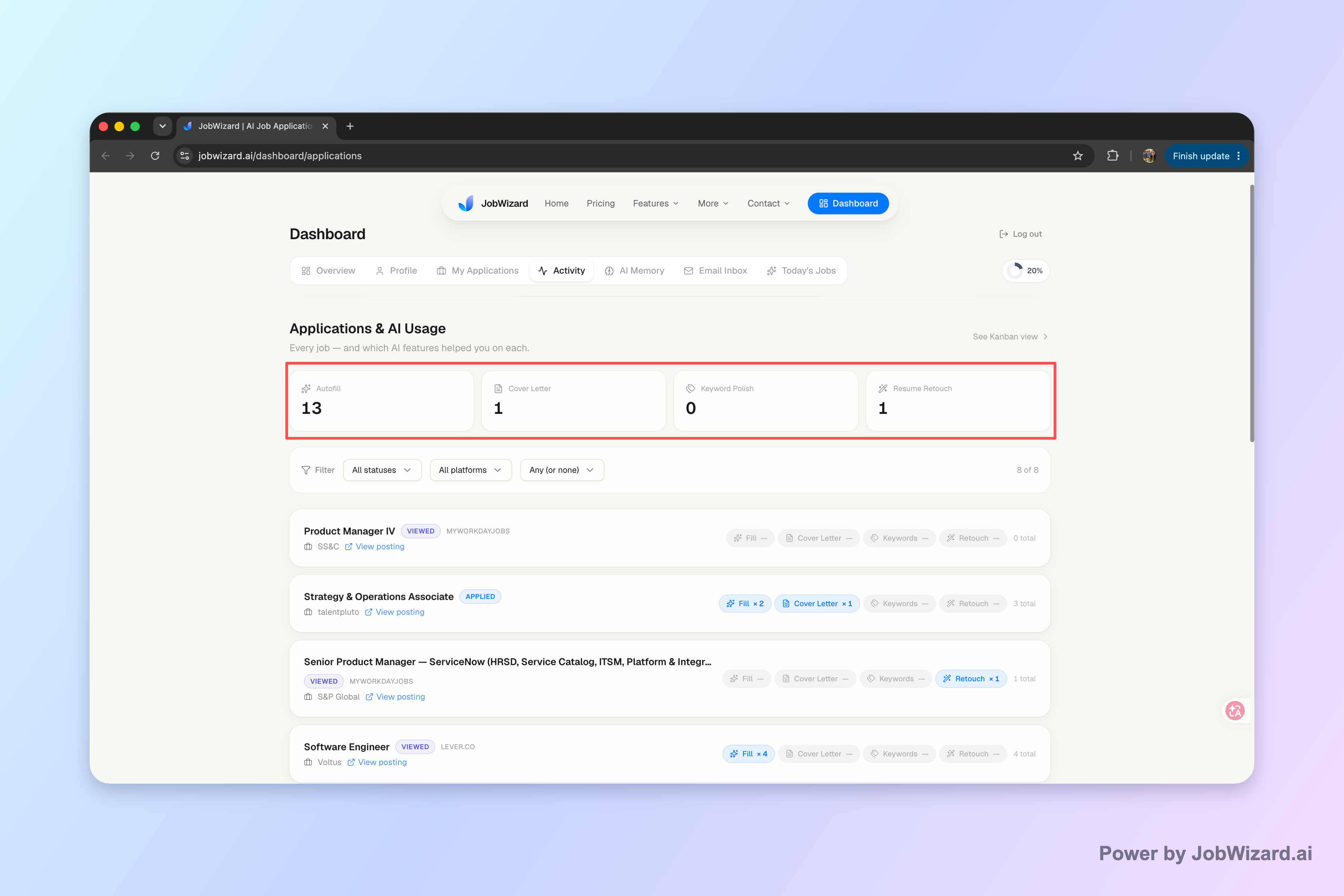
Use the Activity view as a record, not a guarantee of updates. It can keep application details and your next step together, but it does not mean every employer update will be detected automatically or that tracking changes hiring outcomes. Keep your expectations realistic and continue pursuing other roles.
Common follow-up mistakes to avoid
Keep your note professional without making it sound scripted or demanding. Small choices in wording and timing can affect how easy your message is to respond to.
- Writing “just checking in” with no context: Name the role, conversation, or earlier request so the recipient immediately understands the reason for your email.
- Sending several messages close together: Give the recipient a reasonable interval, especially if they shared a timeline or appear to be coordinating interviews.
- Adding pressure or blame: Replace “I haven’t heard back from you” with a neutral question about the timeline or next steps.
- Asking several questions at once: Choose the one answer that would help you most, such as whether the position is still active or when an update may be available.
- Assuming silence means a decision: Treat a lack of reply as uncertainty. Continue with your search instead of interpreting it as a definite rejection or promise.
- Ignoring application instructions: If the employer asks candidates not to contact the team, respect that request and use the stated application process.
Before sending, reread the message from the recipient’s perspective. They should be able to identify who you are, what opportunity you mean, and what one response would help you.
Do this automatically with JobWizard
Skip the manual work — JobWizard's Application Tracker handles this for you.
Frequently asked questions about following up
How long should I wait to follow up on an email after no response?
For a job application or interview-related email, follow the timeline the employer gave you. If they did not give one, waiting about five business days is a reasonable starting point; adjust for weekends, holidays, and any stated hiring schedule.
What should I write when I follow up on an email after no response?
Reply to the original thread, briefly restate the context, make one polite request for an update or next step, and thank the recipient. Keep the message easy to answer and avoid implying that the recipient owes you an immediate response.
How many times should I follow up if I still get no reply?
There is no universal number, but one thoughtful follow-up is usually a good first step. If the role remains active and you have a meaningful reason to check in, consider one more brief note after an appropriate interval; then focus your effort on other opportunities.
Should I send a follow-up email after no response to a job application?
You can, especially if the posting gives a contact or the employer invited questions. Keep expectations realistic, follow any application instructions, and do not treat silence as confirmation of either rejection or progress.
Keep your next move visible. Use JobWizard’s Activity view to keep each application and its next step in one place as you continue your search.
Frequently Asked Questions
Autofill your next job application
JobWizard is a free Chrome extension that fills applications, tracks statuses, and optimizes your resume.