Subject Line for Follow-Up Email After No Response: What to Send Next
Choose a subject line for follow-up email after no response that makes your purpose clear without sounding pushy. Find practical examples for job applications, recruiter conversations, and interview follow-ups, plus a simple timing and tracking workflow.
Free Chrome extension
Autofill your next job application
JobWizard is a free Chrome extension that fills applications, tracks statuses, and optimizes your resume.
Choose a clear subject line, not a clever one
A useful subject line for follow-up email after no response identifies the role or conversation and makes your reason for writing easy to recognize. You want the recipient to understand the context before opening the message—not feel pressured by an urgent-sounding headline. Specificity and a calm tone do more work than gimmicks.
For a job application, try “Following up on the Marketing Coordinator role”. After an interview, use “Thank you and follow-up: Product Analyst interview”. If you are continuing an existing conversation, replying in the original email thread is usually the simplest choice.
Keep the subject aligned with the message itself. Don’t imply that you have new information, an offer, or a deadline if you don’t. A direct subject line sets an honest expectation and makes it easier for the other person to place your note in context.
Examples by situation
- Application: Following up on the [Job Title] role
- Recruiter conversation: Checking in after our [date] conversation
- Interview: Following up on the [Job Title] interview
- Requested update: Checking in on the timeline for [Job Title]
- Earlier email: Re: [Original subject line]
Personalize the bracketed details, and use the employer’s exact job title where possible. Avoid vague subjects such as “Checking in” when a little more context would make the email easier to identify.
For the broader sequence—from what to send to how to keep track of your next step—start with our complete guide to tracking job applications.
Pick a subject line for follow-up email after no response by context
The right wording depends on whether you applied, interviewed, or are continuing a recruiter conversation. A familiar thread may not need a brand-new subject, while a first follow-up should make the role or prior contact clear. Match the subject to what the recipient can reasonably recognize.
| Situation | Subject line example | What it signals |
|---|---|---|
| Application with no reply | Following up on my application for [Job Title] | Names the role and reason for writing |
| Application sent on a known date | Checking in: [Job Title] application submitted [date] | Adds a useful reference point |
| Recruiter said they would follow up | Checking in on next steps for [Job Title] | Connects the note to an expected update |
| Interview completed | Following up after my [Job Title] interview | Identifies the conversation |
| Hiring timeline has passed | Checking in on the [Job Title] hiring timeline | Asks about timing without demanding a decision |
Use the date only when it helps identify the application. It can be useful if you applied to several roles at the same company, but it is unnecessary when the role and thread already make the context clear. If the employer gave you a date for an update, you can refer to that timing in the message body.
Want more complete wording, not just the subject? See what to say in a follow-up email after applying for different application statuses. For a full message you can adapt, use this job application email template with subject lines and follow-up copy.
When to keep the original subject
Reply in the existing thread when it still accurately represents the conversation. This is often a natural fit after an interview, a recruiter exchange, or a message where the recipient invited you to check back. Keeping the thread preserves context without making you invent a new headline.
Start a new thread if the old subject is confusing, the earlier conversation is unrelated, or you are contacting someone who may not have been included. Then make the role or conversation clear in the subject line and identify yourself near the start of the email.
Time your follow-up and write the message
Follow the timeline the employer gave you; if there was no timeline, leave a reasonable pause before checking in. As a practical guideline, many job seekers wait about five to seven business days after applying or after their last message. This is a general courtesy, not a promise about when a company will respond.
After an interview, use the interviewer’s stated timeline rather than applying a fixed rule. If they said they expected to share an update by Friday, a concise note after that date is more grounded than a message sent the next morning.
- Confirm the context: Check the role title, contact name, last interaction, and any timeline they shared.
- Choose the thread: Reply to the original email if it is still relevant; otherwise, write a new message with a specific subject.
- Keep the note brief: State why you are checking in, reaffirm your interest if appropriate, and ask one simple question.
- Review before sending: Verify names, dates, role details, and tone, then send one thoughtful message.
A short application follow-up
Subject: Following up on my application for [Job Title]Hi [Name],I applied for the [Job Title] position on [date] and wanted to check in about the hiring timeline. I’m still interested in the opportunity and would be glad to share any additional information that would be helpful.Thanks for your time,[Your Name]
A good follow-up asks for information without treating a reply as owed. If you have a genuine, relevant update—such as a new certification or a completed project—mention it briefly. Don’t add a long explanation or invent a reason to make the message seem more urgent.
For more subject-line options across job-search situations, browse these follow-up email subject lines that make your next step clear. Choose the example that fits the conversation instead of copying one that implies a different situation.
Track what you sent and decide what comes next
A simple record helps you avoid duplicate follow-ups and remember the next step for each role. Note the employer, job title, application date, last contact, follow-up date, and any timeline the contact shared. If you have several active applications, relying on memory can make two similar conversations easy to confuse.
The JobWizard Activity view shows application status and which JobWizard tools were used for each role. It gives you a place to keep application details and the next step together; it does not mean every application update is detected automatically or guarantee a response.
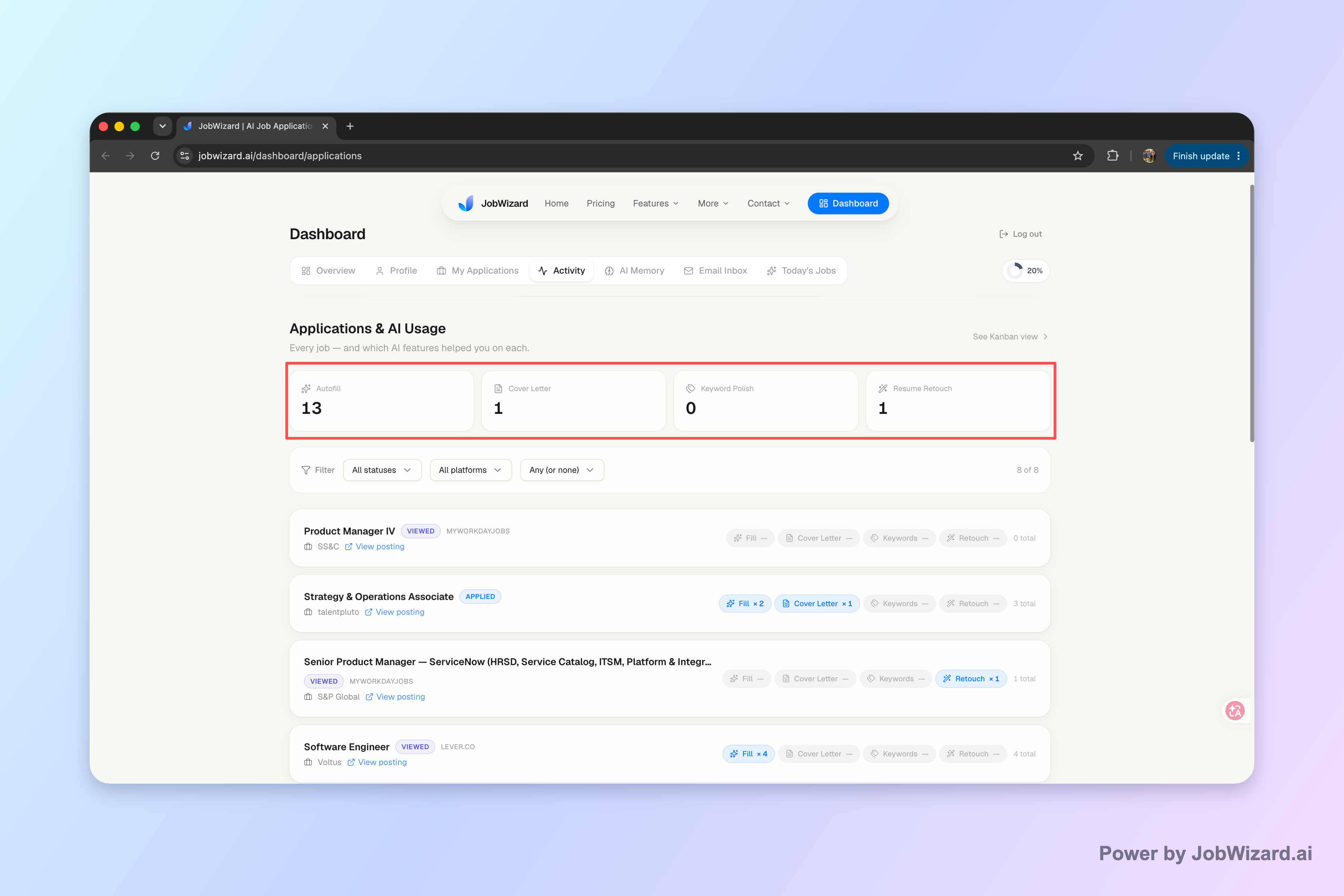
Use a small, consistent log. A note like “Applied Monday; follow up next Thursday if no stated update” is more actionable than a vague reminder to check back. Record what actually happened, and update the next step when you hear from the employer.
- Waiting: The stated review period has not passed, so wait.
- Follow-up due: The reasonable wait period has passed and there is no reply, so send a concise note.
- Response received: Record the update and any requested action or deadline.
- No response after follow-up: Avoid repeated messages close together and keep pursuing other opportunities.
One follow-up is often enough for an application with no personal contact or promised update. A second note may make sense when you have an active relationship, a meaningful new update, or a specific timeline that has passed. If the role is no longer listed or you receive a formal status update, adjust your plan rather than continuing the same sequence automatically.
JobWizard’s Activity view can help keep each application and its next step in one place. Use it as a record to support your own decisions—not as a substitute for reviewing a message or deciding when and whether to send it.
Do this automatically with JobWizard
Skip the manual work — JobWizard's Application Tracker handles this for you.
FAQ about subject lines and follow-ups
What is a good subject line for a follow-up email after no response?
Use a clear, specific subject line for a follow-up email after no response, such as “Following up on the [Job Title] role” or “Checking in after our [date] conversation.” If you are replying in the original thread, keep its subject unless it no longer describes your message.
How long should I wait before sending a follow-up email after no response?
Follow the timeline the employer or contact gave you. If they gave no timeline, wait about five to seven business days after applying or after your last message before sending a brief, polite follow-up. For an interview, the timeline they shared takes priority.
Should I start a new email thread or reply to the original one?
Reply to the original thread when it is still relevant, especially after a recruiter conversation or interview. For a new message about an application, use a direct subject line that identifies the role and, when useful, your application date.
What should I write if there is still no response to my follow-up?
If you have sent one polite follow-up and still hear nothing, avoid sending repeated messages close together. Check any stated hiring timeline, continue applying elsewhere, and decide whether one final note is appropriate based on how recent and substantive your contact has been.
Make your next follow-up easier to manage: use JobWizard’s Activity view to keep each application and its next step together, then decide what to send when the timing makes sense.
Frequently Asked Questions
Autofill your next job application
JobWizard is a free Chrome extension that fills applications, tracks statuses, and optimizes your resume.