Follow Up Email Subject Lines That Make Your Next Step Clear
Choose a follow up email subject that tells the recipient why you’re writing and makes your message easy to recognize. Use these examples and timing tips to follow up on applications, interviews, and other job-search conversations.

Free Chrome extension
Autofill your next job application
JobWizard is a free Chrome extension that fills applications, tracks statuses, and optimizes your resume.
Choose a follow up email subject that tells the recipient what you need
A strong follow up email subject identifies the conversation and gives the recipient a clear reason to open your message. For a job application, that usually means naming the role and saying you’re checking in. A useful starting point is “Following Up: Marketing Coordinator Application.”
Make the subject specific without making it sound urgent or entitled. The goal is to help a recruiter or hiring manager recognize your message at a glance, not to pressure them into replying.
For a deeper set of examples, see these follow-up email subject line options and the review-first plan for choosing one. For a broader process, the pillar guide How to Track Job Applications: A Practical System explains how to keep applications and next steps organized.
Follow up email subject examples for each job-search situation
Match the subject to the reason you’re writing, then keep it short enough to scan. A subject that works after an interview may not be the best fit for a first check-in after applying. Use the examples below as templates, replacing bracketed details with your own.
| Situation | Example subject line | Why it works |
|---|---|---|
| Checking on an application | Following Up: [Role] Application | Names the purpose and position. |
| Following an interview | Thank You and Follow-Up: [Role] Interview | Connects the note to the interview. |
| Continuing an existing email thread | Re: [Role] Interview — Next Steps | Preserves the conversation context. |
| Sending information requested by the employer | [Role] Interview: Requested [Document or Detail] | Signals what the recipient can expect inside. |
| Checking after a stated decision date | Checking In: [Role] Hiring Timeline | References the process without sounding demanding. |
| Following up after a referral | Following Up on [Referrer’s Name]’s Introduction | Reminds the recipient how you connected. |
Use the employer’s exact job title where possible. If the posting calls the position “Customer Success Associate,” don’t shorten it to “Customer Support” if those could refer to different roles.
Include a requisition number only if it makes the application easier to find. Avoid adding personal or sensitive details; the subject line should identify the conversation, while the message itself provides relevant context.
How to choose a follow up email subject for your situation
Start with the recipient’s context, then decide whether to reply in the existing thread or write a new message. A hiring team may be handling many candidates, so the role, prior conversation, or requested next step can help make your email recognizable.
After submitting an application
Use a neutral line such as “Following Up: [Role] Application” or “Application Check-In: [Role].” In the body, briefly state when you applied, reaffirm your interest, and ask whether there is an update or additional information you can provide.
Before checking in, look for any timeline in the posting, confirmation email, or recruiter’s message. If the employer specified when it expects to follow up, use that information rather than sending a note sooner just because you have not heard back.
After an interview
If you’re replying to the scheduling or interview thread, keeping its existing subject generally makes the exchange easier to follow. If you need a fresh email, “Thank You and Follow-Up: [Role] Interview” is clear without suggesting that a decision is overdue.
For a thank-you note, mention the conversation and the position in the body. If you are asking about the next step later, make that request politely and refer to any timing the interviewer shared.
When someone asked you to reconnect
Make the reminder recognizable: “Following Up as Discussed: [Role]” or “Checking In After Our [Month] Conversation.” Use the version that accurately reflects what happened; don’t imply that the person promised a decision or response if they did not.
For sample wording that covers both the initial application message and later check-in, use this job application email template with subject lines and follow-up copy.
Make the subject clear without making it pushy
A professional subject is specific, truthful, and consistent with the tone of the message. It should help the recipient understand what the email concerns, not manufacture urgency or promise something the email does not deliver.
- Be precise: Name the role or conversation rather than writing only “Checking in.”
- Stay accurate: Use “Following Up” or “Checking In” instead of “Urgent” unless there is a genuine, time-sensitive reason.
- Keep it readable: Put the key context near the beginning so it remains easy to scan on a phone.
- Use a calm tone: Avoid guilt, frustration, or demands in the subject line.
- Match the email: If the subject says you’re following up about an interview, the body should explain which interview and what you’re asking.
Avoid vague subjects like “Hello” and overconfident ones like “Your Next Hire.” They make the purpose harder to understand and can put the focus on the sender instead of the message.
Also avoid putting a full follow-up message in the subject. A short label works better; include your context, thanks, and question in the email body, where you can explain them politely.
Use a simple follow-up workflow to keep your message timely
Before sending, confirm the conversation, the timing, and the question you want answered. A quick review helps you avoid mixing up roles, repeating a request, or following up before the employer’s stated timeline.
- Find the original context. Check the job title, application confirmation, interview thread, or recruiter’s last message.
- Check the timing. Follow any date or response window the employer provided; if none was provided, choose a reasonable interval for that stage of the process.
- Choose the subject. Name the role and purpose, and keep the existing subject when replying in the same thread unless there’s a clear reason to change it.
- Write one focused message. Give brief context, express continued interest where appropriate, and ask one clear question or state the next step.
- Record the follow-up. Note when you sent it and what response or next action you’re waiting for.
JobWizard’s Activity view shows application status and which JobWizard tools were used for each role. It can help you keep each application and its next step in one activity view; it does not mean every employer update is detected automatically.
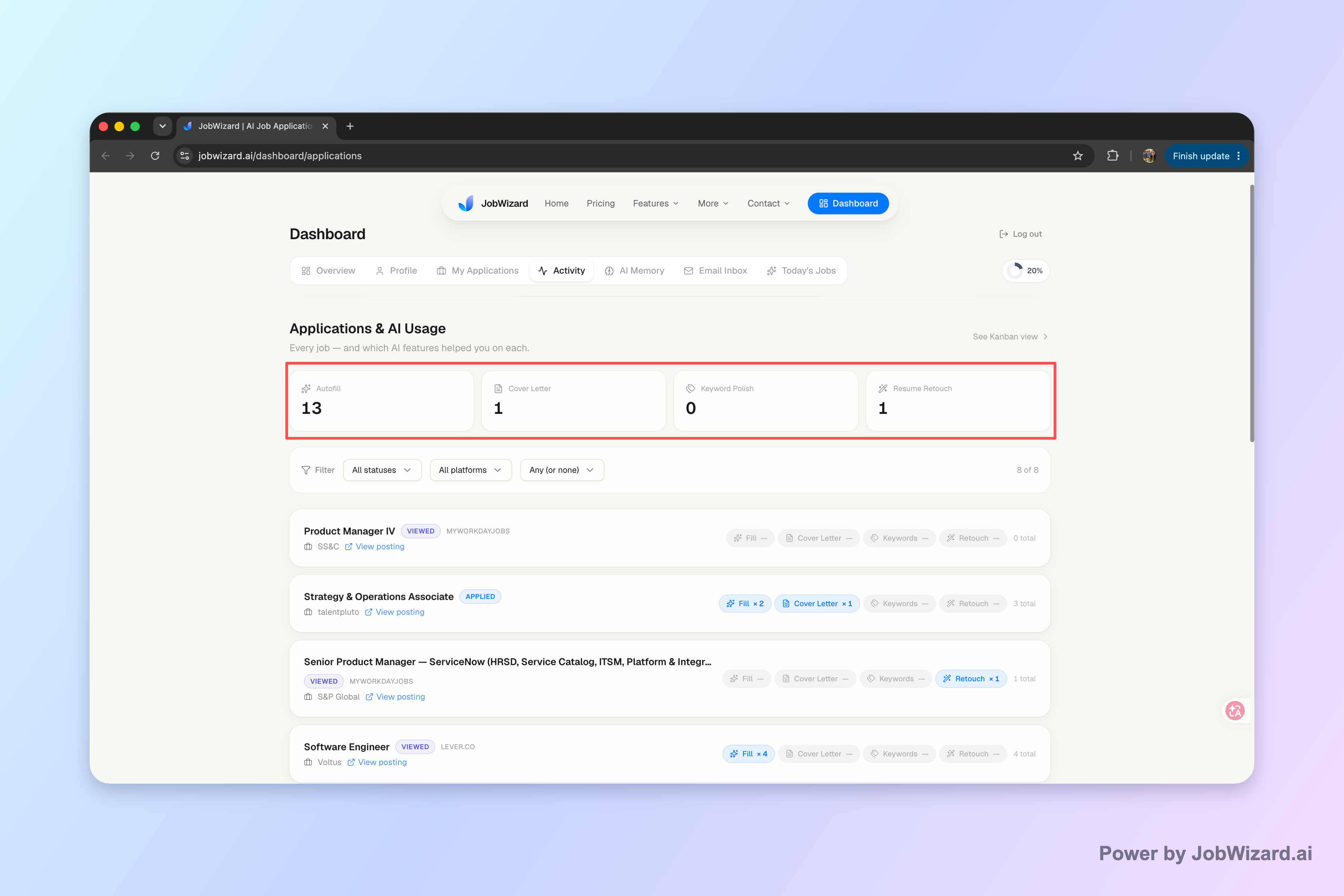
Use your own notes to record when you contacted someone and what they told you about timing. If a status is unclear, distinguish what you know from what you’re waiting to confirm rather than treating silence as a definite decision.
If you still have no response, avoid sending several near-identical messages in quick succession. This guide on how to follow up on an email with no response without losing your cool covers how to consider a later check-in and what to do next.
Do this automatically with JobWizard
Skip the manual work — JobWizard's Application Tracker handles this for you.
Frequently asked questions about follow up email subjects
The best subject depends on the job-search moment, but clarity and accuracy work across situations. Use these answers to choose a line that fits your message rather than relying on a one-size-fits-all formula.
What is a good follow up email subject line for a job application?
A good follow up email subject line identifies the role and makes the purpose clear, such as “Following Up: Marketing Coordinator Application.” If you have an application or requisition number, include it only when it helps the recipient identify your submission.
Should I change the subject line when following up after an interview?
Usually, keep the existing subject if you’re replying in the same email thread, so the conversation stays together. If you’re starting a new message, use a follow up email subject that names the role and interview, such as “Thank You and Follow-Up: Product Designer Interview.”
How long should I wait before sending a follow-up email?
Use the timeline the employer gave you, if there is one. If no date was shared, allow a reasonable interval before checking in; the right timing depends on whether you applied, interviewed, or are waiting on a specific next step.
What should I do if I get no reply to my follow-up email?
Avoid sending repeated messages close together. Check your application notes, allow time for a response, and decide whether one later, concise check-in makes sense; you can also review this guide on following up when an email gets no response.
Keep your applications and next steps together. Use JobWizard’s Activity view to review application status and the JobWizard tools used for each role, then keep your follow-up plan organized as you continue your search.
Frequently Asked Questions
Autofill your next job application
JobWizard is a free Chrome extension that fills applications, tracks statuses, and optimizes your resume.