How to Follow Up After No Response: A Calm Plan That Keeps You Moving
Wondering how to follow up after no response from an employer? Use this timing-and-message plan to check in professionally, decide when to stop waiting, and keep your job search organized.

Free Chrome extension
Autofill your next job application
JobWizard is a free Chrome extension that fills applications, tracks statuses, and optimizes your resume.
A no-response follow-up should be brief, timely, and easy to answer
If you are wondering how to follow up after no response, send a concise note that names the role, asks politely for an update, and gives the employer room to reply. Silence can mean the process is delayed, the team has not made a decision, or the role has changed; it does not always tell you what happened.
Use the employer’s stated timeline first. If no timeline was provided, a short check-in after about a week is a reasonable default for an application, while an interview follow-up should account for any decision date the interviewer gave you.
One thoughtful message is more useful than repeated nudges sent close together. Keep applying elsewhere while you wait, and treat the follow-up as a professional check-in—not a way to force a decision.
How to follow up after no response at each hiring stage
Match your timing and message to the last meaningful contact you had with the employer. An application confirmation, recruiter conversation, and interview are different situations, so avoid sending the same generic note to all of them.
| Situation | When to check in | What to include |
|---|---|---|
| You submitted an application | Use any timeline given; otherwise, consider a brief note after about a week. | Role title, application date, and a courteous request for a status update. |
| You spoke with a recruiter | Follow the schedule discussed. If none was set, allow several business days before checking in. | A reminder of your conversation, the role, and your interest if it remains genuine. |
| You interviewed | Thank the interviewer promptly. For a status check, wait until the promised decision date passes or several business days if no date was offered. | The role and interview date, a brief expression of continued interest, and a direct question about next steps. |
| You completed a later interview or assignment | Use the specific timeline the team gave you; allow extra time if they said the process involves multiple people. | A concise reference to the stage you completed and a polite request for an update. |
These intervals are practical guidelines, not rules or promises. If the employer asks candidates not to contact the team, gives a different timeline, or specifies a particular channel, follow those instructions.
If you are following up on an application, use this status-based plan for following up after applying for a job to choose a next step based on where you are in the process. For the broader system, see how to track job applications with a practical system.
How to follow up after no response with a clear email
A good follow-up email is specific enough to provide context and short enough to read quickly. Use a clear subject line, greet the person by name if you have it, and identify the role or interview before asking your question.
Subject: Checking in on the [Job Title] role
Hi [Name],
I’m following up on my application for the [Job Title] position, which I submitted on [date]. I remain interested in the opportunity and wanted to ask whether there is an update on the hiring timeline or next steps.
Thank you for your time,[Your Name]
For an interview check-in, make the first sentence specific to the conversation: “I enjoyed speaking with you about the [Job Title] position on [date].” Then ask whether there is an update on the decision timeline. If you have a meaningful new detail—such as relevant work you have completed since the interview—you can mention it briefly, but do not add an unrelated sales pitch.
Keep the tone polite and direct. Avoid language that sounds accusatory, such as “I’ve emailed several times and still haven’t heard back,” unless you need to address a concrete logistical issue. For more examples and wording options, read how to follow up on an email with no response without losing your cool.
What to do when the employer still does not reply
After one unanswered check-in, allow a reasonable interval before deciding whether a final message makes sense. If the process is active and you have a real reason to ask, one final, short follow-up can be appropriate; repeated messages are rarely a useful plan.
- Check the context. Re-read the job posting, your correspondence, and any stated timeline or contact instructions.
- Send one relevant check-in. Reply in the existing email thread when possible, so the role and earlier conversation are easy to identify.
- Set your own stopping point. If there is still no reply after a reasonable wait, move your attention to other opportunities rather than continuing to chase an answer.
- Keep the door open. If you receive a late response, assess the opportunity based on the role and current circumstances; silence alone does not require an emotional or confrontational reply.
If you have interviewed and then notice the job has been reposted, that signal can have several explanations. Read what a reposted job after an interview may mean and how to follow up smartly before drawing conclusions.
It is reasonable to feel disappointed, but no response is not a reliable explanation by itself. Keep your next steps under your control: continue your search, prepare for other conversations, and avoid putting every plan on hold for one employer.
Keep follow-ups organized so you do not have to guess
Record the role, your last contact, and the next date you plan to act so each follow-up stays intentional. A simple tracker can help you tell whether you have already checked in and prevent an unanswered application from disappearing into your inbox.
JobWizard’s Activity view shows application status and which JobWizard tools were used for each role. It can give you one place to review application activity and plan your next step; do not assume that every employer update is detected automatically.
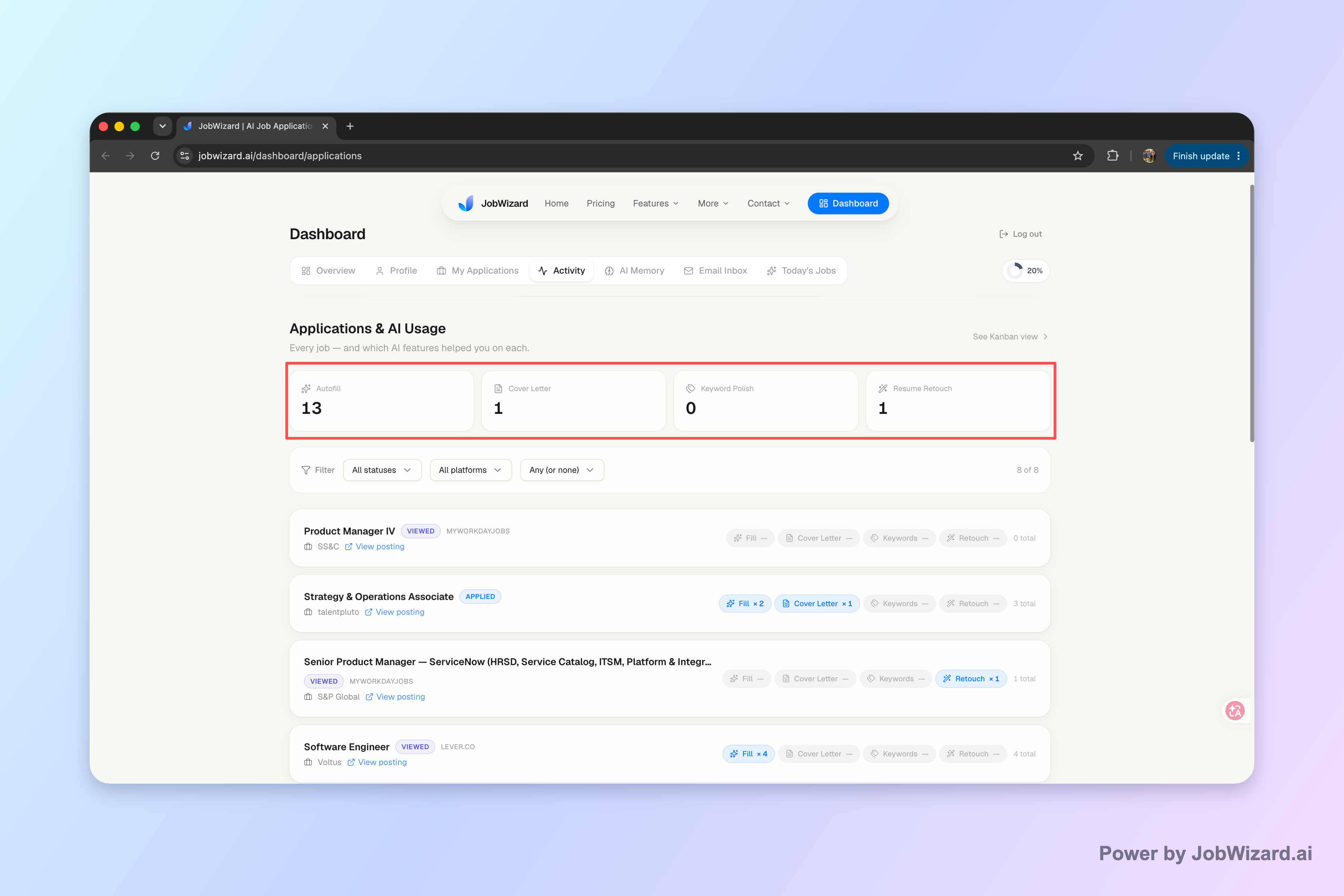
For each opportunity, note the company and role, application or interview date, last message, any timeline the employer gave you, and your next planned action. A clear record helps you follow up once, then move on if there is no reply.
Use a repeatable process, not a growing email thread. JobWizard can help you keep each application and its next step in one activity view. Try JobWizard to organize your application activity and stay clear on what to do next.
Do this automatically with JobWizard
Skip the manual work — JobWizard's Application Tracker handles this for you.
Frequently asked questions about following up after no response
How long should I wait before following up after no response?
Use the timeline the employer gave you if there is one. If there was no timeline, a brief follow-up after about a week is a reasonable default; after an interview, wait until the stated decision date has passed or follow up after several business days if no date was given. These are practical guidelines, not guarantees.
What should I say when following up after no response?
Keep the note short, polite, and specific: refer to the role or conversation, ask whether there is an update, and restate your interest if it is genuine. If you are asking how to follow up after no response, avoid implying that the employer owes you an immediate answer.
How many times should I follow up if an employer does not reply?
Usually, send one concise follow-up and, if appropriate, one final check-in after another reasonable interval. If neither gets a response, move on with your search rather than sending repeated messages. Follow any contact instructions the employer provided.
Should I keep applying while I wait for a response?
Yes. Continue applying and scheduling other conversations while you wait. Track the role, last contact, and next step so you can follow up once without letting one unanswered application stall your search.
Frequently Asked Questions
Autofill your next job application
JobWizard is a free Chrome extension that fills applications, tracks statuses, and optimizes your resume.