
Follow Ups That Keep Your Job Search Moving Without Chasing Employers
Use follow ups to ask about an application or interview with clarity and professionalism. Set a sensible timeline, write a concise message, and track each next step so no opportunity slips through the cracks.

Free Chrome extension
Autofill your next job application
JobWizard is a free Chrome extension that fills applications, tracks statuses, and optimizes your resume.
Why follow ups work best when they have a clear purpose
Good follow ups make it easy for an employer to understand who you are, which role you mean, and what you are asking. A brief message can confirm your continued interest or request an update without sounding impatient. Start with the job-search context, not a demand for a decision.
Before writing, check whether the employer gave you a date or timeline. If they did, use that as your guide; if not, choose a reasonable interval and keep applying elsewhere while you wait.
For a broader process that keeps applications and next actions organized, see How to Track Job Applications: A Practical System. The goal is to make each follow-up intentional, not to contact every employer on a rigid schedule.
When to send follow ups after applying or interviewing
Follow up after the timeline you were given has passed, or allow a reasonable interval when no timeline was provided. Employers’ hiring processes vary, so there is no single waiting period that fits every application. A prompt, role-specific note is more useful than multiple messages sent close together.
- After applying: If the posting or recruiter gave a response window, wait until it ends. Without one, consider a brief check-in after about one to two weeks.
- After an interview: Send a thank-you message within a day, then follow the interviewer’s stated timeline for a status check. If that date passes, a polite inquiry is appropriate.
- After a recruiter call: If the recruiter said they would share an update by a certain day, wait until that day has passed before checking in.
- After a final interview: Refer to the expected decision date if one was shared. If it has passed, ask whether there is an updated timeline.
These are practical guidelines, not guarantees about when an employer will respond. If a hiring contact asks you not to follow up or gives specific instructions, respect them.
If an application asks when you could start, a clear answer can prevent confusion later. Use this guide to answer date available for employment, including notice periods, flexibility, and follow-ups.
What to write in follow ups: a simple structure and examples
Keep a follow-up message short, specific, and easy to answer. Name the job, say when you applied or spoke, restate your interest, and make one polite request. A clear subject line helps the recipient place your message in context.
- Identify the role: Include the job title and, when useful, the date you applied or interviewed.
- State your interest: Briefly connect your continued interest to the position or conversation.
- Ask one question: Request an update or ask whether there is a revised timeline.
- Close courteously: Thank the recipient and use a professional sign-off.
Application status check
Use this when the employer has not shared a timeline and you have waited a reasonable period.
Subject: Checking in on the [Job Title] application
Hi [Name],
I applied for the [Job Title] role on [date] and wanted to check whether there are any updates on the hiring timeline. I’m still interested in the opportunity and would be glad to share any additional information that would be helpful.
Thank you,[Your Name]
Post-interview follow-up
Refer to a real detail from the conversation rather than sending a generic reminder.
Subject: Thank you for speaking with me about [Job Title]
Hi [Name],
Thank you for discussing the [Job Title] role with me on [date]. I especially enjoyed learning about [specific topic]. I remain interested in the position; do you have an updated timeline for next steps?
Best,[Your Name]
Avoid language that implies the employer owes you an immediate answer. If you need a response by a specific date because of another offer or deadline, explain the situation plainly and respectfully.
How to manage follow ups without losing track
Record the next action when you send a message so you know when to check back—and when to move on. A simple tracking system reduces guesswork and helps you avoid duplicate or overly frequent messages. Track the facts you need rather than relying on memory or scattered inbox searches.
- Employer and role: Use the exact company and job title.
- Key dates: Note when you applied, interviewed, and last contacted someone.
- Expected response: Record any timeline the employer gave you.
- Next step: Set a reminder to check in, prepare for an interview, or close the loop.
- Outcome: Update the record when you receive a response or decide to stop pursuing the role.
A spreadsheet may be enough if you want a flexible, do-it-yourself setup. This Google Sheet job application tracker and follow-up system can help you structure the details. If you would rather use a dedicated tool, compare options in this guide to software for job tracking and keeping follow-ups organized.
JobWizard’s Activity view shows application status and which JobWizard tools were used for each role. It can give you one place to review application activity; do not assume every employer update will be detected automatically.
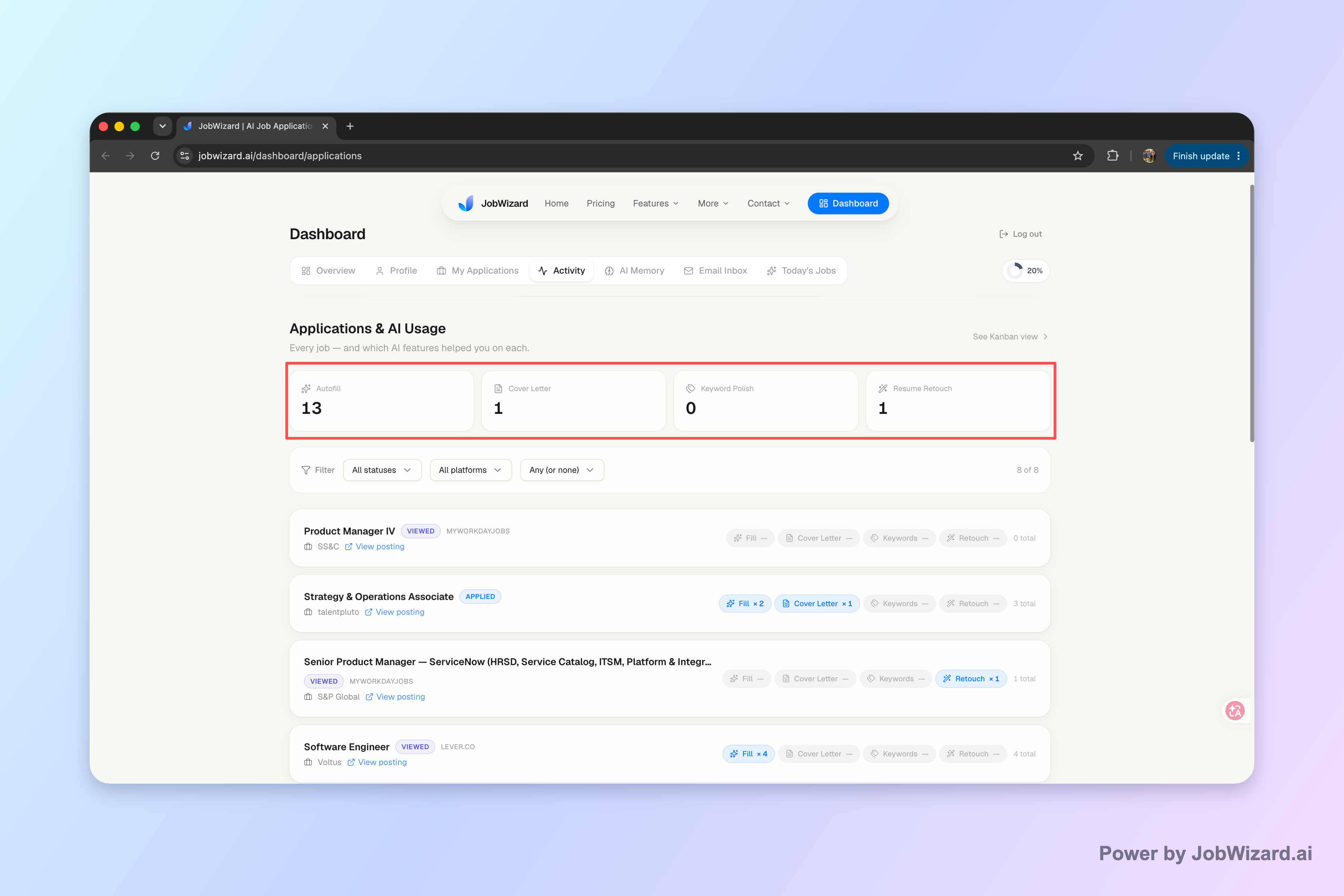
Use that view alongside your own notes and calendar reminders for promised response dates. Keep the next step visible, whether that means sending a check-in or continuing with other applications.
Follow ups when there is no response: how to decide what comes next
If you receive no reply, send a courteous check-in after a reasonable interval, then avoid repeated messages without new information. Silence may mean a process is delayed, the role has changed, or the employer has moved forward; it does not tell you which explanation is true. Keep your message professional and continue your search.
- First check-in: Refer to the role and previous contact, then ask briefly whether there is an update.
- Second check-in: If it is appropriate and enough time has passed, send one final note, especially if the employer had shared a later timeline.
- After that: Update your tracker and focus on other opportunities unless the employer responds or invites further contact.
Do not send the same message across several channels in quick succession. If the employer provided a preferred contact method, use it; if not, reply to the existing email thread when possible so the context stays together.
When there is no reply to an email, wording matters as much as timing. For more examples, read how to follow up on an email with no response.
Do this automatically with JobWizard
Skip the manual work — JobWizard's Application Tracker handles this for you.
Follow ups: common questions
How long should I wait before sending follow ups after applying?
If the employer gave a timeline, wait until that date has passed before sending follow ups. If there was no timeline, waiting about one to two weeks before a brief check-in is a reasonable approach, though there is no universal rule.
What should I include in follow ups to a recruiter?
Keep follow ups concise: identify the role, mention when you applied or interviewed, restate your interest, and ask whether there is an update or next step. Use a polite tone and avoid demanding a decision.
How many follow ups should I send if I get no response?
There is no fixed number, but one courteous follow-up is usually a sensible first step. If you still hear nothing, you can send one more after a reasonable interval, then focus on other applications rather than repeatedly contacting the employer.
How do I keep track of job search follow ups?
Record the employer, role, application date, last contact, expected response date, and next action in a spreadsheet or tracker. JobWizard’s Activity view shows application status and which JobWizard tools were used for each role.
Keep your next step visible instead of letting applications drift. Use JobWizard’s Activity view to review each application’s status and the tools used along the way, and pair it with your own reminders for follow-ups. Open JobWizard and keep each application and its next action in one activity view.
Frequently Asked Questions
Autofill your next job application
JobWizard is a free Chrome extension that fills applications, tracks statuses, and optimizes your resume.