How to Answer to an Interview Email: A Reply-First Plan for Clear Next Steps
Learn how to answer to an interview email with a reply-first template, what to confirm, and how to ask smart follow-up questions—so you sound organized from the start.
Free Chrome extension
Let AI answer these questions for you
JobWizard fills sponsorship, work-auth, and availability answers correctly on every application — free.
If you’ve ever stared at an interview invitation and wondered how to answer to an interview email without accidentally sounding vague, late, or underprepared—you’re not alone. Your reply sets the tone for the entire process, so the goal isn’t “perfect writing,” it’s clear confirmations plus one useful question.
Below is a reply-first plan (with copy you can customize) to help you confirm logistics, show professionalism, and make it easier for the recruiter to coordinate next steps.
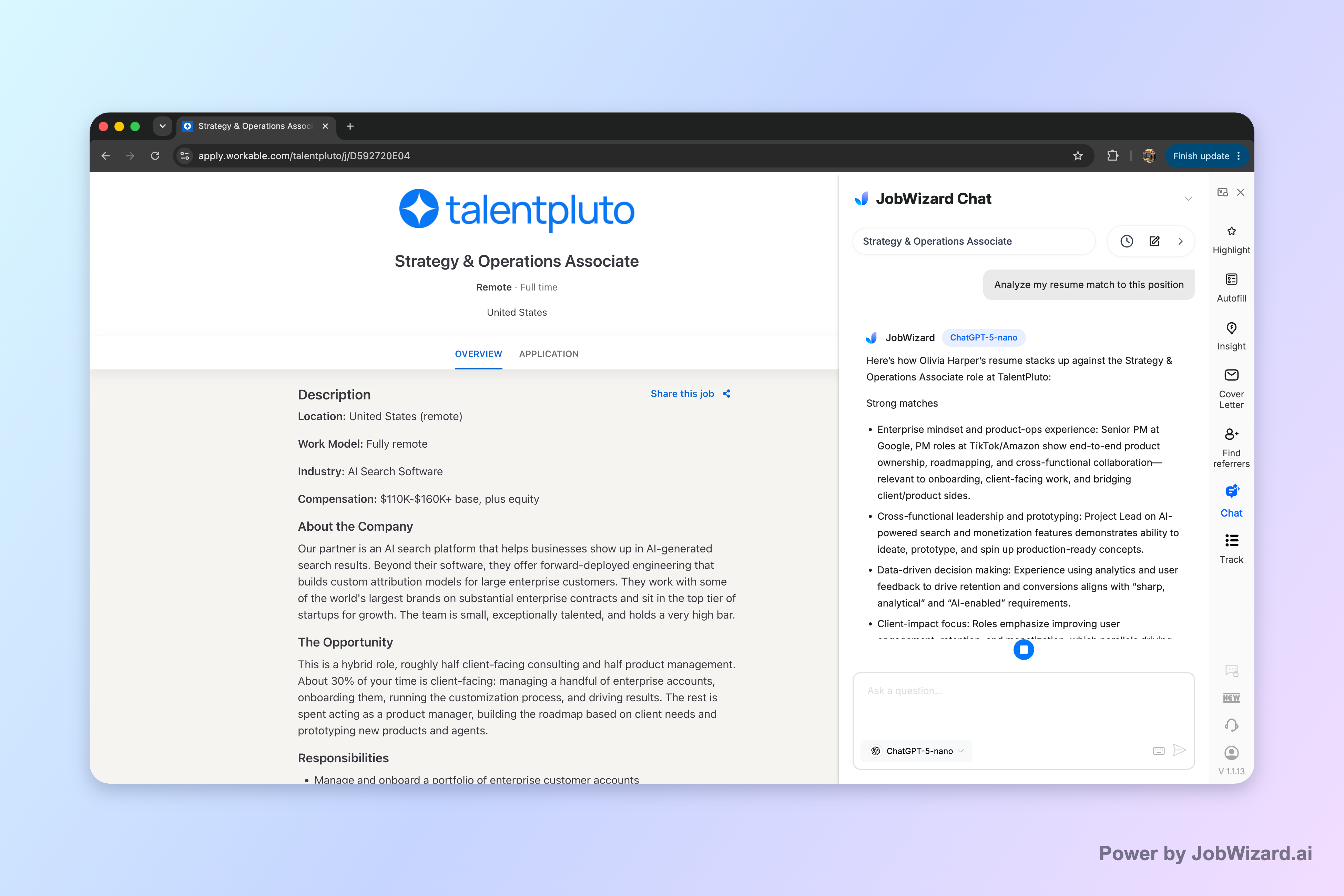
If you want an extra check before you send, JobWizard’s Career Chat keeps the current role in context so you can ask follow-up questions about resume fit and application strategy without pasting the job description again.
What “good” looks like when you answer an interview email
Good replies confirm the essentials fast and then earn trust with one tailored line—like confirming format or asking a targeted logistics question.
When you’re figuring out how to answer to an interview email, think of your message as covering three jobs:
- Logistics confirmation: date/time, time zone, format, and location/video details (if provided).
- Professional tone: thank them, confirm interest, and keep your tone calm and direct.
- One next-step question: something that helps you prepare (interview format, panel, materials, or contact person).
Keep your note short enough that someone can skim it in under a minute. You can always follow up later—your first reply should reduce friction, not create more email threads.
How to answer to an interview email: a reply-first checklist
Use a checklist so nothing important slips through—especially time zone, format, and any “bring/do” items.
Before you hit send, confirm each item below based on what the email already says. If something’s missing, turn it into a question (politely and directly).
- Thank them: one line acknowledging the opportunity and your interest.
- Confirm date/time + time zone: copy exactly what you’re agreeing to, then add your time zone if needed.
- Confirm interview format: phone vs. video vs. in-person changes prep and logistics.
- Confirm location or access: address, building details, entry info, or video link (if not included).
- Ask the one helpful question: panel names/titles, duration, or who to contact day-of.
- Close with availability: a short sign-off and “looking forward” line.
That’s it. If you do those steps, your reply will feel organized and respectful—exactly what interviewers want to see early.
Use templates for quick, polished replies (and customize smart)
A template is only useful if you customize the details that show you’re paying attention.
Start with one of these structures, then swap in the brackets.
Template A: Accept and confirm (most common)
Accept + confirm + one question.
Subject: Interview Confirmation – [Role Name]
Hello [Name],
Thank you for the opportunity to interview for the [Role Name] position. I’m happy to confirm that I can make the interview on [Day, Date] at [Time] [Time Zone].
Could you please confirm whether this will be a phone, video, or in-person interview?
Looking forward to speaking with you, [Your Name]
Template B: Accept but ask for logistics details
Accept + confirm + location/access.
Subject: Re: Interview Scheduling – [Role Name]
Hi [Name],
Thanks for reaching out—I'd be glad to interview for the [Role Name] role. I’m available on [Day, Date] at [Time] [Time Zone].
Could you share the interview location or the video link/access instructions (if applicable)?
Best regards, [Your Name]
Template C: You need to reschedule
Cooperative reschedule + 2–3 options + time zone.
Subject: Interview Reschedule Request – [Role Name]
Hello [Name],
Thank you for inviting me to interview for the [Role Name] position. Unfortunately, I’m not able to attend at [Original Day/Time].
If possible, I’m available [Option 1], [Option 2], or [Option 3]—all times in [Time Zone]. Would one of those work?
Thanks in advance, [Your Name]
Template D: Clarifying if key info is missing
Clarify the gaps with a short question.
Subject: Re: Interview Details – [Role Name]
Hi [Name],
Thanks for scheduling an interview. I want to be sure I’m prepared—could you confirm the role title and the interview location/access details?
Once confirmed, I’ll gladly attend at [Time] [Time Zone].
Best, [Your Name]
What to ask in your reply (so you sound confident, not needy)
Your best questions improve preparation while keeping the email simple.
When you’re learning how to answer to an interview email, the safest follow-ups are the ones that reduce uncertainty. Choose one.
- Interview format: “Will this be phone, video, or in-person?”
- Panel/company expectations: “Who will I be speaking with?”
- Duration: “How long should I plan for?”
- Materials: “Should I bring anything specific?”
- Day-of contact: “If anything changes, who should I contact?”
If the email already includes these details, don’t re-ask them. Instead, add one line that confirms your interest in the role or a relevant responsibility you can see in the posting.
To keep your whole prep aligned, it also helps to revisit how you’ll answer common interview prompts. If you want to tighten your interview responses before you meet them, you can use these guides alongside your email reply:
- How to Answer Job Application Questions: A Field-Tested Method for Confident, Consistent Responses
- How to Answer Behavioral Interview Questions: A STAR+Plan With Evidence You Can Actually Defend
- How Did You Hear About Us Interview Question? Use This Answer Framework to Sound Intentional
- How to Answer an Interview Question About Weakness: Flip “Flaw” Into a Growth Story
Common mistakes when you answer an interview email (and quick fixes)
A few avoidable errors can dilute a strong application—usually because of missing details or unclear tone.
Mistake 1: Confirming the time but forgetting the time zone
Fix: Add “All times are [Time Zone]” or confirm the time zone explicitly when you reply.
Mistake 2: Replying without confirming format/location
Fix: If anything isn’t included, ask one direct question about format or access—don’t guess.
Mistake 3: Writing a long email that buries your point
Fix: Keep it to short paragraphs and bullet-like clarity (thank you, confirm, question, sign-off).
Mistake 4: Over-sharing or sounding uncertain
Fix: Avoid explaining every detail of your schedule. The goal is cooperation and logistics clarity.
Mistake 5: Sending the reply without reviewing it against the original email
Fix: Do a final pass: double-check the date, time, spelling of names, and any attachment/links mentioned.
Tip: If you’re using AI assistance to draft your email, treat it like a polishing partner—review before sending so your final message matches the interview details in the email thread.
Do this automatically with JobWizard
Skip the manual work — JobWizard's Smart Autofill handles this for you.
FAQ: how to answer to an interview email
Use these quick answers to handle the most common situations without overthinking.
What’s the best way to reply to an interview email without sounding rushed?
Reply fast but thoughtfully: thank them, confirm the interview date/time (and time zone), restate the format (phone/video/in-person), and close with one clear question—like who to contact if anything changes.
Should I ask for the interview format or the names/titles of the interviewers in my email reply?
Yes—if it’s not already clear. You can ask: “Will this be a phone, video, or in-person interview?” and “Who will I be speaking with?” Keep it brief so your note stays focused on confirming logistics.
How do I handle it if the email doesn’t include the job title or the location?
Ask a direct clarification question. For example: “Could you confirm the role title and the interview location (or video link)?” A quick clarification helps you prepare and prevents misunderstandings.
What should I do if I want to propose a different interview time?
Offer 2–3 alternate times and include your time zone. Example: “I’m available Tuesday 10–12 ET or Wednesday 2–4 ET—would either work?” Keep your tone cooperative and ask them to confirm the final slot.
Can I use Career Chat to improve my interview email reply?
You can use Career Chat to keep the current role in context while you draft questions and verify that your reply aligns with the job description—without pasting the description again. Just remember Career Chat can’t guarantee you’ll be chosen, so you still review and send the final message yourself.
Ready to send your reply with confidence? If you want, use JobWizard’s Career Chat to ask a focused follow-up question about the role from your application context, then review your draft interview email reply before you send.
Frequently Asked Questions
Let AI answer these questions for you
JobWizard fills sponsorship, work-auth, and availability answers correctly on every application — free.