Email Cover Letter That Gets Read: Generate an AI Draft (Then Make It Sound Like You)
An email cover letter should be short, specific, and easy to scan. Use an AI cover letter draft to speed up your first draft—then personalize it before you send.
Free Chrome extension
Generate this cover letter automatically
JobWizard drafts a tailored letter from your resume and the job description in seconds — free.
Email cover letter writing fails most often for one reason: it reads like a form letter. Hiring managers skim email, so your message has to look effortless, be clearly connected to the role, and still sound like you.
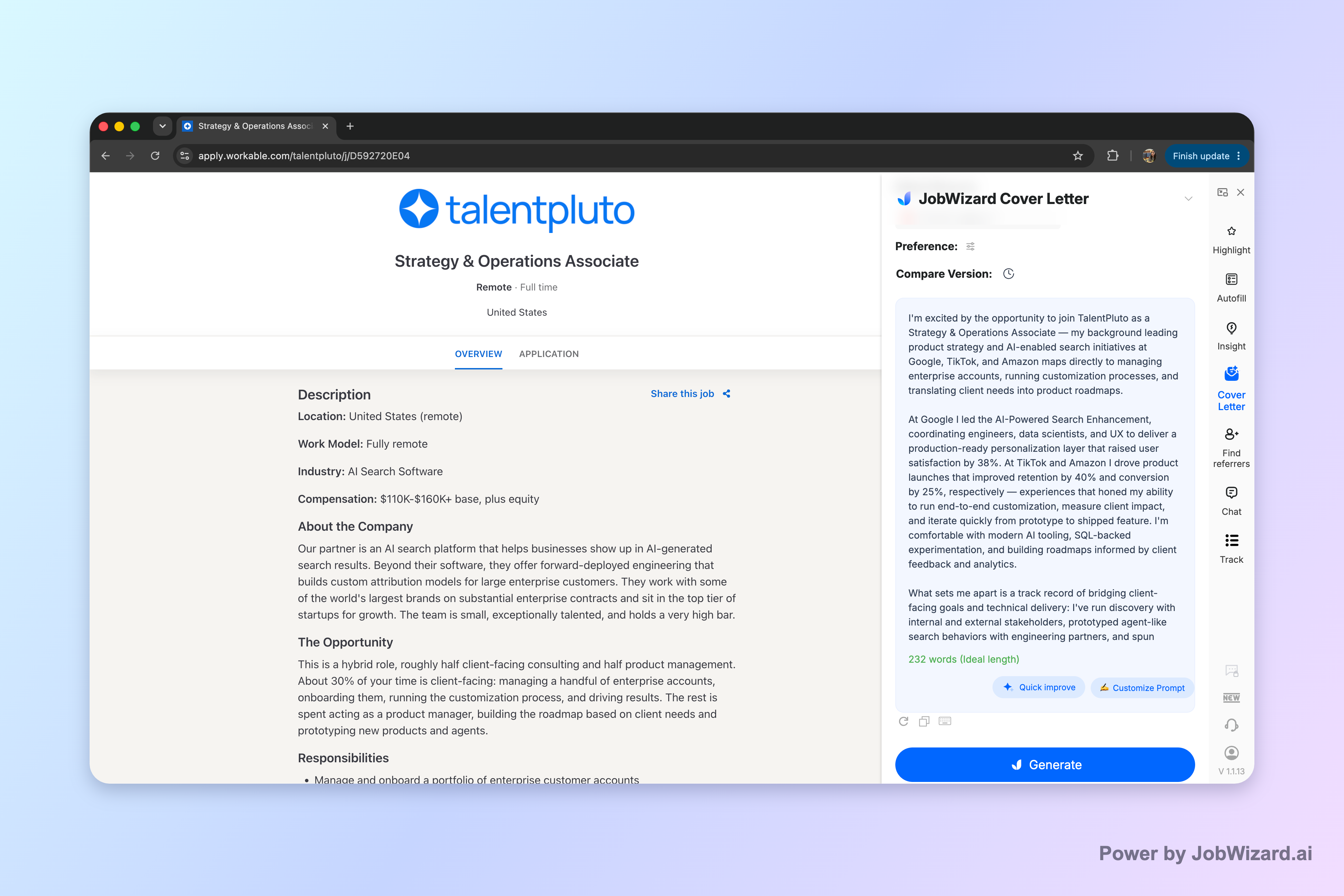
JobWizard can generate an editable first draft cover letter for the current job description using your selected resume. You can choose length, format, tone, style, and focus—then click into the draft and edit it directly before you send.
What an email cover letter should accomplish (in 30 seconds)
An email cover letter should quickly prove relevance and make the next step easy: interview, quick reply, or review of your resume.
Think of your email like an opener—not a replacement for your resume. Your goal is to highlight 1–2 strengths that match the job description and show you understand what the role actually needs.
The 4-part structure that works in email
Keep it in a simple sequence so skimmers can follow:
- 1) One-line context: which job you’re applying for and how you found it (if relevant).
- 2) Your strongest match: a tight example (what you did + the impact, if you have it).
- 3) Company/role fit: why this team or mission matters to you (specific, not generic).
- 4) Call to action: a polite ask to discuss and a note about attaching/reviewing your resume.
What to avoid
Avoid the “same template, everywhere” trap—it’s the fastest way to sound like automation.
- Copying the entire job posting back to the recruiter
- Overly long paragraphs (email is scanned)
- Overpromising or guessing at requirements you don’t fully meet
- Ignoring the posting instructions (some roles want attachments, some want pasted text)
How to write an email cover letter using your real voice
Write to your specific job ad by turning requirements into sentences you can genuinely stand behind.
Start by identifying the top 2–3 skills the employer keeps emphasizing. Then map each one to a real example from your background—one you can explain confidently in an interview.
Turn job requirements into “evidence sentences”
Evidence sentences are the difference between generic and credible. Use this formula:
- Skill: name the requirement in your own words.
- Action: what you did (not what you “helped with”).
- Result: outcome, scale, or what improved (only include what’s true).
Example (adapt to your field): “You’re looking for someone who can streamline intake. In my last role, I redesigned the tracking workflow so requests were routed faster to the right owner, reducing back-and-forth.”
Match “cover letter tone” without impersonating anyone
Cover letter tone should match the culture implied by the posting—professional, confident, and human.
- If the job ad emphasizes collaboration: use warmer phrasing and talk about how you work with others.
- If it emphasizes ownership: use direct language and specific responsibility statements.
- If it emphasizes speed: focus on process, prioritization, and quality checks—not just “fast.”
If you want a targeted angle, see also: How to Write a Consulting Cover Letter That Sounds Like You (and Gets Read) for tone patterns that feel natural in high-velocity industries.
Email cover letter format that recruiters expect
Use a predictable email cover letter format so the recruiter can find key details instantly.
Before you paste: subject line + greeting
Subject lines should be role-based and easy to file. A safe template is:
- “Application: [Job Title] — [Your Name]”
- “Re: [Job Title] (Ref #[Optional]) — [Your Name]”
For the greeting, use the best available option in this order: the hiring manager’s name (if known), the recruiter’s name (if provided), or a neutral option like “Hello Hiring Team.”
Body layout: short paragraphs, not blocks
In the body, aim for 3 short paragraphs plus a final call to action. That typically reads well in most email clients.
- Paragraph 1: what role you’re applying for + 1 sentence of fit
- Paragraph 2: your evidence sentence (with an example)
- Paragraph 3: second evidence sentence or company fit
- Closing: call to action + resume attachment note
Attach or paste? Follow the instruction (and don’t guess)
Some applications want an attachment, some want paste-only. If the posting doesn’t specify, pasting a concise email version is a common approach.
For a deeper walkthrough of what to send and when, read: Resume vs Cover Letter: What to Send (and When) to Get Past ATS.
Use an AI draft workflow for an email cover letter (without losing authenticity)
AI should speed up drafting, not replace your judgment. The best workflow is “draft fast, then personalize with proof.”
Here’s a practical process you can follow every time you write an email cover letter:
Step-by-step workflow
- Paste the job description: so your draft can mirror the role’s priorities.
- Select your resume: so your strongest experience shows up in the draft.
- Choose your intent: set length, format, tone, style, and focus to match the posting and your comfort level.
- Generate a first draft: use it as your starting point, not your final copy.
- Edit in two passes: (1) content accuracy, (2) personal details and voice.
- Review before submitting: make sure facts are correct and add genuine personal details before you use the draft.
JobWizard’s approved approach is: the draft is generated using the selected resume and the current job description, and you can click into the draft to edit it directly. It’s designed to support a draft + review-before-submit workflow, not blind auto-submission.
What to edit (so it doesn’t sound generic)
Don’t just “read and accept.” Change these elements first:
- Your specific examples: swap in one or two real projects you can explain.
- Your phrasing: adjust sentences so they match how you’d talk to a coworker.
- Any facts you’re not sure about: verify them or remove them.
- Role details: reference the team goals or responsibilities if the job ad makes them clear.
If you’re applying to a healthcare role, this workflow pairs especially well with a specialized tone template: Medical Assistant Cover Letter That Gets Noticed: A Tone-Right Template + AI Draft Workflow.
Email cover letter examples you can copy (and customize)
Use examples to set the baseline, then customize the evidence sentences and the company fit.
Below are two email cover letter templates written for email readability. Replace bracketed text with your details.
Example 1: General professional email cover letter
Subject: Application: [Job Title] — [Your Name]
Hello [Hiring Manager Name/ Hiring Team],
I’m applying for the [Job Title] role at [Company]. With experience in [2–3 relevant skills], I’m confident I can help your team by [what you’d realistically contribute].
In my most recent role, I [action] to [goal], which resulted in [measurable outcome or concrete improvement]. I’m especially interested in this position because [specific reason tied to the posting or company].
I’d welcome the chance to discuss how my background fits your needs. My resume is attached (or included), and I’m happy to provide any additional information.
Best regards,[Your Name][Phone] | [Email] | [LinkedIn or Portfolio (optional)]
Example 2: Email cover letter for a role that emphasizes collaboration
Subject: Application: [Job Title] — [Your Name]
Hi [Hiring Manager Name/ Hiring Team],
I’m excited to apply for the [Job Title] role at [Company]. Your job description highlights [specific theme], and that matches how I’ve built outcomes by working closely with [cross-functional partners/stakeholders] to align priorities.
For example, I [action] by [method], helping [team/customer] achieve [result]. I also focus on [quality, process, or communication detail] so projects move forward without losing accuracy.
If it’s helpful, I’d love to discuss how I can contribute to [team goal stated in the job ad]. Thank you for your time—my resume is attached (or available) for review.
Sincerely,[Your Name]
Quick reminder: Keep your email cover letter skimmable, and make sure any AI-generated draft you use is reviewed for accuracy and personalized with genuine details before you send.
Do this automatically with JobWizard
Skip the manual work — JobWizard's AI Cover Letters handles this for you.
FAQ: Email cover letters
What should I include in an email cover letter?
Include a quick greeting, 2–3 sentences that connect your experience to the role, one line showing why you’re a fit for this company, and a clear call to action (e.g., “I’d welcome the chance to discuss…”). Keep it skimmable and match the job description’s wording where it’s accurate.
How long should an email cover letter be?
Aim for a short, focused note—typically 150–250 words. If the job ad is demanding, you can stretch slightly, but avoid writing a full essay because the hiring manager will skim.
Should I paste a cover letter into the email or attach it?
Follow the posting instructions. If they don’t specify, paste a short email version (the essentials) and attach a full PDF only if the form asks for it.
How can an AI cover letter draft help without sounding generic?
Use the draft to get your structure and wording started fast, then edit it so it reflects your real projects, metrics, and specific reasons for applying. You must review any facts the draft includes and add genuine personal details before using it.
What’s the best email subject line for a cover letter?
Use a clear, role-based subject line like: “Application: [Job Title] — [Your Name].” If the posting has a reference or requisition number, include it after the title.
Want an email cover letter draft you can actually personalize? Generate a draft for the current job description in JobWizard, then edit it directly so the examples and phrasing sound like you before you send.
Frequently Asked Questions
Generate this cover letter automatically
JobWizard drafts a tailored letter from your resume and the job description in seconds — free.