AI Cover Letter for No Experience: A Realistic Draft You Can Edit Fast
Learn how to write an AI cover letter for no experience that sounds natural. Get an editable draft based on your resume and the job description, then review it yourself.
Free Chrome extension
Generate this cover letter automatically
JobWizard drafts a tailored letter from your resume and the job description in seconds — free.
Why an “AI Cover Letter for No Experience” Feels Hard (and How to Fix It)
When you’re applying with no experience, a cover letter can feel like a trap: the job wants proof, but you don’t have the traditional “I did this in my last role” story. That’s exactly why an AI Cover Letter for No Experience search exists—people want a strong starting point that still sounds believable.
The goal isn’t to impersonate experience you don’t have. It’s to write a clear, confident letter that connects your real background (projects, coursework, volunteering, leadership, skills you built on your own) to the job’s responsibilities. With the right workflow, an AI draft helps you get unstuck faster—and you stay in control of what’s true.
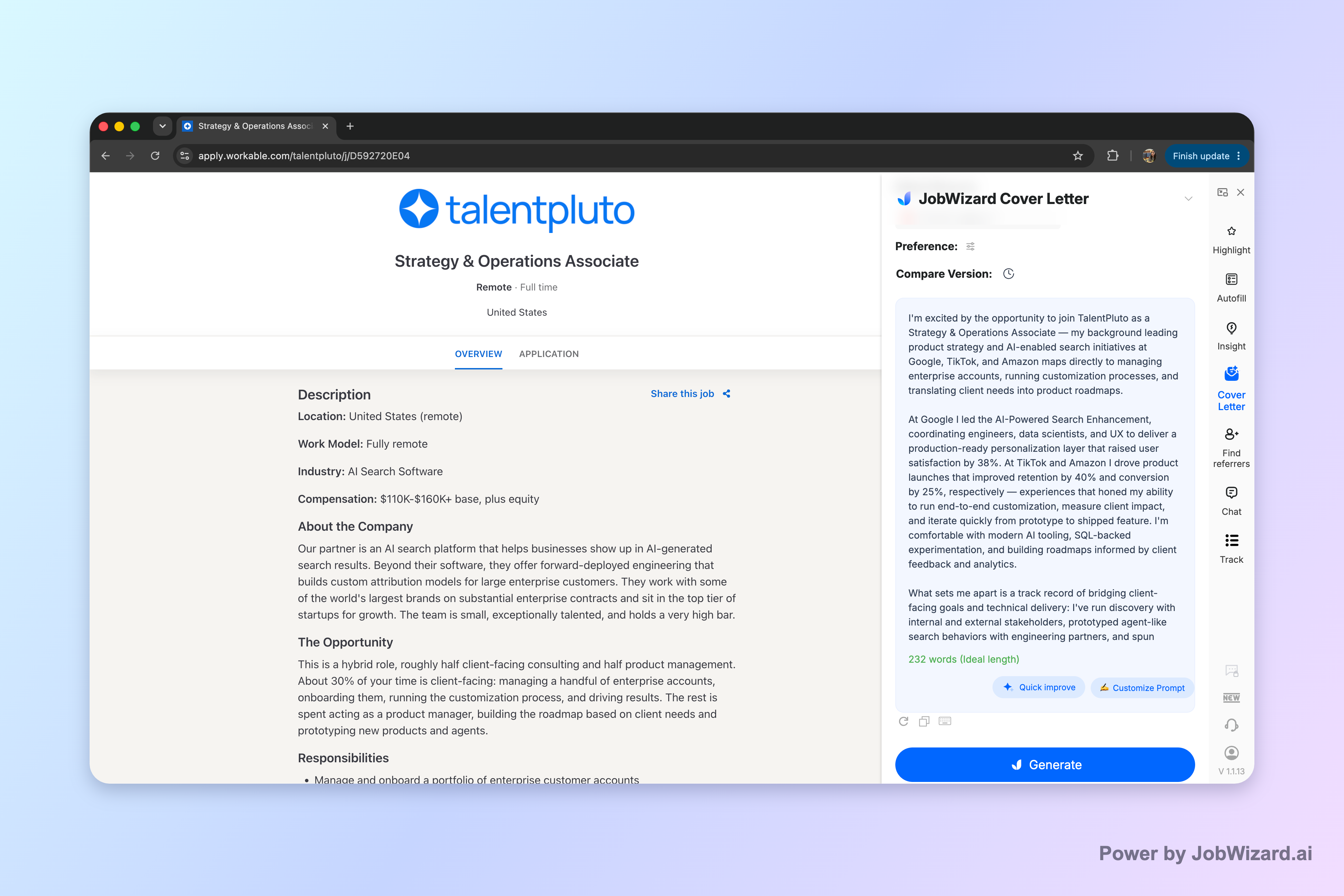
JobWizard creates an editable first draft using your selected resume and the job description on the page. You still review everything and add genuine personal details before submitting.
The Exact Template to Use When You Have No Experience
Below is a practical structure you can reuse for an AI Cover Letter for No Experience. Even if you’re early in your career, this format helps hiring managers quickly understand three things: (1) what you can do, (2) how you learn and execute, and (3) why this specific role.
Cover letter structure (copy/paste-friendly)
- Opening (2–3 sentences): Name the role and company, then state your “why” in terms of the job’s needs (not your missing experience).
- Value evidence (1 short paragraph): Point to 1–3 relevant examples from school, portfolio work, volunteering, or self-directed projects.
- How you work (1 short paragraph): Show transferable habits: communication, ownership, attention to detail, learning speed, teamwork, or problem-solving.
- Role fit close (2–3 sentences): Tie back to the job description’s specific responsibilities and explain what you’re ready to contribute.
- Polite sign-off: Thank them, express interest, and include a simple closing line.
What to avoid (especially with AI drafts)
- Don’t claim experience you can’t back up. If the draft mentions “managed” something you never managed, replace it with what you actually did.
- Don’t overuse buzzwords without proof. “Result-driven” is fine—until it’s not supported by a specific example.
- Don’t ignore the job description. Your letter should mirror the role’s priorities and responsibilities in plain language.
How to Generate a Strong AI First Draft (Then Make It Yours)
The fastest way to get a useful starting point is to generate a draft using your resume plus the current job description. That way, the letter’s focus matches the posting and you don’t spend hours “figuring out what to say.”
Step-by-step workflow
- Start from your resume and the job description. Use the resume you plan to submit and the exact posting content you’re applying to.
- Choose what kind of letter you want. Before generating, select length, format, tone, style, and focus. This is how you prevent a generic letter.
- Generate an editable draft. You’ll get a first draft that you can click into and edit directly.
- Review-before-submit (required). Check every factual statement. Replace anything vague with your real details, and make sure sponsorship / salary / EEO / custom questions (if present) are answered accurately in your application workflow.
Pro tip: Treat the AI letter as a “first draft,” not a final product. Your job is to verify facts and add genuine personal details so the final letter is specific to you.
What to edit first (so it stops sounding like “template text”)
If your draft feels too generic, the fix is usually one of these:
- Replace the “evidence” paragraph: swap out placeholder examples with 2–3 concrete items you can talk about.
- Adjust your voice: shorten sentences, remove over-formal phrases, and keep wording consistent with how you speak.
- Make the job fit explicit: mirror 2–4 responsibilities from the posting and connect each one to a relevant example or habit.
Concrete example: “No experience” doesn’t mean “no proof”
Here are common substitutions you can use in your AI Cover Letter for No Experience draft. Pick the ones that match your real background.
| Job asks for | Use instead of “work experience” | Example sentence you can adapt |
|---|---|---|
| Taking initiative | Self-directed projects, portfolio builds, personal initiatives | “I took initiative by building a project from scratch and iterating based on feedback and performance results.” |
| Communication | Team assignments, presentations, tutoring, collaboration in clubs | “During group work, I communicated progress clearly, documented decisions, and shared next steps to keep the team aligned.” |
| Problem-solving | Class projects, bug fixes, research, volunteer troubleshooting | “When challenges came up, I broke the problem into smaller parts, tested options, and reported outcomes in a straightforward way.” |
| Attention to detail | Editing, compliance training, careful documentation, checklists | “I’m careful with details because I’ve practiced using checklists and double-checking work before sharing it with others.” |
Best Practices for Tone and Format (So It Reads Like You)
Hiring managers aren’t looking for a life story—they’re looking for clarity, relevance, and professionalism. The biggest risk for an AI Cover Letter for No Experience is sounding like the letter came from nowhere. You can avoid that by tightening tone and using a consistent format.
Pick a tone that matches the role
- Entry-level corporate roles: professional, concise, confident.
- Creative or startup roles: slightly more voice, but still respectful and specific.
- Customer-facing roles: emphasize communication, empathy, and reliability.
Use “focus” to prevent the wrong emphasis
Before you generate your draft, choose a focus that aligns with the job. For example:
- If the posting emphasizes learning, prioritize a paragraph about how you ramp up quickly and how you apply feedback.
- If it emphasizes execution, emphasize your ability to finish projects and deliver usable outputs.
- If it emphasizes collaboration, highlight teamwork evidence from group projects or organizational work.
Formatting checklist (quick but important)
- Write 3–5 short paragraphs.
- Keep sentences readable—avoid overly long “AI-smooth” sentences.
- Replace broad phrases with 1–2 specifics.
- End with a confident, grounded close.
Quick template: an opening that doesn’t mention “no experience”
Here’s a safe opener that avoids apologizing for your background:
“I’m applying for the [Role] position at [Company]. I’m especially drawn to this role because it combines [2 job priorities]—and I’ve developed practical experience through [project/course/volunteering] where I focused on [specific skill you demonstrated].”
Do this automatically with JobWizard
Skip the manual work — JobWizard's AI Cover Letters handles this for you.
AI Cover Letter for No Experience: Examples You Can Customize
Use these mini-examples as building blocks. The fastest path is to generate your first draft, then swap in the sections that match your real story.
Example #1: entry-level operations / coordinator
Evidence paragraph (edit for your real examples): “Through coursework and team projects, I learned how to keep work organized and moving. I helped track tasks, maintain clear notes, and follow up to ensure deliverables were completed on time. I’m comfortable using simple tools to document work and communicate status clearly.”
Example #2: entry-level marketing / communications
How you work paragraph: “I enjoy taking feedback and turning it into better outcomes. In projects, I drafted content, tested ideas, and refined messaging based on results and input from teammates. I’m careful about clarity and tone, and I can adapt writing to different audiences.”
Example #3: entry-level software / technical role (no formal experience)
Value evidence paragraph: “I built and improved a portfolio project that required me to translate requirements into working features. I practiced iterative development—planning changes, implementing updates, and reviewing the results to identify improvements. I’m looking to apply this hands-on approach in a role where I can contribute from day one and keep learning quickly.”
FAQ-minded tip: make one claim per paragraph
If your letter feels scattered, revise so each paragraph supports one clear idea. AI can draft more smoothly than you might write manually, so the edit step is where you regain control and authenticity.
Interested in a draft you can edit for the current job? Generate your editable first draft using your selected resume and the job description, then review-before-submit to ensure accuracy and add your genuine personal details.
FAQs About AI Cover Letter for No Experience
Can an AI cover letter help when I have no experience?
Yes—an AI cover letter can draft a strong structure and tone for a role even if you don’t have direct experience. The key is that you must review the draft and replace any generic statements with real details from your background (projects, coursework, internships, volunteering, or transferable skills).
Will an AI cover letter sound fake or generic?
It doesn’t have to. Before generating, choose length, format, tone, style, and focus, then edit the draft to include specifics from the job posting and your own story. You should keep claims realistic and avoid exaggerating experience you don’t have.
What should I write instead of work experience in my cover letter?
Use transferable experience: relevant class projects, portfolio work, volunteer contributions, personal initiatives, hackathon or competition work, caregiving or leadership responsibilities, and measurable outcomes (even small ones). Match your examples to what the job requires, then explicitly connect them to the role’s responsibilities.
How do I tailor an AI-generated cover letter for each job?
Treat the AI draft as a starting point. Use the job description to shape your focus, then review-before-submit: confirm facts, adjust wording to your voice, and add genuine personal details (dates, names of projects, specific results, and why that company).
What is the fastest workflow to create an AI cover letter draft for a specific posting?
Use your selected resume and the current job description to generate an editable first draft. Choose the length, format, tone, style, and focus you want, then click into the draft and edit directly. Before submitting, review every claim and add your real details so the final letter is accurate and specific.
Want more role-specific examples and tone guidance? Start with How to Write a Cover Letter with AI (Step-by-Step That Still Sounds Like You), then compare with other transition-focused versions like AI Cover Letter for Career Changers: How to Sound Credible While Switching Lanes. If you’re targeting SaaS product roles, use AI Cover Letter for Product Manager Roles in SaaS Guide, and if you’re applying to remote roles, see The Fastest Way for Remote Jobs to Write a Cover Letter.
Final CTA: Generate your AI Cover Letter for No Experience draft for the current job description, then edit it directly before submitting—so it stays accurate, specific, and unmistakably you.
Frequently Asked Questions
Generate this cover letter automatically
JobWizard drafts a tailored letter from your resume and the job description in seconds — free.