AI Cover Letter for Career Changers: How to Sound Credible While Switching Lanes
Learn how to write an AI cover letter for career changers that bridges your past to the new role—using a draft you can edit to stay authentic.
Free Chrome extension
Generate this cover letter automatically
JobWizard drafts a tailored letter from your resume and the job description in seconds — free.
AI Cover Letter for Career Changers: The credible bridge that hiring managers expect
In a career change, your biggest challenge isn’t that you lack experience—it’s that your experience may not look like the right kind yet. An AI Cover Letter for Career Changers helps you move from “I want a new role” to “I can do this role,” faster. The trick is using AI to produce a strong draft aligned to the job description, then editing it so it sounds like you and stays factually true.
JobWizard’s workflow is built for that exact moment: you use your selected resume and the current job description to generate an editable cover letter draft. Before generating, you can choose the length, format, tone, style, and focus—then click into the draft and edit it directly.
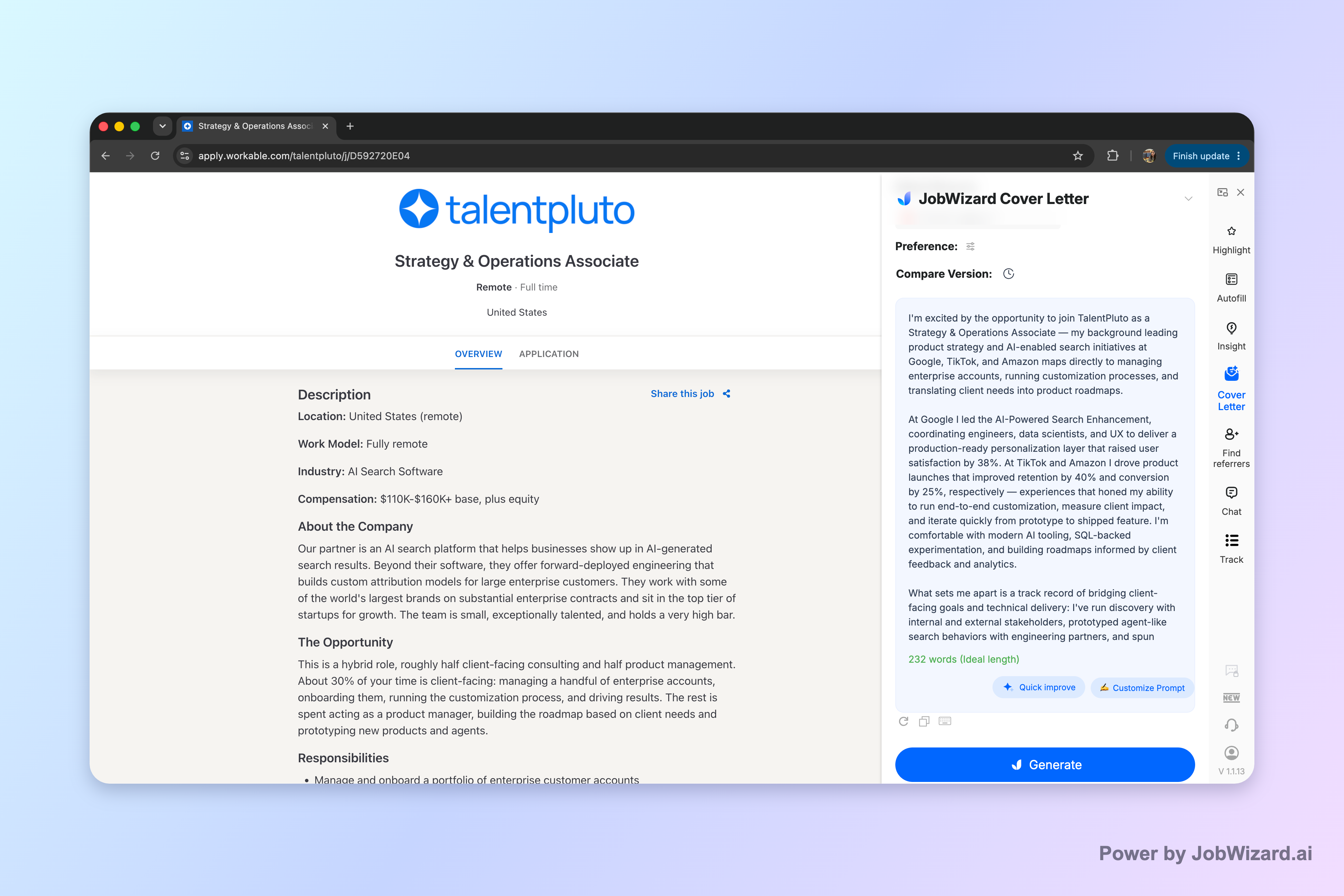
Here’s what to do so your cover letter reads confidently (not vaguely) and actually answers what hiring teams are screening for: transferable impact, role alignment, and believable motivation.
What makes an AI cover letter work for career changers (and what to avoid)
Do: translate your past into the job’s language
Hiring managers screen for fit, not just intent. When you’re switching lanes, your job is to connect three things clearly:
- Role outcomes: What will success look like in this position?
- Your proof: Which parts of your past work show you can deliver those outcomes?
- Your readiness: What have you done to prepare—projects, coursework, portfolio, training, or hands-on practice?
An AI-assisted draft can help you structure those connections. But you still need to replace any “general” lines with specifics you can stand behind.
Avoid: overpromising, hand-waving, and “template energy”
AI drafts can be excellent—but they can also drift into lines that feel like they came from a generator if you don’t tighten them. Keep an eye out for:
- Overconfident claims: “I’m an expert in X” when you’re not.
- Missing details: statements without the “where/when/how” that proves it.
- Keyword stuffing: repeating job terms without explaining your experience.
Reality check: AI can generate the first draft, but you must review facts and add genuine personal details before using it.
Target your tone: confident, specific, and grounded
Career changers often get stuck between two extremes: too cautious (“I hope I qualify”) or too salesy (“hire me, I’ll learn everything”). The better tone is credible confidence: you’re clear about why you’re changing, clear about what you already did, and clear about how you’ll apply it in the new role.
How to write an AI Cover Letter for Career Changers (step-by-step you can reuse)
Use this workflow for any industry switch—tech, data, design, operations, healthcare, education, and more. The goal is to produce a draft you can actually send.
Step 1: Start with the right inputs (resume + current job description)
For an AI Cover Letter for Career Changers, your best results come from matching the draft to the posting. Create (or select) the resume that best represents your target direction, then pair it with the specific job description you’re applying to.
In JobWizard, that means the cover letter draft is generated using the selected resume and the current job description. You can then choose length, format, tone, style, and focus before generating.
Step 2: Choose a focus that reflects your transition strategy
When you’re switching careers, “focus” is your headline story. Pick one of these angles and make sure your draft supports it:
- Transferable skills first: emphasize communication, analysis, project coordination, customer impact, process improvement, or leadership.
- Proof through projects: emphasize portfolio work, case studies, side projects, or lab/class assignments.
- Domain understanding: emphasize how you learned the space and what you understand about the role’s priorities.
Then edit the draft so the paragraphs repeat that focus in concrete language.
Step 3: Build a structure that hiring managers can skim
Most career-change letters fail because they’re long, abstract, or unorganized. Keep it skimmable. A reliable structure:
- Opening: 2–3 lines stating the role you want and the reason you’re switching.
- Body paragraph 1: Your most relevant transferable strength and the closest proof.
- Body paragraph 2: Your second proof (project, responsibility, or achievement) tied to role outcomes.
- Body paragraph 3: Why this company/team + how you’ll contribute in the first months.
- Closing: a confident ask and a final reminder of fit.
Step 4: Replace vague lines with “evidence sentences”
AI often gives you a helpful draft—but you should tighten it with evidence sentences. An evidence sentence usually follows a pattern like:
Action (what you did) + Context (who/what/constraints) + Result (what changed) + Relevance (how it maps to the job).
Example (career changer to a role requiring analysis):
- Vague: “I’m analytical and I love solving problems.”
- Evidence-based: “In my previous role, I reviewed weekly performance data to identify drivers of underperformance and recommended process changes to reduce delays—this maps directly to your team’s need for practical analysis and clear recommendations.”
Step 5: Edit before sending—especially facts and specifics
JobWizard’s approach is built around review-before-submit. After generating, you click into the draft and edit it directly. That’s where you:
- verify names, dates, and responsibilities are accurate
- swap placeholders for real details from your resume
- customize the closing to the company/team
This matters because an AI draft is a first draft, not a final truth. You stay in control of your story.
Career-change examples you can adapt (tech, data, and beyond)
Your letter needs to sound tailored. Below are reusable snippets showing how career changers can bridge their background without pretending they’ve always done the new job.
Example A: Switching to tech (transferable skills + readiness)
Opening you can adapt:
- “I’m applying for the [Target Role] position because I’m ready to bring my [transferable strength] to a team that values [role outcome from the posting]. After building hands-on experience through [project/training], I’m confident I can contribute quickly—and I’m excited to learn the specifics of your stack and workflow.”
Bridge paragraph formula:
- 1–2 sentences describing your previous domain + how you solved problems
- 1 sentence connecting that skill to a job requirement
- 1 sentence showing readiness (project, coursework, or practical work)
Where AI helps most: turning your resume bullets into clear paragraph form that matches the job description.
If you want a more specialized version for a tech pivot, see AI Cover Letter for Career Changers Switching to Tech.
Example B: Switching into data analyst work (proof-first, method-forward)
Bridge paragraph you can adapt:
- “In my previous work, I regularly translated messy inputs into decisions by [method you used—e.g., building summaries, creating dashboards, running comparisons]. What drew me to this role is the emphasis on turning analysis into action. I’m prepared for your environment because I’ve practiced [relevant task] through [project/coursework], and I’m comfortable working with stakeholders to clarify requirements before starting analysis.”
What to emphasize: your process (how you work) and your outputs (what you created).
If you’re targeting data analyst roles specifically, explore AI Cover Letter for Career Change to Data Analyst Jobs and AI Cover Letter for Career Change into Data Analyst Roles: Guide.
Example C: “Letter of interest” style when you’re not a perfect match yet
If the job title isn’t a perfect match, a letter of interest can still work if your story is precise. Instead of claiming you already do everything, frame the gap as a plan:
- “While my background is rooted in [past function], I’ve been strengthening my capability in [target area] through [project/training]. I’m applying now because your posting emphasizes [specific responsibility], which aligns with what I’ve done: [proof]. If selected, my immediate goal would be to ramp quickly on your workflows and deliver [first-month contribution].”
JobWizard tips to make your AI cover letter feel like you (not a draft)
To get the best outcome from an AI cover letter draft, treat it like a starting point—and keep your review tight. Here are practical ways to do that.
1) Customize tone and focus before you generate
Before generating, JobWizard lets you choose length, format, tone, style, and focus. Use that to match the role’s vibe:
- If the posting emphasizes collaboration, choose a tone that highlights teamwork and stakeholder communication.
- If it emphasizes independent execution, choose a tone that highlights ownership and clear deliverables.
This prevents the draft from sounding mismatched before you even edit.
2) Edit for “why you” in the third body paragraph
Your motivation should be specific. Replace generic lines like “I’m passionate about this field” with details such as:
- what you learned that changed your mind
- what you built (project, portfolio, coursework)
- what you want to contribute to this team
3) Verify facts and personalize custom questions
Even strong AI content must be verified. Confirm:
- company name and team references
- your responsibilities and timelines
- any technical or domain details you mention
Keep the story honest—your reviewer (and future teammates) will notice if something feels inflated.
4) Use AI to write the draft; you make the submission
JobWizard supports an autofill + review-before-submit workflow: it fills repetitive fields quickly while you review key parts like sponsorship, salary, EEO, and custom questions before submitting. That means you’re still steering the final content—and that’s the safest way to keep career-change stories accurate.
If you want the bigger picture on how AI can fit into your application process, start with the pillar: How to Write a Cover Letter with AI (Step-by-Step That Still Sounds Like You).
Do this automatically with JobWizard
Skip the manual work — JobWizard's AI Cover Letters handles this for you.
AI Cover Letter for Career Changers: FAQs
What should an AI Cover Letter for Career Changers focus on so it doesn’t sound generic?
It should focus on the specific job requirements and translate your past experience into credible proof. In practice, use AI to draft clear paragraphs, then replace any vague claims with concrete examples, metrics you can stand behind, and details from your resume and the job description.
Can I use an AI Cover Letter for Career Changers if I’m switching into tech or data roles?
Yes—use AI to generate an editable draft tailored to the job posting, but ensure you review and add genuine personal details. For tech/data switches, make the bridge explicit: map transferable skills (communication, problem-solving, stakeholder work) to the role’s day-to-day responsibilities and show relevant projects or coursework.
What’s the best cover letter format when you’re a career changer?
A standard cover letter format works best: a direct opening, 2–3 body paragraphs that connect your background to the role, and a concise closing. Before using the draft, choose the length, tone, and focus that fits the posting, then edit it so the story matches your real experience.
Should I let the AI “write everything,” or do I need to edit before sending?
You should always review before sending. AI can produce a strong first draft using your resume and the current job description, but you must verify facts and add real personal details so the letter remains accurate and authentically yours.
How do I keep my cover letter tone confident without sounding overpromised?
Use specific language and evidence, not hype. Keep claims tied to what you can demonstrate, and frame your change as a motivated, structured transition—then back it up with examples from your past work, projects, and any relevant training.
Ready to draft your best AI Cover Letter for Career Changers? Generate an editable first draft in JobWizard using your selected resume and the current job description, then review it and add your genuine details before you submit. That’s the fastest way to sound credible while your career story is still in transition.
Frequently Asked Questions
Generate this cover letter automatically
JobWizard drafts a tailored letter from your resume and the job description in seconds — free.