Medical Assistant Cover Letter That Gets Noticed: A Tone-Right Template + AI Draft Workflow
A medical assistant cover letter should read like a confident, caring clinician—without sounding generic. Use this tone-right template and an AI-assisted draft workflow to match the job description.
Free Chrome extension
Generate this cover letter automatically
JobWizard drafts a tailored letter from your resume and the job description in seconds — free.
Write a medical assistant cover letter that sounds like you, but is targeted to the job. Hiring managers skim fast—so your best chance is a letter with the right tone, clear alignment to the clinic’s needs, and concrete examples (not buzzwords). This guide shows you exactly what to include, plus a JobWizard workflow to generate an editable first draft from your resume and the current job description.
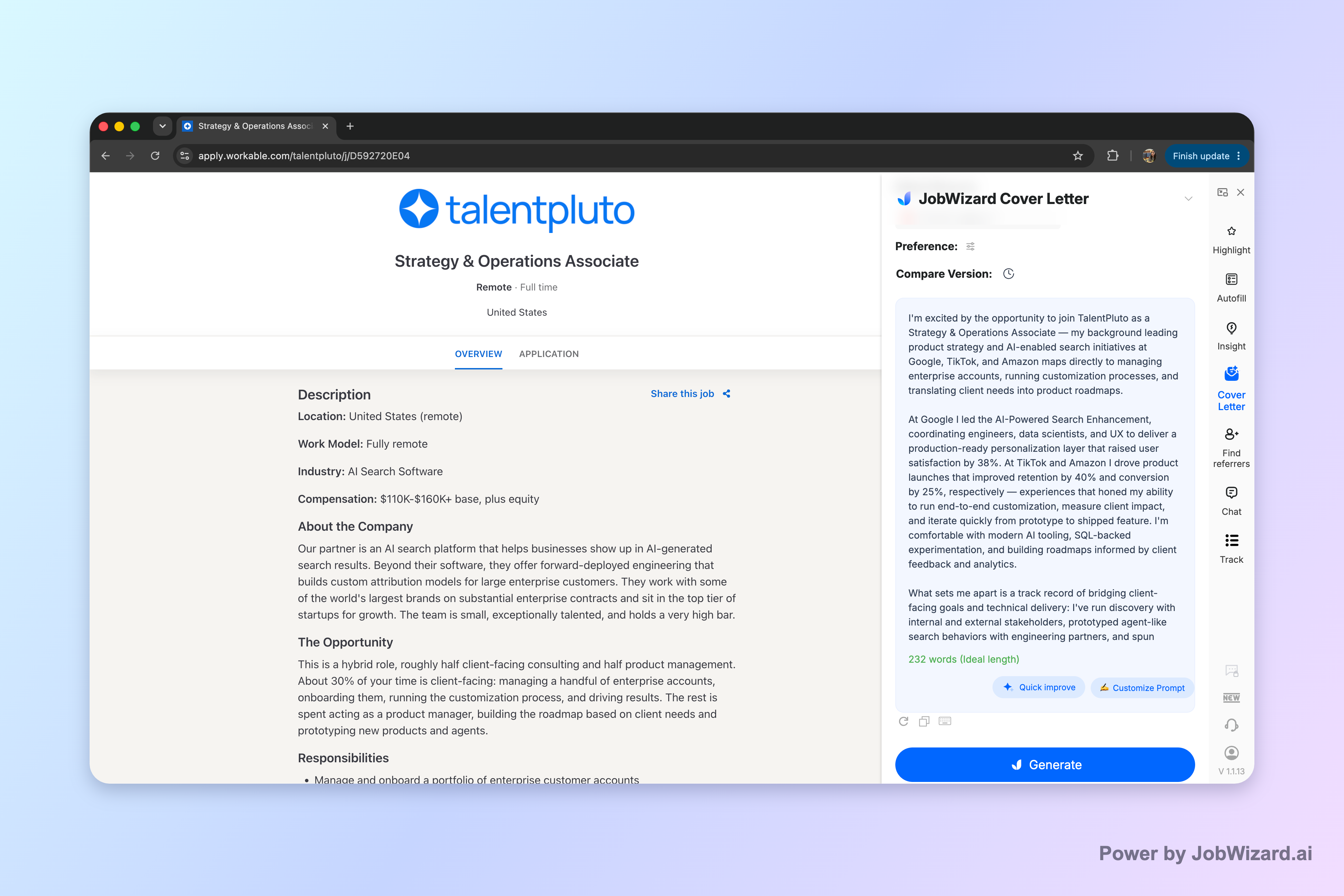
Start with an editable first draft, then make it truly yours. JobWizard creates an editable cover letter draft using the selected resume and the job description on the page.
What a Hiring Manager Expects in a Medical Assistant Cover Letter
Your medical assistant cover letter should prove fit in one page—care skills plus day-to-day reliability. Most recruiters want to quickly see how you support patients and clinicians, and whether you can handle the front-office and clinical basics that keep the practice running smoothly.
In a medical assistant application, your letter typically needs to balance two areas: patient-facing care and practice operations. That means you should connect your experience to both how you interact with patients and how you help the care team move efficiently.
- Patient intake & rooming: greeting, rooming, vitals, documenting, and preparing patients for the clinician.
- Administrative flow: scheduling, check-in/out, managing paperwork, and coordinating next steps.
- Clinical support: assisting with procedures as appropriate, collecting specimens, and following standard workflows.
- Documentation & systems: EHR-related tasks and maintaining accurate records.
Most importantly, avoid generic language like “hard-working” or “team player” unless you back it up with a specific example tied to what the posting emphasizes.
Use This Medical Assistant Cover Letter Template (With Fill-In Prompts)
Follow a proven cover letter format and customize the content to the role. The template below is designed for medical assistant openings—so it stays readable and gives you space to show relevant strengths.
Before you write, skim the job description for repeated themes (fast-paced workflow, patient communication, charting accuracy, schedule coordination). Then plug those priorities into the prompts so your letter is targeted without becoming stiff.
Template: 3-Paragraph Structure
Paragraph 1 (hook + role match): Introduce yourself and link your background to the practice’s needs.
Dear Hiring Manager, I’m excited to apply for the Medical Assistant position at [Clinic/Practice Name]. With experience in [front office/clinical support/patient intake] and a patient-centered approach to care, I’m drawn to your team because [reference a detail from the job description]. In this role, I’m especially prepared to support [top 1–2 duties mentioned].
Paragraph 2 (proof + examples): Share 2–3 accomplishments tied to the job’s responsibilities.
In my previous roles, I’ve supported day-to-day clinic operations by handling [scheduling/check-in/intake], taking and documenting [vitals/room prep], and maintaining organized workflows that help clinicians stay focused on patient care. For example, [example of handling intake, coordinating visits, or improving accuracy]. I’m comfortable collaborating across the care team and communicating clearly with patients and families, especially when explaining next steps and ensuring paperwork and instructions are complete.
Paragraph 3 (fit + close): Reinforce why you’re a great match and invite next steps.
I would welcome the opportunity to discuss how my experience in [relevant duties] and commitment to accurate documentation can support your patients and providers. Thank you for your time and consideration—I'd be glad to interview at your convenience. Sincerely, [Your Name]
Fill-in Prompts to Make It Specific (Without Sounding Like a Robot)
- [Clinic/Practice Name]: Use the actual name (or the department) from the posting.
- [Top duties]: Choose the duties they mention most (rooming, vitals, scheduling, EHR tasks).
- [Your example]: Pick one moment you can explain clearly: what you did, what improved, and what you learned.
- [Patient communication detail]: Add how you handle questions, instructions, or calm transitions between steps.
If you’re unsure what to write, you can draft quickly with AI—just be sure to adjust wording and facts so it accurately reflects your experience.
How to Draft Faster with JobWizard (Edit Before You Submit)
You can reduce the blank-page problem by generating an editable cover letter draft—then review it line by line. JobWizard uses your selected resume and the current job description to generate an editable cover letter draft.
Instead of relying on a one-size-fits-all template, you can choose length, format, tone, style, and focus before generating the draft. Then you click into the draft and edit it directly.
Important: JobWizard helps you draft faster, but you must review facts and add genuine personal details before using the draft.
Workflow: From Job Posting to a Final, Personal Letter
- Select your resume: Choose the resume that best matches this specific medical assistant role.
- Use the current job description: Make sure the letter is grounded in the exact duties and priorities they list.
- Choose your tone and focus: Aim for professional, patient-centered, and confident—then generate your first draft.
- Edit directly in the draft: Replace placeholders with your real examples, tools, and details.
- Review before submit: Confirm accuracy for patient-related duties, documentation, and any job-specific questions.
This approach supports speed and consistency while still keeping the letter honest. You’re not outsourcing your credibility—you’re accelerating drafting, then finishing the job yourself.
What to Change During Your Review (Checklist)
- Facts: Verify names, tools/systems, dates, and the responsibilities you actually performed.
- Personal details: Add why you want this clinic and what you’ll bring to their day-to-day.
- Patient-care examples: Replace generic phrases with one specific scenario you can explain.
- Job-specific questions: Answer sponsorship, salary, EEO, and custom questions with your genuine responses.
If you want more context on how cover letters fit alongside other application documents, see CV vs Cover Letter: What Recruiters Expect—and How to Use Both.
Medical assistant cover letter Dos and Don’ts (That Hiring Managers Notice)
Small wording choices can make your medical assistant cover letter feel credible or generic. Use the list below to stay on the right side of what employers look for in healthcare settings.
Do
- Be specific about tasks: rooming, intake, vitals, scheduling, charting support, and patient instructions.
- Show communication skill: describe how you help patients understand next steps and feel comfortable.
- Keep your examples explainable: “I did X by Y” is better than “I’m great at everything.”
- Use a calm, professional tone: healthcare hiring teams read for reliability and clarity.
Don’t
- Don’t overclaim: if a duty isn’t part of your actual background, don’t imply you performed it.
- Don’t ignore the job description: your letter should reflect the duties they listed most prominently.
- Don’t bury the point: your first paragraph should tell them why you’re a match.
If you’re comparing formats or writing style across industries, you may also find these checklists useful for tone control: Engineering Cover Letter That Gets Read: a Draft + Editing Checklist for Real Proof and Teacher Cover Letter That Gets Read: Use This AI-Helped Draft + Tone Checklist.
Do this automatically with JobWizard
Skip the manual work — JobWizard's AI Cover Letters handles this for you.
FAQ: Medical assistant cover letter Questions (Answered)
Get quick, practical answers to the questions that hold people back from sending a strong medical assistant cover letter.
What should I include in a medical assistant cover letter?
Include (1) a strong first paragraph that links you to the clinic or practice and the role’s needs, (2) 2–3 achievement-focused examples (front desk, patient intake, vitals, scheduling, EHR tasks), (3) your clinical and administrative strengths, and (4) a clear closing that invites an interview. Keep sponsorship, salary, EEO, and any job-specific custom questions to what you can genuinely stand behind—then review the draft before you submit.
How do I match my medical assistant cover letter to the job description without sounding generic?
Mirror the job posting’s priorities with specific proof: the exact duties (like scheduling, patient intake, lab coordination, rooming), the tools or systems named in the posting, and the patient-care mindset they emphasize. A helpful workflow is to generate an editable first draft from your selected resume and the current job description, then edit it so it reflects your real experience, facts, and any personal details before you use it.
Should I use AI to write my medical assistant cover letter?
AI can help you draft a strong, professional cover letter format and tone faster, but it should not replace your review. With JobWizard, you generate an editable cover letter draft using your selected resume and the current job description, then you click into the draft and edit it directly. You must review facts and add genuine personal details before using the draft.
What medical assistant cover letter tone works best for hiring managers?
Use a professional, patient-centered, and confident tone: clear about your strengths, calm in how you describe patient interactions, and specific about how you support the care team. Avoid exaggeration or claims you can’t verify. If you’re using an AI-assisted draft, choose the tone and focus before generating, then refine the wording so it sounds like you.
How long should a medical assistant cover letter be?
Aim for a concise, recruiter-friendly length that covers the most relevant highlights—typically about half a page to one page. The key is readability: make the first paragraph specific to the role, include only the strongest examples, and end with a direct call to action. If your draft feels too long, tighten it during your review before you submit.
Ready to draft a stronger medical assistant cover letter faster? Generate an editable first draft for your current job description in JobWizard, then edit it directly to add your real examples and personal details before you apply.
Want a broader look at cover letter structure and wording choices? Start with How to Write a Cover Letter with AI (Step-by-Step That Still Sounds Like You.
Frequently Asked Questions
Generate this cover letter automatically
JobWizard drafts a tailored letter from your resume and the job description in seconds — free.