Cover Letter for Administrative Assistant: A Results-Oriented Template + AI Draft Workflow
Learn how to write a cover letter for administrative assistant roles that sounds like you—and get an editable first draft you can customize before you apply.
Free Chrome extension
Generate this cover letter automatically
JobWizard drafts a tailored letter from your resume and the job description in seconds — free.
Cover letter for administrative assistant: what a hiring manager expects in 30 seconds
A strong cover letter for administrative assistant roles should quickly prove you can keep things running—calendars, inboxes, documents, and people—while sounding like a real person, not a form. In practice, most hiring managers scan for: role fit, relevant experience, and a confident (but not cocky) close.
If you’re tempted to write a generic intro, don’t. Instead, start by naming the role and referencing 1–2 job requirements you genuinely match (for example: “calendar coordination,” “meeting support,” “confidential records,” or “customer communication”).
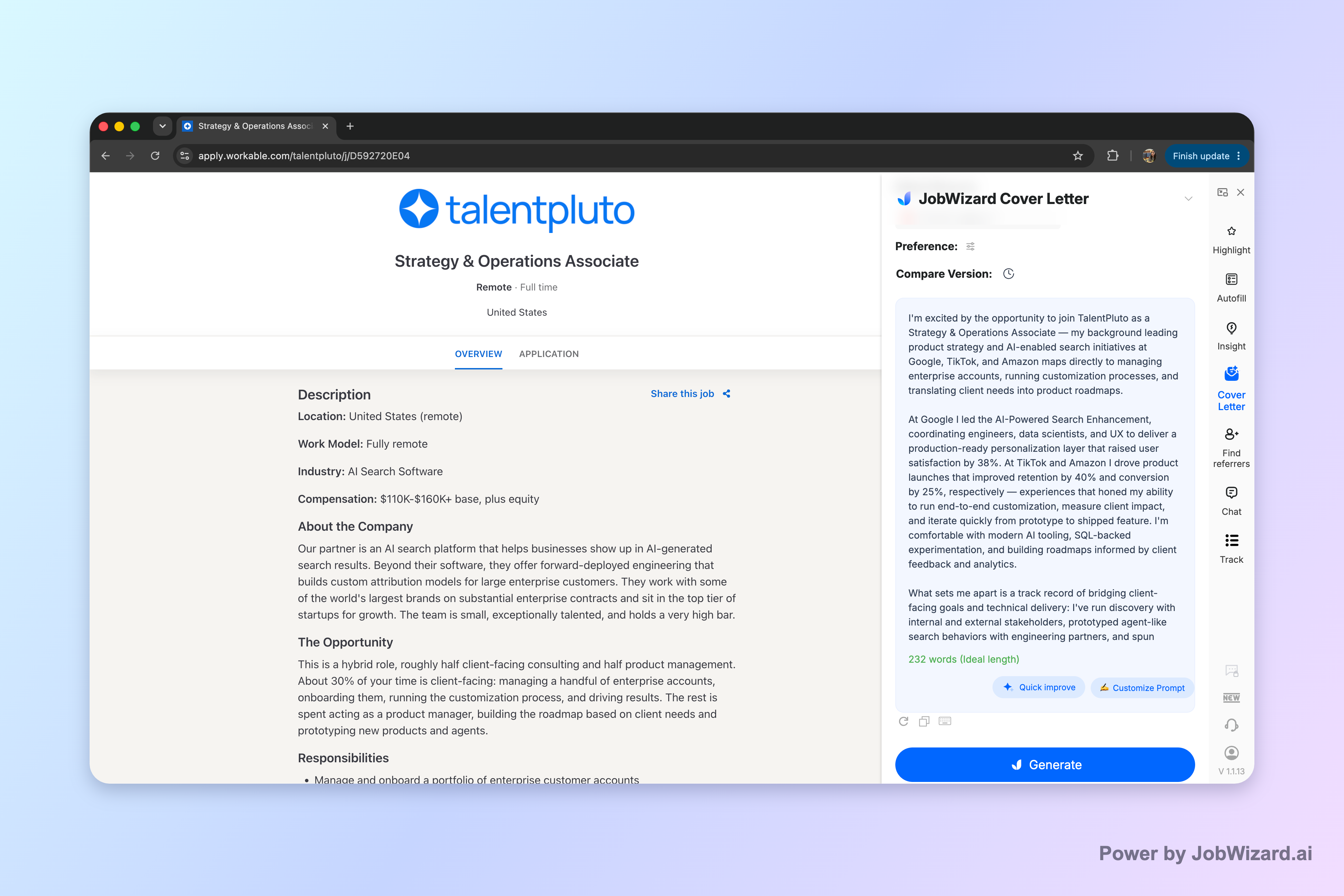
With JobWizard, you can generate an editable cover letter draft using your selected resume plus the job description, then adjust length, format, tone, style, and focus before you polish and submit. The draft is just a starting point—you’ll review facts and add genuine personal details to make it accurate and credible.
Use this administrative assistant cover letter structure (with plug-and-play examples)
This structure keeps your cover letter for administrative assistant clear, skimmable, and aligned with what office teams actually hire for: coordination, accuracy, and responsiveness.
Paragraph 1: Hook + role match (2–3 sentences)
Goal: tell them why you’re applying and show a quick fit. Include the role title, and one competence that matches the posting.
- Example opener: “I’m excited to apply for the Administrative Assistant position at [Company]. With a background supporting executives and cross-functional teams, I’m known for keeping calendars, meetings, and internal requests organized with minimal follow-up needed.”
Tip: If the job description mentions tools (Outlook, Google Workspace, Excel, Slack, ticketing systems, document management), you can name them here—only if you’ve truly used them.
Paragraph 2: Proof point #1 (the “how I work” paragraph)
Goal: show what you do day to day. Pick one theme: scheduling/meetings, customer communication, or document/process work.
- Scheduling/meeting support example: “In my recent role, I coordinated executive calendars, scheduled meetings across time zones, and prepared agendas and materials. I also handled last-minute changes by confirming availability, updating invitations, and notifying stakeholders so meetings stayed on track.”
- Customer/client communication example: “I manage incoming requests professionally and efficiently—responding to questions, routing urgent items to the right owner, and keeping the team updated with clear notes. This approach helps customers get answers faster and reduces back-and-forth.”
- Document/process example: “I’m meticulous with document control: naming conventions, versioning, and secure handling of sensitive files. I maintain accurate records so the team can retrieve information quickly when priorities shift.”
Paragraph 3: Proof point #2 + close (reliability + next step)
Goal: reinforce value and end with a friendly call to action. Add a second proof point tied to the job description, then close with availability.
- Second proof point example: “I also support administrative workflows like onboarding logistics, travel/expense coordination (when needed), and tracking requests through to completion. I prioritize accuracy, confidentiality, and clear communication—especially when multiple tasks compete for attention.”
- Close example: “I’d welcome the chance to discuss how my experience in scheduling, documentation, and day-to-day support can help your team. Thank you for your time and consideration.”
Quick checklist: what to match from the job posting
- Match the top 3 responsibilities in the posting with your proof points (don’t just list duties—show how you did them).
- Mirror key terms naturally (calendar coordination, meeting coordination, inbox triage, document management, confidentiality, follow-through).
- Keep it honest: if you didn’t do something, don’t claim it—use transferable experience instead.
Tailor your administrative assistant cover letter to common job posting scenarios
The fastest way to improve your cover letter for administrative assistant is to tailor it to the situation the employer is hiring for—what’s urgent, what’s missing, and what “great” looks like.
Scenario A: Executive/admin support (calendars + stakeholder coordination)
If the posting emphasizes executive calendars, meeting prep, or stakeholder communications, foreground coordination and discretion.
- Say: You scheduled meetings, prepared materials, and handled changes calmly.
- Show: You communicated updates clearly and minimized disruption.
- Focus on: Prioritization, confidentiality, and follow-through.
Scenario B: Customer-facing administrative role (front desk + communication)
If the posting mentions customer service, phone/email responsiveness, or routing requests, highlight professionalism and clarity.
- Say: You responded to inquiries, routed requests, and kept records organized.
- Show: You de-escalated issues and resolved simple requests quickly.
- Focus on: Service tone, accuracy, and process discipline.
Scenario C: Operations/admin support (systems + documentation + tracking)
If the posting mentions documentation, tracking, or process support, prove you can keep order in workflows.
- Say: You maintained documentation and ensured nothing fell through gaps.
- Show: You used consistent naming/versioning and careful review.
- Focus on: Reliability, attention to detail, and system-minded work.
Scenario D: “Confidentiality and compliance” emphasized
When the posting flags confidentiality, data handling, or controlled access, your cover letter should reflect care without overclaiming.
- Say: You handled sensitive information responsibly and followed internal processes.
- Show: You maintained accurate records and restricted access appropriately (as you were trained/required).
- Focus on: Trust, discretion, and consistency.
AI-assisted drafting: how to get a strong first draft (and still sound like you)
Using an AI cover letter draft can speed up the first version of your cover letter for administrative assistant—but the quality comes from editing it into your own voice and facts.
JobWizard workflow: draft from your resume + the posting
- Select your resume so the draft can reflect your actual background.
- Add the job description so the letter stays aligned with the employer’s needs.
- Choose the draft settings like length, format, tone, style, and focus.
- Edit directly in the draft to ensure wording, proof points, and specifics are correct.
- Review before submitting and add genuine personal details (including any tools, industries, or outcomes you can stand behind).
What to change after the draft (high-impact edits)
Even a great draft can miss nuance. Here are edits that almost always improve results for administrative roles:
- Replace “generic” lines with your real examples: One sentence each for scheduling, communication, and documentation (only if accurate).
- Tighten the opener: Name the role and the strongest match (for example: “calendar management,” “meeting coordination,” “inbox triage,” “confidential records”).
- Make the close specific: Mention a next step like a discussion, and confirm availability in a calm, confident way.
What not to do (common AI cover letter mistakes)
- Don’t skip fact-checking: verify company names, tools, dates, and any claims about responsibilities.
- Don’t “over-personalize” with made-up details: your letter should reflect what you’ve genuinely done.
- Don’t use the same tone for every job: match the posting’s emphasis (executive support vs. customer communication vs. documentation/process).
Where JobWizard fits (and what it doesn’t)
JobWizard generates an editable cover letter draft using your resume and the job description, and you can choose the draft’s length/format/tone/style/focus. It’s still your responsibility to review content, ensure it’s accurate, and add personal details before using it.
Administrative assistant cover letter mistakes that quietly reduce interviews
Even with strong experience, a cover letter for administrative assistant can underperform if it doesn’t read like practical evidence of day-to-day competence.
1) Repeating your resume instead of explaining your impact
Don’t turn your letter into bullet points. Use short examples that show process and follow-through: how you handled changes, reduced friction, or kept records clean.
2) Being vague about coordination and accuracy
Administrative roles are detail-heavy. Replace “I’m detail-oriented” with one sentence about what you actually did (document versioning, calendar confirmations, agenda prep, record keeping).
3) Using a generic “To Whom It May Concern” opener
If you can, address the role with specificity. At minimum, name the company and the position—then state why you’re a fit in one confident sentence.
4) Overloading with buzzwords
“Hard-working, team player, motivated” can feel like placeholders. Keep the tone professional and service-oriented, then let your examples do the convincing.
5) Ignoring the job posting’s priorities
Your letter should mirror what they’re hiring for: scheduling, customer communication, documentation control, confidentiality, or workflow tracking. If the posting emphasizes one area, give it more space in your proof points.
Do this automatically with JobWizard
Skip the manual work — JobWizard's AI Cover Letters handles this for you.
FAQ: Cover letter for administrative assistant
What should I include in a cover letter for an administrative assistant?
Include a brief opener (why this role), 1–2 proof points tied to office work (scheduling, customer service, document control, data entry, calendar management), and a closing that signals availability and interest—then mirror key phrases from the job description.
How long should a cover letter for an administrative assistant be?
Aim for about 3 short paragraphs (roughly 200–350 words). If the job posting asks for specifics (tools used, shift coverage, confidentiality), add a focused sentence or two rather than stretching the whole letter.
Should I use an AI cover letter draft for administrative assistant jobs?
Yes—use AI to generate an editable first draft, then make it truly yours. Review every detail for accuracy, add genuine personal details (metrics, industries, tools you’ve used), and tailor your examples to the job description.
What tone works best for an administrative assistant cover letter?
Professional, calm, and service-oriented. Show reliability and attention to detail without sounding stiff—use clear, concrete examples and avoid generic statements like “I am a hard worker.”
Can you provide a template outline for a cover letter for an administrative assistant?
Use: (1) a one-sentence opener naming the role and your fit, (2) two paragraphs of proof points tied to the posting (with one “how you did it” example), and (3) a close that confirms interest, availability, and a call to action like “I’d welcome the chance to discuss how I can support your team.”
Ready to draft yours faster? Generate an editable cover letter draft in JobWizard for your current job description—then review it and personalize the details so it sounds like you before you submit.
Want more examples to match different role styles? Read How to Write a Cover Letter with AI (Step-by-Step That Still Sounds Like You) for a full workflow, or use these role-specific tones: Medical Assistant Cover Letter That Gets Noticed: A Tone-Right Template + AI Draft Workflow, Engineering Cover Letter That Gets Read: a Draft + Editing Checklist for Real Proof, and Cover Letter for Teaching Position: A Confident Template That Sounds Like You (Plus AI Draft Steps).
Frequently Asked Questions
Generate this cover letter automatically
JobWizard drafts a tailored letter from your resume and the job description in seconds — free.