Receptionist Cover Letter That Gets Read: A Template + Workflow (With AI Draft)
Learn how to write a receptionist cover letter that matches the job posting, sounds like you, and gets attention fast. Includes a ready-to-edit template and an AI draft workflow.
Free Chrome extension
Generate this cover letter automatically
JobWizard drafts a tailored letter from your resume and the job description in seconds — free.
If you’re applying for a receptionist cover letter role, your goal is simple: make it easy for a hiring manager to trust you with the front desk—before they ever meet you. The fastest way to do that is to tailor your greeting, spotlight the exact skills the posting needs, and keep your tone polished and service-first.
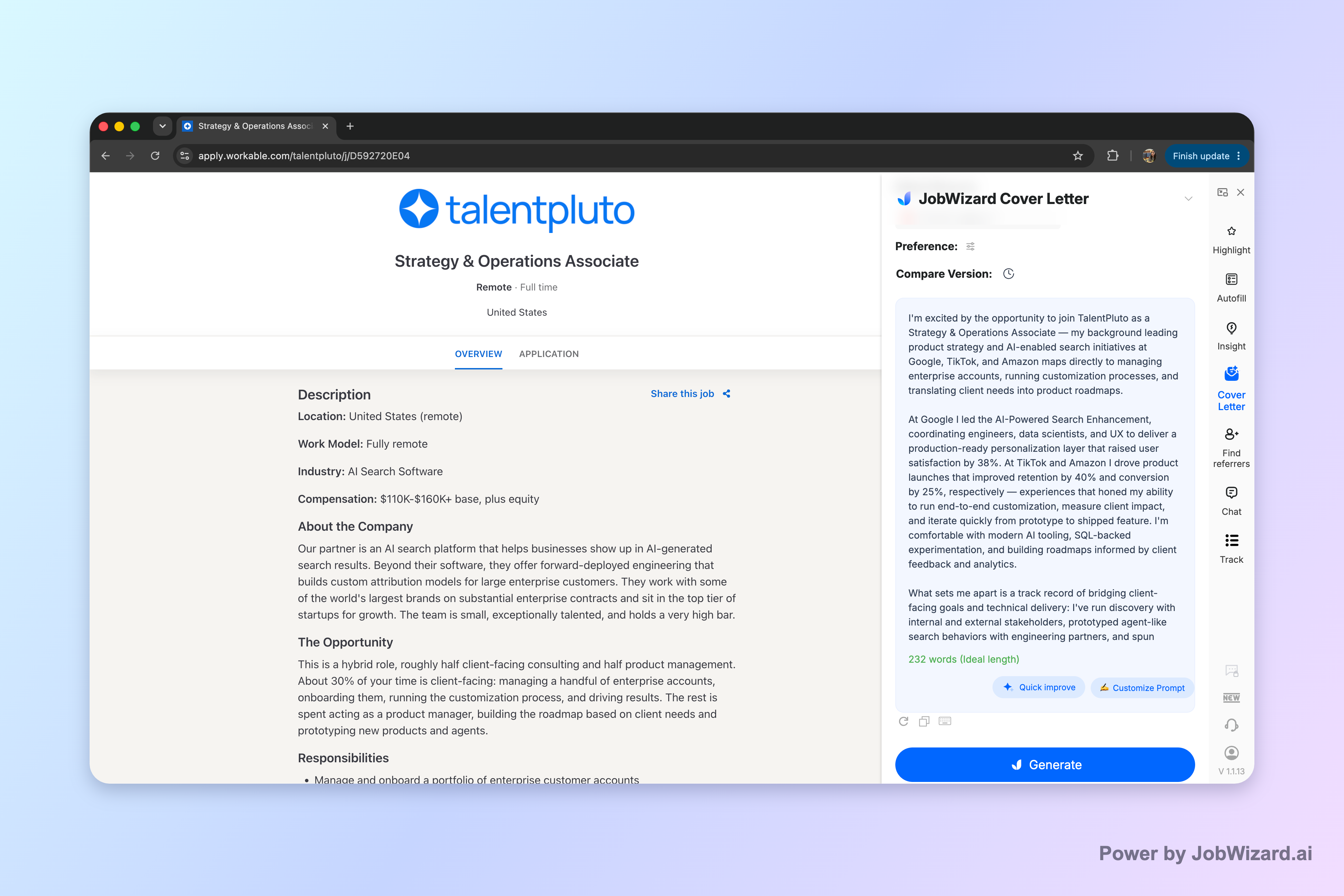
With JobWizard, you can generate an editable first draft for the current job description using your selected resume—then you review it and make it truly yours (not blind auto-submit). You can choose the length, format, tone, and focus, then click into the draft and edit directly.
What makes a receptionist cover letter “hireable”?
A receptionist cover letter works when it proves you can handle people, pace, and professionalism—at the same time. Think of it as your front desk “walk-up”: clear, calm, and specific.
To do that, aim for these elements in your structure:
- Targeted opening: name the role and company, and connect your experience to what they need.
- Front-desk proof: highlight the skills they ask for (or that are implied) like greeting visitors, phones, scheduling, and accurate records.
- One concrete example: show how you handled a real-day challenge (peak walk-ins, a difficult caller, appointment changes, or documentation basics).
- Service-focused closing: invite an interview and express enthusiasm without sounding generic.
If you’re unsure what counts as “specific,” use this quick test: if a hiring manager read only your second paragraph, would they know what you actually do day-to-day? If not, add one short, concrete detail.
Receptionist cover letter template (copy, then tailor)
Use this template as a direct, ATS-friendly receptionist cover letter draft you can edit in minutes—then personalize it to the job posting.
Template (edit the bracketed parts):
Subject (optional): Application for Receptionist — [Company Name]
Dear [Hiring Manager Name or “Hiring Team”],
I’m excited to apply for the Receptionist position at [Company Name]. With [X months/years] of front desk experience supporting visitors and teams, I’m known for being calm under pressure, welcoming in-person guests, and keeping appointments and calls organized.
In my recent role as a [Current/Most Relevant Title] at [Company], I handled [phone + scheduling + check-in tasks] while maintaining professional communication and accurate records. Highlights include:
- Greeted and checked in visitors, confirmed details, and routed questions to the right person quickly.
- Managed phone calls and appointment requests, updating schedules and documentation according to procedure.
- Supported confidentiality by following processes for sensitive information and keeping internal records accurate.
One example that reflects my approach: during [brief situation—e.g., “busy mornings with walk-in volume” or “a high volume week of appointment changes”], I [what you did] to keep the front desk running smoothly—so guests felt taken care of and the team stayed on track.
I’d welcome the chance to discuss how my front-desk experience and customer-first mindset can support [Company Name]. Thank you for your time and consideration.
Sincerely, [Your Name] [Phone] | [Email]
Quick tailoring checklist:
- Match the top duties: reorder your bullets to mirror the job posting.
- Use their words (sparingly): if they say “scheduling” or “visitor management,” mirror that phrase once or twice.
- Swap in your real example: replace the bracketed scenario with something you’ve actually done.
- Adjust tone: a healthcare receptionist reads differently than a corporate office receptionist—keep it appropriate.
Want role-specific variants? Start with healthcare-focused phrasing in Cover Letter Examples Healthcare: Templates & a Workflow to Make Them Sound Like You, or browse student-friendly receptionist scenarios at Cover Letter Examples for Students: Templates That Sound Like You (Plus Real Student Scenarios).
How to write a receptionist cover letter that matches the job posting
The secret to standing out isn’t longer writing—it’s alignment. Your receptionist cover letter should echo what the employer is solving for at the front desk.
Start by pulling the job posting into four “receptionist signals.” Then write one sentence per signal in your draft:
- People: How you welcome visitors, communicate clearly, and represent the organization.
- Operations: Scheduling, phone routing, check-in/check-out, and documentation basics.
- Quality: Accuracy, professionalism, and following procedures (especially around records).
- Pace: Your approach to busy periods and prioritizing tasks without getting flustered.
Here’s a practical example you can reuse (swap in your details):
- If they mention scheduling: “I manage appointment requests by confirming availability, updating schedules accurately, and coordinating changes quickly.”
- If they mention phones/customer service: “I answer calls professionally, ask clarifying questions, and route requests so callers get timely help.”
- If they mention confidentiality: “I follow processes for sensitive information and keep records accurate and appropriately handled.”
Next, check your opening and closing. Many receptionist cover letters sound good—but don’t “fit.” To fix that, make sure your first paragraph says what makes you relevant to that specific workplace, and your closing references an interview conversation (not just “please consider my application”).
If you want to confirm what to include and why, review What Is a Cover Letter for Employment? Purpose, Format, and What to Write—it helps you keep the content focused on relevance rather than biography.
Using JobWizard to draft (and still sound like you)
You can save time without sacrificing authenticity by using an AI-generated draft as a structured starting point—then editing it with real details.
JobWizard creates an editable cover letter draft using the selected resume and the current job description. Before generating, you can choose length, format, tone, and focus. After that, you can click into the draft and edit it directly.
Workflow (fast and safe):
- Pick the resume that matches: use the most receptionist-relevant resume you have.
- Paste the current job description: so the draft aligns with their priorities.
- Select the right tone: corporate, healthcare, nonprofit, or hospitality—choose what fits the environment.
- Generate a first draft: use JobWizard’s editable output as your foundation.
- Review before use: verify facts and add genuine personal details (your real experience, availability, and any specifics you can stand behind).
- Polish the “you” parts: adjust wording so it sounds like your natural style and includes your real example.
Important limitation to remember: don’t rely on the draft as-is. You must review the content and add your genuine personal details before using it. That’s how you avoid generic phrasing and ensure your receptionist cover letter reflects your real background.
If you want to go beyond receptionist specifics and learn a repeatable writing method, use How to Write a Cover Letter with AI (Step-by-Step That Still Sounds Like You to keep your drafts aligned with the posting while staying authentic.
Receptionist cover letter examples you can adapt (by situation)
Below are short, adaptable mini-examples for common receptionist cover letter situations—use them to replace the “one concrete example” paragraph in your draft.
Example 1: Busy front desk / walk-in volume
During busy mornings with walk-in volume, I kept the check-in flow moving by confirming required details, giving clear next steps, and routing questions efficiently. I stayed calm and friendly while prioritizing what needed immediate attention so guests didn’t feel ignored.
Example 2: Scheduling changes / phone volume
When callers needed to reschedule or had appointment questions, I handled requests professionally by asking quick clarifying questions, updating the schedule accurately, and communicating changes clearly. This helped reduce confusion and kept the team informed.
Example 3: Confidentiality and accurate records
I’ve supported confidentiality by following established procedures for handling sensitive information and maintaining accurate records. Whether it was verifying details during check-in or documenting requests, I focused on precision and professionalism.
Example 4: Cross-team support
I work effectively with different team members at the front line—coordinating routing, clarifying needs, and keeping the desk organized. When priorities shift, I communicate what’s needed and maintain a welcoming experience for visitors.
Tip for your bullets: choose 2–4 bullets that match the posting and remove the rest. A receptionist cover letter should be scannable—your goal is clarity, not showing everything you’ve ever done.
Do this automatically with JobWizard
Skip the manual work — JobWizard's AI Cover Letters handles this for you.
FAQ about receptionist cover letters
What should a receptionist cover letter include?
A strong receptionist cover letter typically includes: (1) a tailored opening that names the role and company, (2) 2–3 specific strengths tied to front desk work (greeting visitors, scheduling, phones, CRM/records, professionalism), (3) a brief example of handling a real-day challenge, and (4) a closing that invites an interview and thanks the reader. Keep your tone confident and service-focused, and match the job’s keywords without copying.
Can I use an AI-generated receptionist cover letter draft?
Yes—an AI draft can be a fast starting point. JobWizard generates an editable cover letter draft using your selected resume and the current job description, with options for length, format, tone, and focus. Before you use it, review the facts and add genuine personal details (and any specifics like your experience, availability, or metrics you truly have).
How do I tailor a receptionist cover letter if the job posting is short?
If the posting is brief, tailor by translating the requirements into receptionist work you’ve done. For example: if they mention “scheduling,” reference your experience with calendars or appointment booking; if they mention “customer service,” describe how you de-escalated issues or handled walk-ins; if they mention “confidentiality,” connect it to handling patient/client data, internal records, or visitor check-in processes. Mirror the job’s language in your own words.
Should I mention skills like scheduling, phone calls, and confidentiality?
Yes, but connect them to outcomes you can back up. Mention scheduling and phone handling in the context of what you supported (appointments, routing calls, updating records, managing queues). For confidentiality, emphasize professionalism and accuracy—how you followed procedures for sensitive information. Avoid vague claims; include one concrete example when possible.
What’s a good receptionist cover letter closing line?
A good closing thanks the hiring manager, reiterates interest, and makes it easy to take the next step. For example: “I’d welcome the opportunity to discuss how my front-desk experience and customer-first approach can support your team. Thank you for your time and consideration—I look forward to hearing from you.” Then sign with your name and include a phone/email line consistent with your resume.
Ready to write a receptionist cover letter that sounds like you? Generate a draft for the current job description in JobWizard, then edit it directly—keeping the facts accurate and adding your genuine personal details before you submit.
Frequently Asked Questions
Generate this cover letter automatically
JobWizard drafts a tailored letter from your resume and the job description in seconds — free.