CV vs Cover Letter: What Recruiters Expect—and How to Use Both
Confused about CV vs cover letter? This guide breaks down what each document does, when to use a CV vs a cover letter, and how to draft a cover letter that still sounds like you.
Free Chrome extension
Generate this cover letter automatically
JobWizard drafts a tailored letter from your resume and the job description in seconds — free.
You’re staring at two uploads: one labeled CV (or resume) and one labeled “cover letter,” and the job posting doesn’t clearly say what they prefer. Meanwhile, you’ve already tailored your bullets—but you’re not sure whether a cover letter will add real value or just create more work.
This guide answers cv vs cover letter with recruiter-minded clarity: what each document does, when to use which, and how to create a cover letter draft you can edit to match the exact job description.
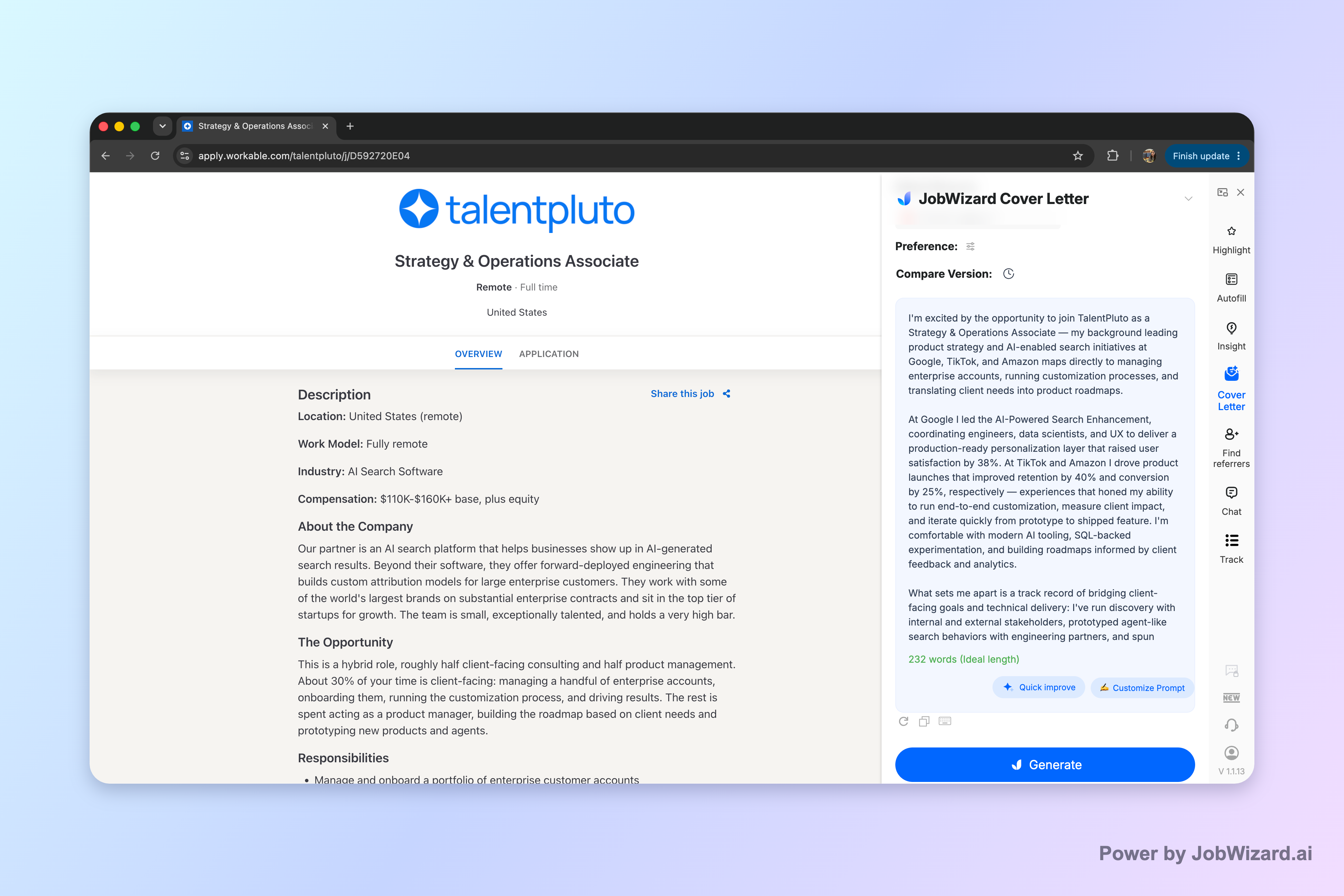
Key idea: A strong cover letter draft can be generated from the resume and the current job description, and then edited directly by you before you submit.
What’s the difference between a CV and a cover letter?
CV vs cover letter comes down to purpose: one documents your background, the other explains fit.A CV (often more detailed) or a resume (usually shorter and role-targeted) summarizes your experience, skills, education, and achievements. A cover letter is a narrative that connects your background to the specific role: why you want it, what makes you a fit, and how you’ll contribute.
Recruiters typically scan the CV/resume to verify qualifications quickly. Then, if a cover letter is included, they use it to understand your communication style and to look for clear, role-specific reasoning that may not appear in bullet form.
Key takeaway: Treat your CV/resume as proof of experience and your cover letter as your “why this role, why you” explanation.
When a job posting says “CV,” should you submit a CV or a resume?
Follow the posting’s wording—“CV” generally means they want that specific document format.In US job searches, many employers use “resume” by default, but some explicitly request “CV.” If the posting says “CV,” aim to submit a CV rather than a resume substitute—especially if they provide instructions or formatting expectations.
If you only have a resume and need to convert, focus on expanding the appropriate sections (for example, more detail where relevant) while still keeping content accurate and readable. If the employer is vague, prioritize what they ask for and what the application fields allow.
- Posting says CV: submit a CV that matches their request
- Posting says resume: submit a resume (targeted summary)
- Posting is unclear: follow the upload label and submission instructions first
Key takeaway: Don’t guess—match the document type the application explicitly requests.
Do you need a cover letter if you already submitted your CV/resume?
A cover letter is often expected when an application provides the option—or when you want to clarify fit fast.If the employer asks for a cover letter (or if the application makes it easy to include one), consider adding it. Even when recruiters don’t read every cover letter in full, they may use it to quickly confirm motivation, communication tone, and role alignment.
If you’re worried about extra work, make it efficient: write a cover letter that references the job description directly and highlights a few targeted points from your CV/resume. Keep it truthful, specific, and concise.
Key takeaway: A cover letter can add context that bullets can’t—use it when the posting allows or requests it.
What should a cover letter include (cover letter format and tone)?
A strong cover letter format is simple: clear opening, targeted proof, and a confident close.Use a consistent structure so recruiters can skim. Your cover letter should sound like you, not like a generic template. Keep the tone professional and tailored to the role.
In particular, include:
- Opening: the role you’re applying for and why it matters to you
- Fit points: 2–3 specific reasons you match the job (skills, experience, outcomes)
- Connection to the CV/resume: briefly reference the most relevant parts of your background
- Close: a call to action and thanks, aligned to the hiring process
Key takeaway: Cover letter format should be skimmable and anchored to the job description.
How do you tailor a CV vs tailor a cover letter for the same job?
Tailoring a CV/resume proves you qualify, while tailoring a cover letter helps you explain how you’ll apply those qualifications.For your CV/resume, tailor the “evidence”: the skills and experiences you highlight, the order of sections, and the wording that mirrors the job description’s requirements. This helps recruiters see your relevance quickly.
For your cover letter, tailor the “story”: choose a few of the job’s key themes (tools, responsibilities, outcomes, or challenges) and connect them to your lived experience. If something isn’t true, don’t force it—edit your narrative around what you can genuinely support.
| Document | What it’s doing | What to tailor | Recommended action before submitting |
|---|---|---|---|
| CV (or resume) | Demonstrates qualifications | Experience order, relevant skills, role-matching bullets | Verify each revised bullet is accurate and still fits your actual history |
| Cover letter | Explains fit and motivation | Job-specific themes, targeted proof, a role-aligned closing | Review and add genuine personal details; don’t rely on “generic personalization” |
| AI-assisted draft (cover letter) | Speeds up first version | Length, format, tone, style, focus—then edit | Read line-by-line and replace any facts that aren’t precisely yours |
| AI-assisted revision (resume) | Highlights expression gaps | Ways your resume may under-express job requirements | Verify every suggested change; keep only accurate experience |
Key takeaway: Don’t treat cv vs cover letter as redundant—tailor both, but for different reasons.
Can you use AI to write a cover letter (cv vs cover letter workflow)?
Yes—use AI to generate an editable cover letter draft, then make it accurate and personal.With JobWizard’s cover letter workflow, you generate an editable draft using your selected resume and the current job description. Before generating, you can choose length, format, tone, style, and focus so the draft matches the role and your preferences.
After it’s generated, you can click into the draft and edit it directly. The most important limitation: the user must review facts and add genuine personal details before using the draft—don’t assume the draft is fully “done” for your specific background.
Key takeaway: Think of AI as a first-draft assistant, not a substitute for your real experience.
What follow-up email should you send after applying (cover letter included or not)?
A good follow-up is brief, polite, and references the role and one concrete theme from your application.If you included a cover letter, don’t repeat it line-for-line. Instead, reference the role and the core fit point you emphasized (the same theme your CV/resume supports).
Copy-paste follow-up email: Subject: Follow-up on [Role Title] Application Hi [Hiring Manager Name], I wanted to follow up on my application for the [Role Title] position. I’m especially excited about [specific job theme], and my experience with [relevant skill/experience] aligns closely with what you’re looking for. If there’s anything else I can provide to support my candidacy, I’d be happy to. Thanks for your time and consideration. Best regards, [Your Name]
- Keep it short: recruiters are busy; focus on one relevant theme
- Match what you proved: tie the email to your CV/resume evidence
- Ask about next steps: a simple “anything else needed?” works well
Key takeaway: Your follow-up should reinforce fit—not re-summarize your documents.
How does match score help when you’re deciding cv vs cover letter emphasis?
Match score helps you decide what to fix first: your resume’s expression gaps vs your cover letter’s narrative.JobWizard’s Insight compares your selected resume with the current job description and presents a match score, an overall assessment, and improvement suggestions. It’s built to identify resume expression gaps and turn them into an editable resume revision draft.
Important limitation: the score is not a hiring probability and does not guarantee ATS passage or an interview. You still have to verify every suggested resume change and keep only accurate experience.

Practical use: If your match score indicates expression gaps, you likely need to refine your CV/resume content before you spend extra time polishing a cover letter that’s explaining qualifications you didn’t clearly present.
Key takeaway: Use match score to diagnose resume fit first, then use your cover letter to explain and reinforce the story.
How do Workday, Greenhouse, Ashby, and Lever applications affect cv vs cover letter strategy?
ATS and application platforms mainly affect what you can submit and what fields you fill—not whether your documents should be tailored.In practice, many employers use structured application flows. The fields you see may capture basic details and custom questions, while documents (like a CV/resume and cover letter) provide deeper context.
JobWizard autofills repetitive fields plus you still review before you submit—so the bottleneck shifts from data entry to writing accuracy and fit. From JobWizard’s verified usage: ~65% of applications are on Workday, ~19% on Greenhouse, ~12% on Ashby, and ~4% on Lever. Workday is where it saves the most time.
Key takeaway: Your tailoring still matters most; platform differences mainly change the submission experience.
What does “Cv vs cover letter” mean for ATS and recruiter scanning?
ATS and recruiters scan differently—aim for clarity for humans and structured relevance for systems.For ATS, the most reliable strategy is to align your resume/CV content with the job description’s skills and responsibilities. For recruiters, the cover letter helps them interpret your intent and communication style, and it should reinforce the strongest evidence from your CV/resume.
If you’re choosing where to focus first, start with your CV/resume fit. Then use the cover letter to provide the missing context: why your background is relevant and how you’d approach the role.
- ATS-focused: align resume/CV wording and evidence to the job description
- Human-focused: write a cover letter that’s specific, truthful, and easy to skim
- Verification: review every AI suggestion so facts stay accurate
Key takeaway: Use cv vs cover letter as a division of labor: evidence first, then explanation.
Do this automatically with JobWizard
Skip the manual work — JobWizard's AI Cover Letters handles this for you.
FAQ
Is a CV the same thing as a resume?
A CV and a resume are different formats in most US job searches: a CV is typically more detailed and academic, while a resume is usually a shorter, targeted summary for a specific role. If a job posting says “resume,” use a resume; if it says “CV,” follow that wording.
Do I need a cover letter if I’m uploading my CV/resume?
Often, yes—at least when the application asks for one or when you’re making a competitive, targeted application. A cover letter helps you explain fit (motivation, role-relevant stories, and how you match the job) beyond what a CV/resume headline and bullets can cover.
What should I write in a cover letter if I don’t have experience for the role?
Focus on transferable skills and proof of readiness: your strongest relevant projects, coursework, internships, volunteer work, or results from adjacent roles. Use an AI draft as a starting point, then review and add genuine personal details so it stays accurate.
How do I tailor a cover letter vs tailoring my CV/resume for ATS?
Tailoring your CV/resume is about aligning wording to the job description’s role requirements and skills. Tailoring your cover letter is about using that same job description to craft a specific narrative—why you’re a fit—while keeping the content accurate and personal.
Can I use AI to generate a cover letter, or does it need to be fully original?
You can use AI to generate an editable cover letter draft using your selected resume and the current job description. You still need to review facts and add genuine personal details before using it—don’t treat it as guaranteed personalization.
Should my cover letter be short or long?
Choose length, format, tone, and focus based on the application and role. If the job posting doesn’t specify, lean toward concise and specific: clear opening, a few targeted fit points, and a closing that matches the role—then adjust after you review for accuracy.
What’s the best follow-up message after applying (cv vs cover letter context)?
A good follow-up is brief, polite, and references the role you applied for. Mention a single relevant point from your CV/resume (or the theme of your cover letter) and ask about next steps—then keep it to a few sentences.
How can match score help me decide between “Cv vs cover letter” choices?
A match score helps you diagnose gaps between your resume and the job description and suggests improvements you can turn into an editable resume revision draft. It doesn’t predict hiring or guarantee ATS passage, so verify every change and keep only accurate experience.
Related reads: build your cover letter step-by-step
If you want more targeted drafts, use these guides to match your situation and keep your tone consistent with who you are:
- How to Write a Cover Letter with AI (Step-by-Step That Still Sounds Like You)
- AI Cover Letter for No Experience: A Realistic Draft You Can Edit Fast
- AI Cover Letter for Career Changers: How to Sound Credible While Switching Lanes
- AI Cover Letter for Product Manager Roles in SaaS Guide
Final key takeaway: Use cv vs cover letter as a strategy—CV/resume for evidence, cover letter for role-specific explanation, and AI to speed up drafts you still verify.
Ready to apply with confidence? Use JobWizard to generate an editable cover letter draft for the current job description (built from your selected resume), then review and tailor it with your genuine details before you submit.
Frequently Asked Questions
Generate this cover letter automatically
JobWizard drafts a tailored letter from your resume and the job description in seconds — free.