Resume vs Cover Letter: What to Send (and When) to Get Past ATS
Wondering resume vs cover letter? Learn what recruiters expect, how ATS reads your materials, and exactly when to send each one—plus templates you can reuse.
Free Chrome extension
Generate this cover letter automatically
JobWizard drafts a tailored letter from your resume and the job description in seconds — free.
I’m two days into job searching and I can’t tell whether I should attach a cover letter or keep it simple with my resume.
The posting says “resume required” but the application page also includes a “cover letter” field—and I’m worried about ATS keywords and sounding repetitive. Here’s how to decide resume vs cover letter quickly and submit with confidence.
When should I send a resume vs cover letter?
Send both when the employer asks for it or when you need to add context that your resume can’t fully explain.
Your resume is the proof document: titles, timelines, measurable work, and relevant skills. Your cover letter is the translator: it connects those proof points to the specific job description so a human recruiter can understand your fit fast.
Use this rule of thumb: if the job listing gives you an explicit instruction, follow it. If it’s silent, decide based on communication expectations and how “explainable” your background is.
Quick decision: If you can clearly explain “why this role” and “why you” in 6–10 sentences, a cover letter is usually worth sending.
What to send in common scenarios
- Resume only: The posting explicitly says “resume only” or there’s no way to submit a cover letter.
- Cover letter + resume: The posting requests it, or you’re applying to a role where writing and communication are core.
- Resume + short letter: If you have a minor gap, career pivot, or location change that you can explain succinctly.
Key takeaway: Choose based on the posting’s instruction first; then use a cover letter to add job-specific context that your resume can’t carry alone.
What’s the difference between a cover letter and a resume?
Think resume = evidence and cover letter = explanation.
If you’ve ever asked “resume vs cover letter—what’s actually different?”, here’s the practical distinction:
| Document | What it does | What recruiters look for | Recommended action |
|---|---|---|---|
| Resume | Summarizes your experience in a skimmable, structured format | Relevant roles, impact, skills, consistency across dates and responsibilities | Tailor bullet phrasing to match the job description—accurately |
| Cover letter | Connects your background to the specific role and employer needs | Why you, why this job, how your experience maps to their goals | Use the job posting language, but keep the tone human and specific |
| When both matter | Resume supports screening; cover letter supports interpretation | A clear “fit story” plus hard proof | Align: every claim in the letter should be supported in the resume |
If you want an even tighter “what to send and when” breakdown, start with Difference Between Cover Letter and Resume: What to Send (and When).
Key takeaway: The resume proves; the cover letter explains—send each one for the job’s required purpose.
When should I include a cover letter if the job posting doesn’t explicitly ask?
Include one when you can reduce ambiguity for the reader.
Some postings don’t say “cover letter required,” but they still accept one. In those cases, the cover letter can help when your resume alone leaves questions.
Consider sending a cover letter when any of these are true:
- You’re pivoting: your prior work isn’t the obvious match, so you need to frame the transition.
- The role is communication-heavy: roles like customer success, education, marketing, product storytelling, or leadership often benefit from written voice.
- You have a “fit gap”: maybe you don’t have the exact years, but you do have transferable outcomes.
- Location or timing changed: explain eligibility, availability, or relocation briefly.
If you’re in a communication-focused field, use a targeted draft like Teacher Cover Letter That Gets Read: Use This AI-Helped Draft + Tone Checklist as a model for tone and structure.
Key takeaway: Use a cover letter to clarify your fit when the resume can’t do it by itself.
When should I skip the cover letter and just submit a resume?
Skip it when instructions or constraints make it unnecessary.
There are times when adding a cover letter won’t improve your application—and can waste your time. Skip it if:
- The application requires resume-only: follow the employer’s instruction.
- It’s a low-signal listing with no role context: without a job description, writing a “why this job” letter becomes guesswork.
- You can’t tailor: if you can’t connect your experience to the job description, a generic letter can read like filler.
- The cover letter field doesn’t map to the job: if the platform makes submission clunky, prioritize accuracy in the resume.
Even when you skip the cover letter, you can still apply job-specific thinking by tailoring your resume bullets to match the responsibilities and requirements that matter.
Key takeaway: Don’t force a cover letter—send it only when it adds meaningful context that improves interpretation.
How do ATS systems treat your resume vs cover letter?
ATS is usually more sensitive to your resume than to your letter’s style—so optimize for clarity and relevance.
Most ATS screening happens on the content you submit (resume text and any structured fields). A cover letter may be parsed or ignored depending on the workflow, but it can still help a human reviewer when it’s read.
Here’s what to focus on for ATS-friendly resume vs cover letter decisions:
- For your resume: use clear headings, consistent dates, and skill terms that match the job description—only when true.
- For your cover letter: keep paragraphs short and readable; avoid heavy formatting tricks that can reduce legibility.
- For both: align terminology—your cover letter should reflect your resume’s actual experience.
Key takeaway: Tailor your resume for matching and readability, then use the cover letter to strengthen the job-specific narrative.
What should a strong cover letter include (so it complements your resume)?
A strong cover letter mirrors the job description and adds your “fit story” in plain language.
Most effective cover letters do three things:
- Open with a specific hook: the role, the company, and a one-line reason you’re a fit.
- Map skills to requirements: 2–3 paragraphs connecting your experience to what they asked for.
- Close with a clear next step: express interest and invite consideration.
To keep everything consistent, write your cover letter after you’ve already tailored the resume bullets that prove your claims. If you want an engineering example, see Engineering Cover Letter That Gets Read: a Draft + Editing Checklist for Real Proof.
Key takeaway: Your cover letter should be an easy read that explains your resume—not a second resume.
What follow-up email should I send after applying with a resume and cover letter?
Use a short, professional follow-up that references the role and restates fit in one sentence.
Keep it respectful and specific. Don’t re-paste your entire resume—assume they already have your materials.
Subject: Follow-up on [Role Title] Application
Hi [Hiring Manager Name/Team],
I wanted to follow up on my application for the [Role Title] position submitted on [date]. I’m especially excited about [specific job or team detail from the posting], and my background in [1–2 relevant areas from your resume] aligns well with what you’re looking for.
If helpful, I’d welcome the chance to provide any additional information. Thank you for your time and consideration.
Best regards, [Your Name]
- One-line fit: include a single sentence that matches the job posting.
- No new fluff: don’t invent credentials—only mention what’s already on your resume.
- Clear close: ask for consideration or the next step.
Key takeaway: Your follow-up email should connect the dots quickly—resume evidence plus cover letter context—then ask for the next step.
Can AI help decide resume vs cover letter—or draft them faster?
AI can speed up drafting and help you tailor content, but you still own the final accuracy.
JobWizard supports two workflows that map directly to this question. First, it can generate an editable cover letter draft using your selected resume and the current job description. Before generating, you can choose length, format, tone, style, and focus. Then you can click into the draft and edit it directly.
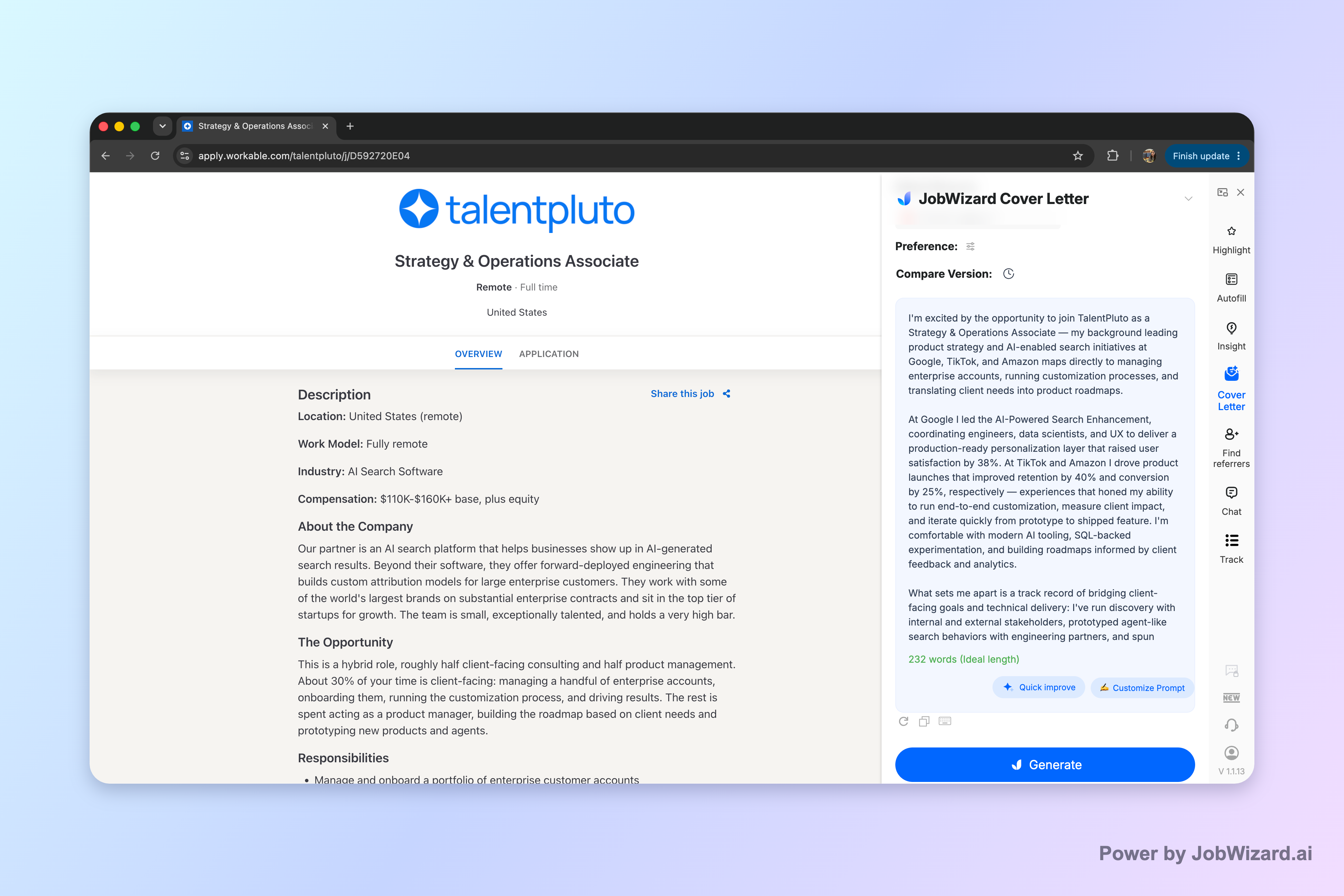
Second, it can help you diagnose resume tailoring with an Insight / Match Score that compares your resume to the job description, presents a match score and improvement suggestions, and can turn expression gaps into an editable resume revision draft.

Important limitations: a cover letter draft is not a guaranteed personalization or performance boost—you still need to review facts and add genuine personal details. Likewise, any match score is not a hiring probability and doesn’t guarantee ATS passage or an interview. In both cases, verify every suggested change and keep only accurate experience.
Key takeaway: Use AI to draft and diagnose gaps, then do the final human review for accuracy, tone, and real fit.
What does a match score mean for my resume tailoring?
A match score is guidance for gaps—not a decision by itself.
When you compare your resume to a job description, the goal is to understand where your wording and emphasis may not reflect the employer’s priorities. JobWizard’s Insight compares your selected resume with the current job description and provides an overall assessment and improvement suggestions; it can identify resume expression gaps and turn them into an editable resume revision draft.
When you see suggestions, use them like this:
- Treat it as a checklist: “Did I truly do this?” “Does this bullet reflect reality?”
- Preserve truth: keep only changes that accurately describe your experience.
- Tailor the language: adjust phrasing to match the job description—without copying blindly.
If you want the decision logic to extend beyond the number, pair this with the content guidance in Difference Between Cover Letter and Resume: What to Send (and When).
Key takeaway: Use a match score to improve alignment, but always verify accuracy—don’t treat it like a pass/fail rating.
Do this automatically with JobWizard
Skip the manual work — JobWizard's AI Cover Letters handles this for you.
FAQ about resume vs cover letter
When should I send a cover letter vs just a resume?
Send a cover letter when the job posting requests it, when the role is highly communication-driven, or when you’re explaining a specific mismatch. If the listing says “apply with resume only,” follow those instructions and use your resume for the core proof points.
Do I still need a cover letter if I’m applying on Workday or an ATS portal?
Often, yes—if the posting asks for a cover letter field or an attachment. ATS portals still route what you submit, so if a cover letter is optional, it can help you connect your resume to the job description before you’re screened.
What’s the difference between a cover letter and a resume?
A resume proves your experience with structured bullets and dates across roles. A cover letter adds context: why this job, why you, and how your background maps to the employer’s needs—typically in a shorter, more narrative format.
How long should a cover letter be (and what format works best)?
Aim for a concise, readable letter—typically around one page. Use a standard business format (greeting, opening hook, 2–3 paragraphs that map skills to the job, and a close). Keep it easy to skim and avoid dense blocks.
How do I tailor my resume for ATS keywords without lying?
Mirror the job description’s required skills and job-relevant wording only when it matches your real experience. Update phrasing in your bullet points to be accurate, add missing-but-true skills, and verify every change against your actual work history.
Should I use AI to draft my cover letter, or write it from scratch?
AI can be a strong starting point: generate an editable first draft based on your resume and the job description, then review and add genuine personal details. Don’t treat AI text as final—verify facts, tone, and anything that should reflect your real voice.
What should I write in a follow-up email after applying with a resume and cover letter?
Reference the role, briefly restate your fit in one sentence, and include a clear call to action (requesting consideration or the next step). Keep it short, professional, and specific—avoid repeating your entire resume.
Can a match score tell me whether I should apply?
A match score can help you diagnose expression gaps between your resume and the job description and suggest improvements. It’s not a hiring probability and doesn’t guarantee ATS passage or an interview, so treat it as guidance and always verify changes for accuracy.
Key takeaway: Resume vs cover letter isn’t a guess—it’s a “purpose match” decision grounded in the job posting and your ability to add accurate, job-specific context.
Resume vs cover letter: your fastest next step
Pick the right files, then use one job description as your source of truth to tailor both documents.
If you want a practical workflow, do this:
- Check the posting: required vs optional fields for a cover letter.
- Tailor your resume bullets: align with what’s actually requested (and only what’s true).
- Draft a cover letter that maps: generate an editable draft for the current job description, then personalize it.
- Review accuracy: verify facts and make sure the tone sounds like you.
Get started in JobWizard by generating a cover letter draft for the current job description (using your selected resume) and editing it before you submit—so your application has both proof and context.
Try JobWizard now to generate an editable cover letter draft and use Insight to spot resume expression gaps for the same job description you’re applying to.
Frequently Asked Questions
Generate this cover letter automatically
JobWizard drafts a tailored letter from your resume and the job description in seconds — free.