What Is the Best Free Auto Apply Tool? Choose Between Bots and Reviewed Autofill
What is the best free auto apply tool depends on whether you want a bot to submit applications or a tool to help you fill them out. Compare the trade-offs and learn how to speed up applications while checking every answer yourself.
Free Chrome extension
Autofill your next job application
JobWizard is a free Chrome extension that fills applications, tracks statuses, and optimizes your resume.
What is the best free auto apply tool? Start with who controls submission
What is the best free auto apply tool depends on whether you want a bot to submit for you or help completing applications you review yourself. Automated submissions can save manual effort, but they may also send incorrect screening answers or a resume that does not fit the role. If the job matters to you, keeping the final check and submission in your hands is an important distinction.
JobWizard is not an auto-apply bot: its Chrome extension fills detected fields on supported application pages using saved profile and resume data, and you review and submit. For a practical walkthrough of that workflow, see How to Autofill Job Applications (Step-by-Step with JobWizard).
What auto-apply tools do—and what they do not guarantee
Auto-apply tools aim to reduce repetitive application work, but automated submission does not guarantee accurate or well-matched answers. Depending on the product, it may help find roles, fill forms, or submit applications with less direct involvement. Compare what a tool actually automates rather than assuming every product works the same way.
- Job discovery: Some services help surface job openings that fit selected criteria.
- Form filling: Autofill tools populate application fields from saved information while the applicant remains involved.
- Submission: Some products offer automated application submission. Check the workflow and decide whether you are comfortable with a tool sending answers without a final review.
These distinctions matter because “auto apply” is often used broadly. A tool that fills a form for you is not necessarily submitting it, and a service that submits applications may not give you the same opportunity to inspect every answer first.
What can go wrong when a bot submits applications?
Unreviewed submissions can turn a small data mismatch into an application that represents you inaccurately. Job forms often include questions that cannot be safely answered by copying information from a resume, so automation deserves careful scrutiny before it sends anything.
- Wrong screening answers: A bot may select or enter an answer that does not reflect your eligibility, experience, or circumstances.
- Mismatched resumes: Reusing one resume across different roles can leave an employer with a version that does not highlight the most relevant background.
- Employer-side filters: Employers may use processes to identify or filter submissions. A bot-driven pattern is not a guaranteed path to consideration.
- Reputation with a target company: If an application contains obvious errors or does not fit the position, it can create a poor first impression with an employer you actually want to reach.
These are general risks to weigh, not claims that every bot or employer behaves the same way. For a closer look at common automation mistakes and a user-reviewed alternative, read Is There a Free Way to Automatically Apply for Jobs? Here’s What “Bot” Tools Get Wrong.
How reviewed autofill speeds up applications without submitting for you
Reviewed autofill handles repetitive form entry while leaving the decisions and final submission to you. JobWizard’s Chrome extension uses saved profile and resume data to fill detected fields on supported application pages. You can then inspect the populated information and make corrections before submitting.
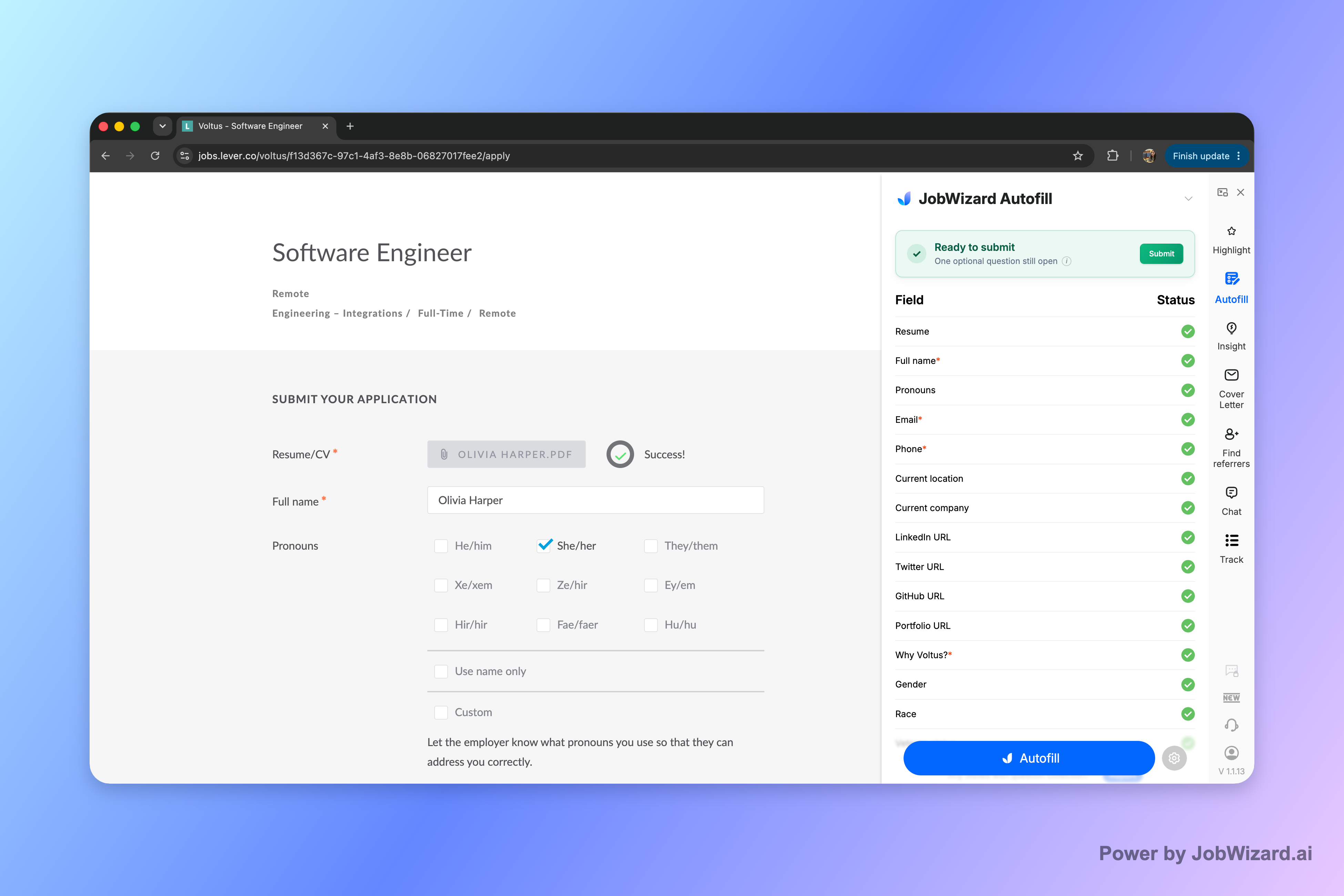
If a required field still needs attention, JobWizard can identify it and let you jump to the matching question. That helps you focus on anything incomplete instead of assuming every field has been filled correctly.
The practical workflow is straightforward:
- Open an application: Navigate to a supported job application page yourself.
- Fill detected fields: Use saved profile and resume data to populate fields the extension detects.
- Review answers: Check for missing details, inaccurate entries, or information that should be tailored to this role.
- Submit yourself: Send the application only after you are satisfied with the answers.
Autofill is not a promise that every field will be completed, that every website is supported, or that every answer is perfect. Treat it as help with form entry—not a substitute for your judgment.
How to choose the right tool for your job search
Choose based on how much control you want over each application, not on the label “auto apply.” A bot may suit someone who prioritizes submitting applications with less hands-on involvement, while reviewed autofill fits a workflow where the applicant wants to inspect answers before sending them.
| What matters to you | What to look for | Question to ask before using it |
|---|---|---|
| Less manual form entry | Autofill based on saved profile or resume details | Can I inspect and edit the fields before submission? |
| Less involvement in submitting | A clearly explained automated submission workflow | How are role-specific and screening questions handled? |
| Applications tailored to each role | A process that lets you review the resume and answers for each job | Will I see what is being sent to the employer? |
| Confidence before applying | A clear way to find required fields that still need attention | Can I correct an incomplete or inaccurate answer myself? |
Look at the actual workflow, including which details the tool fills, what it does with questions that need judgment, and whether you control submission. For more context on evaluating a bot-focused service, see How much does aiapply cost? The real pricing question—and what bot-submission tools get wrong and this applyblast review: What to expect from an application autofill tool—and how to vet the safe workflow.
Do this automatically with JobWizard
Skip the manual work — JobWizard's Smart Autofill handles this for you.
FAQs about what is the best free auto apply tool
What is the best free auto apply tool?
There is no single best choice for every job seeker. If you want applications submitted without your review, compare auto-apply tools carefully; if you want help completing forms while keeping control, JobWizard autofills detected fields on supported application pages and lets you review and submit yourself.
Is JobWizard a free auto apply tool that submits applications?
No. JobWizard does not submit applications, mass-apply, or apply while you are away. Its Chrome extension uses saved profile and resume data to fill detected fields on supported application pages, then you review the answers and submit.
What can go wrong when an auto-apply bot submits a job application?
A bot may provide an inaccurate answer to a screening question or use a resume that does not match the role. Depending on the employer and its process, repeated or mismatched submissions may also be filtered or create a poor impression. Reviewing each application helps you catch errors before you submit.
How can I apply faster without letting a bot submit for me?
Use a tool that fills application fields from your saved information, then check the populated answers, correct anything that needs attention, and submit yourself. JobWizard can identify a required field that still needs attention and let you jump to that question.
Try JobWizard Autofill on your next application, review every answer, and submit it yourself.
Frequently Asked Questions
Autofill your next job application
JobWizard is a free Chrome extension that fills applications, tracks statuses, and optimizes your resume.