Do Auto Apply Tools Work? What They Can—and Can’t—Do
Do auto apply tools work? They can speed up repetitive parts of applying, but fully automated submissions may get details wrong. Learn what to check and how reviewed autofill keeps you in control.

Free Chrome extension
Autofill your next job application
JobWizard is a free Chrome extension that fills applications, tracks statuses, and optimizes your resume.
Do auto apply tools work? The short answer
Do auto apply tools work? They can reduce repetitive work, but an application submitted without your review can contain the wrong answers, the wrong resume, or details that do not fit the role. The useful distinction is whether a tool helps you fill an application or submits it for you.
Some products automate parts of a job search, and their features vary. A tool may help find roles, populate fields, or submit applications; none of those steps guarantees that each application is accurate or tailored. Automation is not the same as a good application.
For a closer look at how to assess claims and trade-offs, read Better Apply Reviews: How to Vet Auto-Apply Tools Without Guesswork. The right fit depends on how much control you want over answers, resumes, and the final submission.
Where automated applications can go wrong
The main risk is submitting information you have not checked. Screening questions can require a precise answer about work authorization, sponsorship, availability, or experience. If an automated process chooses incorrectly, the application may misrepresent you.
- Wrong screening answers: A generic or guessed response may not reflect your situation.
- Mismatched resume: Sending the same version to every role can leave relevant experience or keywords out of focus.
- Employer-side filtering: Employers may use spam filters or other screening processes, so repetitive or poorly matched submissions may not reach a hiring manager.
- Reputation with a target employer: A careless application can make a poor impression at a company you genuinely want to join.
These are risks of unreviewed automation, not proof that every auto-apply product behaves the same way. A tool can still be useful when it saves effort while leaving meaningful choices to you. Review matters most on questions that depend on your circumstances.
Automation may also encounter login screens or captchas that interrupt a workflow. See why auto-apply tools can fail on captchas and login screens for context on those obstacles.
A reviewed alternative: autofill, check, and submit
Reviewed autofill speeds up form entry without taking the final decision away from you. JobWizard's Chrome extension uses saved profile and resume data to fill detected fields on supported application pages. You review the populated fields and submit the application yourself.
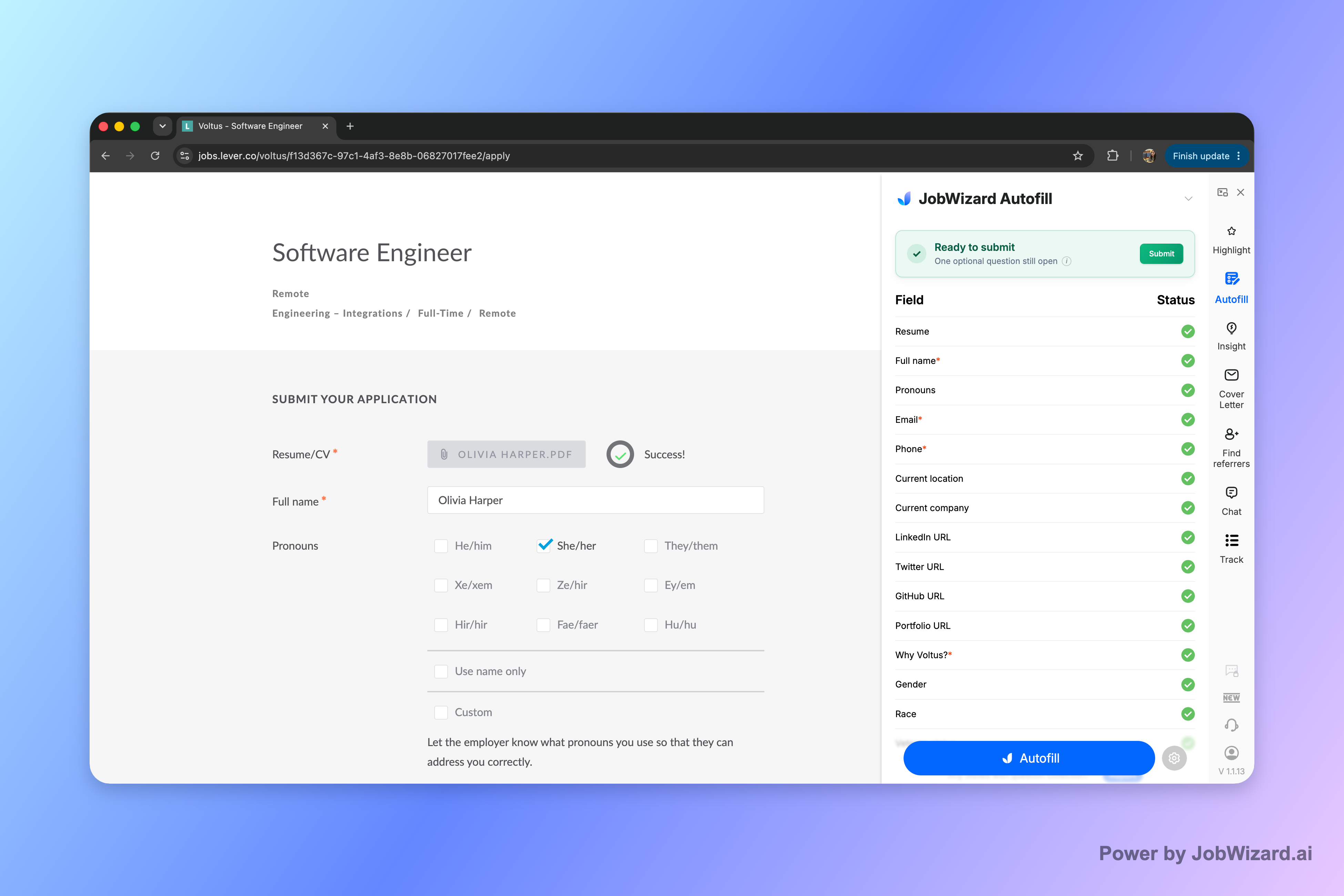
If a required field still needs attention, JobWizard can identify it and let you jump to the matching question. That helps you focus your review on missing information rather than assuming every field is complete or correct. You remain responsible for checking each answer.
- Open an application: Start the application on a supported page.
- Use autofill: JobWizard fills detected fields with saved profile and resume data.
- Review the details: Check personal information, resume choices, screening answers, and any fields needing attention.
- Submit yourself: Send the application only when you are satisfied with what it says.
JobWizard does not mass-apply, submit applications by itself, or apply while you are away. For the full workflow, see How to Autofill Job Applications (Step-by-Step with JobWizard). You can also compare this approach with easy one-click apply tools that use smart autofill and keep review in your hands.
How to decide whether an auto-apply tool fits your search
Choose based on the tasks you want to delegate and the answers you want to control. Before relying on a tool, check whether it fills forms, submits applications, or does both—and whether you can review the information first.
| What to check | Why it matters | What to do |
|---|---|---|
| Submission behavior | Filling a form and sending it are different actions. | Confirm whether you approve and submit each application. |
| Screening questions | Answers may depend on your individual circumstances. | Review every response instead of assuming a default is right. |
| Resume selection | A resume suited to one role may not present another role as well. | Check the document and its fit before sending. |
| Unfinished fields | Required questions can remain unanswered or need a personal response. | Look for missing fields and complete them yourself. |
Use automation for repetitive entry, not for decisions you cannot afford to get wrong. A review-first workflow is especially practical when applications include custom questions or when the employer is a priority. The goal is to save effort without surrendering oversight.
Do this automatically with JobWizard
Skip the manual work — JobWizard's Smart Autofill handles this for you.
Frequently asked questions
Do auto apply tools work?
They can automate parts of a job search, but results depend on the tool and application. A tool that fills fields or submits applications automatically may not get every screening answer or resume choice right, so review each application before submitting. JobWizard fills detected fields on supported application pages, then you check the answers and submit yourself.
Can auto apply tools send an application without my review?
Some tools may offer automated submission, but JobWizard does not. It fills detected fields using saved profile and resume data; you review the populated answers and submit the application yourself.
What can go wrong when a bot submits a job application?
A bot may select an inaccurate screening answer, use a resume that does not match the role, or send an application that looks generic. Employers may also filter high volumes of repetitive applications. Review the details and submit yourself, especially for roles you care about.
How does JobWizard help me apply faster without auto-submitting?
JobWizard's Chrome extension uses saved profile and resume data to fill detected fields on supported application pages. It can identify a required field that still needs attention and let you jump to it; you review the answers and submit yourself.
Try JobWizard Autofill on your next application: check every populated answer, complete anything still needing attention, and submit only when it is ready.
Frequently Asked Questions
Autofill your next job application
JobWizard is a free Chrome extension that fills applications, tracks statuses, and optimizes your resume.