Best way to auto apply to roles? A smarter choice than blind bots
Wondering about the best way to auto apply to roles? Compare hands-off bots with reviewed autofill, and learn how to move faster without giving up control of your answers.

Free Chrome extension
Autofill your next job application
JobWizard is a free Chrome extension that fills applications, tracks statuses, and optimizes your resume.
Best way to auto apply to roles? Start with what “auto apply” means
The best way to auto apply to roles is to automate repetitive form-filling without handing a bot the final decision to submit. Some job seekers use “auto apply” to mean submitting applications in the background; others mean completing forms faster while they are on the application page. Those approaches have different trade-offs.
A bot that applies without your review may send an inaccurate screening answer, attach a mismatched resume, or submit to a role you would not choose after reading the details. A more controlled approach is to fill routine fields quickly, check the application, and submit it yourself.
For a practical walkthrough of that process, see the complete guide to autofilling job applications with JobWizard. It explains the review-first approach rather than treating every form of automation as hands-off submission.
Why blind job-application bots can create avoidable problems
Submitting more applications is not useful if important answers or materials do not fit the role. Employers ask role-specific questions, and personal details such as work authorization, sponsorship needs, salary expectations, and availability may require a deliberate answer.
- Incorrect screening responses: A generic or guessed answer can misrepresent your circumstances or qualifications.
- Mismatched resumes: Sending the same resume to every opening may overlook differences in responsibilities and required experience.
- Employer-side filtering: Repetitive or poorly matched submissions may be treated as low-relevance applications or caught by employer-side spam controls. The exact result depends on the employer and its process.
- Reputation with a target company: An irrelevant or inaccurate submission can make a poor impression at a company you genuinely want to join.
These are trade-offs to consider, not a claim that every tool or automated application causes harm. A useful comparison is whether a product helps you move through forms while preserving your ability to check each application before it leaves your hands.
For a focused discussion of that distinction, read our review of auto-submit job bots and the review-first way to apply. The goal is to choose a workflow that fits your search, not to assume every job seeker needs the same tool.
Compare hands-off bots with reviewed autofill
Choose a workflow based on how much control you want over each submitted application. A hands-off service may appeal when your priority is delegating more of the process; reviewed autofill is designed to reduce repeated typing while leaving final answers and submission with you.
| What to compare | Hands-off auto-apply approach | Reviewed autofill approach |
|---|---|---|
| Form completion | May aim to handle applications with less input from you; check each tool’s stated process. | Fills detected fields using saved profile and resume data on supported application pages. |
| Screening answers | Confirm how the tool handles questions that need your personal judgment. | You can review answers and correct anything that needs your attention. |
| Final submission | Depending on the service, you may delegate more steps; understand exactly what it submits and when. | You review the populated fields and submit the application yourself. |
| When a field needs work | Check whether the tool gives you a chance to resolve unanswered or ambiguous questions. | JobWizard can identify a required field that still needs attention and let you jump to the matching question. |
JobWizard’s Chrome extension uses saved profile and resume data to fill detected fields on supported application pages. It does not automatically submit, mass-apply, or apply while you are away; you review the populated fields and submit each application yourself.
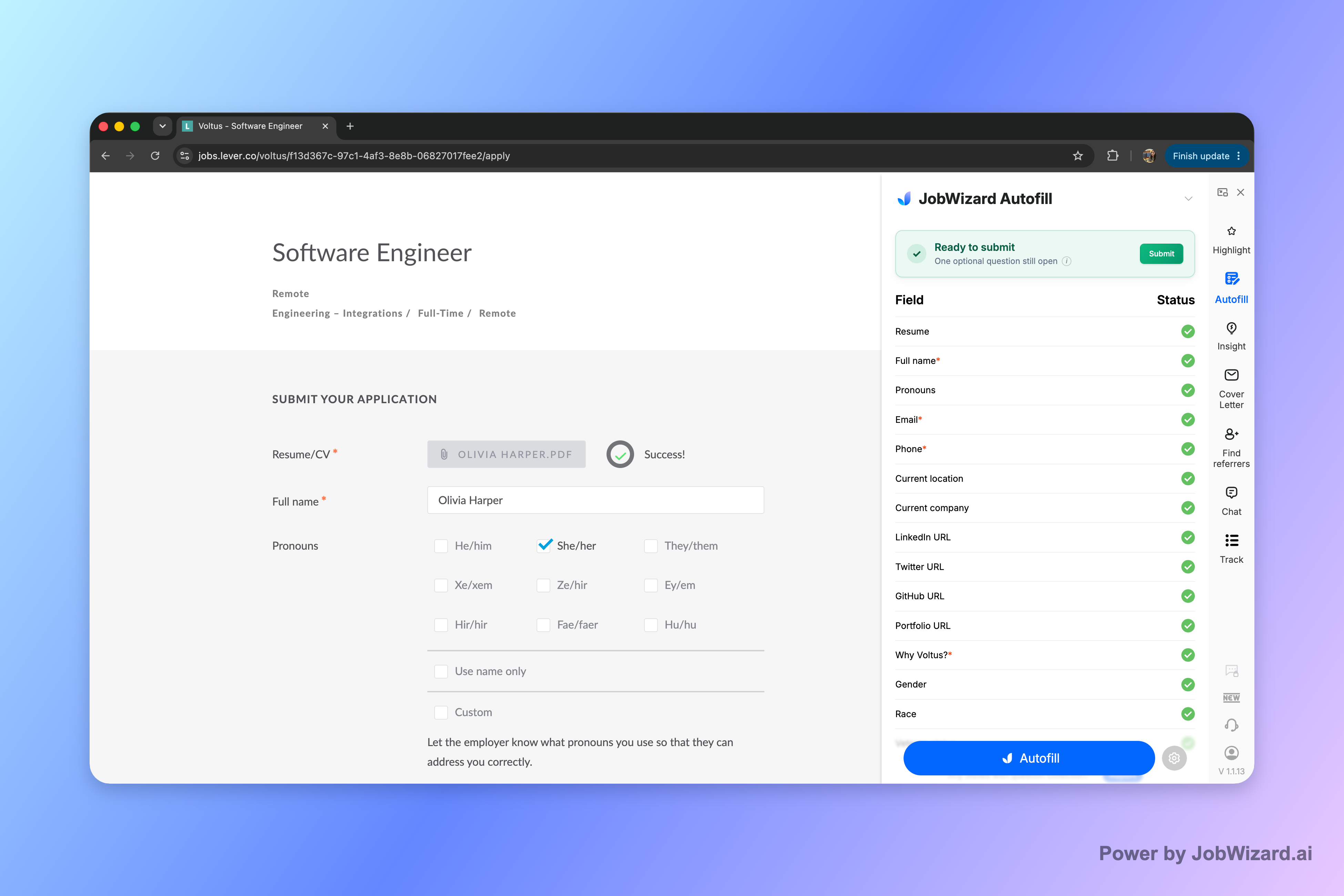
This can be a fit if you want faster form completion with a review before submission, rather than fully delegated applications. For a tool-focused comparison, see how to choose between auto-apply bots and reviewed autofill.
Make a faster application process without skipping your review
Use autofill for repeated information, then personally check the details that can change from role to role. A short review can help catch errors and make sure the application reflects the opportunity you actually want.
- Open a role you have chosen. Read the requirements and confirm that you want to apply.
- Fill routine fields. Use a form-filling tool on a supported application page to populate detected fields from your saved information.
- Review the important answers. Check resume selection, sponsorship and work-authorization responses, salary, EEO questions, and custom screening questions.
- Resolve anything missing. If a required field still needs attention, find the question and enter a clear, accurate response.
- Submit it yourself. Make the final decision after reviewing the completed application.
The same principle applies when you are targeting a particular job family. For example, our advice on the best way to apply to marketing manager jobs faster centers on speeding up repetitive work without treating every opening as interchangeable.
Autofill does not guarantee that every field will be detected or completed, and supported pages can vary. Keep your information current and review the whole application rather than assuming that populated fields are automatically correct.
Do this automatically with JobWizard
Skip the manual work — JobWizard's Smart Autofill handles this for you.
FAQ: Best way to auto apply to roles?
What is the best way to auto apply to roles?
The best way to auto apply to roles depends on what you mean by “auto apply.” If you want applications submitted without your review, bots can create risks around screening answers, resume fit, and employer perception. A review-first tool like JobWizard fills detected fields on a supported application page, then you check the answers and submit yourself.
Does JobWizard automatically submit job applications?
No. JobWizard uses saved profile and resume data to fill detected fields on supported application pages. You review the populated fields and submit the application yourself.
Can auto-apply bots get screening questions or resumes wrong?
They can create a mismatch if an answer does not reflect your circumstances or a resume does not fit the role. Review screening questions, salary and sponsorship answers, and the resume attached to each application before submitting.
How can I apply faster without mass-applying?
Use autofill for repetitive application fields, then review the answers and submit each application yourself. This reduces repeated typing without giving up control over role-specific responses.
Try JobWizard Autofill on your next application. Let it fill detected fields on a supported page, review every answer, and submit only when the application is ready.
Frequently Asked Questions
Autofill your next job application
JobWizard is a free Chrome extension that fills applications, tracks statuses, and optimizes your resume.