Is lazyapply legit? What “auto-submit” job bots can mess up—and the safer review-first way to apply
If you’re searching “is lazyapply legit,” it usually means you’re weighing an auto-apply/bot approach. Learn what can go wrong with bot submissions—and how review-first autofill lets you fill fast without surrendering control.
Free Chrome extension
Autofill your next job application
JobWizard is a free Chrome extension that fills applications, tracks statuses, and optimizes your resume.
If you’re searching is lazyapply legit, you’re probably trying to figure out whether an “auto-apply” style tool is worth trusting with your actual applications. The real question isn’t only whether the tool works—it’s what happens when something submits for you, with you unable to catch mistakes first.
JobWizard approaches speed differently: it autofills repetitive fields on the application page while you stay in control of the final review and submission. If you’re deciding between an auto-submit bot and a review-first autofill workflow, here’s what to watch for.
Why “is lazyapply legit” often comes down to auto-submit behavior
Auto-apply legitimacy usually hinges on whether the tool submits for you (or just helps you fill). Many job seekers want fewer clicks, but submission-by-bot creates failure modes that aren’t obvious at first.
When a tool pushes an application forward automatically, the user experience shifts from “I filled this” to “the system sent it.” That’s where things can go sideways: the application you intended and the application the employer receives may not match closely enough for screening teams—or for your own reputation with a company you actually want.
- Wrong answers to screening questions: screening logic is sensitive, and automated selections can be subtly off (years, dates, titles, eligibility, or preferences).
- Resume mismatch: the resume data used by a tool may not be the version you intended for that specific role, especially when you have multiple resumes or recent updates.
- Custom question gaps: job posts often include role-specific prompts (projects, tools used, short narrative questions). Bots may misread context or leave fields that require human judgment.
- Employer-side spam/integrity filters: repetitive or overly “templated” submissions can trigger risk controls, slowing review or causing applications to be deprioritized.
- Reputation damage: if you apply with inconsistent details to a company you genuinely want, it can create unnecessary friction for recruiting teams and hiring managers.
The fix for these risks is not “work slower.” It’s keep the speed from autofill, keep the control at submit.
What review-first autofill gets right (and how it fits real application flows)
Review-first autofill tools aim to eliminate repetitive typing while preserving your ability to verify everything that matters before you submit.
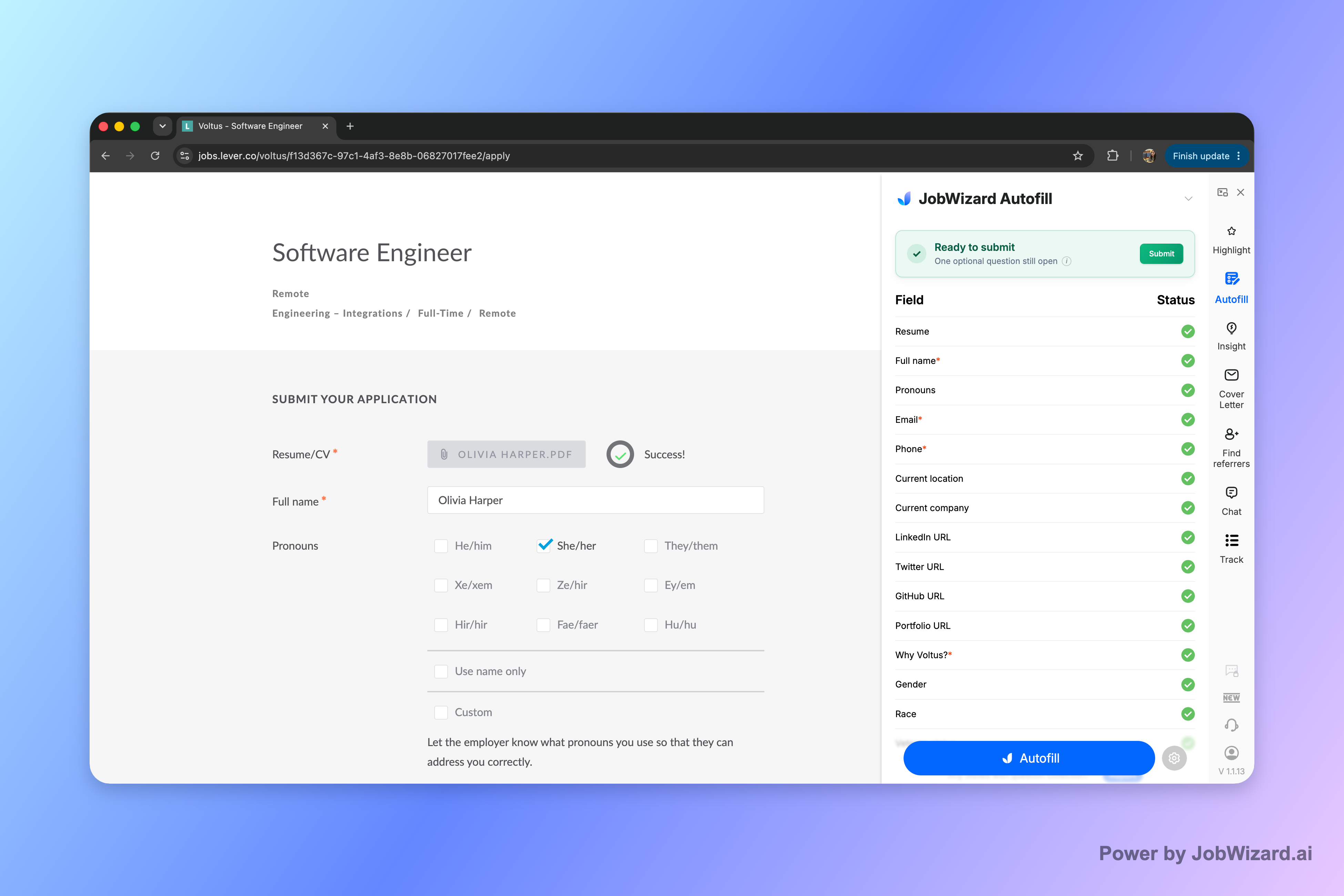
With JobWizard, the workflow is designed so the user stays the submitter: JobWizard autofills application fields on pages you’re actively using, and then you review the populated answers and submit yourself. If a required field still needs attention, JobWizard can identify it so you can jump to the matching question.
In practice, that means you get the benefit of fast form completion while avoiding the most common bot-submission problems: you can correct screening answers, align resume details, and tailor custom responses based on what the employer is asking.
Why this matters for popular ATS portals: JobWizard’s autofill behavior covers the major ecosystems job seekers run into, including Workday, Greenhouse, Ashby, and Lever. Workday is where it saves the most time—because repetitive fields tend to be more consistently structured.
Real usage context: JobWizard has driven 720,000+ applications submitted and 600,000+ autofill sessions run through it. It autofills an average of ~18 repetitive fields per application (typically 11–23), and about ~65% of submitted applications are on Workday.
Again, this is autofill + review-before-submit—not blind automation. JobWizard is not designed to submit while you’re away, and it doesn’t mass-apply. The point is to fill quickly, then validate and submit with your own judgment.
Legitimacy check: lazyapply-style bots vs JobWizard-style autofill
Here’s a fair way to compare tools: look at the exact moment where you stop controlling the answers.
| What you’re really evaluating | Auto-submit / bot-style approach | Review-first autofill approach (JobWizard) |
|---|---|---|
| Who submits the application | Often the tool aims to submit on your behalf (depending on settings/workflow) | The user reviews and submits the application themselves |
| Screening question accuracy | Higher risk of incorrect selections when the bot can’t confirm intent | You review populated answers, and fix anything that still needs attention before submitting |
| Resume matching to the role | Mismatches can slip through if the selected resume version isn’t the one you intended | You can verify what’s filled (including resume-related fields) before you submit |
| Custom/free-text prompts | Can be incomplete, poorly interpreted, or left inconsistent | You can review and revise before submission |
| Employer perception | Repetitive or templated submissions can increase scrutiny | Because you review, your final submission is more aligned with your real details |
If your top priority is to reduce manual work but you still want to prevent avoidable mistakes, review-first autofill is the safer trade-off. That’s also why “is lazyapply legit” shouldn’t be answered with a single label—it’s about whether the workflow keeps you in control at the submit step.
How to apply faster without letting a bot “guess” your answers
Use this quick workflow to keep speed and reduce bot-submission risk.
- Autofill the repetitive fields: fill what can be filled quickly from your profile/resume data.
- Review screening answers line by line: confirm eligibility, experience level, and preferences match the role.
- Verify resume match: ensure the correct resume version (and any role-specific details) is what the employer will see.
- Answer custom questions yourself: even a short prompt should reflect your real experience and wording.
- Submit yourself: keep the final check where it belongs—before the application goes out.
If you’re looking for a step-by-step approach to autofill, start here: How to Autofill Job Applications (Step-by-Step with JobWizard). And if you’re also comparing automation tools, you may find it useful to review trust-check thinking for other autofill tools like Is Teal Legit? A Job Seeker’s Checklist to Verify Trust Before You Auto-Fill.
Want a directly comparable angle on lazyapply specifically? See: lazyapply alternative: fill fast with JobWizard autofill, then submit yourself (no bot surprises), and also this real-world perspective: lazyapply jobhunterbot autoapply.jobs user reviews experiences pros cons: what can go wrong—and the safer review-first way.
Ready to apply faster with fewer mistakes? Try JobWizard’s Autofill on your next application—fill the repetitive fields, review every answer, and submit yourself with confidence.
Do this automatically with JobWizard
Skip the manual work — JobWizard's Smart Autofill handles this for you. On these platforms: JobWizard vs LazyApply.
FAQ about “is lazyapply legit”
Is lazyapply legit for job seekers who want faster applications?
“Legit” depends on what you mean by fast. Many “auto-apply” tools aim to submit on your behalf, which can introduce avoidable errors in screening answers, resume matching, and custom questions. JobWizard takes a different approach: it autofills repetitive fields, then you review and submit yourself.
What are the most common problems when an auto-apply bot submits your application?
The biggest issues are wrong or incomplete answers to screening questions, mismatches between what you meant and what was selected (like experience level, location, or eligibility), and forms that trigger employer-side spam or integrity filters when submissions look repetitive. A bot can’t reliably validate your specifics—so you should control the final review.
How do review-first autofill tools like JobWizard reduce risk?
JobWizard autofills the application fields you’re currently on using your saved profile and resume data. You review what was filled (and fix anything that still needs attention) before you submit, so you’re not sending answers you haven’t checked.
Will autofill tools handle every question on every site perfectly?
No. Autofill tools can still leave required fields that need attention and may not be perfect for every custom question or every career portal. The safer workflow is: autofill, jump to the remaining required items, verify everything, then submit yourself.
What should I check before submitting if I used a job application autofill tool?
Before you hit submit, verify screening answers, job title/role selections, work authorization/EEO-style questions, and any custom or free-text questions. Also confirm the resume match for that specific role so the employer sees the version you intend.
Frequently Asked Questions
Autofill your next job application
JobWizard is a free Chrome extension that fills applications, tracks statuses, and optimizes your resume.