Best Auto Apply Tool for Software Engineers: Which Workflow Fits?
Looking for the best auto apply tool for software engineers? Compare hands-off application bots with reviewed autofill, and choose a workflow that keeps technical and screening answers under your control.

Free Chrome extension
Autofill your next job application
JobWizard is a free Chrome extension that fills applications, tracks statuses, and optimizes your resume.
Best auto apply tool for software engineers: start with the level of control you need
The best auto apply tool for software engineers depends on whether you want applications sent without review or help filling forms while you stay in control. An unattended bot may increase application volume, but a wrong answer about a technical qualification, work authorization, or salary can turn a seemingly fast process into a poor fit. If you’re comparing hands-off automation with a more deliberate workflow, consider what you want the tool to do—and what you want to decide yourself.
JobWizard is not an auto-submit or mass-apply service. Its Chrome extension uses saved profile and resume data to fill detected fields on supported application pages; you review the populated answers and submit the application yourself. For a broader overview, see How to Autofill Job Applications (Step-by-Step with JobWizard).
What can go wrong when a bot submits software engineering applications?
Automation can’t safely guess at every detail that makes a software engineering application accurate. A form may look repetitive, but screening answers can depend on your specific background, the role’s requirements, and what you are willing to accept.
- Incorrect screening answers: A yes-or-no question about sponsorship, employment eligibility, or required experience needs your actual answer—not a guess based on a resume.
- A mismatched resume: If you use different versions for backend, frontend, infrastructure, or machine-learning roles, the wrong attachment can weaken an otherwise relevant application.
- Employer-side filtering: Employers may use screening and spam-filtering processes. No tool can promise that a high volume of submissions will reach a hiring team or receive consideration.
- Damage to a relationship: A careless answer or poorly matched application can reflect badly when you apply to a company you genuinely want to join.
These are general trade-offs of submitting without review, not claims that a particular product behaves badly. Auto-apply tools vary, and some job seekers may value their approach to increasing application volume. The key question is whether you are comfortable letting software submit answers you haven’t checked.
If you want to compare approaches before choosing, read best auto-apply tools for job applications 2026: avoid bot submissions, use controlled autofill.
What to look for in the best auto apply tool for software engineers
Evaluate tools by the work they automate, the decisions they leave to you, and how clearly they handle incomplete fields. A useful tool should fit your application routine rather than encourage you to treat every role as interchangeable.
| What to evaluate | Why it matters for engineers | What to check |
|---|---|---|
| Application-form support | Companies use different hiring platforms and forms. | Confirm whether the tool supports the pages you encounter; don’t assume universal coverage. |
| Control over submission | You may need to tailor a resume or confirm a screening response. | Check whether you review the completed answers and personally submit. |
| Handling of missing fields | Custom questions may not be answered by saved profile information. | Look for a clear way to find and address questions that still need attention. |
| Resume and role fit | A platform, language, or specialty may matter for a particular job. | Make sure you can select or verify the materials and details relevant to that role. |
JobWizard focuses on reviewed autofill: its Chrome extension uses saved profile and resume data to fill detected fields on supported application pages. When a required field still needs attention, it can identify the field and let you jump to the matching question. It does not submit applications for you, and supported pages or fields should not be assumed to cover every employer’s form.
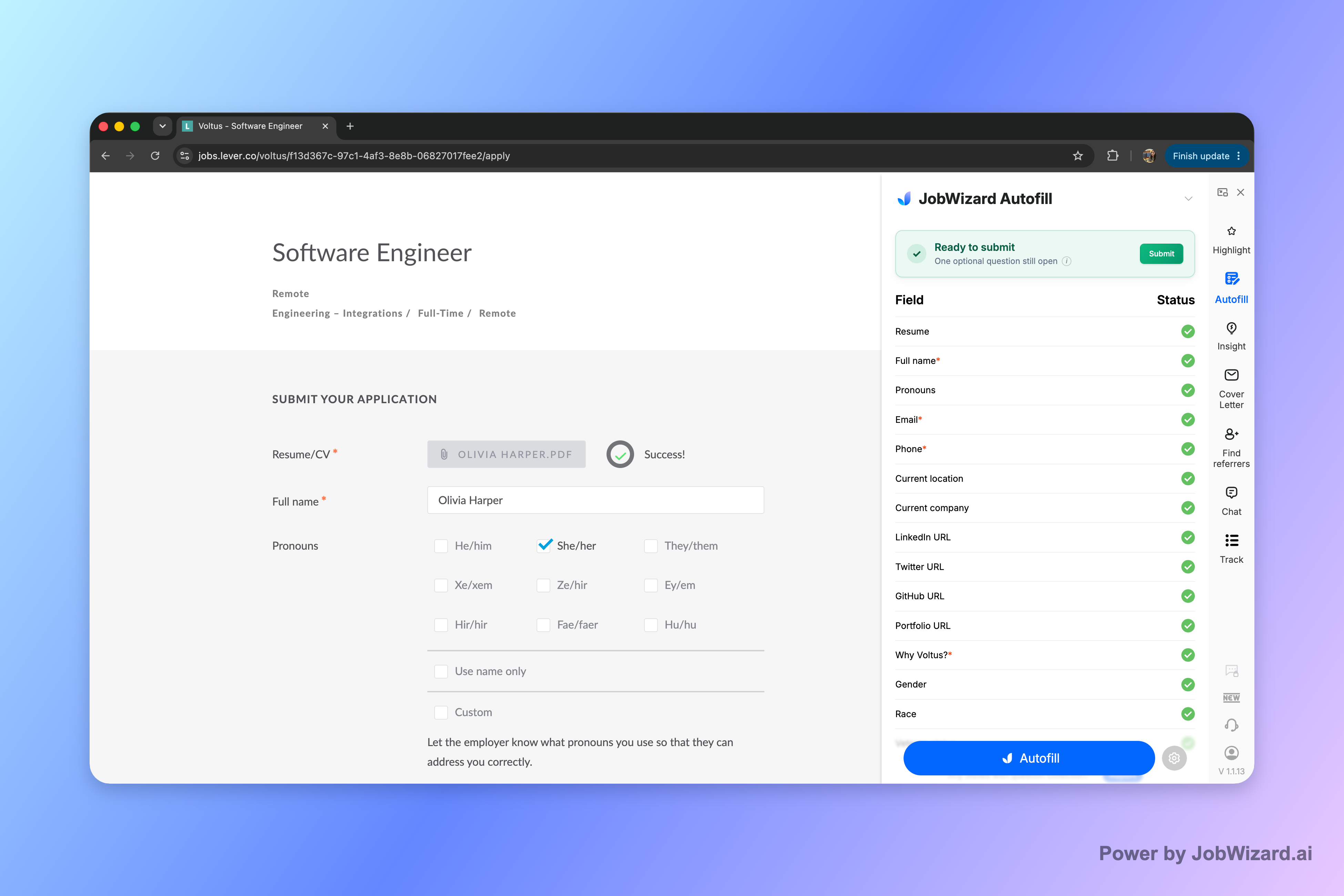
For another perspective on choosing between automation and review, see What Is the Best Free Auto Apply Tool? Choose Between Bots and Reviewed Autofill. The right fit depends on whether your priority is unattended volume or keeping the final answers and submission in your hands.
How to apply faster while keeping engineering applications accurate
A short review step can help you move quickly without treating every application as a one-click submission. Start with a relevant resume, let autofill handle detected repetitive fields, and focus your attention on the answers that require judgment.
- Choose the right role and resume. Match your application materials to the position, such as backend, frontend, platform, or infrastructure engineering.
- Fill the detected form fields. Use a tool such as JobWizard to populate supported fields with saved profile and resume data.
- Check consequential answers. Verify eligibility, sponsorship, compensation expectations, experience claims, and any custom or technical questions.
- Resolve anything still required. Review fields that were not filled, and make sure the form reflects your actual qualifications and preferences.
- Submit it yourself. Send the application only after you are comfortable with the completed form and attached materials.
This approach is especially useful when you’re applying to a mix of roles that need different resumes or answers. For ideas on handling a larger search without unattended submission, explore Top AI Job Application Software for Bulk Applying—Without Risky Auto-Submit.
Try JobWizard Autofill on your next application to fill detected fields on a supported page, then review every answer and submit it yourself.
Do this automatically with JobWizard
Skip the manual work — JobWizard's Smart Autofill handles this for you.
Frequently asked questions
What is the best auto apply tool for software engineers?
The best auto apply tool for software engineers depends on whether you prioritize unattended applications or control over each submission. If you want help completing forms while reviewing answers yourself, JobWizard autofills detected fields on supported application pages, then you check and submit.
Does JobWizard automatically submit software engineering applications?
No. JobWizard fills detected fields using saved profile and resume data on supported application pages. You review the answers and submit the application yourself.
Can an auto-apply bot answer every software engineering screening question correctly?
No tool should be assumed to know the right answer to every screening question. Questions about work authorization, sponsorship, salary, experience, or technical requirements need your review before submission.
How can I apply faster without submitting the wrong information?
Use saved profile and resume information to fill the repetitive fields, then check the populated answers and any remaining required questions. JobWizard can identify a required field that needs attention and let you jump to it; you submit when the application is ready.
Frequently Asked Questions
Autofill your next job application
JobWizard is a free Chrome extension that fills applications, tracks statuses, and optimizes your resume.