Workday “Under Consideration” Meaning: What Recruiters Really See and What You Should Do Next
Wondering what “workday under consideration meaning” really implies for your application? Learn the most likely interpretations, what to do while you wait, and when to follow up.
Free Chrome extension
Track all your applications in one place
JobWizard auto-tracks status changes across Workday, Greenhouse, and every major job site — free.
Two weeks after you apply, you refresh your Workday account and see the same line: Under Consideration. You’re not rejected—but you’re also not invited to interview. What does that label actually mean, and what should you do while you wait?
In this guide, you’ll learn the most common workday under consideration meaning in real hiring workflows, how to interpret related statuses, and the best next steps for staying proactive without spamming recruiters.
What does “Under Consideration” mean in Workday?
“Under Consideration” typically means your application is in the active review pool and a recruiter or hiring team is considering you against the role’s requirements.
Practically, it usually indicates your application has passed the “received” stage and hasn’t been marked as rejected or closed out. Many employers use a workflow where candidates move through review, screening, and decision steps—“Under Consideration” is commonly one of the “in motion” states.
- Good sign: It generally suggests you haven’t been automatically filtered out.
- Not a guarantee: Review can still end without an interview.
- Process-dependent: Each company configures Workday statuses differently.
Key takeaway: Treat “Under Consideration” as “we’re reviewing you,” not “you’re hired” and not “you’re out.”
Is “Under Consideration” the same as “In Progress” on Workday?
Usually, they aren’t the same thing—“Under Consideration” is more review-focused than “In Progress.”
Even though both sound like movement, “In Progress” often describes the overall job process or an internal workflow state. “Under Consideration” more directly points to a candidate being evaluated as part of the pipeline.
Because employers customize Workday labels, the safest interpretation is to compare how the company uses these statuses across the same job posting. If “Under Consideration” appears alongside other candidate outcomes (interview steps, offer steps, or rejections), that’s your best clue that it’s part of a review stage.
Key takeaway: Don’t assume two labels mean the same stage—use the job’s full status set as your guide.
What does “Under Consideration (or Review)” mean for my chances?
“Under Consideration” means your application is being actively weighed, but it doesn’t rank you in a way you can see.
Hiring teams often review applications in batches. Some will do an initial screen based on essentials (location, required skills, work authorization, minimum experience), then narrow to fewer candidates for interviews. While you’re “Under Consideration,” your materials are likely part of that narrowing process.
What you can control is whether your application details are easy to interpret. If there are areas you know are borderline (dates, job titles, tool experience, or role scope), it helps to ensure your resume and cover letter clearly reflect your fit—because the status itself won’t explain what the reviewer is thinking.
- If you’re a strong match: keep your follow-up message aligned with the role’s top requirements.
- If you’re a partial match: emphasize transferable experience and learning speed.
- If you’re switching fields: explicitly connect past projects to the new job’s responsibilities.
Key takeaway: Your status shows review is happening; your job is to make your fit unmistakable.
Does “Under Consideration” mean I’ll get an interview?
No—“Under Consideration” is a review status, not an interview commitment.
Even when candidates are being considered, interview decisions depend on factors you can’t always see: interview panel availability, competing candidates, prioritization changes, or budget and headcount timing.
If you want a simple way to interpret it, think in probabilities rather than certainty: “Under Consideration” means you’re in the conversation. It doesn’t mean the conversation will reach “interview” for everyone in that group.
Key takeaway: It’s positive, but you should keep your expectations flexible.
How long does “Under Consideration” last in Workday?
Workday doesn’t enforce a standard timeline for “Under Consideration,” so the duration varies by employer.
Some hiring teams move quickly after initial review; others batch decisions to reduce recruiter workload. The timeline can also shift if the company pauses hiring, reopens the role, or changes who owns the screening step.
If you’ve waited longer than what you’d reasonably expect for a similar role, a single, respectful follow-up can be the right next move. If the hiring team is still reviewing, your follow-up won’t “force” a decision—but it can help ensure you remain visible and well-positioned.
Key takeaway: Use time as a cue for follow-up, not as proof of rejection.
What action should I take while my application is “Under Consideration”?
Your best actions are (1) keep applying elsewhere and (2) stay ready to respond quickly if the recruiter reaches out.
Because statuses can change after batch reviews, you want to be responsive. Meanwhile, your application pipeline should not depend on a single role.
- Track the job + date applied: save the posting link and note the submission date for future follow-ups.
- Prepare your “interview answers” now: outline your top 3 project stories mapped to the job requirements.
- Polish your resume version: you may need to update it quickly if asked for additional details.
- Follow up once if warranted: send a short message after enough time has passed.
- Keep applying: “Under Consideration” can still take time—run parallel searches.
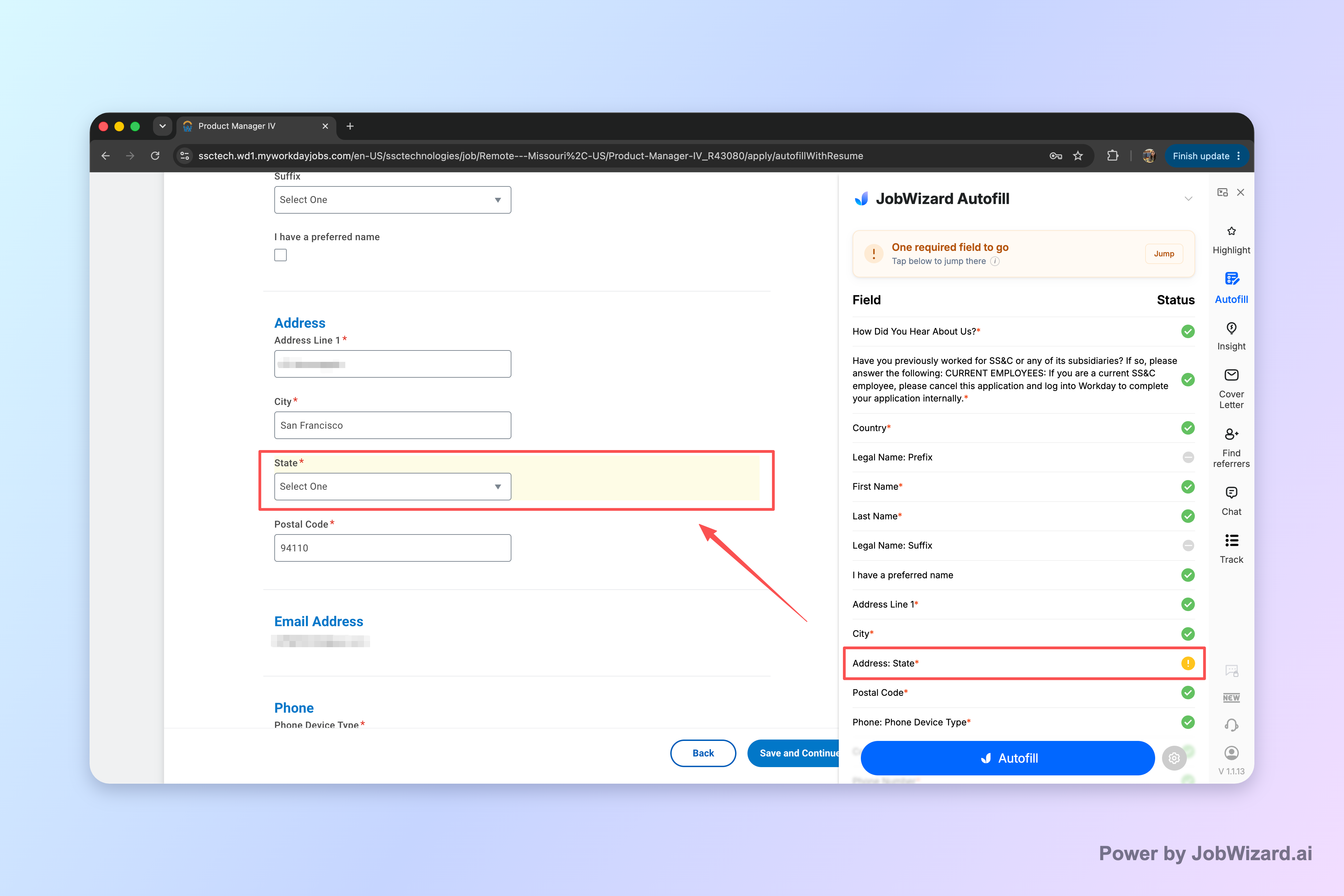
If you’re worried about submitting complete applications quickly, consider using JobWizard to autofill repetitive fields while you review every answer before submitting.
Key takeaway: While you wait, stay productive—review your application details and prepare for the next step.
Should I follow up if my application is “Under Consideration”?
In many cases, yes—one concise follow-up is appropriate if you haven’t heard back after a reasonable period.
When you follow up, you’re not asking for a status update every day. You’re helping the recruiter connect your application to your value. Keep the message short, professional, and specific.
Below is a copy-paste template you can adapt.
Subject: Follow-up: [Job Title] application submitted on [Month Day]
Hi [Recruiter Name/Team],
I hope you’re doing well. I’m following up on my application for the [Job Title] role submitted on [Month Day]. I remain very interested, and I believe my experience with [1–2 relevant skills or outcomes] aligns well with what you’re looking for.
If there’s anything else I can provide to support your review, I’d be glad to share. Thank you for your time and consideration.
Best regards,[Your Name][Phone] | [Email] | [LinkedIn or Portfolio]
Key takeaway: Follow up once with value-forward details, not repeated “any updates?” messages.
What if my Workday status changes away from “Under Consideration”?
Status changes can reflect internal workflow updates—not always a final decision.
Sometimes a job owner changes, the application is reassigned for screening, or the company updates the pipeline based on additional checks. Other times, the status may move toward an interview step or toward rejection.
Because Workday labels are configured by each employer, your best strategy is to interpret the direction of movement:
- Moving toward interview stages: usually means your profile cleared a screening gate.
- Returning to earlier workflow states: can happen if the pipeline is reorganized.
- Moving to “Not Selected/Rejected/No longer considered” (if shown): usually indicates the decision is final.
Key takeaway: Don’t panic on every change—look for the label pattern that indicates where candidates are headed.
How should I interpret “Under Consideration” when I haven’t heard back at all?
If you’re still seeing “Under Consideration,” lack of communication usually means they haven’t reached the milestone that triggers candidate outreach.
Many companies notify candidates only at specific points, such as when they’re inviting you to interview, asking for additional materials, or confirming next steps. If you never get messages during “Under Consideration,” it may simply mean the team is busy with batch review.
That said, if it has been long enough that you’d normally expect a decision, follow up once using a brief template. If you still hear nothing after a reasonable time, continue your job search while you maintain readiness to reply immediately.
Key takeaway: Silence doesn’t always mean “no”—use one follow-up to break the fog.
How does Workday “Under Consideration” connect to applying faster (like with JobWizard)?
Fast, accurate applications can help you get through “received” and into review—but they can’t control how Workday labels your status.
One reason candidates end up stuck in a review state for longer than they expect is that their applications may be incomplete or require manual correction (even if they applied quickly). JobWizard focuses on reducing repetitive form work: the Chrome extension uses saved profile and resume data to fill detected fields on supported application pages.
The crucial point: you review the populated fields and submit the application yourself, so you’re not outsourcing accuracy. If a required field still needs attention, JobWizard can identify it and let you jump directly to the matching question.
| Workday item | Meaning (most common) | Recommended action |
|---|---|---|
| Under Consideration | Your application is in the active review pool. | Keep applying; prepare for interview; follow up once if enough time has passed. |
| In Progress (if shown) | Process is moving forward (often broader than candidate review). | Track the status and compare it to the job’s full set of labels. |
| Interview (if shown) | Your application moved past screening into scheduling/conversation. | Respond quickly; confirm availability; review the role requirements. |
| Not Selected / Rejected / No Longer Considered (if shown) | Typically means they’re not moving forward for this role. | Redirect effort to similar roles; consider revising resume/targeting. |
| Received (if shown) | Your application was successfully submitted/registered. | Confirm materials are accurate; continue applications while waiting. |
Key takeaway: JobWizard can help you submit a complete application, but “Under Consideration” depends on the employer’s pipeline.
What does “workday under consideration meaning” imply for your follow-up timing and wording?
It implies you’re being reviewed, so your follow-up should be supportive and value-focused—not demanding a decision.
Use your follow-up to (a) remind them who you are, (b) connect your experience to the role’s needs, and (c) offer anything else they might require. Avoid language that suggests you’re pressuring them.
Here are a few wording choices that tend to land well:
- Instead of: “Any update?” Try: “I remain very interested and wanted to follow up regarding next steps.”
- Instead of: “My status hasn’t changed.” Try: “I’d be excited to discuss how my experience aligns with the role.”
- Instead of: multiple messages in a short window Try: one note, then give the team room to complete review.
Key takeaway: “Under Consideration” is an invitation to stay professional, concise, and ready.
Do this automatically with JobWizard
Skip the manual work — JobWizard's Application Tracker handles this for you. On these platforms: Workday autofill.
FAQ: Workday “Under Consideration” Meaning
What does “Under Consideration” mean in Workday?
“Under Consideration” generally means your application is in the active review pool—recruiters or hiring teams are considering you against the role’s requirements. It does not guarantee an interview, but it’s a positive sign that your materials haven’t been rejected or automatically closed out.
Is “Under Consideration” the same as “In Progress” on Workday?
Not usually. “Under Consideration” typically describes an application being reviewed, while “In Progress” more broadly indicates the process is moving. The exact labels can vary by company configuration, so it’s worth comparing the full set of statuses shown for that job posting.
Does “Under Consideration” mean I’ll get an interview?
No. It means you’re being reviewed, not that an interview is scheduled or that you’re the top choice. Many companies move candidates from review to “Interview” (or similar) based on role needs, additional screening, and competition for the position.
How long does “Under Consideration” last in Workday?
Workday itself doesn’t standardize timelines. Duration depends on the company’s process, the volume of applicants, internal approvals, and how quickly interview steps are arranged. If it’s been several weeks with no change, a polite follow-up email can help you stay on the recruiter’s radar.
Should I follow up if my application is “Under Consideration”?
Often, yes—especially if enough time has passed since submission (for example, after the typical decision window you’ve seen for similar roles) and you haven’t received any response. Keep it concise, reference the job posting and date applied, and ask if there’s anything else they need. Avoid multiple aggressive follow-ups.
Why does my Workday status keep changing away from “Under Consideration”?
Status movement can reflect internal workflow changes, reassignment to different recruiters, updated screening results, or shifting hiring priorities. If the status changes to something like “Not Selected” or “No Longer Considered,” that usually means they’re not moving forward—otherwise changes can be normal in active pipelines.
What if my Workday application shows “Under Consideration” but I haven’t heard back at all?
That’s common. Many hiring teams batch reviews and only notify candidates at key milestones (e.g., interview decisions). If you’ve been waiting a while, follow up once with a brief note that reiterates your fit and confirms you’re still interested.
Can I speed up the process after I’m “Under Consideration” using JobWizard autofill?
JobWizard can help you submit a clean, complete application faster by autofilling repetitive fields and letting you review every answer before you submit. However, it can’t change how the hiring team reviews candidates or override Workday statuses—your “Under Consideration” status depends on the employer’s workflow.
JobWizard CTA: Apply faster with autofill + review-before-submit
When you’re actively job hunting, reduce form friction so you can submit accurate applications with less busywork.
Try JobWizard Autofill on your next application: it fills detected fields using your saved profile and resume data, then you review every answer before submitting. If a required field still needs attention, JobWizard can identify it and help you jump straight to the matching question—so you spend less time on repetitive typing and more time applying to roles where you’re a strong fit.
Frequently Asked Questions
Track all your applications in one place
JobWizard auto-tracks status changes across Workday, Greenhouse, and every major job site — free.