Workday Status Under Consideration: What It Usually Means (and What to Do Next)
Seeing “workday status under consideration” can feel unclear. This guide explains what it typically indicates, how it fits with other Workday stages, and what to do to stay moving while you wait.
Free Chrome extension
Track all your applications in one place
JobWizard auto-tracks status changes across Workday, Greenhouse, and every major job site — free.
You applied to a role, you got through the Workday questions, and then you watch the status quietly update to workday status under consideration. A week later, you’re still waiting—and you’re not sure whether that label means “good news,” “we’re reviewing,” or “move on.”
This guide breaks down what that status commonly indicates, how it fits with nearby Workday stages, and what you can do right now to keep momentum—without overreacting to one label.
What does “workday status under consideration” mean for my application?
Workday status under consideration usually indicates your application is in an active review path—your materials haven’t been marked as finalized/rejected in the public view, but no decision has been posted yet.
In practice, employers use Workday status labels to reflect internal workflow stages. “Under consideration” generally means the hiring team is still evaluating your candidacy, or your application is queued for evaluation/review.
Key takeaway: “Under consideration” is a “still in the running” signal, not a final verdict.
What does “In Progress” mean in Workday after I applied?
In Progress typically suggests the application is being processed or reviewed by the hiring workflow—often earlier than a “decision-ready” state.
If you see your status switch from “under consideration” to “in progress” (or the other way around), don’t assume anything dramatic. Different organizations map internal steps to different labels, so focus on the latest visible state and the lack/presence of interview requests.
- In Progress → Under consideration: your materials may have progressed from intake into review.
- Under consideration → In Progress: the employer may have moved the application to a different internal step.
- No change: it may simply mean the hiring team hasn’t posted the next update yet.
Key takeaway: Treat “In Progress” as processing, and “Under consideration” as ongoing evaluation.
What does “Review” mean in Workday hiring statuses?
Review generally means the hiring team or system is actively checking your submitted information and/or screening criteria.
When employers use “review,” it can mean anything from initial screening to deeper review by a hiring manager. If you’re trying to time your next action, “review” is a sign to stay ready to respond quickly if you get outreach.
Key takeaway: “Review” means attention is happening, but timing is still controlled by the employer.
What does “Submitted” mean in Workday—and is it different from “under consideration”?
Submitted usually means your application has been received by the system and successfully completed to the submission point.
That’s different from “workday status under consideration,” which more specifically implies your candidacy is being evaluated beyond mere receipt. If your status is “submitted,” it may indicate the employer hasn’t yet moved your application into active consideration.
| Workday-visible status | What it typically means | Recommended action |
|---|---|---|
| Submitted | Your application was received and recorded. | Confirm details (email/phone) and continue applying to other roles while you wait. |
| Under consideration | Your application is being evaluated; no final decision is shown yet. | Stay ready for follow-up, avoid excessive follow-ups, and keep your pipeline active. |
| In Progress | The hiring workflow is processing or moving your application through steps. | Maintain availability and prepare targeted materials for potential interview prompts. |
| Review | Screening or assessment by a team or recruiter is underway. | Be prompt if contacted; keep notes on what you submitted to reference later. |
Key takeaway: Think of “Submitted” as receipt, and “Under consideration” as evaluation.
Does “under consideration” mean I’m likely to get an interview?
Under consideration usually means your application hasn’t been ruled out in the visible status view, but it doesn’t guarantee an interview.
Interview decisions depend on role fit, internal competition, and hiring timelines. A status label is helpful context, but your best strategy is to keep building your odds across multiple applications and stay responsive if outreach happens.
- Positive: the employer is still evaluating your candidacy.
- Not guaranteed: many factors can stop or pause a process before an interview is scheduled.
- Actionable: keep your readiness high—resume/experience notes, availability, and contact readiness.
Key takeaway: Treat it as encouragement, then keep executing your job search.
How long should I wait while my application is “under consideration” on Workday?
Workday status under consideration doesn’t come with a universal “wait this many days” rule.
Hiring cycles vary widely by organization, team size, urgency, and candidate pool. Some roles update quickly; others stay in an “under consideration” state while multiple candidates are reviewed.
Instead of waiting indefinitely without a plan, use your calendar. If you don’t receive any outreach and it’s been a reasonable interval since your application or last update, consider a professional follow-up (next section).
Key takeaway: Use time-based follow-up, not guesses about what the status “should” mean.
Should I follow up when my status is “under consideration”?
Yes, sometimes—a follow-up can be appropriate if enough time has passed since submission or the last meaningful update.
The goal is to be polite, brief, and specific. Avoid sounding demanding; ask about timeline/next steps and restate why you’re a fit.
Copy-paste follow-up email template:
Subject: Follow-up on [Position Title] Application
Hi [Hiring Manager/Recruiter Name],
I hope you’re doing well. I’m following up on my application for the [Position Title] role submitted on [Date]. My application shows as under consideration, and I remain very interested in the opportunity.
If there are any next steps or additional information I can provide, I’d be happy to share. Thank you for your time and consideration.
Best regards,
[Your Name][Phone] | [Email] | [LinkedIn/Portfolio—optional]
- Follow-up window: choose a reasonable interval based on your application date and typical response times you’ve experienced.
- Be concise: 5–8 lines is usually enough.
- Be ready: if you get a reply, respond quickly and align your answers to the role.
Key takeaway: Follow up professionally—then let the process run.
What should I do while I wait for Workday “under consideration” to change?
While you wait, your best move is to keep improving your pipeline—so you’re not relying on one label to determine your outcome.
Continue applying to other roles that match your target, tailor your resume/cover letter, and keep your scheduling availability current in case interview requests come quickly.
If you’re applying to multiple positions, repetitive form fields can slow you down. JobWizard’s Smart Autofill fills detected fields on supported application pages using saved profile and resume data, and you review every populated answer before submitting—so you can move faster without losing control over what you send.
Key takeaway: Use “under consideration” as a waiting phase—but keep applying and refining.
Can my Workday status go from “under consideration” to something else?
It can. Workday statuses can change as the employer’s workflow advances, and some organizations may update labels to reflect internal stages.
If you see a new status after being “under consideration,” consider it the latest signal—not a reversal of your worth. The only reliable interpretation is the most current state and whether you’re contacted next.
- Status changed: read it as “next step in the workflow,” not as a verdict.
- No contact yet: remain proactive with other applications and follow-up as appropriate.
- New instructions: follow them promptly and double-check your details.
Key takeaway: Status movement reflects process steps; your strategy stays consistent.
What is “required field” and how can applying faster help while I’m under consideration?
Required fields are the sections you must complete for an application to submit successfully.
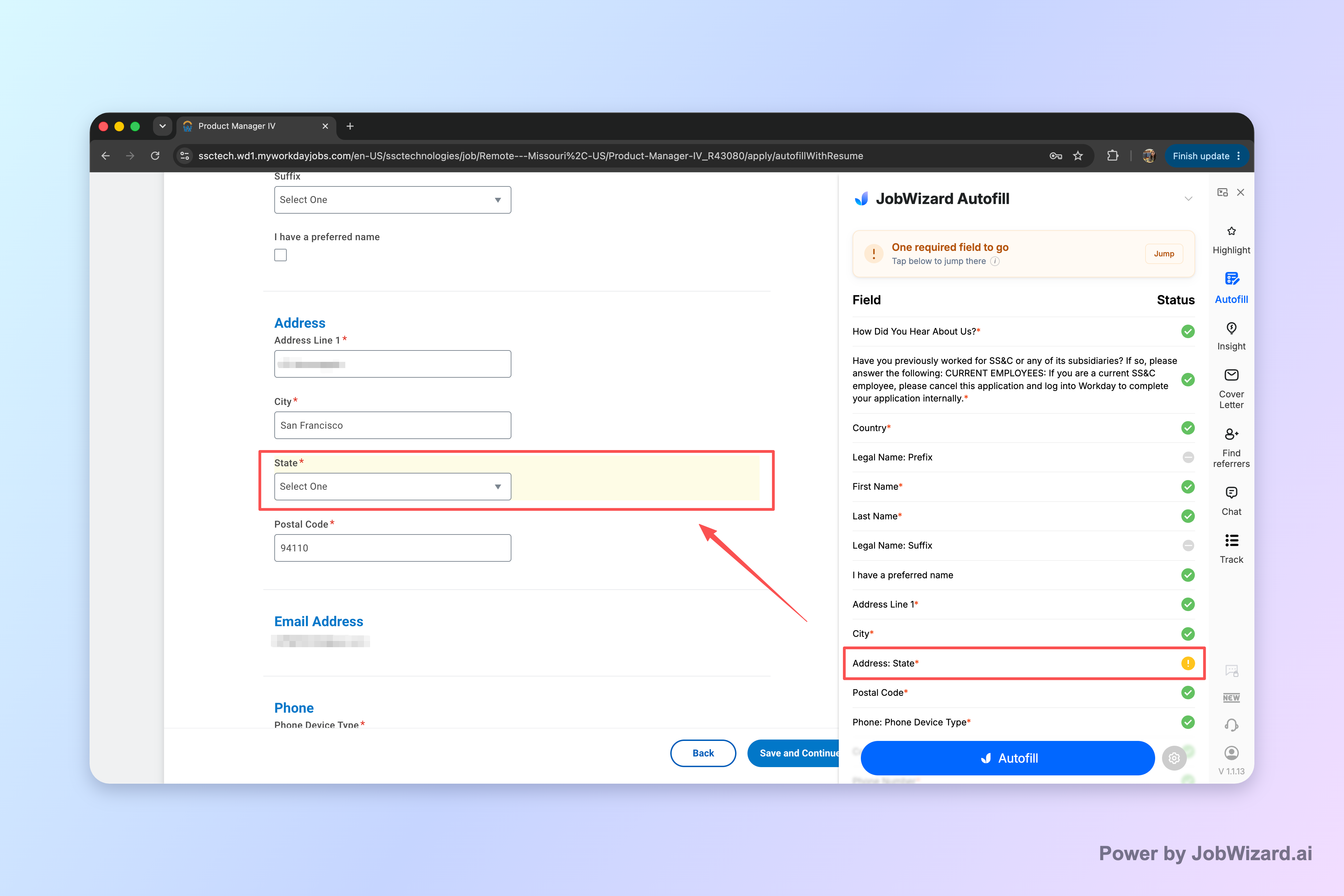
When you’re applying while waiting on “Workday status under consideration,” form friction can cost you time—especially when you repeat the same details across multiple roles. JobWizard Smart Autofill uses your saved profile and resume data to fill detected fields on supported application pages. If a required field still needs attention, JobWizard can identify it and let you jump directly to the matching question—then you review what was filled before submitting.
Key takeaway: Faster, reviewed completion can help you keep momentum while one application is still pending.
What happens after I submit—does autofill change my Workday “under consideration” status?
No tool can control the employer’s Workday workflow labels.
JobWizard helps with application completion by autofilling detected fields on supported application pages, but the user reviews the populated fields and submits the application themselves. The “under consideration” status comes from how the employer processes applicants after submission.
- JobWizard role: speed up repetitive form completion and help you find required fields that need attention.
- Your role: review every answer and submit yourself.
- Employer role: update Workday statuses based on their hiring process.
Key takeaway: Autofill can help you apply more consistently; only the employer updates the status.
How do I manage expectations with Workday “under consideration” without spiraling?
Use structure: check statuses on a cadence, track follow-ups, and keep applying until you have real next-step communication.
It’s easy to read too much into one label. Instead, treat “under consideration” as one data point. Your process should include pipeline activity (new applications), readiness (interview prep), and professional follow-up if time has passed.
- Pick a checking cadence: e.g., once or twice per week (not hourly).
- Track follow-ups: note dates so you don’t over-message.
- Apply in parallel: keep your search active so you’re not stuck on a single outcome.
- Stay ready: keep your talking points and availability updated.
Key takeaway: Calm your process with a plan—then focus on actions you can control.
Do this automatically with JobWizard
Skip the manual work — JobWizard's Application Tracker handles this for you. On these platforms: Workday autofill.
FAQ: Workday status under consideration
What does “Workday status under consideration” mean for my application?
“Under consideration” generally means your application has been reviewed enough to be considered by the hiring team, but a final decision isn’t posted yet. It’s a signal to keep monitoring while you prepare your next steps.
Does “under consideration” mean I’m likely to get an interview?
It usually suggests your application hasn’t been rejected yet, but it doesn’t guarantee an interview. Treat it as a positive sign, then keep pursuing other roles and be ready to respond quickly if contacted.
How long does Workday typically keep an application “under consideration”?
Workday doesn’t provide a universal timeline for this stage. Timelines vary by role and hiring process, so use “under consideration” as a status cue—not a promise of when the next step will happen.
Should I follow up when my status is “under consideration”?
If enough time has passed since your application or last update, a short, professional follow-up can be appropriate. Ask about timeline/next steps and reiterate interest, but avoid frequent messages.
What should I do while I wait on “under consideration”?
Continue applying to other roles, tailor your resume/cover letter for positions you’re targeting, and make sure your contact details and availability are current. If you’re applying elsewhere, using tools to autofill repetitive fields can help you move faster—then you review everything before submitting.
Can my status change from “under consideration” back to an earlier stage in Workday?
It can, depending on how the company manages its recruiting workflow. If you see a new status update, interpret it as the latest process signal and adjust your follow-up and application efforts accordingly.
Will a tool like JobWizard affect my Workday application status?
JobWizard helps you complete applications faster by autofilling detected fields on supported forms, but it does not submit applications automatically. Your status updates come from the employer’s Workday workflow after you submit and they process your candidacy.
Next steps: apply smarter while you monitor Workday
Don’t stall just because a status says “under consideration.” Keep your pipeline active and make each application easier to complete.
Try JobWizard’s Smart Autofill on your next Workday application to quickly fill repetitive fields from your saved profile and resume data—then review every answer before you submit. If a required field needs attention, JobWizard can identify it and help you jump to the matching question so you don’t miss anything.
Ready to move faster on applications? Install JobWizard and start using Smart Autofill for your next submission.
Frequently Asked Questions
Track all your applications in one place
JobWizard auto-tracks status changes across Workday, Greenhouse, and every major job site — free.