Under Consideration on Workday: What It Really Means and How to Follow Up
Seeing “under consideration” workday status is stressful—especially when you’re not sure what recruiters are doing. Here’s what it usually means and how to follow up without wasting time.
Free Chrome extension
Track all your applications in one place
JobWizard auto-tracks status changes across Workday, Greenhouse, and every major job site — free.
You submitted your application through Workday, and then you see it stuck on under consideration workday. A week later, you’re refreshing the portal anyway—wondering whether “under consideration” means they’re actively reviewing you or just holding your file.
In this guide, you’ll learn what under consideration workday commonly signals, what you should do (and what you shouldn’t), and how to follow up in a way that fits recruiter workflows—plus a simple system to track each step.

What does “under consideration” mean on Workday?
Under consideration on Workday usually means your application has moved past “just submitted” and is being reviewed for potential fit.
In practice, this status is often a “holding” state while the hiring team compares candidates internally. You may not get immediate updates, because review decisions, interview scheduling, and internal approvals often happen on schedules that don’t match the date you applied.
Key takeaway: Treat “under consideration” as “in the review loop,” not as confirmation you’ll be contacted soon.
What does “under consideration” vs “in process” mean on Workday?
Under consideration and in process both suggest movement, but they can represent different internal stages depending on the employer.
Some employers use “under consideration” as the broad label for candidate review, while “in process” may indicate a more active step (for example, interview coordination or a deeper screening stage). Because Workday is configured by each organization, the safest interpretation is: both mean you’re not at the “nothing is happening” stage—yet neither guarantees a specific outcome.
- Under consideration: often review/shortlisting stage while candidates are compared.
- In process: often indicates the workflow has moved to another step.
- Next step: watch for a status change plus any recruiter outreach.
Key takeaway: Use your next action to match the status category—review stage vs later workflow stage.
What does “under consideration” mean for a Workday application activity tracker?
An application activity tracker helps you stop guessing by connecting each role to the exact status you saw and what you did afterward.
JobWizard’s Activity view shows application status and which JobWizard tools were used for each role—so when you see under consideration workday, you can also see your last action (and date) instead of re-reading everything from scratch.
This matters because “under consideration” can last for different lengths of time depending on how quickly a company progresses candidates. A tracker turns that uncertainty into a clear follow-up timeline.
Key takeaway: Track status + your last action so follow-ups are consistent and never accidental or repetitive.
Why does Workday show “under consideration” but you haven’t heard back?
No reply after “under consideration” usually comes down to process timing—not necessarily a rejection.
Even when your application is in the review pipeline, delays happen: interview panels may be in meetings, approvals can take time, and roles are often filled by comparing multiple candidates before contacting anyone. Some companies also update Workday statuses in batches rather than instantly.
So instead of assuming silence means “they moved on,” assume it means “they haven’t made the next public move.” Your follow-up should be short, respectful, and tied to the role—not a demand for updates.
Key takeaway: Silence is data, but it’s not a verdict—follow up once, then wait.
Should you follow up if your Workday status is still “under consideration”?
You should follow up if the timing makes sense, but keep it controlled: one well-written note beats repeated pings.
When your status is “under consideration,” your goal isn’t to pressure the team. It’s to make it easy for them to recognize you and confirm interest—especially if they’re comparing candidates from similar backgrounds.
Use this rule of thumb:
- Wait for a reasonable review window: don’t follow up immediately after submission.
- Send one concise email: reference the role and confirm ongoing interest.
- Stop after the second attempt: if you don’t hear back, pivot to other applications and networking.
Key takeaway: Follow up once, make it easy to say “we’ll be in touch,” and then give them space.
Copy-paste follow-up email template (Workday “under consideration”)
Subject: Following up on [Role Title] application
Hi [Recruiter Name/Team],
I’m following up on my application for the [Role Title] role submitted on [Date]. I’m very interested in the position and believe my experience with [1 relevant skill/project] would be a strong match for your team.
If there’s any additional information I can provide to support my application, I’d be glad to share it. Thank you for your time and consideration.
Best regards,[Your Name][Phone] | [Email] | [LinkedIn/Portfolio]
Under consideration workday can feel like a black box—this template keeps your message aligned with what recruiters care about: clarity, fit, and next steps.
What Workday statuses commonly come after “under consideration”?
Statuses that come after under consideration typically indicate either progress toward interviews or a final disposition.
Because each employer configures Workday differently, the exact labels vary. But in general, you’ll see transitions toward:
- Interview-related states: when candidates are being scheduled or evaluated more directly.
- Final review outcomes: labels that indicate whether you move forward or were not selected.
- Rejection/closure states: wording like “not retained” or similar closing dispositions (the wording is employer-specific).
If you want a deeper breakdown for the same keyword family, use these guides next:
- Workday Status Under Consideration: What It Usually Means (and What to Do Next)
- Workday “Under Consideration” Meaning: What Recruiters Really See and What You Should Do Next
- Workday Says No Longer Under Consideration — What It Really Means
Key takeaway: Your next action depends on whether the status suggests “workflow progress” or “workflow closure.”
What does “no longer under consideration” mean on Workday?
No longer under consideration generally means your candidacy moved out of that review pipeline for this specific role.
This phrase can feel personal, but it often reflects workflow timing and internal decisions—sometimes even when candidates are redirected to different tracks. Still, treat it as a signal to adjust your job search plan immediately.
If you’re seeing this label, read the dedicated guide:
Key takeaway: When “under consideration” ends, switch strategies fast: re-apply only when it’s appropriate, and keep momentum.
How do you track Workday application updates without losing your place?
You track Workday updates best with a simple system that records status + date + next action for each role.
Here’s a practical way to do it:
- Create a single “application log”: one row per role, with the current status.
- Write down the last change date: “under consideration” is meaningful only when you know when it appeared.
- Record what you did: follow-up email date, referral sent date, or recruiter message date.
- Set a follow-up checkpoint: schedule one controlled follow-up (not daily refresh behavior).
If you want a full workflow, use the pillar page:
Key takeaway: Tracking prevents over-following—and it helps you know when to move on.
What should you do if a Workday application has missing required fields?
Missing required fields can slow down your submission—or lead to an incomplete application that doesn’t get reviewed properly.
JobWizard Smart Autofill can help you move faster through long application forms by filling detected fields using saved profile and resume data on supported application pages.
Important: autofill is not “automatic submission.” You review the populated fields and submit yourself. And if a required field still needs attention, JobWizard can identify it and let you jump to the matching question.
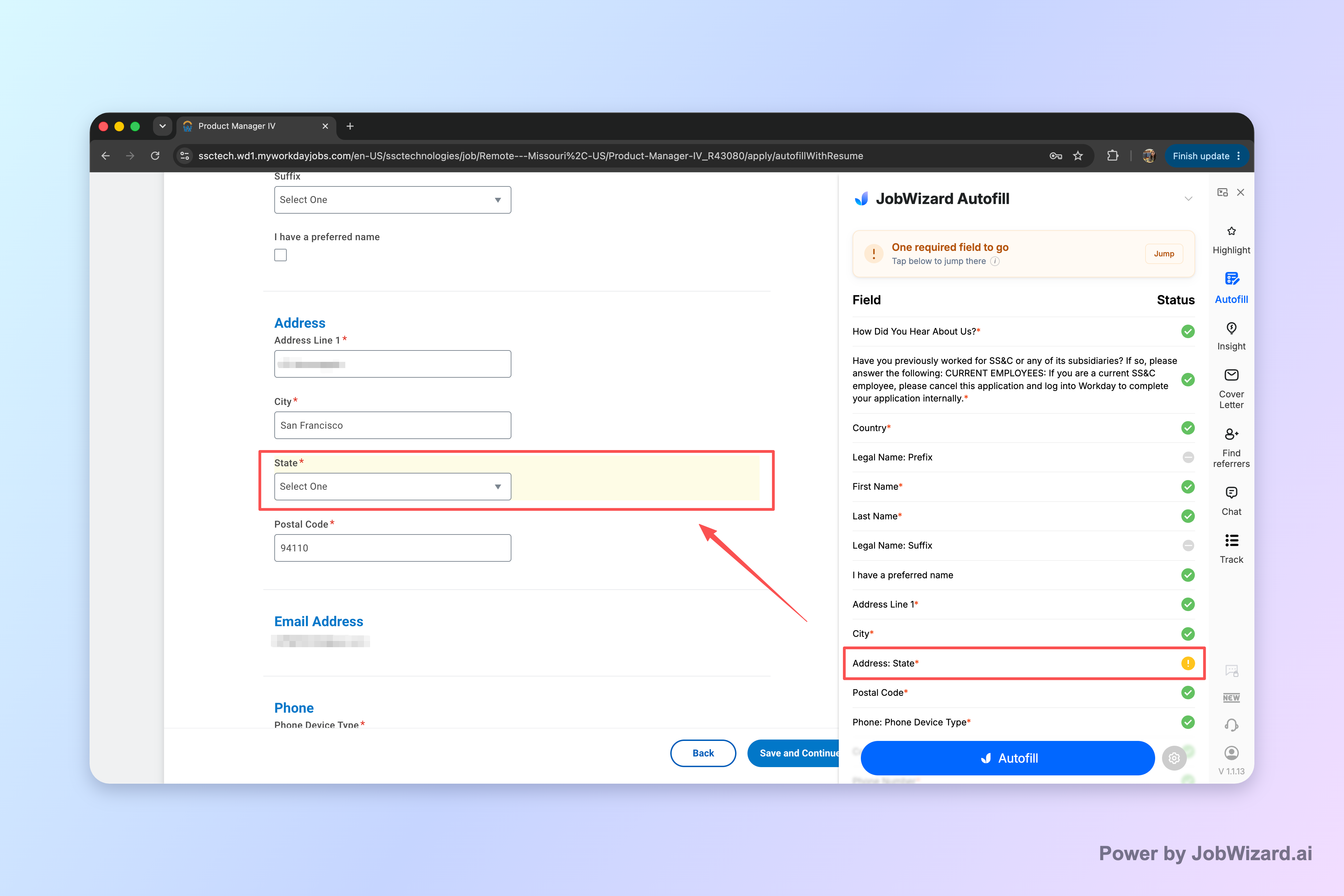
Key takeaway: Use autofill to reduce typing, then review every answer before you submit.
Is JobWizard helpful for Workday roles when your status is “under consideration”?
Yes—because it supports both the application activity side (tracking where you are) and the “filled forms” side (reducing avoidable form friction).
JobWizard has processed 720,000+ applications submitted and 600,000+ autofill sessions run through the tool. Across those submissions, JobWizard autofills an average of ~18 repetitive fields per application (typically 11–23). About 65% of applications submitted through JobWizard are on Workday, where it saves the most time.
Remember: JobWizard is positioned as autofill + review-before-submit, not blind auto-apply. The user reviews sponsorship/salary/EEO/custom questions and any other items that still need attention before sending the application.
Key takeaway: Pair a status tracker with review-before-submit autofill so “under consideration workday” is less stressful and more actionable.
Under consideration workday: meaning-to-action cheat sheet
Use this mapping to decide what to do next the moment you see the status.
| What you see (Workday status) | Most likely meaning | Recommended action |
|---|---|---|
| Under consideration | Application is in the review/shortlisting loop | Wait a reasonable window, then send one short follow-up if you haven’t heard back |
| In process | Process has moved deeper into evaluation or workflow steps | Continue tracking; don’t spam. Follow up only if a defined checkpoint passes |
| No longer under consideration | Candidacy moved out of that active review pipeline | Shift focus to other roles; consider tailoring a new application only when it’s appropriate |
| Not retained (if shown) | Often indicates a final disposition for this posting | Stop repeating follow-ups for that specific role; keep applying and network strategically |
Key takeaway: Status words help, but your action should be consistent: track, follow up once, and then move with purpose.
Do this automatically with JobWizard
Skip the manual work — JobWizard's Application Tracker handles this for you. On these platforms: Workday autofill.
FAQ about “under consideration workday”
What does “under consideration” mean on Workday?
“Under consideration” on Workday typically means your application has moved past the initial submission step and is being reviewed for fit. It’s often a holding stage while the team compares candidates; you may not see changes until the next internal step (like interviews or a final disposition).
How long should I wait after a Workday status shows “under consideration”?
There’s no single correct timeline. As a practical rule, wait long enough for the review process to complete, then follow up once with a short, professional note. If the listing gives specific timing (“reviewing applications on a rolling basis”), follow that cue rather than guessing based on your application date.
If my Workday status stays “under consideration,” should I apply again or submit a referral?
If the role allows it, submitting a targeted referral or sending a concise message can help—without spamming. “Under consideration” usually doesn’t mean you’re guaranteed an outcome, so the best move is to strengthen your match (resume tailoring, a relevant project example) and consider whether another application is appropriate for the same posting or a closely related open role.
What should I write in a follow-up email when the Workday status is “under consideration”?
Keep it brief: reference the role, confirm you remain interested, and add one concrete detail (a metric, project, or skill) that aligns with the job. End with a polite question about next steps. Avoid asking for special treatment—aim for clarity and continued consideration.
Can I track applications in JobWizard when the status is “under consideration” on Workday?
Yes. JobWizard’s Activity view shows application status and what JobWizard tools were used for each role, so you can keep a simple, consistent record of where each application stands and what you did next.
What if the Workday status changes from “under consideration” to something else—does it mean I was rejected?
Not necessarily. Workday statuses can vary by employer workflow. If you see a clear change like “not retained” or another final disposition label, that’s usually a stronger signal. If it changes into a different in-progress stage, it may simply mean the process moved to a new internal step.
How can Smart Autofill help me avoid missing required fields when applying to Workday roles?
JobWizard Smart Autofill fills detected fields using saved profile and resume data on supported application pages. After autofill, you still review what was populated and submit yourself; if a required field still needs attention, JobWizard can identify it and let you jump directly to the matching question.
Ready to make “under consideration workday” less stressful?
If you want fewer missed form steps and less status guessing, try JobWizard: use Smart Autofill for review-before-submit applications and keep every role’s next step in one Activity view.
Start using JobWizard today and track your next Workday application from submit to follow-up.
Frequently Asked Questions
Track all your applications in one place
JobWizard auto-tracks status changes across Workday, Greenhouse, and every major job site — free.