Workday Application Status Meanings: What Each Update Really Means
Learn workday application status meanings so you can interpret every recruiter update, reduce uncertainty, and time your follow-ups with confidence.
Free Chrome extension
Track all your applications in one place
JobWizard auto-tracks status changes across Workday, Greenhouse, and every major job site — free.
Workday application status meanings: why the wording matters
If you’ve ever stared at your Workday portal wondering what your update actually means—“Received,” “Under Review,” “In Progress,” “Interview,” or even “Rejected”—you’re not alone. Workday application status meanings can feel inconsistent because different employers configure Workday stages differently.
The good news: most Workday updates map to the same broad hiring stages. If you can interpret where you are in that pipeline, you can (1) manage expectations, (2) follow up at the right time, and (3) avoid chasing the wrong signals.
How to read Workday statuses (the fast framework)
Instead of memorizing one employer’s exact labels, use this framework. Every Workday stage usually belongs to one of these buckets:
- Submission confirmed: Workday acknowledges you applied.
- Early screening: Recruiters or automation checks your fit and completeness.
- Hiring committee review: Relevant teams evaluate qualifications and experience.
- Interview process: Scheduling, rounds, and panel reviews.
- Decision stage: Offer, hold, or rejection.
Then, match the words you see to the closest bucket. Below are the most common Workday application status meanings you’ll run into.
Common Workday application status meanings (by stage)
| What you see in Workday | Likely meaning | What to do next |
|---|---|---|
| Received / Application Received | Your application was successfully submitted and entered the system. | Wait. Only follow up if it’s been an extended period with no movement. |
| Submitted | Submission is confirmed, but review hasn’t necessarily started yet. | Maintain your job search. Keep an eye on email/portal notifications. |
| Under Review / In Review | A recruiter or hiring team is evaluating your application. | Be ready to respond quickly if contacted. Continue applying to other roles. |
| Recruiter Review / Hiring Team Review | Human review is happening—often with more role-specific screening. | Tailor your resume/cover letter for the role if you have a strong reason to adjust. |
| Application in Progress / In Progress | Workday considers your file active in the process (screening or coordination). | Follow up based on your timeline (commonly 7–14 days after meaningful changes). |
| Shortlisted / Shortlisted Candidate | You made it past initial screening and are likely being considered for interviews. | Prepare interview answers and update availability. Respond fast to scheduling requests. |
| Assessment / Online Assessment / Test | You’ve been asked to complete a skills screen (coding, case study, questionnaires, etc.). | Complete promptly. Treat it like part of the interview, not a checkbox. |
| Interview / Scheduling / Interview Scheduled | The process has moved forward and dates are being coordinated. | Confirm times, review the job description, and prep for common interview themes. |
| Final Interview / Panel Interview | You’re in deeper evaluation—often involving leaders or multiple interviewers. | Focus on impact stories, leadership/communication, and role-aligned examples. |
| Offer / Offer Extended | The employer is making (or has made) a job offer decision. | Follow employer instructions, review details carefully, and respond professionally. |
| On Hold | The employer paused consideration (budget, prioritization, internal approvals, or re-org). | Keep applying. If appropriate, send a short, polite check-in after a reasonable window. |
| Rejected / Not Selected | The employer decided not to move forward for that role. | Update your approach (resume, targeting, messaging). Keep applying—don’t stop. |
Important: Workday is configured by the employer, so the exact labels can vary. Treat these as the most common Workday application status meanings and use the “stage bucket” approach.
Why Workday wording differs between companies
Even when two employers both use Workday, their hiring workflow can look different. Common reasons:
- Custom stage naming: One company may call it “In Progress,” another “Recruiter Review.”
- Different decision points: Some roles include assessments earlier or later.
- Multiple pipelines: A single Workday account can show statuses across many roles and recruiting teams.
- Notification delays: Your portal might update after internal approvals or after someone updates the record.
That’s why the best interpretation isn’t “what does this word mean in general?” but rather “what hiring phase does this word most resemble?”
What to do when your status doesn’t change
Stagnation is common. Recruiting teams may review in batches, coordinate interview panels, or pause due to approvals. If your Workday status stays the same, you can still act intelligently.
Follow-up timing: a practical rule of thumb
Use a simple schedule based on the stage:
- After “Received/Submitted”: wait at least 7–10 business days before a short, polite follow-up.
- After “Under Review”: if no updates appear after 2–3 weeks, send a targeted check-in.
- After “Assessment”: allow a few business days for scoring and coordination. Then follow up if you haven’t heard anything.
- After “Interview scheduled”: follow employer instructions; if changes occur, the recruiting team will usually coordinate.
What to say in a follow-up (keep it role-specific)
Recruiters respond best to messages that are:
- Short
- Professional
- Relevant (mention the role title and one concrete fit point)
- Actionable (ask about next steps or timing)
You’re not asking for a guaranteed outcome—you’re helping them move forward with clarity.
How to track Workday application status meanings so you don’t lose momentum
One reason people misread Workday updates is they don’t track the “before and after.” If you apply to multiple jobs across different platforms, the timeline matters.
A simple tracking system should include:
- Company + role title
- Date submitted
- Status text you saw (copy it)
- Date of status change
- Any recruiter emails or next steps
If you’re applying frequently, an application tracker can reduce manual work and help you plan follow-ups. For example, JobWizard Track stores application details like company, role, match percentage, and when you last autofilled—then you can organize what to do next.
Where JobWizard fits in (without submitting for you)
Workday status meaning questions usually start after you’ve applied and are waiting. JobWizard helps you spend less time on the “apply” step so you can focus on what comes after.
- JobWizard is a FREE Chrome extension for job application autofill.
- It works on Workday plus many other platforms (including Greenhouse, iCIMS, Lever, Ashby, SmartRecruiters, Taleo, and 500+ platforms).
- It does NOT auto-apply or submit without user review. Every application is reviewed by you before submitting.
- Plans include a 10 applications/day free plan (Pro available for more capacity).
When your application status changes, you’ll be more prepared to interpret it—because you’ll already have your materials and records in order.
Stop refreshing the portal: keep every application in one view
Checking each employer's Workday portal every day gets old fast. JobWizard's Activity view shows the status of each application and which JobWizard tools you used for that role, so your follow-ups live in one place instead of a dozen portal tabs. It won't catch every status change automatically — employers control what Workday exposes — but it keeps what you know organized.
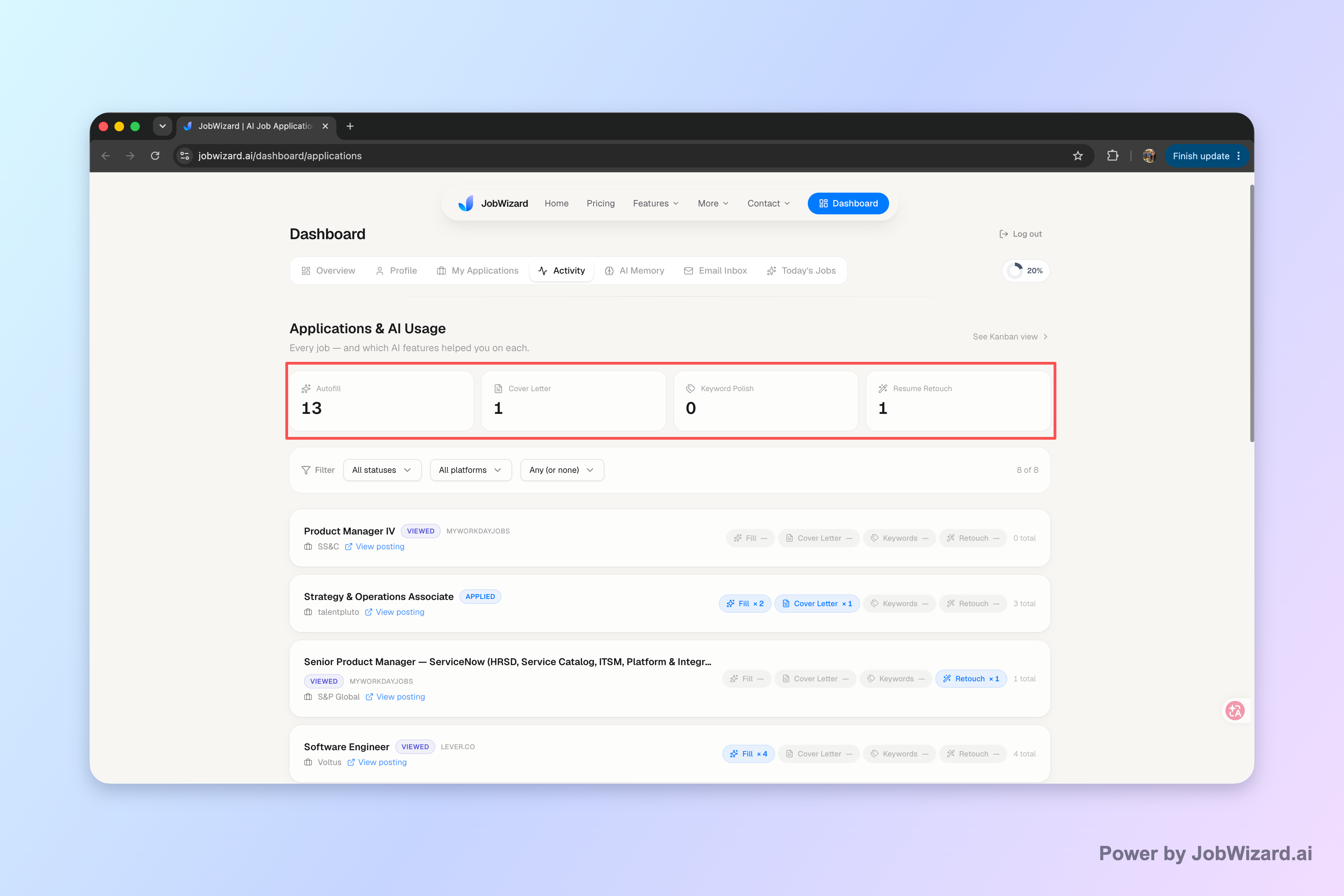
If you're juggling more than a handful of applications, keep each application and its next step in one activity view.
Do this automatically with JobWizard
Skip the manual work — JobWizard's Smart Autofill handles this for you. On these platforms: Workday autofill.
FAQ: Workday application status meanings
What does “Received” or “Application Received” mean in Workday?
Usually it means your application has been successfully submitted and entered into the hiring system. It’s a confirmation, not a hiring decision—next steps depend on whether recruiters shortlist you.
If my Workday status says “Under Review,” does that mean I’m being considered?
Yes—typically “Under Review” means a recruiter or hiring team is evaluating your application (often against the role requirements). You may hear nothing for a while while reviews happen.
What does “In Progress,” “In Review,” or “Recruiter Review” indicate on Workday?
These variations generally mean your application is still in the evaluation stage. The exact wording can differ by employer, but the common theme is that the team is assessing fit, qualifications, and screening responses.
What does “Interview” or “Scheduling” mean on Workday?
It usually indicates the employer has decided to move you forward to interviews and is coordinating times. Watch for email/notifications from the recruiting team, and be ready to confirm availability quickly.
Does a “Rejected” or “Not Selected” status on Workday mean the job is closed to me permanently?
Generally, yes for that specific role: the employer has decided not to move forward with your application. However, the company may still consider you for other openings—so it’s worth monitoring similar roles and updating your profile or resume when appropriate.
How can I track Workday application status meanings and avoid missing updates?
Use a consistent tracking method: log the company, role, date submitted, and the status shown in Workday. Tools that auto-record key details and help you plan follow-ups can reduce manual work—especially when you apply across many platforms.
Next step: put your follow-ups on a timeline
Once you understand the workday application status meanings behind common labels, the waiting becomes more manageable. Your goal isn’t to interpret every word perfectly—it’s to figure out which hiring stage you’re in and then take the right action at the right time.
If you want to apply more efficiently across Workday and other portals, explore how autofill can save hours per week, or compare approaches in why autofill beats auto-apply. And when you’re ready to refine materials after you see how your applications perform, you can use AI cover letter help to match each role more closely.
Frequently Asked Questions
Track all your applications in one place
JobWizard auto-tracks status changes across Workday, Greenhouse, and every major job site — free.