AI Cover Letter Generator: Write a Tailored Cover Letter in 30 Seconds
Stop switching tabs between your application form and ChatGPT. JobWizard generates a tailored cover letter in a sidebar next to the form — based on the actual job description. Edit tone, adjust length, submit.
Free Chrome extension
Generate this cover letter automatically
JobWizard drafts a tailored letter from your resume and the job description in seconds — free.
The Cover Letter Problem (That ChatGPT Made Worse)
Before AI tools existed, cover letters were painful because writing was slow. Now they're painful for a different reason: the workflow is broken.
The current process most job seekers use:
- Open the job application form in one tab
- Open ChatGPT in another tab
- Copy the job description from tab 1 to tab 2
- Prompt ChatGPT for a cover letter
- Copy the output from tab 2 back to tab 1
- Repeat for the next application
It's faster than writing from scratch — but it's still 5–10 minutes of tab-switching, copy-pasting, and context-switching for every single application. Across 50 applications, that's 4–8 hours of mechanical busywork.
There's a better way. JobWizard generates a tailored cover letter in a sidebar directly next to the application form — based on the actual job description you're looking at — with no tab switching required.
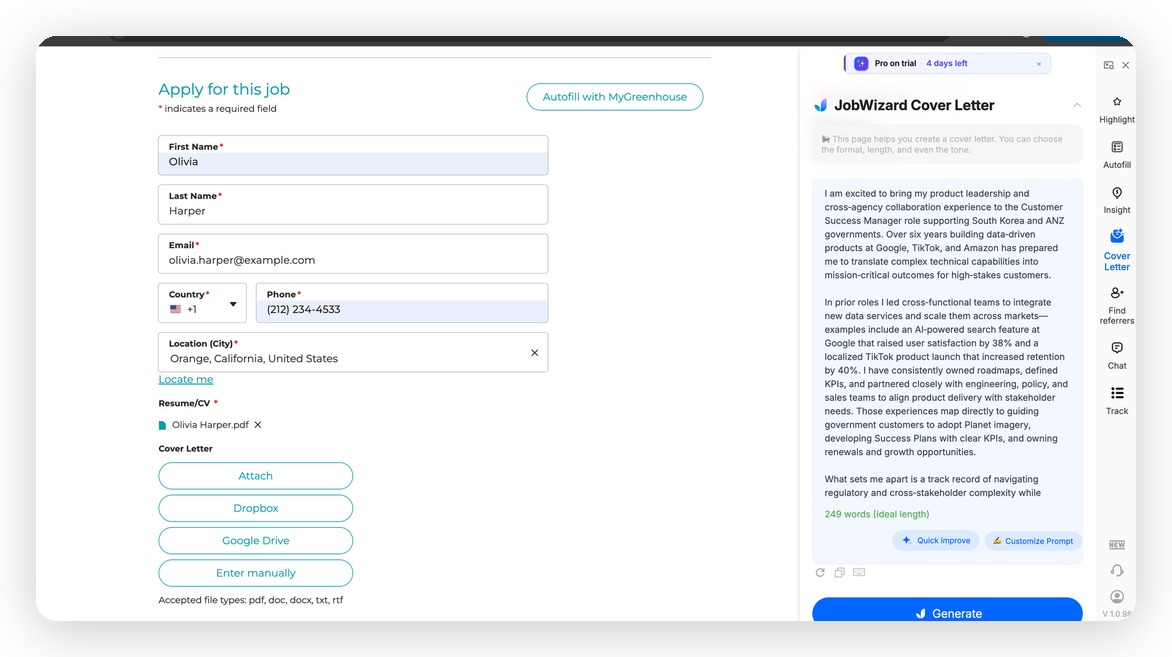
JobWizard Cover Letter panel: generates a tailored cover letter in a sidebar next to the application form, based on the actual job description.
What a Good AI Cover Letter Actually Does
Before getting into how it works, it's worth being clear on what a cover letter is supposed to accomplish — because most AI-generated cover letters fail at this even when they're grammatically perfect.
A cover letter that gets read does three things:
- Shows you read the job description. References specific requirements, team context, or company priorities from the actual JD — not generic language about being "hardworking" and "passionate."
- Connects your specific experience to the role. Draws a line from something concrete in your work history to something specific the company needs. Not "I have 5 years of experience" — "I led the migration you're describing in your requirements, here's the outcome."
- Matches the company's tone. A cover letter for a Series A startup should feel different from one for a Fortune 500 company. Tone matters.
Generic AI cover letters fail on #1 and often #2. They produce professional-sounding text that says nothing specific. JobWizard's cover letter generator is built specifically to avoid this — by working from the actual JD in front of you, not a prompt you typed from memory.
How JobWizard's AI Cover Letter Generator Works
Step 1: Open any job application
Navigate to a job posting and click Apply. You land on the actual application form — Workday, Greenhouse, iCIMS, Lever, or any other ATS platform. JobWizard's sidebar opens automatically.
Step 2: Autofill the form fields
Click autofill. JobWizard fills the standard form fields from your resume — contact info, work history, education — in seconds. You do a 60-second review.
Step 3: Generate a cover letter for this specific role
In the sidebar, click Generate Cover Letter. JobWizard reads the job description on the page you're on and your profile simultaneously, then writes a cover letter that:
- Opens with a specific reference to the role or company
- Connects 1–2 concrete experiences from your history to the JD's requirements
- Closes with a clear CTA and your contact information
This takes about 10–15 seconds.
Step 4: Adjust tone and length
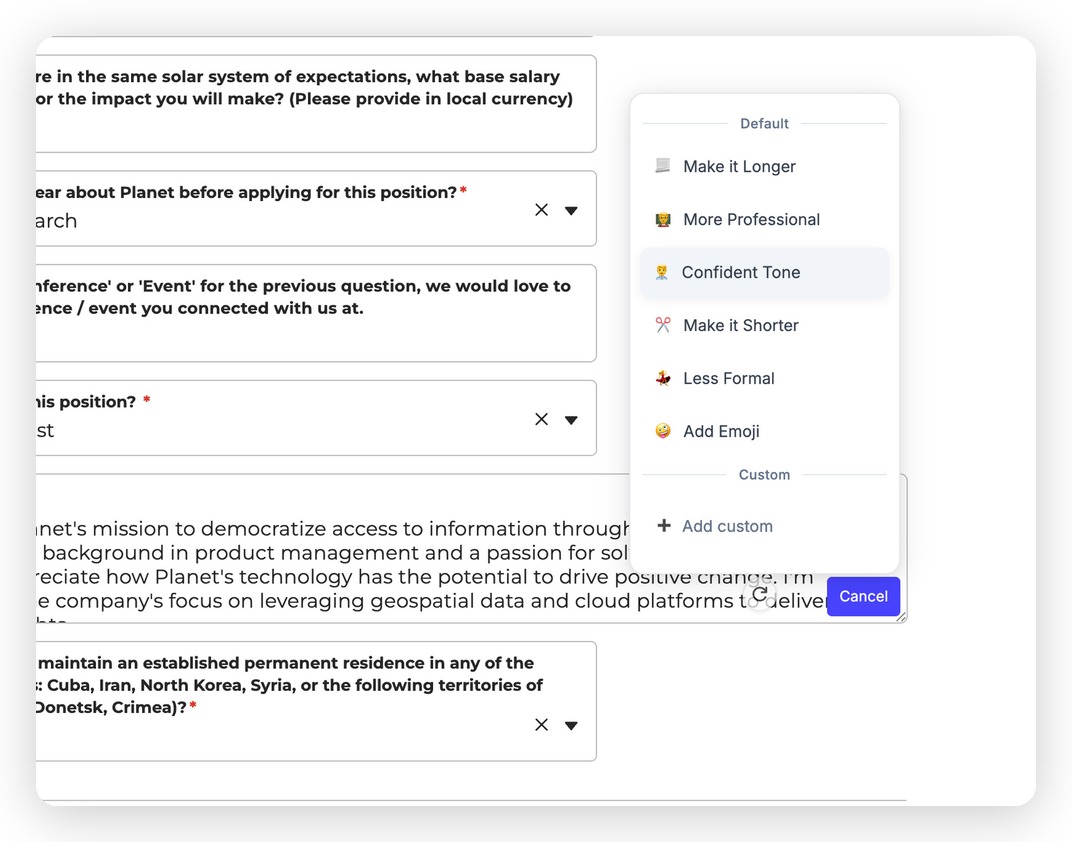
Tone controls: one-click options to adjust tone and length, plus a Custom Prompt field for specific instructions.
If the default output isn't quite right, use the controls in the sidebar:
- Tone: Formal (enterprise, regulated industries), Casual (startups, creative), Enthusiastic (consumer, mission-driven companies)
- Length: Brief (3 short paragraphs), Standard (4–5 paragraphs), Detailed (full-page with more context)
One click regenerates with the new settings. No re-prompting. No copy-pasting.
Step 5: Edit inline in the sidebar
The generated cover letter is editable directly in the sidebar. You can adjust specific sentences, add a personal detail, or change the opening line — without leaving the application form or opening a separate editor. Your changes are preserved; closing and reopening the sidebar doesn't reset them.
Step 6: Copy to the application
Once you're satisfied, copy the cover letter text into the application's cover letter field with one click. Done.
JobWizard vs. ChatGPT for Cover Letters: A Real Comparison
| JobWizard | ChatGPT (manual) | |
|---|---|---|
| Reads the actual JD automatically | Yes — from the page you're on | No — you paste it manually |
| Knows your full work history | Yes — from your profile | Only if you paste it in the prompt |
| Tab switching required | No — sidebar stays next to the form | Yes — constant switching |
| Context persists across applications | Yes — profile stays loaded | No — each session starts fresh |
| Tone / length controls | Yes — one-click adjustments | Manual re-prompting |
| Inline editing | Yes — directly in sidebar | In ChatGPT, then copy back |
| Time per cover letter | ~30–60 seconds | 5–10 minutes |
| Cost | Free (10 applications/day) | Free or $20/month (ChatGPT Plus) |
The time difference is significant at scale. But the quality difference matters more: ChatGPT doesn't know the specific job description unless you paste it, and doesn't know your resume unless you paste that too. JobWizard has both, automatically, every time.
What Makes a Cover Letter Worth Reading in 2026
With AI cover letters now common, recruiters have gotten better at spotting the generic ones. The ones that stand out share the same characteristics:
1. Specificity about the role
"I'm excited to apply for this role" — skip. "The platform reliability challenges you described in the JD are exactly what I worked on at [Company]" — reads. The specificity signals you actually read the posting.
2. One concrete achievement that maps to a requirement
Pick the one most relevant thing you've done and connect it directly to the JD. Don't summarize your resume — the recruiter has it. Give them one concrete reason why you're the right fit for this specific problem.
3. Short
Most cover letters are too long. Three solid paragraphs beat five mediocre ones. If you're using the Brief setting and the content is strong, don't add length for the sake of it.
4. Matched tone
Read the job posting language before you generate. If the posting is informal and uses "you" language, the Casual tone setting will produce a better result than Formal. If it's a highly structured enterprise role, Formal matches the context.
ATS and Cover Letters: Does Anyone Actually Read Them?
Short answer: it depends on the company and role.
At high-volume companies using aggressive ATS filtering, cover letters are often not read until the screener has already passed you through. At smaller companies and startups, cover letters are read more frequently — especially for roles where writing quality is relevant (marketing, product, operations, CS).
The practical implication: for roles where you're a strong candidate, a good cover letter can reinforce the decision. For roles where you're a borderline candidate, a specific, well-written cover letter can make the difference. It's rarely the only thing, but it's rarely irrelevant either.
With AI cover letter generation taking 30 seconds, the cost of including one is now low enough that the expected value is almost always positive.
Related: AI Application Assistant — Fill Out Job Applications 5x Faster
Do this automatically with JobWizard
Skip the manual work — JobWizard's AI Cover Letters handles this for you.
Frequently Asked Questions
Can AI write a cover letter based on the actual job description?
Yes. JobWizard reads the job description on the page you're applying to and writes a cover letter based on it — not a generic template. It also knows your full work history from your resume profile, so it can connect specific experiences to the JD's requirements. You can adjust tone, adjust length, and edit inline in the sidebar.
Is JobWizard's AI cover letter generator free?
Yes. JobWizard's free plan includes cover letter generation for up to 10 applications per day, along with autofill, application tracking, and all core features. Install free from the Chrome Web Store.
What's the difference between using ChatGPT and JobWizard for cover letters?
ChatGPT requires you to manually paste the job description and your resume into the prompt, then switch tabs to copy the output back into the form. JobWizard reads both automatically — the JD from the page you're on and your work history from your stored profile — and generates the cover letter in a sidebar directly next to the application form. No tab switching, no manual pasting, and your profile persists across every application.
How do I make an AI cover letter not sound generic?
The key is specificity: the AI needs to read the actual job description (not a generic prompt) and know your actual work history. JobWizard does both automatically. After generating, review the opening paragraph — if it could apply to any job, regenerate or edit it to reference something specific to this role or company. The Brief length setting also helps — it forces specificity over filler.
Should I include a cover letter if it's optional?
Generally yes, especially if writing quality is relevant to the role or you're applying to a smaller company. With AI generation taking 30 seconds, the cost is low enough that the expected value is almost always positive. Skip it only if the application explicitly says it won't be read, or if you're doing extremely high-volume applications and can't review each one.
Does JobWizard's cover letter work on Workday applications?
Yes. JobWizard works across Workday, Greenhouse, iCIMS, Lever, Ashby, and 500+ ATS platforms. The cover letter sidebar appears on any job application page where JobWizard's autofill is active. You generate the letter in the sidebar and paste it into the cover letter field with one click.
Write Cover Letters on Any Platform
JobWizard generates cover letters directly inside the application form — on every major platform:
- Workday Job Application Autofill
- Greenhouse Job Application Autofill
- Lever Job Application Autofill
- AI Job Application Autofill — Full Guide
30 Seconds Per Cover Letter — Every Application
A tailored cover letter used to require 10–15 minutes of writing, or 5–10 minutes of prompting ChatGPT across multiple tabs. With JobWizard, it's 30 seconds — and the output is better because it's based on the actual JD and your actual work history, not whatever you remembered to paste into a prompt.
Install JobWizard free, upload your resume once, and generate your first cover letter on the next application you open.
Read next: How to Autofill Job Applications in 2026 — Save 10 Hours Per Week
Generate this cover letter automatically
JobWizard drafts a tailored letter from your resume and the job description in seconds — free.