AI Application Assistant for Job Applications: Autofill, Review, Submit
An AI application assistant should help with repetitive fields and custom questions while keeping the applicant in control of review and submission.
Free Chrome extension
Autofill your next job application
JobWizard is a free Chrome extension that fills applications, tracks statuses, and optimizes your resume.
What Is an AI Application Assistant — and What Should It Actually Do?
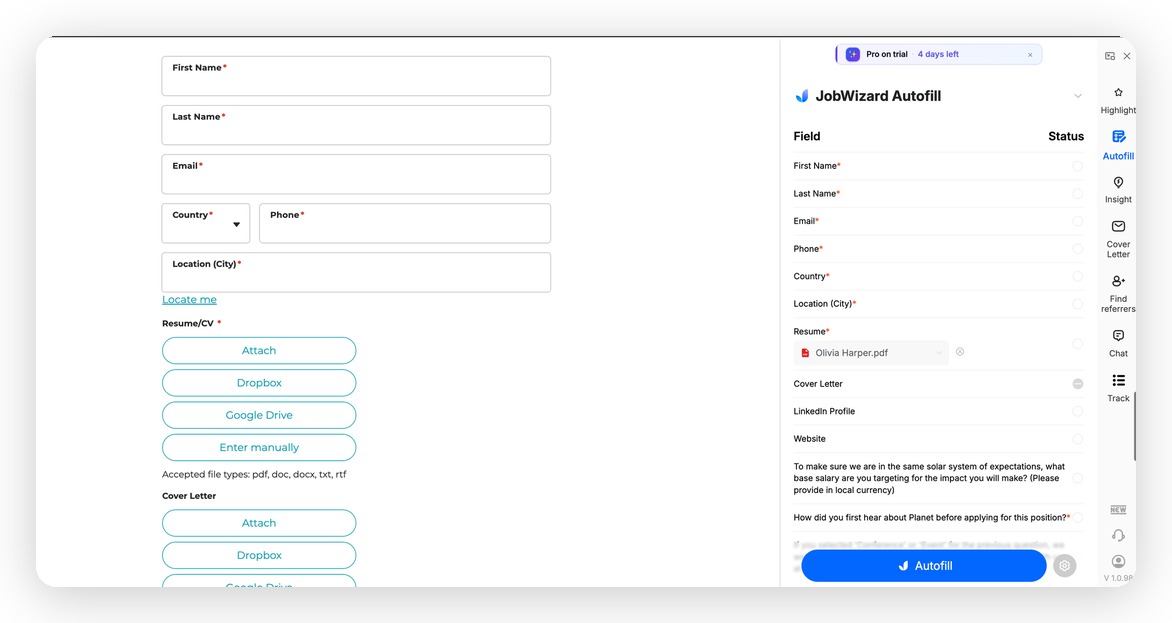
The Autofill tab maps your resume data to every form field. Click Autofill to fill the entire application in one click.
If you've searched for an "AI application assistant," you probably want the same thing: a tool that sees the job application form in front of you and fills it out, so you don't have to copy-paste the same information 40 times across 40 different company portals.
That's exactly what JobWizard does. It's a Chrome extension that works as your AI application assistant — detecting form fields on job sites like Workday, Greenhouse, iCIMS, Lever, Ashby, and 500+ more, then auto-filling them from your resume so you can review and submit in minutes instead of an hour.
The important distinction: JobWizard is an autofill tool, not an auto-apply bot. Every application still goes through you. You review the fields, adjust anything role-specific, and click Submit. The difference is you're spending 3 minutes instead of 45.
The Real Problem: It's Not the Resume — It's the Forms
Most job seekers spend weeks perfecting their resume. Then they open a Workday portal and spend 45 minutes re-entering every piece of information that's already on it.
It's the same 20 questions on every portal:
- First name, last name, email, phone
- Current company, job title, start date, end date
- Education, degree, institution, graduation year
- Work authorization, visa status, LinkedIn URL
- "How did you hear about us?"
An AI application assistant solves this by reading your resume once and filling all those fields automatically — across every platform — every time you apply.
The math: If you apply to 50 jobs and each form takes 30 minutes manually, that's 25 hours of copy-pasting. With autofill, it's under 3 hours — and you can spend the time you save tailoring your answers and cover letters.
How JobWizard Works as Your AI Application Assistant
Here's the exact flow, from install to submitted application:
Step 1: Install JobWizard and upload your resume
Install the JobWizard Chrome extension and upload your resume (PDF or Word). JobWizard parses your resume once and stores your profile — work history, education, skills, contact info. You don't touch this again unless you update your resume.
- Free to install and use
- Works in Chrome on any job site
- Your resume data stays in your profile, ready to use on every application
Step 2: Open any job application form
Navigate to a job posting — on Workday, Greenhouse, iCIMS, Lever, Ashby, SmartRecruiters, or any of 500+ supported platforms. When you click "Apply," JobWizard's sidebar opens automatically alongside the form.
You can see both the application and JobWizard's controls at the same time. No switching tabs. No losing your place in the form.
Step 3: Click autofill — review in 60 seconds
Trigger autofill with one click. JobWizard maps your resume data to the form fields and fills them in. For most standard applications, 80-90% of the fields are filled correctly in seconds.
Your 60-second review checklist:
- Contact info: confirm email and phone are correct
- Work history dates: check start/end months and years
- Job titles: adjust if your resume title differs from what the form expects
- Role-specific questions: fill in any custom text fields about why you want this role
Step 4: Generate a cover letter in the sidebar (optional)
If the application asks for a cover letter, JobWizard generates one in the sidebar — tailored to the specific job description. You can adjust the tone (formal, casual, enthusiastic) and length (brief, standard, detailed), then edit it directly in the sidebar without switching to another app.
This is different from pasting a generic template. JobWizard reads the actual JD you're applying to and writes a cover letter that references the role, company, and requirements.
Step 5: Submit — done
Review, submit. Move to the next application. JobWizard tracks each application you submit automatically, so you always know what's in progress, what's been reviewed, and what needs follow-up.
Which Job Platforms Does It Work On?
JobWizard is built to work across the platforms where most jobs actually live:
- Workday — the most common enterprise ATS. JobWizard handles Workday's multi-step forms, dropdown fields, and work authorization questions.
- Greenhouse — standard structured forms. Autofill covers name, contact, experience, and education blocks.
- iCIMS — known for long, repetitive forms. JobWizard fills the repeated resume sections automatically.
- Lever — cleaner forms, but still benefits from autofill on contact and experience fields.
- Ashby — used by many YC-backed startups. JobWizard handles Ashby's structured question sets.
- SmartRecruiters, Taleo, BambooHR, Jobvite, Breezy HR — all supported.
- 500+ other platforms — JobWizard's field detection works on most ATS-based application forms even when they're not on the main list.
AI Application Assistant vs. Using ChatGPT for Job Applications
A lot of job seekers try to use ChatGPT as their "AI application assistant" — pasting the JD into ChatGPT, asking it to write answers, then copying answers back into the form. Here's why that workflow breaks down:
- Tab switching: you're constantly moving between the form, ChatGPT, and your resume. Each switch costs time and attention.
- Form fields don't get filled: ChatGPT can write you a cover letter but can't touch the actual form. You're still typing everything manually.
- Context is lost: each ChatGPT session starts fresh. It doesn't know your full work history, your preferred format, or what you've already applied to.
JobWizard is purpose-built for this task. It lives in your browser, reads the form in real-time, fills the fields automatically, and keeps your profile persistent across every application.
For more on this topic: Why You Should Use Autofill Over Auto Apply
What About Auto-Apply Tools — Are They the Same Thing?
No. Auto-apply tools submit applications entirely without you. You set some filters and let the bot apply to hundreds of jobs while you're offline. This sounds appealing, but it comes with serious downsides:
- Answers to custom questions are generic or wrong
- No control over which companies get your application
- Many job boards detect and flag automated submissions — and can suspend your account
- Response rates on auto-apply applications are significantly lower because the quality shows
JobWizard is not an auto-apply tool. You stay in the loop on every application. You review what was filled, adjust what needs adjusting, and submit when you're ready. The time savings come from autofill, not from removing yourself from the process.
Related: How to Replace LazyApply with Auto-Apply That Won't Get You Banned
Finding LinkedIn Referrals While You Apply
One feature that makes JobWizard unique as an AI application assistant: the built-in LinkedIn Referral Finder.
When you're on a job posting, JobWizard can surface second-degree LinkedIn connections at the target company — people who might be willing to refer you before you apply. Referred candidates are 3-4x more likely to get an interview.
Most autofill tools stop at filling the form. JobWizard also helps you get your foot in the door before you fill anything.
Do this automatically with JobWizard
Skip the manual work — JobWizard's Smart Autofill handles this for you.
FAQs About AI Application Assistants
Can an AI assistant actually fill out job applications for me?
Yes — JobWizard reads your resume and fills out the form fields automatically on Workday, Greenhouse, iCIMS, and 500+ other platforms. You review the filled fields and submit. The AI does the copy-pasting; you do the judgment calls on role-specific questions.
Is JobWizard free to use as an AI application assistant?
Yes, JobWizard is free to install and use. Add it to Chrome from the Chrome Web Store and start autofilling applications immediately.
What's the difference between an AI application assistant and an auto-apply bot?
An AI application assistant like JobWizard autofills forms for you to review and submit. An auto-apply bot submits applications without your involvement. Auto-apply tools often result in lower response rates, generic answers, and in some cases account flags from job boards. JobWizard keeps you in control of every submission.
Does JobWizard work on company career sites (not just job boards)?
Yes. JobWizard works on company-hosted career portals that run on Workday, Greenhouse, iCIMS, Lever, Ashby, and other common ATS platforms — including direct company sites like those ending in .myworkdayjobs.com or jobs.lever.co.
Can the AI write my cover letter too?
Yes. JobWizard generates a tailored cover letter in a sidebar right next to the application form — based on the actual job description you're applying to. You can adjust the tone and length, and edit it directly in the sidebar without switching apps.
Will autofill ever submit the wrong information?
Autofill maps your resume data to form fields, but some fields — like custom questions, work authorization status, or dropdown options — may need manual review. JobWizard fills what it can confidently map, and you do a quick review before submitting. Never skip the review step for role-specific or eligibility questions.
Autofill Guides by Platform
JobWizard works across all major ATS platforms. See the platform-specific guide for detailed tips:
- Workday Job Application Autofill
- Greenhouse Job Application Autofill
- iCIMS Job Application Autofill
- Lever Job Application Autofill
- AI Job Application Autofill — Full Guide
Ready to Cut Your Application Time in Half?
If you're applying to more than 5 jobs, the time you spend on repetitive forms adds up fast. JobWizard is the AI application assistant that actually works inside the form — not in a separate tab, not as a template generator, but directly in the Workday or Greenhouse portal you have open right now.
Install it free, upload your resume once, and start applying faster today.
How to Autofill Job Applications in 2026: Save 10+ Hours Per Week
Frequently Asked Questions
Autofill your next job application
JobWizard is a free Chrome extension that fills applications, tracks statuses, and optimizes your resume.