AI Job Search Assistant: How to Cut Application Time in Half
An AI job search assistant can save you hours every week on applications, cover letters, and follow-ups. Here's exactly how to use one effectively in 2026.
Free Chrome extension
Autofill your next job application
JobWizard is a free Chrome extension that fills applications, tracks statuses, and optimizes your resume.
Applying for jobs is a numbers game — but manually filling out the same fields on dozens of applications, rewriting cover letters for every role, and tracking where you applied is a full-time job in itself. An AI job search assistant eliminates most of that busywork so you can focus on what actually matters: preparing for interviews and landing the right offer.
This guide breaks down exactly what an AI job search assistant does, what to look for in one, and how tools like JobWizard handle every stage of the application process — from autofill to cover letters to tracking your pipeline.
What Is an AI Job Search Assistant?
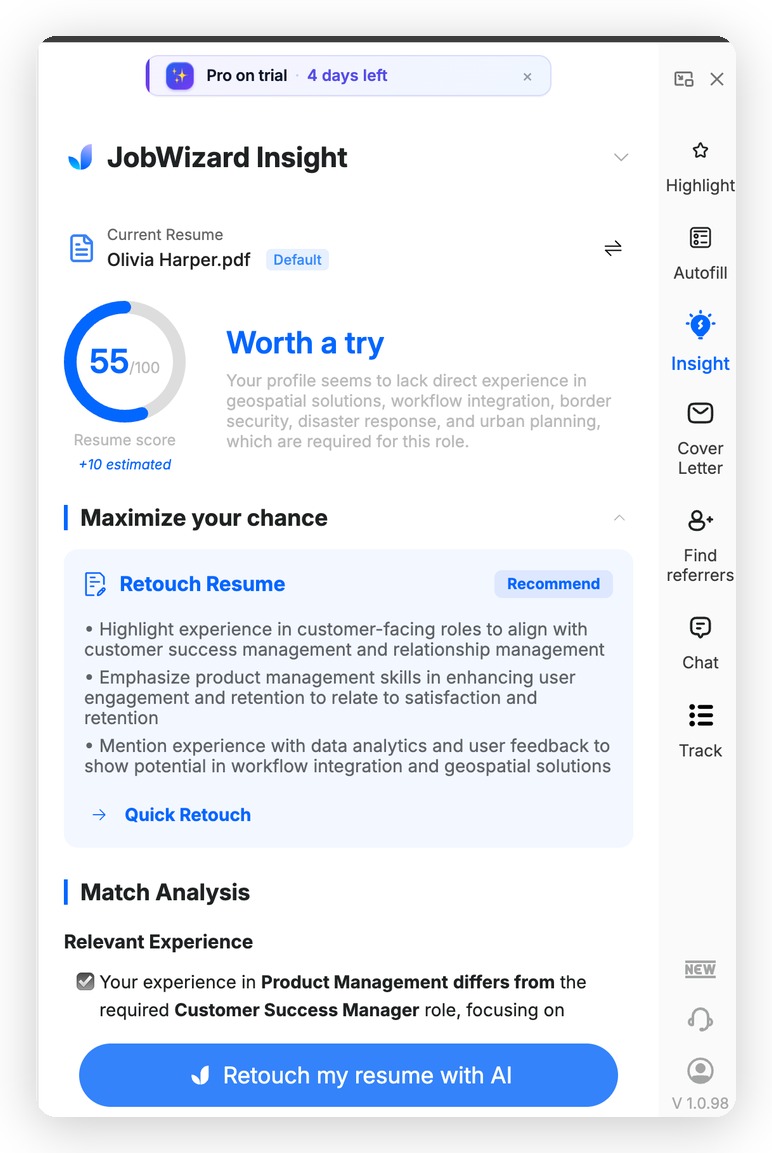
The Insight tab scores your resume against the job description and suggests specific improvements to boost your match.
An AI job search assistant is a tool — typically a browser extension or web app — that uses artificial intelligence to automate and enhance the job application process. The best ones do more than just fill in your name and email. They:
- Parse your resume and map your experience to application fields automatically
- Generate tailored cover letters based on the specific job description
- Highlight keywords from job descriptions so you know what employers are screening for
- Score your resume against a posting to show how strong a match you are
- Track every application so nothing slips through the cracks
- Help you find referrals at target companies via LinkedIn
The goal isn't to apply blindly to hundreds of jobs — it's to apply smarter and faster to the right roles, with stronger materials at each step.
Job seekers who use structured application tools apply to 3x more positions per week while reporting lower stress and higher response rates than those applying manually.
The Real Cost of Applying Manually
Before you can appreciate what an AI job search assistant saves you, consider what manual applications actually cost:
| Task | Manual Time (per application) | With AI Assistant |
|---|---|---|
| Filling out application fields | 10–20 minutes | Under 2 minutes |
| Writing a cover letter | 30–45 minutes | Under 3 minutes |
| Reviewing JD for keywords | 10–15 minutes | Instant (auto-highlighted) |
| Logging the application | 5 minutes | Automatic |
| Finding a referral contact | 15–30 minutes | Built-in LinkedIn finder |
If you're applying to 10 jobs a week manually, you're spending 10+ hours just on logistics. An AI job search assistant can cut that down to under 2 hours — freeing the rest of your time for research, networking, and interview prep. For a deeper look at the time savings, see how autofill saves 10 hours per week.
Key Features to Look for in an AI Job Search Assistant
Not all tools are equal. Here's what separates a genuinely useful AI job search assistant from a gimmick:
1. Smart Autofill Across Multiple Platforms
The assistant should work across the major ATS platforms job seekers encounter daily — Workday, Greenhouse, Lever, iCIMS, Taleo, Ashby, SmartRecruiters — not just one or two. JobWizard supports 500+ job platforms, so you're covered regardless of where a company posts their openings. It reads your uploaded resume and intelligently maps your experience, skills, education, and work history to each field — including tricky custom fields that basic autofill browsers miss.
2. AI Cover Letter Generation (With Real Customization)
Generic cover letters hurt more than they help. A good AI job search assistant generates a cover letter that references the specific role, company, and requirements from the job description. JobWizard's AI cover letter tool opens directly in a sidebar while you're on the application page. You can edit inline, adjust tone (formal, conversational, confident), and control length — so the output always sounds like you, not a robot. Learn more about how the AI cover letter generator works.
3. Job Description Keyword Highlighting
ATS systems screen resumes for specific keywords before a human ever sees them. JobWizard highlights the keywords in any job description so you can quickly check whether your resume and cover letter actually include the language the employer is looking for — without having to manually comb through the posting yourself.
4. Match Score
Before you invest time in an application, it helps to know how well you match the role. JobWizard's match score compares your resume against the job description and gives you an honest read on your fit. This helps you prioritize your strongest applications instead of spending equal effort on roles where you're a long shot.
5. Application Tracker
Losing track of where you've applied — and when — is a common problem in an active job search. A built-in tracker logs every application automatically, so you always know your status, can follow up at the right time, and never accidentally apply to the same role twice. See how to build a follow-up system around your application tracker.
6. LinkedIn Referral Finder
Referred candidates are 4x more likely to get hired than cold applicants. JobWizard's LinkedIn Referral Finder identifies connections at your target company directly from the job posting, so you can reach out for a referral before you submit — a step most job seekers skip entirely because it takes too long to do manually.
How an AI Job Search Assistant Changes Your Daily Workflow
Here's what a typical application workflow looks like with JobWizard installed:
- Find a role on any job board or company careers page.
- Open the posting — JobWizard instantly highlights keywords and shows your match score in the sidebar.
- Check LinkedIn referrals — the Referral Finder shows your connections at that company with one click.
- Start the application — click autofill and JobWizard populates every field from your resume in seconds.
- Generate a cover letter — tailored to the specific role, editable inline, ready in under a minute.
- Review everything — you check the filled fields, adjust anything that needs it, and read your cover letter. Nothing is submitted without your approval.
- Submit — your application is automatically logged in your tracker.
The entire process takes 5–8 minutes per application instead of 45–60. And because you're reviewing before submitting, quality doesn't suffer — it actually improves, because you're spending your attention on substance rather than copy-pasting the same data repeatedly.
JobWizard is used by 10,000+ job seekers and holds a 4.6★ rating on the Chrome Web Store.
AI Job Search Assistant vs. Auto-Apply Tools: An Important Distinction
Some tools on the market promise to auto-apply to hundreds of jobs on your behalf with zero input from you. This sounds appealing but has serious downsides: applications go out with generic materials, you apply to roles you'd never actually want, and recruiters can tell when cover letters aren't real. Mass auto-applying can actually damage your reputation with companies you care about.
JobWizard is an AI job search assistant, not an auto-apply bot. It handles the tedious parts — filling fields, drafting cover letters, logging applications — while keeping you in control of every submission. You review each application before it goes out. This is a deliberate design choice, and it's why users see better results. For the full breakdown, read why autofill beats auto-apply.
| Feature | AI Job Search Assistant (JobWizard) | Auto-Apply Bots |
|---|---|---|
| Autofill from resume | ✅ Yes | Sometimes |
| Tailored cover letters | ✅ Yes | ❌ Generic or none |
| User reviews before submit | ✅ Always | ❌ No |
| Match score & keyword analysis | ✅ Yes | ❌ Rarely |
| Application tracker | ✅ Built-in | Sometimes |
| LinkedIn referral finder | ✅ Yes | ❌ No |
| Risk of spamming recruiters | Low | High |
Do this automatically with JobWizard
Skip the manual work — JobWizard's Smart Autofill handles this for you.
Getting Started with JobWizard
JobWizard is a free Chrome extension — no payment required to start. Install it from the Chrome Web Store, upload your resume, and it's ready to use on your next application. The free plan covers 10 applications per day, which is more than enough for a focused, quality-first job search. A Pro plan is available for higher-volume searching.
If you're comparing JobWizard against other tools in the market, see our comparison of JobWizard vs. Simplify vs. Job Copilot, or read about better alternatives if LazyApply isn't working for you.
For a full overview of what the AI assistant does across every feature, visit the complete guide to AI application assistants.
What does an AI job search assistant actually do?
An AI job search assistant automates the most time-consuming parts of applying for jobs — filling out application forms, writing cover letters, highlighting job description keywords, scoring your resume against postings, and tracking your applications. JobWizard does all of this directly in your browser via a free Chrome extension, while keeping you in control of every submission.
Is an AI job search assistant the same as an auto-apply bot?
No. An auto-apply bot submits applications without your review, often with generic materials, which can hurt your chances with employers you actually care about. An AI job search assistant like JobWizard handles the busywork but always puts you in the driver's seat — you review and approve every application before it's submitted.
Which job platforms does JobWizard work on?
JobWizard works on Workday, Greenhouse, iCIMS, Lever, Ashby, SmartRecruiters, Taleo, and 500+ other job application platforms. If a company uses a standard ATS, JobWizard almost certainly supports it.
Does an AI job search assistant write cover letters for you?
Yes. JobWizard's AI cover letter tool generates a tailored cover letter based on your resume and the specific job description, directly in a sidebar on the application page. You can edit it inline, adjust the tone and length, and finalize it before submitting. It's designed to sound like you, not a generic template.
Is JobWizard free to use as an AI job search assistant?
Yes. JobWizard is a free Chrome extension with a free plan that includes 10 applications per day — enough for a focused, quality-driven job search. A Pro plan is available for job seekers who need higher daily volume.
How is an AI job search assistant different from just using LinkedIn?
LinkedIn is primarily a job board and networking platform. An AI job search assistant like JobWizard works on top of any job platform to automate the application process itself — filling forms, writing cover letters, scoring matches, and tracking submissions. JobWizard even includes a LinkedIn Referral Finder that identifies your connections at target companies directly from the job posting.
Autofill your next job application
JobWizard is a free Chrome extension that fills applications, tracks statuses, and optimizes your resume.