Job Application Tracker: How to Track Every Application and Know When to Follow Up
Applied to 30 jobs and losing track of where you stand? Here's a system for tracking every application — and how AI can catch recruiter replies before they get buried in your inbox.
Free Chrome extension
Track all your applications in one place
JobWizard auto-tracks status changes across Workday, Greenhouse, and every major job site — free.
The Job Application Tracking Problem
You've applied to 30 jobs over the past two weeks. Right now, can you answer these questions?
- Which companies are still reviewing your application?
- Which ones have gone silent and might need a follow-up?
- Which roles closed without a decision?
- Did you get a "we'll be in touch" email from that Greenhouse application on Tuesday, or was that a different company?
Most job seekers can't answer these questions accurately after 30 applications. After 50, it becomes genuinely unmanageable. And the result is missed follow-ups, duplicate applications, and recruiter emails that go unread for three days because they got buried in your inbox.
A good job application tracker solves all of this. This article covers what to track, how to track it without manual work, and when to follow up at each stage.
What Your Job Application Tracker Should Log
Every application you submit should have at minimum:
| Field | Why It Matters |
|---|---|
| Company name | Obvious — but easy to miss when applying fast |
| Role title | Especially if you apply to multiple roles at the same company |
| Application date | Sets the clock for follow-up timing |
| Application URL / portal | Quick access if you need to check your submitted answers |
| Current status | Applied / Recruiter Screen / Interview / Offer / Rejected / Closed |
| Last contact date | When did you last hear from them? Triggers follow-up window |
| Notes | Recruiter name, anything discussed, specific prep needed |
Most job seekers start with a spreadsheet. The problem: spreadsheets require manual updates, and when you're applying to 10 jobs a day, you stop updating them within a week.
The 5 Application Statuses You Need
Keep your tracker simple. Five statuses cover the entire lifecycle:
- Applied — submitted, awaiting any response
- In Progress — recruiter screen scheduled, assessment sent, or any active next step
- Interview — first-round or beyond
- Decision Pending — final round completed, waiting on offer/rejection
- Closed — rejected, offer declined, or role filled
Everything else is noise. Don't add 15 sub-statuses — you'll stop maintaining it.
How JobWizard Tracks Applications Automatically
The friction point with any job tracking system is the manual logging. JobWizard eliminates it.
When you autofill and submit an application using JobWizard, it's automatically logged in your Job Tracker — company, role, date, portal, and current status — with no separate entry required. Here's how it works:
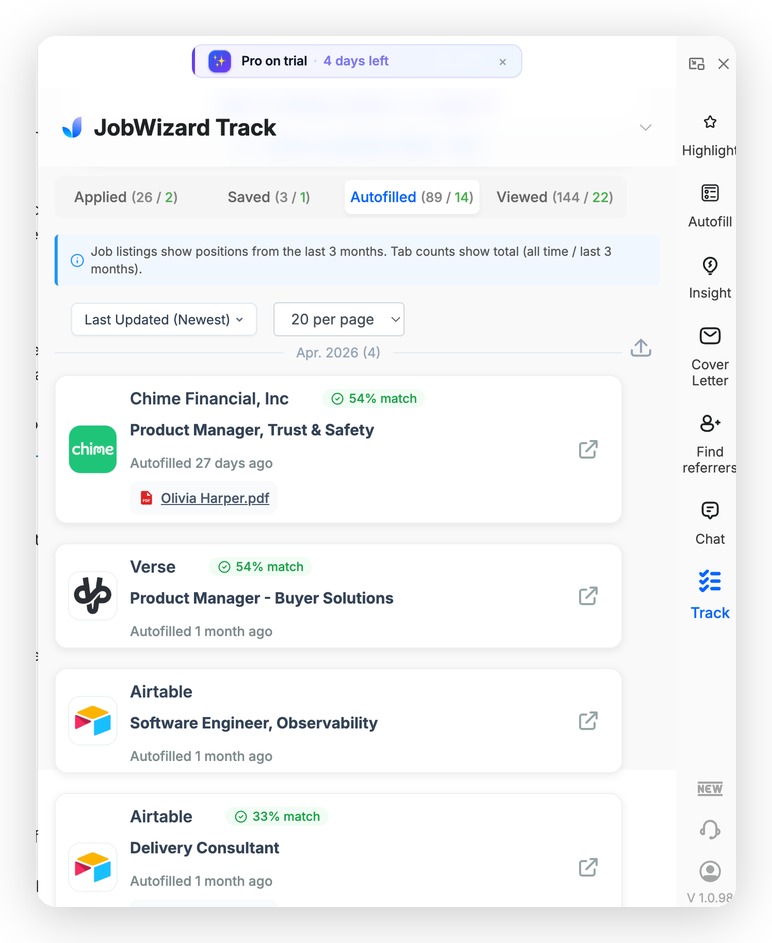
The Track tab auto-logs every application you submit — company, role, date, and match score — with no manual entry.
Automatic logging on submission
Every application you fill and submit via JobWizard is captured in the sidebar tracker. You can add notes immediately after submitting (recruiter name, any custom answers you wrote, things to prep for). No copy-pasting into a spreadsheet.
Status updates as you progress
As the hiring process moves forward, you update the status in one click — Applied → In Progress → Interview → Decision Pending. The tracker shows your full pipeline at a glance, and sorts by last-contact date so you can see what needs attention.
Email Tracker: automatic recruiter reply detection
JobWizard's Email Tracker uses a proxy email address that you set as your application contact. When recruiters reply, JobWizard's AI parses the email and categorizes it automatically:
- Interview invite — flags for immediate action
- Assessment sent — logs the deadline if mentioned
- Rejection — updates status to Closed automatically
- Generic "we're reviewing" response — logged, no action needed
This means recruiter emails don't get buried. They're parsed, categorized, and surfaced in your tracker within minutes.
When to Follow Up After Applying
The follow-up question everyone has: when do you send one, what do you say, and how do you know if you're crossing a line?
The follow-up timeline by stage
| Stage | Wait Time Before Following Up | Who to Contact |
|---|---|---|
| After applying (no response) | 7–10 business days | Recruiter listed on job post, or LinkedIn message to HR |
| After recruiter screen (no next steps) | 5 business days | Reply to the recruiter's email thread |
| After any interview round | Same day (thank-you note) + 5 days if no feedback | Interviewer + recruiter |
| After final round (no decision) | 3–5 business days | Recruiter — ask about decision timeline |
Follow-up message template (initial application)
Keep it short. You're not re-pitching yourself — you're confirming they received your application and signaling genuine interest:
Hi [Name], I applied for the [Role] position on [Date] and wanted to confirm receipt and reiterate my interest. I'm happy to provide any additional information that would be helpful. Thanks for your time.
After an interview round
Hi [Name], thank you for the time today — I enjoyed learning more about [specific detail from conversation]. I remain very interested in the role and look forward to hearing about next steps.
Send the post-interview note the same day, within 4 hours if possible. That window is when you're most memorable.
Job Application Tracking Software: What to Use
There are several approaches, from simple to automated:
| Tool | Best For | Manual Work Required |
|---|---|---|
| Google Sheets / Notion | Full customization, low volume (<20 applications) | High — every update manual |
| Huntr / Teal | Dedicated job tracking UI, Kanban view | Medium — import from job boards |
| JobWizard | Auto-logging on submit + email parsing + autofill in one place | Low — logs on submit, email tracker auto-categorizes |
If you're applying at volume (10+ per day), you need something that logs automatically. Manual spreadsheets break down in the first week.
Referrals: The Follow-Up That Happens Before You Apply
The most effective follow-up isn't a cold email after applying — it's a LinkedIn message before you apply. Referred candidates are 3–4× more likely to get an interview, and the referral ask is a far easier message to write than a follow-up cold email to a recruiter.
JobWizard's Referral Finder surfaces second-degree LinkedIn connections at target companies while you're on the job posting. You can reach out before submitting, mention the role, and ask if they'd be willing to put in a word. That 2-minute message is worth more than any follow-up email after the fact.
Do this automatically with JobWizard
Skip the manual work — JobWizard's Application Tracker handles this for you.
Frequently Asked Questions
What is the best free job application tracker?
For fully automatic tracking with no manual logging, JobWizard is the most efficient option. It logs every application you submit automatically, parses recruiter emails through its Email Tracker, and shows your full pipeline in a Chrome sidebar. It's free for up to 10 applications per day.
How do I keep track of all my job applications?
The most reliable system: use a tracker that logs submissions automatically (like JobWizard) so you don't have to update it manually. Maintain five status categories — Applied, In Progress, Interview, Decision Pending, Closed — and sort by last contact date so you always know what needs attention.
When should I follow up after submitting a job application?
Wait 7–10 business days after applying if you haven't heard anything. After a recruiter screen with no next steps, follow up after 5 business days. After an interview, send a thank-you note the same day and follow up after 5 business days if you haven't received feedback.
Is there a tool that automatically tracks job applications?
Yes. JobWizard automatically logs every application you submit through its autofill extension — company, role, date, and status — with no manual entry. Its Email Tracker also parses recruiter replies and categorizes them (interview invite, rejection, assessment) so they don't get lost in your inbox.
How many job applications should I submit per week?
Quality matters more than volume, but most active job seekers should aim for 10–20 targeted applications per week. With autofill, the bottleneck isn't time — it's finding and vetting the right roles. Use the time you save on form-filling to research companies and tailor your custom answers.
What's the best way to organize a job search?
Three things: a tracker that logs automatically (so you don't stop updating it), a consistent follow-up cadence (7–10 days after applying, same-day after interviews), and a prioritized list of target companies where you're actively pursuing referrals. JobWizard handles the first; the latter two are on you.
Speed Up the Applications You're Tracking
Tracking applications is step one — autofilling them is step two. Platform guides:
- Workday Job Application Autofill
- iCIMS Job Application Autofill
- Greenhouse Job Application Autofill
- AI Autofill — Full Guide
Stop Losing Track — Start Tracking Automatically
The job search generates a lot of paperwork: applications, emails, interview invites, follow-ups. The job seekers who manage it well aren't working harder — they're using a system that captures information automatically so nothing falls through the cracks.
JobWizard autofills every application, logs it to your tracker on submit, and parses recruiter emails so you always know where you stand. Install free and start your first tracked application today.
Read next: How to Autofill Job Applications in 2026 — Save 10 Hours Per Week
Track all your applications in one place
JobWizard auto-tracks status changes across Workday, Greenhouse, and every major job site — free.