Workday auto apply: why bot submissions go wrong—and the review-first autofill workflow that keeps you in control
Searching for a “workday auto apply” shortcut? Here’s what bot-style submissions can break—then how to use review-first autofill to fill fast and submit yourself.
Free Chrome extension
Autofill your next job application
JobWizard is a free Chrome extension that fills applications, tracks statuses, and optimizes your resume.
If you’re looking for workday auto apply, you probably want faster applications—but “bot apply” shortcuts often create problems that hurt you, not the other way around. The real goal should be speed with accuracy: fill repetitive fields quickly, then review and submit yourself.
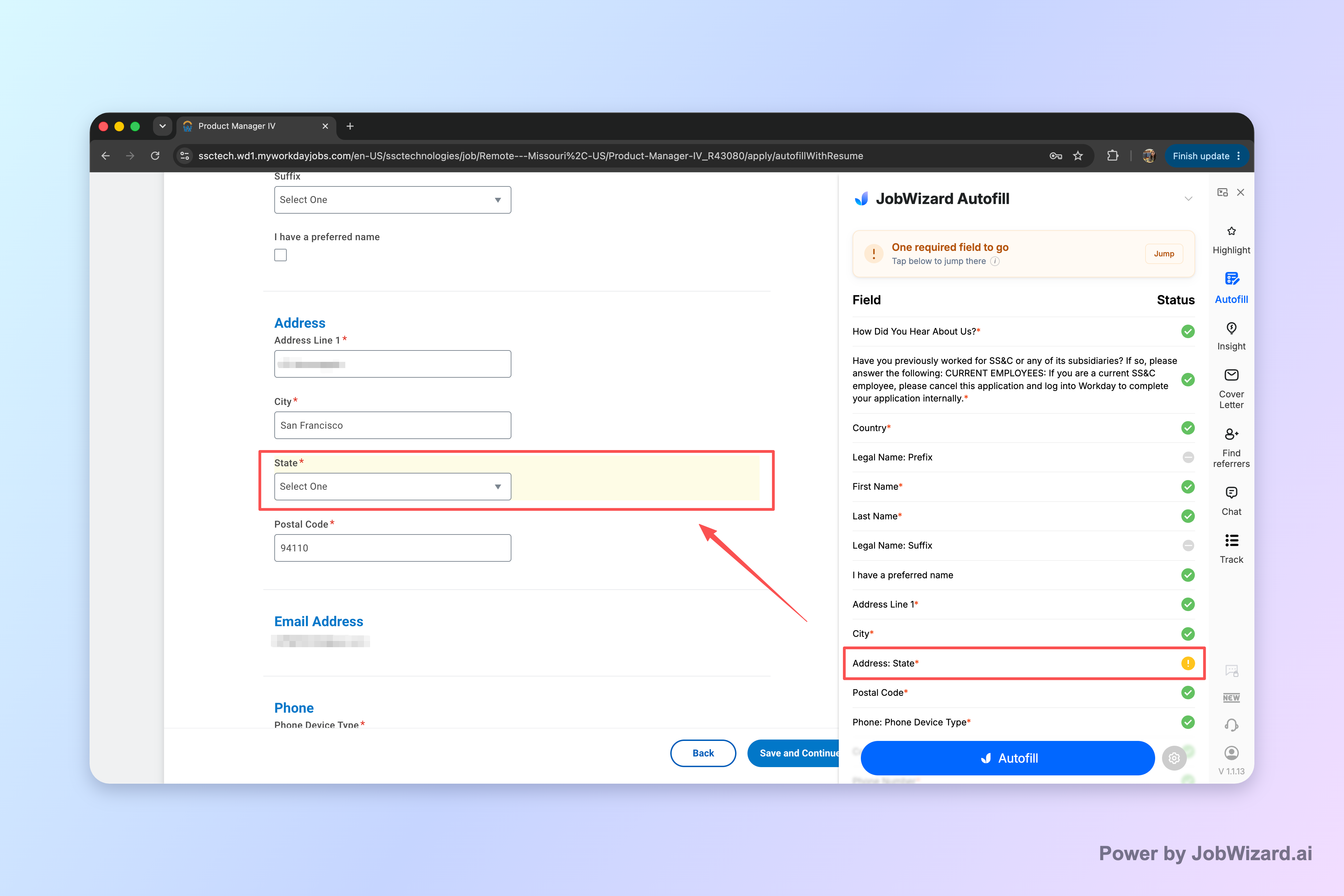
With review-first workday auto apply-style autofill, the workflow focuses on what actually matters on Workday: getting you to the right question fast while you verify the final answers.
What “workday auto apply” bots usually get wrong
Bot-style “auto apply” can mis-answer screening questions and mismap your details to the specific role—even when the page looks filled in.
When a tool submits without your eyes on each answer, small mismatches become permanent. Screening questions are often job-specific (or even recruiter-specific), so an answer that’s “close” may still be incorrect for that employer’s criteria. That’s one reason why “set it and forget it” approaches can backfire.
Here are the most common failure modes job seekers report in practice when automation submits while they’re away:
- Wrong screening answers because the questions vary by posting (and the bot can’t know your intent in that moment).
- Resume-to-form mismatches where autofilled fields don’t align with the resume details you’d actually want for this particular job.
- Missing required fields when a required question is overlooked or not properly mapped.
- Employer-side spam filtering triggered by repeated, highly similar submissions that don’t look like they were tailored.
- Reputation damage with a company you genuinely want—because you can’t fix or clarify answers after the submit click.
The core problem isn’t “automation” as a concept—it’s what happens when the tool substitutes your judgment with guessed or outdated responses. A job application is not just data entry; it’s a set of decisions you’re accountable for.
A safer alternative: review-first autofill on Workday
Review-first autofill fills fast, then gives you control before submission—so you can correct anything that doesn’t match the job.
JobWizard’s approach is designed around a simple boundary: it can populate the application page, but the user reviews what gets filled in and submits the application themselves. That keeps you in charge of the parts that matter most.
When a required field still needs attention, the workflow can identify it and let you jump directly to the matching question. That’s a practical way to avoid the “it looked complete” problem that happens when automation moves on too quickly.
Think of it as two phases:
- Fill repetitive fields in seconds so you’re not rewriting the same personal details over and over.
- Review job-specific questions carefully so screening responses match your real experience and preferences.
In aggregate usage across Workday and other ATS platforms, JobWizard has processed 720,000+ applications with 600,000+ autofill sessions. The key detail: this is autofill + review-before-submit, not blind auto-submission while you’re away.
JobWizard autofills an average of ~18 repetitive fields per application, and you still review and submit yourself—so speed comes from fewer manual keystrokes, not from losing control.
Workday-specific “gotchas” to watch before you click submit
Workday forms can include required, job-specific questions that you must verify every time—even if your profile data is correct.
Even with strong autofill, your review checklist should focus on categories that commonly vary from posting to posting:
- Screening questions (eligibility, role fit, work authorization details, experience requirements).
- Work history alignment (job titles, dates, and descriptions that must match what you’d defend in an interview).
- Custom prompts that ask for context (projects, metrics, availability, or why you want that exact role).
- Required fields that may not map perfectly in every case—always confirm nothing is left to guesswork.
Here’s a quick, review-first approach that helps you stay fast:
- Scan required fields first, because missing answers can derail the submission.
- Spot-check any screening answers that sound like hard requirements.
- Confirm attachments and role details are consistent with the job you’re applying to.
- Submit yourself only after the answers match your intent.
This is also where bot-driven “workday auto apply” strategies often fail: they don’t reliably reproduce your intent, and they can’t correct mistakes after submission.
How JobWizard compares to “auto-apply” tools (and which fit matters)
The right tool depends on whether you want control at submit time or you’re optimizing purely for automation.
Some job tools position themselves around auto-apply behavior. To choose fairly, focus on the trade-off: automation can reduce typing, but it can also increase the odds of incorrect answers or inconsistent tailoring.
| What you care about | Review-first autofill workflow (JobWizard) | Bot-style “auto apply” tools |
|---|---|---|
| Submit control | You review populated fields and submit yourself. | May submit without you checking every answer (varies by tool). |
| Screening answer accuracy | You can correct mismatches before submission. | Higher risk if answers are guessed or not tailored to that posting. |
| Required fields handling | Can identify a required field needing attention so you jump to it. | Could miss or mis-handle required inputs depending on mapping. |
| Employer trust signal | More consistent with human review and tailoring. | Repeated, highly similar submissions may trigger spam-like filtering. |
In other words: if your priority is workday auto apply speed, you can still get it—without handing over your judgment at the final click.
Ready to try review-first autofill? On your next Workday application, use JobWizard to populate fields quickly, then review every answer before you submit.
Do this automatically with JobWizard
Skip the manual work — JobWizard's Smart Autofill handles this for you. On these platforms: Workday autofill.
FAQ about workday auto apply
Is “workday auto apply” actually automatic submission?
No—review-first autofill fills fields on the application page, and you submit yourself after you verify every answer. Avoid tools that claim they’ll submit while you’re away.
What goes wrong when a bot submits applications for you?
Common issues include wrong answers to screening questions, mismatched resume content, and responses that don’t line up with the specific job. Employers may also treat repetitive submissions as spam-like behavior, which can hurt your chances with companies you want.
How can I use autofill safely on Workday without missing required questions?
Use a workflow that highlights fields needing attention and lets you jump directly to the matching question. Then review each autofilled response—especially anything marked required—before you click submit.
How do I balance speed and accuracy when using autofill?
Prioritize fast completion of repetitive fields, then slow down for the user-controlled parts: screening questions, work history details, sponsorship/EEO-related items, salary or custom prompts, and anything that could be job-specific.
Will autofill work on every Workday job or every form field?
Not always. Websites and application forms vary, and some required fields may still need your input. A safe approach is to fill what you can, then review the remaining questions before submitting.
Want the full step-by-step workflow? Start with How to Autofill Job Applications (Step-by-Step with JobWizard). For Workday specifically, use Workday Application Tracking System: A Review-First Autofill Workflow to Apply Faster (and Stay in Control) and Safe Workday Autofill: Review Before Submit, No Auto-Apply (JobWizard Workflow).
If you’re coming from a “workday auto apply” mindset, you may also find it helpful to review simplify auto apply: why bot submissions backfire and review-first autofill wins before you apply again.
Try JobWizard today: autofill your next application on Workday, review every answer, and submit yourself for the accuracy that bots can’t guarantee.
Frequently Asked Questions
Autofill your next job application
JobWizard is a free Chrome extension that fills applications, tracks statuses, and optimizes your resume.