Lazy Apply: What Goes Wrong With Auto-Submission—and the Smarter Autofill-Then-Review Fix
Lazy apply tools may submit incomplete or mismatched applications automatically—then you inherit the mistakes. Use autofill to fill fast, review, and submit yourself with confidence.
Free Chrome extension
Autofill your next job application
JobWizard is a free Chrome extension that fills applications, tracks statuses, and optimizes your resume.
Lazy apply tools promise speed, but when a bot submits for you, the “fast” part can turn into wrong answers, mismatched resumes, and employer-side filtering. The fix isn’t to apply less—it’s to apply smarter: fill repetitive fields quickly, review the sensitive parts, and submit yourself.
In this guide, you’ll learn what typically goes wrong with auto-submission, why it can backfire with employers you actually want, and how to use an autofill-then-review workflow (including how JobWizard fits) to keep your applications accurate—without losing momentum.
Why “lazy apply” auto-submission backfires
Auto-submission breaks the one thing employers use to judge you: accuracy. When the system submits without your confirmation, tiny mismatches can look like carelessness—or worse, misrepresentation.
Let’s break down what commonly goes wrong when you use a lazy apply tool that submits automatically, or when a bot completes the application based on incomplete context.
1) Screening questions get guessed or outdated
Many applications include screening questions that require current, precise answers: availability, location preferences, authorization/visa details, salary expectations, and eligibility criteria. Bots often make plausible-sounding assumptions from your past profile—then the employer reads an answer that doesn’t match your real situation.
- Example: You selected “open to hybrid” last time, but this role is in-office only—yet the bot submits “hybrid” anyway.
- Example: You updated your resume for a new visa status, but the auto-fill still reflects an older selection.
Even if you personally would correct those responses, auto-submission removes your chance to do so.
2) The wrong resume (or wrong mapping) gets submitted
“Lazy apply” often focuses on speed rather than alignment. But employers expect your resume to match what the role is asking for—skills, level, and relevant experience. If a tool grabs the wrong version (or the right resume but doesn’t match your latest story), the application can fail on fit.
- Example: A role asks for “security clearance” experience. Your latest resume includes it, but the auto-application uses an older file.
- Example: Your resume is updated, but custom questions emphasize a specific project you only described in a recent document.
When the resume doesn’t match the employer’s screening logic, you often won’t even get the courtesy of a reason—just a rejection.
3) Custom questions and formatting errors reduce quality signals
Beyond multiple-choice screens, applications may ask open-ended or multi-field questions (projects, “why this role,” team fit, work authorization narratives). Bots may fill these with generic text or incorrectly map content across fields.
- Example: A question expects a short paragraph; the bot pastes a bullet-heavy summary that doesn’t answer it.
- Example: A formatting glitch causes line breaks or punctuation to disappear—then the employer’s review stack flags it as low quality.
Employers may also run applications through quality controls that try to detect repeated submissions or inconsistent data. When answers don’t match the narrative in your resume, it can look suspicious—even if you intended nothing wrong.
4) You can accidentally create “spammy” submission behavior
Even if a tool isn’t trying to be malicious, auto-submission at scale can create behavior that looks like automated outreach. That can hurt future opportunities if you apply to the same organization again with inconsistent or incorrect data.
To be fair: reputable tools exist and can help with some parts of the workflow. The key risk isn’t the existence of automation—it’s submitting without your review and confirmation.
At best, you want speed for repetitive fields. At minimum, you need control over the answers that determine eligibility and relevance.
The right alternative to lazy apply: autofill, then review, then submit
Autofill-then-review gives you the best of both worlds: faster completion for the fields that don’t require judgment, and your human check for everything that does.
This workflow is intentionally narrow. It’s built for the reality of job applications: they’re a mix of mechanical inputs and high-stakes details. When you let automation touch the mechanical part and you personally confirm the rest, you avoid the most common failure points.
What to let automation fill
Save time on entries that are repetitive, structured, and stable across applications.
- Profile basics: contact information, standard work history blocks, education dates when consistent.
- Routine selections: standardized fields where you already know the correct answer.
- Form structure: moving between fields so you don’t lose momentum.
What you should review before you submit
These are the details most likely to mismatch, change, or require context.
- Sponsorship / work authorization: verify the exact option matches your current status.
- Salary expectations: confirm whether the posting requires a specific range or format.
- EEO / protected-class questions: ensure accuracy and consistency with your intent.
- Custom screening questions: answer the role-specific items based on the job description.
- Resume selection: confirm the file you upload matches the level and requirements.
This is the practical “safe speed” approach: automation handles repetitive fields quickly, and you stay responsible for eligibility, fit, and final accuracy.
If you want a deeper explanation of what goes wrong, read Lazyapply Risks: Why “Auto-Apply” Can Backfire (and the Safer Autofill-Then-Review Fix).
Where lazy apply goes wrong across popular ATS platforms
ATS differences don’t remove the core problem: auto-submission magnifies mismatches. Even on the most common platforms, the same risks apply—just in different interfaces.
Most job seekers run into Workday, Greenhouse, Ashby, and Lever—systems that capture both structured answers and custom screening details. The platform can change, but the need to review remains.
- Workday: often saves time because it’s heavily structured, but you still need to validate screening answers and custom fields.
- Greenhouse: commonly includes multi-step questions and role-specific inputs that should match your resume and intent.
- Ashby / Lever: still relies on accurate eligibility and relevant experience mapping.
Key point: Autofill + review is about accuracy, not blind completion.
And if you’re comparing approaches, see Lazyapply Reviews: What Goes Wrong With Auto-Submission (and the Better Way to Apply) for concrete examples of failure modes.
JobWizard’s autofill-and-review approach (and how it protects you)
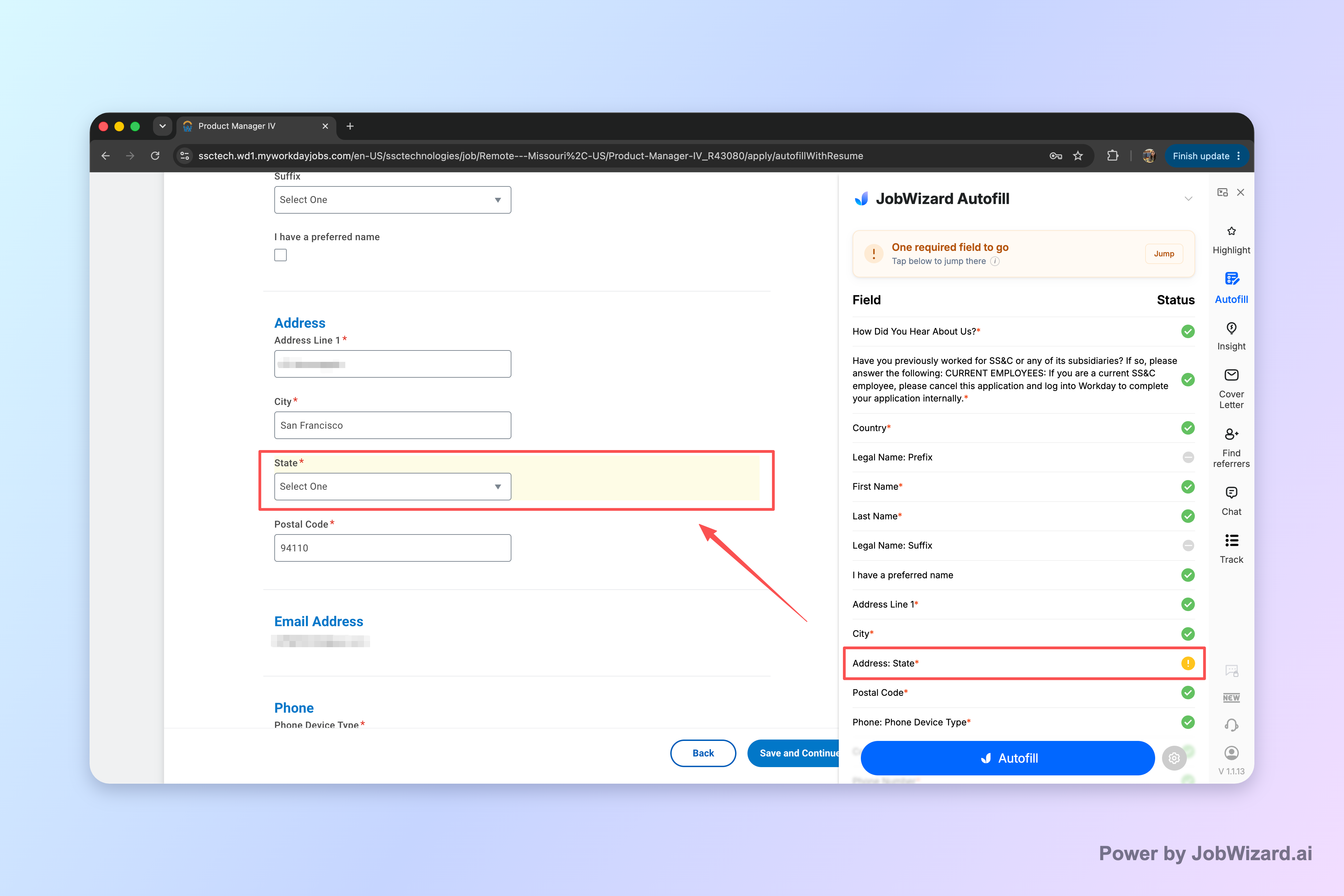
JobWizard is designed for autofill while you stay in control—it fills the application you’re already on, then you review and submit yourself.
That distinction matters for the “lazy apply” problem. JobWizard does not mass-apply, does not submit by itself, and does not apply while you’re away. Instead, it speeds up the repetitive part of job applications so you can finish faster and still make sure your answers are correct.
In usage data from our database (refreshed quarterly), JobWizard has supported 720,000+ applications submitted and 600,000+ autofill sessions run through the platform. On average, it autofills about ~18 repetitive fields per application (typically 11–23). And among applications submitted through JobWizard, ~65% are on Workday, ~19% Greenhouse, ~12% Ashby, and ~4% Lever—Workday being where it saves the most time.
Those numbers reflect autofill + review-before-submit: the repetitive fields are filled quickly, while sponsorship/salary/EEO/custom questions are left for you to review before submitting. That’s exactly the separation you want to avoid the mistakes that auto-submission creates.
If you’re weighing options, compare directly with JobWizard vs LazyApply: A Practical Autofill-and-Review Showdown for Applications.
How this changes your day-to-day workflow
Instead of trying to “set and forget” your applications, you build a repeatable rhythm:
- Fast start: you get past the repetitive form entry without losing your place.
- Human check: you confirm every eligibility and role-specific answer.
- Final submit: you click submit yourself—so you’re the last line of defense.
That’s the practical answer to “lazy apply” search intent: not automation that submits blindly, but a safer workflow that preserves accuracy.
Do this automatically with JobWizard
Skip the manual work — JobWizard's Smart Autofill handles this for you.
Lazy apply FAQ: risks, alternatives, and what to do instead
Here are direct answers to the questions job seekers most often ask when they’re trying to decide whether to use “lazy apply” automation.
Is a “lazy apply” tool ever a good idea?
It can help you move faster, but auto-submission increases the odds of wrong answers and mismatches—so the safer approach is autofill-and-review, where you stay in control of screening answers, resume selection, and the final submit.
What are the most common problems when a bot submits for you?
Common issues include incorrect or outdated screening answers, the wrong resume/experience mapping, missing details in custom questions, and formatting problems that trigger employer spam or quality filters. Even when the form “looks filled,” the content may not match what the employer asked for.
How do I use the “autofill-then-review” approach without losing time?
Fill the repetitive fields quickly, then review the pieces that truly matter—sponsorship/visa status, salary expectations, EEO details, and any custom questions. In practice, that’s where most mismatches happen, so you can keep momentum while preventing the avoidable mistakes.
Will autofill hurt my chances with Workday, Greenhouse, or other systems?
Autofill itself isn’t the problem—submitting without reviewing is. Employers care about the accuracy of your responses and the relevance of your materials, regardless of whether the form is on Workday, Greenhouse, Ashby, or Lever.
How does JobWizard fit into a safer lazy apply workflow?
JobWizard autofills the application you’re already on, then you review everything and submit yourself. It never submits while you’re away or mass-applies, so you get speed for repetitive fields without turning your screening answers into guesses.
Ready to speed up without sacrificing accuracy? Start with How to Autofill Job Applications (Step-by-Step with JobWizard), then use JobWizard to autofill the repetitive parts and keep your review and final submit fully in your hands.
Frequently Asked Questions
Autofill your next job application
JobWizard is a free Chrome extension that fills applications, tracks statuses, and optimizes your resume.