Lazyapply Review: What Goes Wrong When a Bot Submits (and a Safer Alternative)
This lazyapply review explains what typically breaks when a bot submits for you—then shows the safer alternative: fill the repetitive fields quickly and submit yourself after you review.
Free Chrome extension
Autofill your next job application
JobWizard is a free Chrome extension that fills applications, tracks statuses, and optimizes your resume.
Lazyapply review: when a bot submits your job applications for you, the failure modes are predictable—wrong answers to screening questions, mismatched resumes, and even employer-side spam/compliance flags—so the safer approach is speed with your review before you submit.

Most people don’t start with the goal of “doing it wrong.” They just want fewer repetitive clicks. But auto-apply tools that submit on your behalf can turn that goal into a workflow where you’re not fully in control of the details recruiters use to decide whether you’re a fit.
What a lazyapply review should focus on: the risk of unattended submission
The biggest issue with bot submission is that it removes your chance to catch role-specific mismatches and screening answers that must be accurate.
In a typical lazyapply-style experience, the promise is convenience: fill once, go fast, and let the tool push applications out. The problem is that job applications are not “one-size-fits-all.” Employers often ask questions that are specific to the role, the location, or eligibility requirements—and those answers can’t be assumed.
When a bot submits while you’re away (or before you’ve confirmed the details), you risk sending answers that are technically plausible but factually wrong, or sending the right person with the wrong materials. That’s the core reason this “lazyapply review” is less about whether automation is fast and more about what can go wrong when speed beats verification.
How bot-submitted errors happen (even when you think you set everything up)
Screening questions are where automation breaks most often because they’re the most role-specific parts of the form.
- Wrong answers: A question may ask about a requirement you did (or didn’t) meet for this specific role, but the tool reuses an earlier selection.
- Outdated details: If your “current” status changed (job eligibility, location preference, willingness to relocate, start date), a bot may submit stale responses.
- Ambiguous inputs: Free-text or multi-part prompts can be hard to generalize—bots may fill something that looks correct at a glance but fails recruiter expectations.
Now add the second common failure: the materials you attach. A bot might choose a resume version that doesn’t align with the job’s focus (for example, “backend-only” experience vs. a role emphasizing data tooling). That mismatch can make your application look unfocused.
Employer-side filters and “spam” signals
Even if your profile is real, inconsistent submissions can trigger red flags because many employers screen for volume, mismatch patterns, and data integrity.
It’s not that every employer blocks “auto-apply” behavior universally. But inaccurate or repetitive applications—especially those that repeatedly submit inconsistent answers or clearly misaligned resumes—can contribute to automated sorting, compliance reviews, or spam-like filtering. In other words: the risk isn’t only “you made a mistake,” it’s that your mistake can look like bad intent to systems designed to protect review capacity.
Where lazyapply tools can misfire: resumes, screening answers, and fit
A quality application depends on consistency across your resume, your answers, and the specific role requirements.
If your goal is a “lazyapply review,” it’s worth examining the typical mismatch chain. Bot submission often creates inconsistencies that you wouldn’t notice if you were in the loop at the moment of sending.
Resume mismatch: the fastest way to look unqualified
Using the wrong resume version is one of the most common ways an auto-submitted application undermines you.
Example: you have two resumes—one tailored for software engineering, one tailored for data engineering. The job posting emphasizes data pipelines and SQL performance. If the tool attaches the software-engineering version, your application might omit the strongest evidence for what they asked for. Even if the bot filled the rest correctly, the materials you submitted can steer reviewers away from you.
Another common variant: the job requires a specific domain keyword or tooling emphasis. If your attached resume doesn’t cover that area, your “proof” becomes weaker before any human reads it.
Screening questions: small wording differences matter
Screening forms are designed to filter, so small wording differences can change the meaning of an answer.
- Eligibility phrasing: “Authorized to work in the U.S.” vs. “Require sponsorship now” can lead to different interpretations.
- Location specificity: “Remote only” vs. “Hybrid ok” can affect eligibility even when your broader profile suggests flexibility.
- Availability windows: Start date and notice period questions may require precise mapping to your current timeline.
If you review, you can correct these. If the tool submits for you, you may never see what was selected, typed, or defaulted.
Custom questions and “hidden” role fit
Not every question is labeled “screening”, but many custom prompts still function as gating criteria.
Hiring teams may include short essay prompts, project summaries, or compliance questions. Bots can respond using generic content that sounds competent but doesn’t reflect the exact role. That can lower your perceived relevance—especially if the employer expects specificity.
In practice, “fast” without verification often becomes “inconsistent,” and inconsistent applications are exactly what employers want to avoid.
Why review-before-submit beats “submit while you’re away”
The safer alternative is simple: fill quickly, then verify and submit yourself.
A review-before-submit workflow keeps the benefits of speed (you don’t have to type the same repeated details over and over) while restoring your control over the parts that must be accurate.
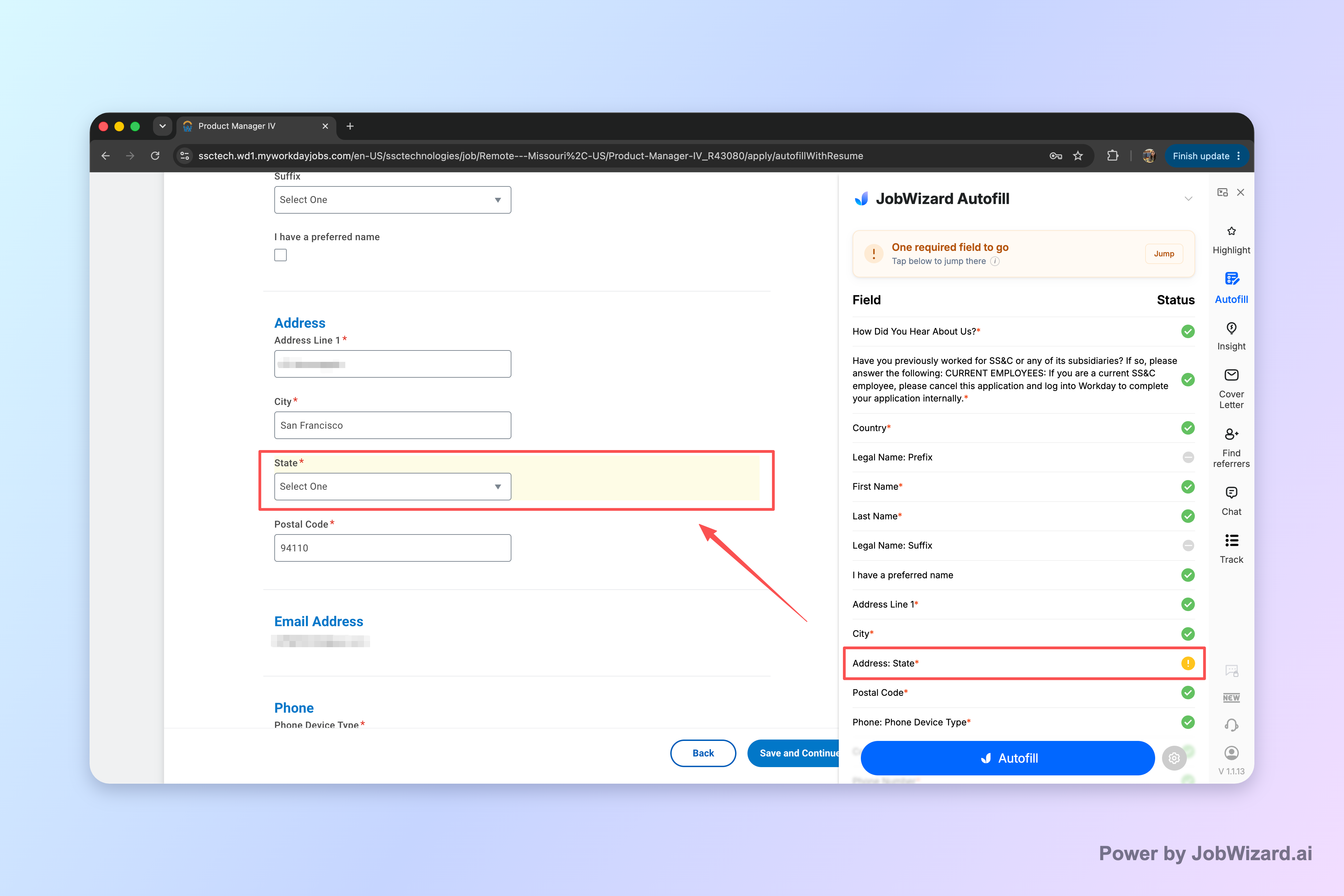
This distinction matters: JobWizard autofills applications the user is already on, then the user reviews and submits. It never submits by itself, never mass-applies, and never applies while the user is away—so the user can still catch role-specific issues before anything is sent.
That control point is what prevents the most damaging lazyapply-style outcomes: wrong screening answers, mismatched resumes, and “unknown by you” submissions that can harm how a company perceives your fit.
How autofill-with-review reduces the common lazyapply-review risks
Autofill can speed the repetitive fields, but you stay responsible for the decisions that screening relies on.
- Less typing, fewer accidental omissions: repetitive fields get filled for you.
- You still verify the “meaningful” parts: sponsorship, salary, EEO, and custom questions must be reviewed before submission.
- More consistency across a single application: you can ensure the resume and answers align with the specific posting.
JobWizard usage in our database reflects real-world volume and workflow patterns: 720,000+ applications submitted and 600,000+ autofill sessions run through JobWizard. On average, autofill fills about ~18 repetitive fields per application (typically 11–23). And when looking at where most of that time-saving happens, roughly ~65% of autofill is on Workday, ~19% on Greenhouse, ~12% on Ashby, and ~4% on Lever. Workday is where it tends to save the most time.
Importantly, this is autofill + review-before-submit, not blind auto-apply/auto-submit. The “gotchas” that a lazyapply review warns about—like wrong answers or mismatched fit—are exactly what you can catch during review.
Lazyapply review checklist: what to verify before you click submit
Use this checklist to prevent bot-style mistakes even if you’re using an assisted tool for speed.
When you submit, pretend a recruiter will read every answer literally. Because they can—especially for screening questions and eligibility requirements.
- Confirm the screening choices: every eligibility, authorization, location, and start-date question should be checked line-by-line.
- Verify the attached resume: make sure the resume version matches the role’s focus (and that your strongest evidence for that role is present).
- Check custom prompts: any role-specific free text should reflect this posting—not a generic template.
- Review “defaulted” fields: contact info, work history dates, and work authorization details are frequent sources of silent errors.
- Re-read the last page: confirmation screens sometimes reveal mismatches (for example, selected role vs. attached file) that earlier screens don’t.
This is the practical difference between speed tools that submit for you and workflows where you retain control. A lazyapply review shouldn’t just tell you what to avoid—it should help you build a repeatable process that keeps accuracy high.
Where JobWizard fits this workflow
JobWizard is built for “autofill + you review + you submit.”
It fills repetitive fields on the application page you’re already viewing, then you review before submitting. If your goal is to apply faster without losing accuracy, that workflow is designed to reduce the friction that causes people to abandon careful review.
In other words: you still do the final quality control, and that final check is where lazyapply-style failures get prevented.
Do this automatically with JobWizard
Skip the manual work — JobWizard's Smart Autofill handles this for you. On these platforms: JobWizard vs LazyApply.
FAQ: Lazyapply review questions people ask before trying auto-apply tools
Is a lazyapply tool the same as autofill with review?
No. In an autofill-with-review workflow, a tool fills repetitive fields while you stay in control; you review the content and submit yourself. A true lazyapply-style bot submission aims to send applications on your behalf, which increases the chance of wrong answers and mismatched materials if you don’t manually verify everything.
What are the most common mistakes from bot-submitted applications?
Common problems include wrong or incomplete answers to screening questions, using the wrong resume/version for the specific role, and submitting default or outdated details (like contact info, work authorization, or location). These issues can also trigger employer-side spam or compliance filters that expect accurate, human-intent applications.
Will using a bot harm my reputation with employers?
It can. If a bot submits the wrong answers or clearly mismatched materials, it may create a bad first impression with a company you actually want to work for. Even if you later correct things, the initial application data can still be used in screening decisions.
What should I do instead of bot submission?
Use a workflow where you can fill repetitive fields quickly, then review every screening and custom question before submitting. The goal is speed without losing accuracy: you get the “boring parts” done fast, but you stay responsible for the decisions that affect screening and fit.
How can I protect myself when using any auto-apply or assisted tool?
Treat every submission as something you must verify. Read each screening question, confirm your resume matches the role, and double-check details like job eligibility, dates, and location. If the tool can only autofill and you still submit, you reduce risk by catching issues before sending.
Ready to apply faster without handing off control? Try JobWizard for autofill + review-before-submit, so you can fill repetitive fields quickly, double-check screening details, and submit yourself with confidence.
Frequently Asked Questions
Autofill your next job application
JobWizard is a free Chrome extension that fills applications, tracks statuses, and optimizes your resume.