Follow-Up Questions That Move Your Job Search Forward
The right follow-up questions can clarify your fit, sharpen your application, and help you decide what to do after an interview or application. Use these examples and a simple tracking workflow to choose what to ask next.
Free Chrome extension
Autofill your next job application
JobWizard is a free Chrome extension that fills applications, tracks statuses, and optimizes your resume.
Follow-Up Questions That Help You Choose Your Next Move
Good follow-up questions turn uncertainty into a practical next step. Whether you are reviewing a job posting, preparing for an interview, or waiting after applying, ask about one specific point and use the answer to decide what to do next.
A useful question is relevant, concise, and easy for the other person to answer. It should help you understand the role or process—not pressure an employer to make a decision or repeat information already provided.
For the bigger picture, start with our practical guide to tracking job applications. It explains how to keep roles, updates, and next actions organized while your search is in progress.
How to Write Follow-Up Questions That Get Useful Answers
Make each question specific, timely, and connected to a decision you need to make. Before sending it, identify what you want to learn and whether the person you are contacting is the right source.
Try this simple structure: brief context, one focused question, and a courteous close. For example: “I applied for the operations associate role last week and remain interested. Could you share whether there is an expected timeline for next steps?”
Choose the question based on the situation:
- Clarify: Ask about a responsibility, requirement, or process detail that the posting or conversation did not explain.
- Confirm: Check your understanding of a discussed timeline or next step.
- Explore: Ask how the team approaches a priority that matters to the role.
- Plan: Find out what you can prepare or whether you should expect another conversation.
Keep the tone neutral. Instead of “Why haven’t I heard back?” ask whether there is an update on the hiring timeline. The second version requests information without implying that the recipient owes you an immediate response.
Do not combine several unrelated requests in one message. A question about status, salary, interview feedback, and another opening can be difficult to answer all at once; send only what is relevant to the current decision.
Before reaching out, check the original posting, confirmation email, and any messages from the recruiter. If the answer is already there, use that information rather than asking again.
Follow-Up Questions for Each Stage of a Job Search
Match the question to the stage: clarify the opportunity before applying, discuss the work in interviews, and ask about process after applying. The examples below are starting points, not scripts to send word for word.
| Stage | Useful question | What it helps you understand |
|---|---|---|
| Before applying | “Which experience would be most relevant to the team’s current priorities?” | Whether your background connects to the role’s needs. |
| Before applying | “Could you clarify how this position works with the product team?” | A responsibility or working relationship not explained in the posting. |
| First interview | “What would you hope the person in this role accomplishes in the first few months?” | How the interviewer describes early priorities. |
| First interview | “How does the team typically collaborate on this kind of work?” | How the team approaches collaboration and communication. |
| Later interview | “Is there an area of my experience you would like me to explain in more detail?” | Whether you have an opportunity to address an open question. |
| After applying | “Is there an expected timeline for the next step?” | Whether the employer can share a process update. |
| After an interview | “Would it be helpful if I sent an example of the project approach we discussed?” | Whether additional material would be relevant. |
During an interview, prioritize questions that reveal the work, expectations, and process. The dedicated article Good Follow Up Questions During an Interview: 23 Smart Prompts That Land offers more prompts for different interview moments.
Use discretion with questions about compensation, flexibility, or work authorization. These can be important, but timing and wording matter; ask when the topic is relevant and address it directly and professionally.
Follow-Up Questions After Applying or Interviewing
After you apply or interview, ask for a process update only when it is appropriate to the timeline. If the employer gave you a date, wait until it passes before checking in; if there is no stated date, avoid sending repeated messages in quick succession.
A concise check-in can name the role, note when you applied or interviewed, restate your interest, and ask one question. For example: “I enjoyed speaking with you about the analyst position on Tuesday. I’m still interested; could you let me know whether the team has an updated timeline for next steps?”
If there is no response, keep your message calm and brief. Our plan for following up after no response covers how to make a considerate check-in and keep moving with your search.
When the question is mainly about the email subject line, see what to put in a follow-up email subject line after no response. A clear subject helps the recipient recognize the conversation, while the body should still explain your request.
Do not treat silence as a definite answer about your qualifications or the hiring decision. Hiring timelines can change, and a follow-up message cannot guarantee a reply. Continue with other applications rather than putting your search on hold for one employer.
Keep track of your outreach so you do not have to reconstruct it later. In JobWizard’s Activity view, application status and which JobWizard tools were used for each role appear together.
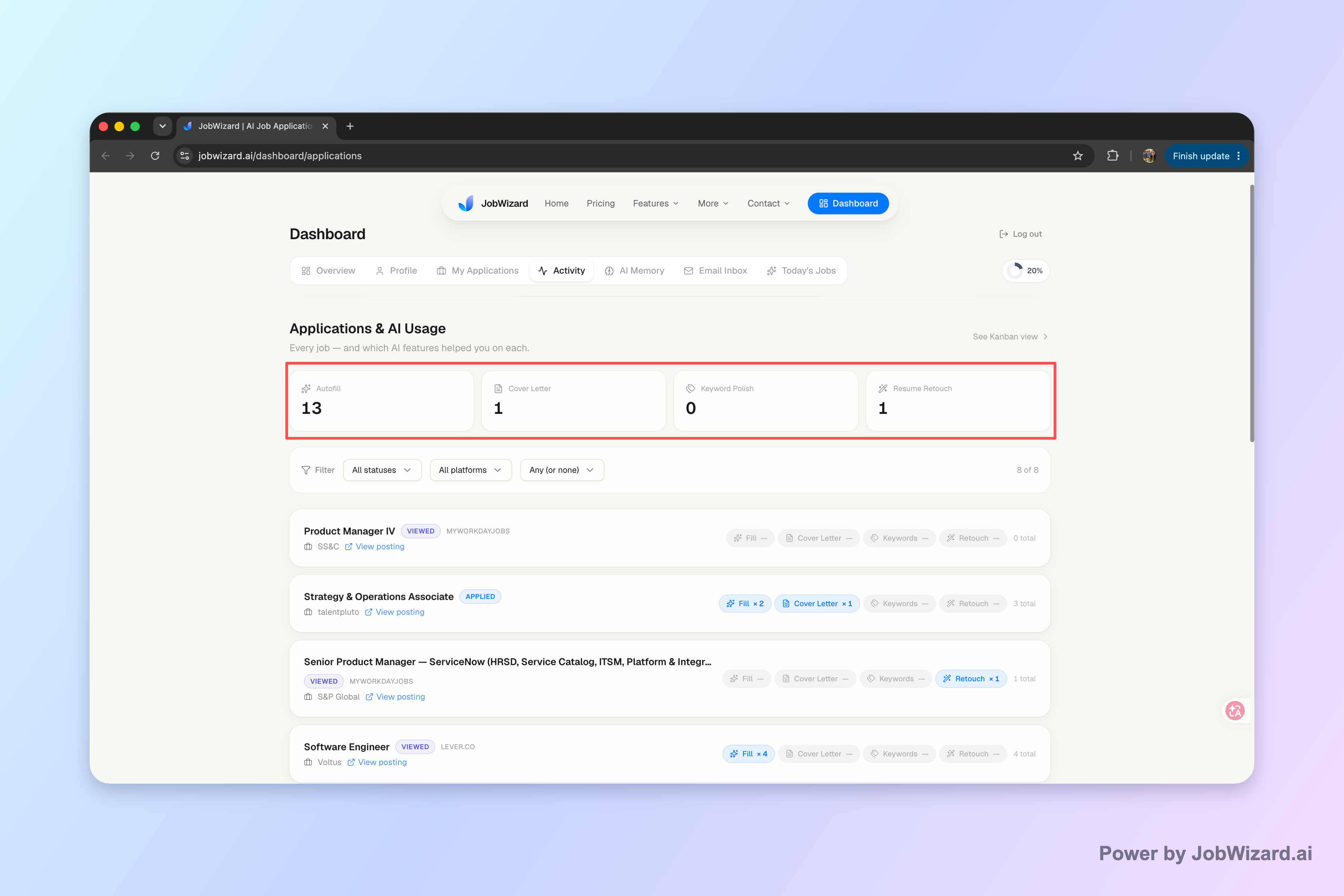
Record the date, the person you contacted, the question you asked, and any next step you agreed on. That record can help you distinguish an unanswered check-in from a promised update or another interview invitation.
Use Career Chat to Refine Questions About a Role
Career Chat can help you think through resume fit and application strategy while keeping the current role in context. That means you can ask a focused question about the role without pasting the job description again.
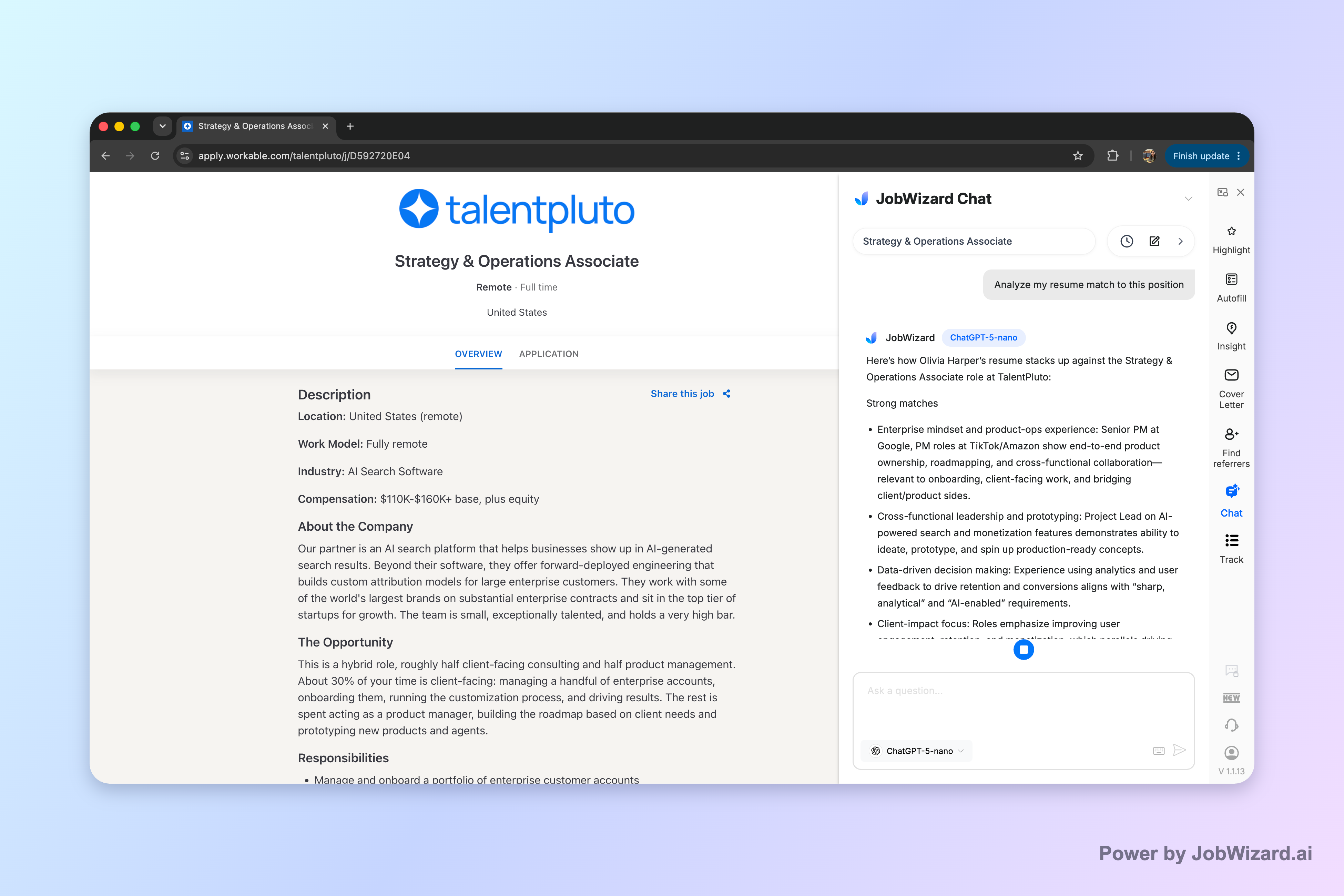
For example, ask, “Which part of my experience most directly matches this role’s requirements?” or “What should I clarify in my application before I submit it?” Then compare the response with the actual job description and your own experience.
Use the answer as a prompt for your judgment, not as a hiring decision. Career Chat cannot guarantee that you qualify, and its analysis does not replace the employer’s criteria or your review of the posting.
A simple workflow keeps the tool useful:
- Choose one uncertainty. Identify the particular responsibility, qualification, or application decision you want to understand.
- Ask a focused question. Include the specific role context you are considering, rather than asking for a broad verdict on your prospects.
- Check the evidence. Compare the response with the job description and the details of your resume.
- Decide your next step. Revise your materials, prepare an interview question, or move on if the role is not a fit.
For example, if a posting emphasizes cross-functional planning and your resume describes coordinating a project across departments, ask how to make that connection clearer. Review the suggestion and make sure any wording accurately reflects what you did.
Do this automatically with JobWizard
Skip the manual work — JobWizard's Application Tracker handles this for you.
Follow-Up Questions: Frequently Asked Questions
The best follow-up is the one that fits the moment and gives you information you can act on. Use these answers to choose a thoughtful next step.
What are good follow-up questions during an interview?
Ask about the role’s priorities, how success is measured, the team’s working style, or the next steps in the hiring process. For more examples, see our guide to good follow-up questions during an interview.
When should I send follow-up questions after applying?
Follow the timeline the employer gave you. If they did not provide one, allow a reasonable period before sending a brief, polite check-in that identifies the role and asks whether there is an update.
How many follow-up questions should I ask in one message?
Usually, one clear question is enough for a check-in. In an interview, prepare several options, then choose the ones that fit the conversation and time available.
Can Career Chat answer follow-up questions about a job?
Career Chat keeps the current role in context, so you can ask follow-up questions about resume fit or application strategy without pasting the job description again. Verify its response against the job description; it is not a recruiter decision or a guarantee that you qualify.
Keep your next step clear: organize each application and its follow-up in JobWizard’s Activity view, then use Career Chat to ask a focused question about the current role and verify the answer against the posting.
Frequently Asked Questions
Autofill your next job application
JobWizard is a free Chrome extension that fills applications, tracks statuses, and optimizes your resume.