Accounting Cover Letter That Gets Reviewed: A Role-Matched Template + AI Draft Workflow
Learn how to write an accounting cover letter that matches the job, keeps a professional tone, and uses an AI draft you can edit before you send.
Free Chrome extension
Generate this cover letter automatically
JobWizard drafts a tailored letter from your resume and the job description in seconds — free.
If you’re applying for accounting roles, the accounting cover letter problem usually isn’t “what do I write?”—it’s “how do I make it match this posting without sounding generic?” The fastest way to solve that is to use a role-matched structure, then generate an editable draft you can personalize before sending.
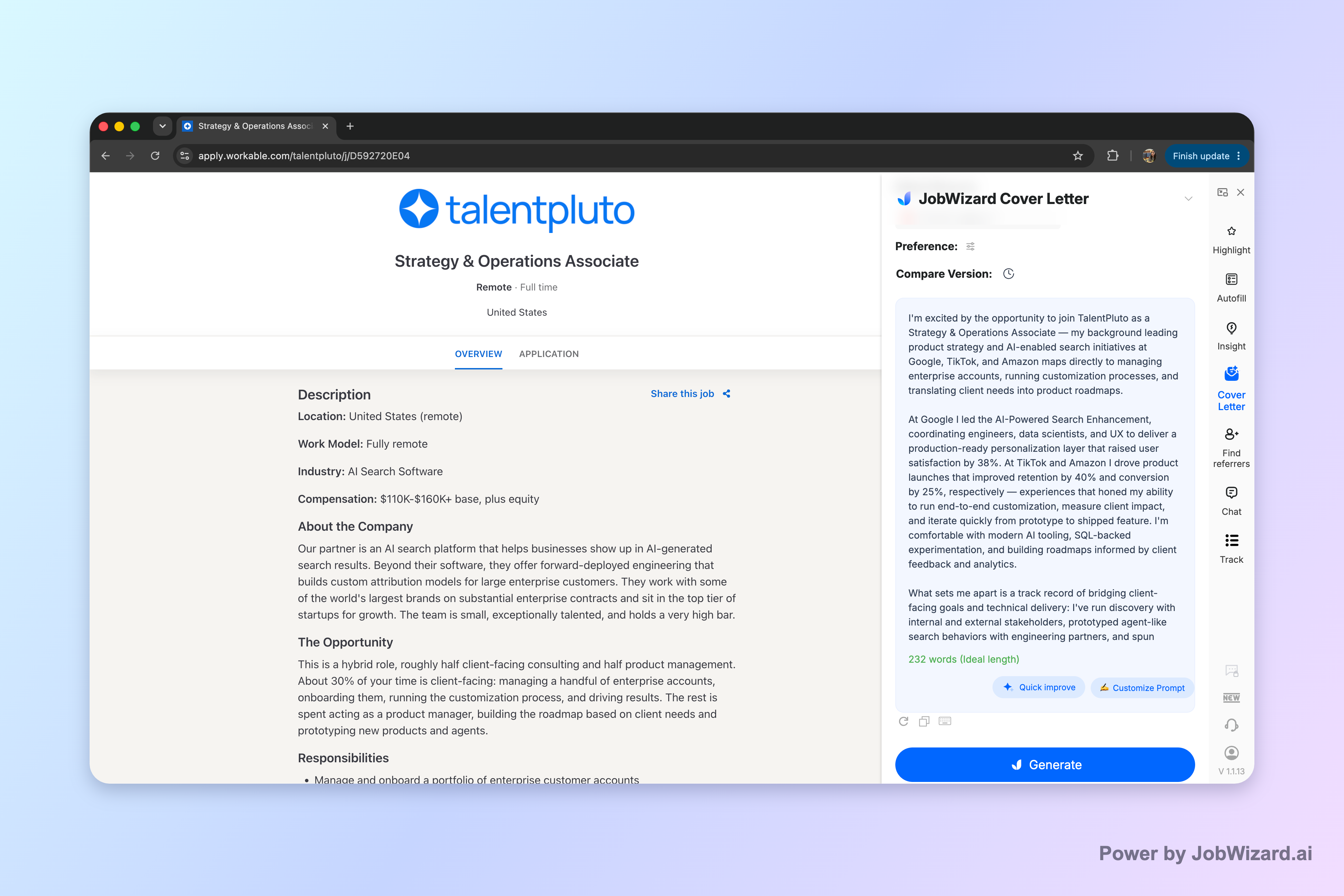
JobWizard creates an editable first draft using the selected resume and the job description on the page, so you can start from a version that already mirrors the role’s focus—then you refine details until it sounds like you.
What hiring managers look for in an accounting cover letter
Hiring managers expect proof of accounting competence—not just enthusiasm—so your letter should quickly connect your experience to what the job description emphasizes.
Most accounting screenings are skimming for alignment: can you handle the day-to-day accounting work, follow controls/processes, and communicate clearly with stakeholders. Your opening should reflect the exact role (AP/AR, month-end close, reconciliation, audit support, FP&A support, etc.), and your middle paragraphs should mirror the posting’s key responsibilities.
To keep your accounting cover letter reviewable, organize it like this:
- Opening (2–3 sentences): role title + why you’re applying + one relevant theme from the posting.
- Proof points (2–3 paragraphs or bullets in sentence form): specific accounting functions + how you worked (accuracy, timelines, systems, collaboration).
- Close (2–3 sentences): why you’ll add value for this employer and a clear next step (interview/meeting).
If you’re still deciding what to write, it helps to check a solid general framework first. Start with How to Write a Cover Letter with AI (Step-by-Step That Still Sounds Like You), then come back for accounting-specific proof points and tone.
Accounting cover letter format and tone that reads “professional” fast
Use a clean, conventional cover letter format so your experience is easy to scan and your tone stays polished.
Recommended structure (simple and effective)
- Header: your contact info + date + employer info.
- Salutation: use “Dear Hiring Manager” if you don’t have a name.
- Body: 3 short sections (opening, proof, close).
- Sign-off: “Sincerely,” then your name.
Tone: confident, specific, and control-minded
Accounting roles reward precision. Your accounting cover letter tone should sound: clear, organized, and accountable. Swap vague claims for verifiable details you can defend in an interview.
For example, instead of writing “I’m detail-oriented,” write something like “I focus on reconciliation accuracy by verifying variances and documenting follow-ups before month-end deadlines.” That’s still readable, but it signals actual work behavior.
Length: keep it readable
In most cases, one page is the sweet spot for an accounting cover letter. If you want a quick rule you can follow, see Should a Cover Letter Be One Page? Use This Length Rule (and When to Break It).
A role-matched accounting cover letter template (edit these parts)
Use this accounting cover letter template as a starting point, then replace brackets with job-specific details and real proof.
Template (fill in the bracketed sections):
[Opening] Dear Hiring Manager,
I’m writing to apply for the [Accounting Role Title] position at [Company Name]. Based on the job description, you’re looking for someone who can [2–3 responsibilities from the posting], and my background in [your relevant accounting area] aligns closely with those priorities.
[Proof Point #1: Accounting function] In my previous role, I supported [AP/AR, month-end close, reconciliation, audit support—choose what matches the posting] by [what you did]. I focused on accuracy and timeliness by [how you did it: process, controls, documentation, checks], which helped ensure [result you can stand behind—keep it honest].
[Proof Point #2: Tools/process/compliance] I also bring experience with [systems/ERP or tools mentioned or closely related] and a control-minded approach to [reconciliations, journal entries, reporting support, documentation]. When handling [a constraint from the posting: deadlines, audit readiness, volume, stakeholders], I communicate clearly with [cross-functional partners] and document work so it’s easy to review.
[Proof Point #3: Communication and ownership] What I enjoy most is owning [a recurring responsibility] and collaborating to resolve issues early. If selected, I’ll help the team by [tie to the company’s needs: reduce errors, improve cycle times, support audits, strengthen reporting], while staying consistent with your expectations for quality and professionalism.
[Close] Thank you for your time and consideration. I’d welcome the opportunity to discuss how my experience in [your key theme] can support [Company Name] in this [role]. Sincerely, [Your Name]
Accounting-specific proof ideas you can plug in
Pick 2–3 that match the posting and that you can discuss in an interview.
- AP/AR: invoice processing accuracy, payment application, collections support, dispute handling.
- Month-end close: journal entry support, reconciliation workflows, deadline discipline, reporting preparation.
- Reconciliation: variance checks, documentation, follow-up tracking, error reduction.
- Audit/compliance support: documentation organization, response to questions, audit trail readiness.
- Cross-functional collaboration: working with operations, payroll, or FP&A to resolve data issues.
If you’re applying for roles with a specific “sales” or “customer-facing” twist (like certain finance-accounting hybrid roles), you can borrow a persuasive flow from Sales Cover Letter That Gets Read: A Personal Template + AI Draft Workflow—just keep your accounting evidence front and center.
How to use AI to draft your accounting cover letter (and still keep it true)
AI should produce a draft you edit, not a final letter you blindly send—and that’s exactly the right workflow for an accounting cover letter.
JobWizard uses the selected resume and the current job description to generate an editable cover letter draft. Before generating, you can choose length, format, tone, style, and focus. After the draft is created, you can click into it and edit it directly.
Step-by-step workflow (what to do before you generate)
- Select the right resume: pick the one with the closest accounting experience to the role.
- Load the correct job description: the draft is only as aligned as the posting content.
- Choose a tone and focus: professional, detail-oriented, and role-specific (AP/AR vs close vs audit).
- Set the length and format: aim for concise and scannable.
Step-by-step workflow (what to do after you generate)
- Verify every factual claim: systems used, timelines, responsibilities, and scope.
- Add genuine personal details: one or two specifics only you can confirm.
- Match the posting wording carefully: mirror the responsibilities, but don’t copy entire sentences.
- Do a “controls and clarity” pass: replace vague phrases with concrete processes and ownership.
Limit to remember: You must review AI-generated content and add genuine personal details before using the draft. Don’t claim higher callback rates or guaranteed personalization—your job is to make it accurate and authentic.
Because accounting work is often evaluated on accuracy and clear documentation, your final review step matters most here. A strong practice is to read the letter once for fit (does it match the job?) and once for truth (can you defend every detail?).
Quick tailoring examples for common accounting roles
Tailoring is easiest when you swap proof points, not your entire letter—so create a reusable core and adjust the role-specific evidence.
Example 1: AP/AR (invoice volume + accuracy)
Opening tweak: “I’m applying for the AP/AR role… you emphasize invoice processing accuracy and timely follow-up.”
Proof tweak: highlight invoice matching, payment application, dispute resolution, and communication with internal partners.
Example 2: Month-end close (reconciliation + deadlines)
Opening tweak: “I’m excited about the month-end close focus… you’re looking for consistent, control-minded close support.”
Proof tweak: lead with reconciliations, journal entries support, documentation habits, and deadline execution.
Example 3: Audit or compliance support (documentation + readiness)
Opening tweak: “I’m applying for the audit support role… your posting highlights documentation readiness and response support.”
Proof tweak: emphasize organizing supporting schedules, answering data requests, and maintaining an audit trail.
When you’re done tailoring, return to the general quality checklist from How to Write a Cover Letter with AI (Step-by-Step That Still Sounds Like You), and use the length guidance from Should a Cover Letter Be One Page? Use This Length Rule (and When to Break It) to keep it tight.
Do this automatically with JobWizard
Skip the manual work — JobWizard's AI Cover Letters handles this for you.
FAQ about an accounting cover letter
What should an accounting cover letter include?
An accounting cover letter should include (1) a direct opening tied to the role, (2) 2–3 proof points that match the job description (skills + outcomes you can stand behind), (3) a short explanation of your accounting background (e.g., AP/AR, month-end close, reconciliation, audit support), and (4) a clear close with why you’re a fit and an invite to interview. Keep it specific, professional, and focused on what the employer asked for.
How long should an accounting cover letter be?
Aim for a single, readable page. In practice, that usually means 250–400 words, with enough detail to connect your experience to the posting while avoiding repetition. If the job posting asks for a particular length, follow that instruction; otherwise, keep it tight and scannable.
Should I use an AI to draft my accounting cover letter?
Yes—if you treat it as a first draft, not a final submission. JobWizard generates an editable cover letter draft using your selected resume and the current job description, and you can choose length, format, tone, style, and focus before generating. You still need to review facts and add genuine personal details so the final letter is accurate and sounds like you.
How do I make an accounting cover letter sound personal (not generic)?
Replace generic statements (“I’m a hard worker,” “I’m passionate about accounting”) with job-matched specifics: mention the exact accounting functions the posting emphasizes, align your language to their wording (without copying), and add one or two details only you can verify (a system you used, a type of reconciliations you’ve done, a deadline you consistently met). Then do a quick tone pass so it reads like your voice.
What’s the best way to tailor an accounting cover letter for different roles (AP/AR, audit, close)?
Start by mapping each role to 2–3 priority themes from the posting. For AP/AR roles, lead with invoice processing, collections, and accuracy. For month-end close, lead with reconciliation, journal entries, and controls. For audit or compliance support, lead with documentation, variance explanations, and readiness. Swap only the proof points and the opening/close tie-in each time, while keeping a consistent professional tone and format.
Ready to draft your next accounting cover letter? Use JobWizard to generate an editable first draft for the current job description—then review and customize it with your real experience so it stays accurate, specific, and convincingly professional.
Frequently Asked Questions
Generate this cover letter automatically
JobWizard drafts a tailored letter from your resume and the job description in seconds — free.