Sales Cover Letter That Gets Read: A Personal Template + AI Draft Workflow
A strong sales cover letter proves you can create pipeline and close—without sounding generic. Use this personal template and an AI draft workflow to tailor fast, then edit with real details.
Free Chrome extension
Generate this cover letter automatically
JobWizard drafts a tailored letter from your resume and the job description in seconds — free.
If you’re applying for sales roles, a sales cover letter is your chance to show—not tell—how you create pipeline, guide discovery, and drive next steps. The goal isn’t to be “formal.” It’s to be specific, credible, and easy to skim.
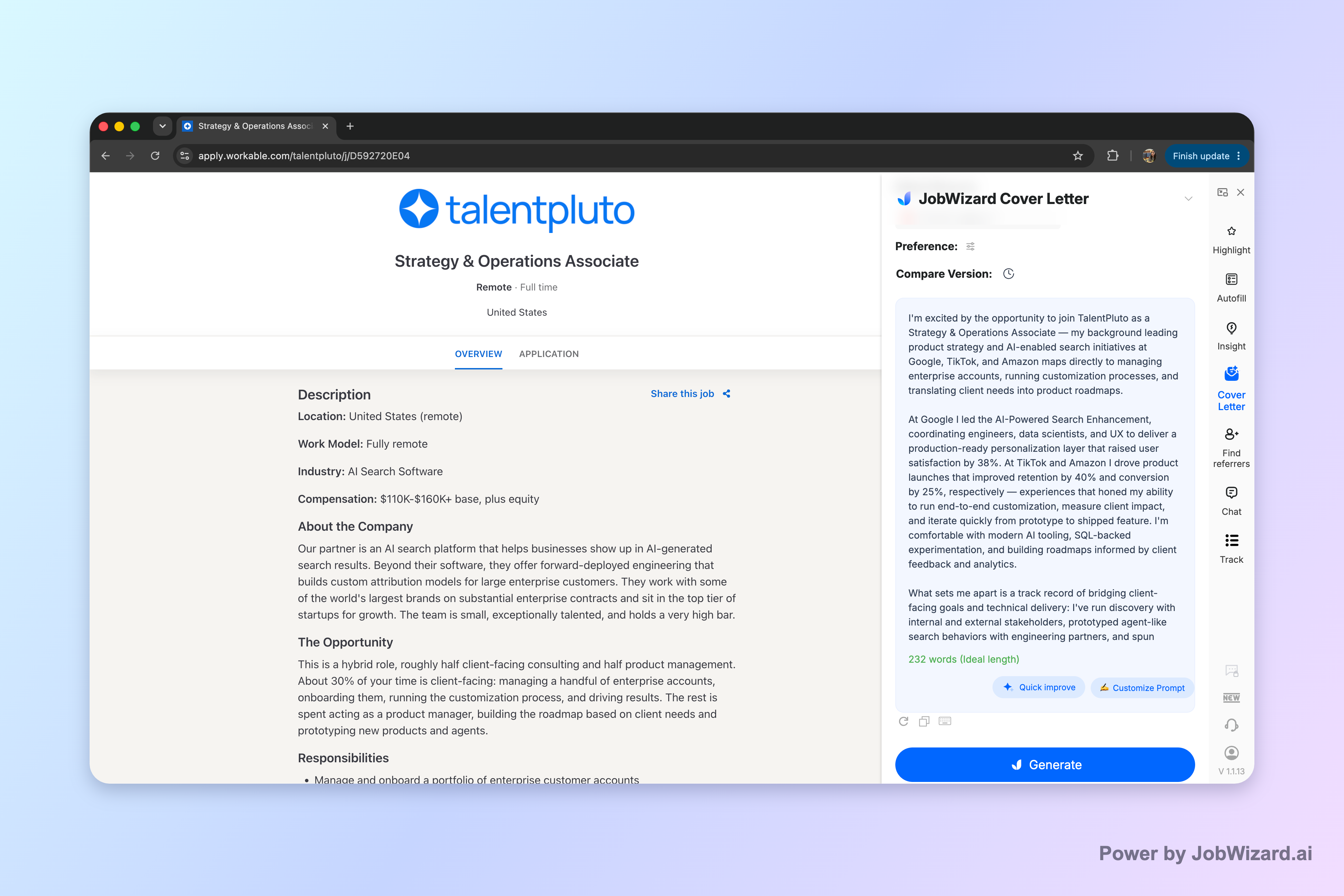
JobWizard creates an editable first draft using the selected resume and the job description on the page, so you can focus on tailoring the message instead of staring at a blank document.
What Makes a Sales Cover Letter Different (and Stronger)
Sales cover letters win when they mirror how you sell: discovery, relevance, proof, and a clear close. Hiring managers want evidence you understand their motion and can contribute immediately.
Match the role’s sales motion, not just the title
Most job descriptions quietly signal the “how” behind the “what.” Is it inbound lead handling, outbound prospecting, enterprise deal cycles, renewals/expansion, or a hybrid motion? Your sales cover letter should reflect that same pattern.
- Inbound-heavy roles: emphasize speed-to-lead, qualification, and converting interest into meetings.
- Outbound-heavy roles: emphasize prospecting strategy, messaging tests, and scalable outreach.
- Enterprise roles: emphasize stakeholder navigation, multi-threading, and longer cycle discipline.
- Renewals/expansion: emphasize retention strategy, QBRs, and identifying expansion paths.
Lead with one strong, relevant reason they should read
A common failure is opening with generic enthusiasm (“I’m excited to apply”). For a sales cover letter, your opening should do sales work: earn attention by connecting your experience to their priorities.
Use a pattern like: role + context + proof. Example: “For the last 3 years, I’ve built pipeline from qualified conversations in [segment], and I’m at my best when I translate discovery into a clear next step.”
The sales cover letter Template You Can Personalize Fast
Use this template as your base structure—then swap the three parts that hiring managers actually read: opener, proof points, and close.
Template (copy, then customize)
Opening (2–3 sentences)
- What role you want + what attracted you (tie to the job description)
- Your selling specialty (in one line)
- One proof cue (award, scale, deal type, or measurable impact if you can)
Example opener you can adapt:
“I’m excited about the [Role Title] role at [Company]. In my recent experience selling [product/segment], I’ve focused on turning discovery into qualified opportunities—so deals don’t stall at the ‘interesting’ stage. What stands out to me is your emphasis on [job priority from posting], which matches how I’ve built pipeline and guided next steps.”
Proof points (6–10 sentences total, 2–3 bullets or mini-paragraphs)
- Proof point #1: pipeline creation/qualification (include deal type, channel, and what you improved)
- Proof point #2: conversion/closing (include sales cycle or stakeholder context)
- Proof point #3 (optional): retention/expansion, forecasting, or collaboration (if relevant to the role)
Bullet example:
- Pipeline & qualification: “Generated and qualified pipeline by combining targeted outreach with fast, structured discovery—resulting in more meetings with decision-makers.”
- Deal execution: “Drove deals from discovery through solution alignment by clearly mapping value to stakeholders and maintaining crisp next steps.”
- Cross-functional impact: “Partnered with marketing and product to refine messaging based on objections and buyer needs.”
How you sell (2–3 sentences)
Example:
“My approach is consultative but decisive: I qualify quickly, align value to the buyer’s goals, and confirm mutual action items before moving forward. That discipline helps shorten deal drift and keeps momentum through internal approvals.”
Close (2–3 sentences)
- Why you fit (tie back to their language)
- What you’ll do in the first months (specific, not vague)
- Call to action (confident, not desperate)
Example close:
“I’d love to bring that same pipeline discipline and discovery-to-decision process to [Company]. If helpful, I can share examples of how I’ve handled [specific situation aligned to posting] and what I’d prioritize in the first 30–60 days. Thank you for your time—I’m looking forward to the conversation.”
Quick checklist: make it read like a sales message
- Specifics: role, company, and the job’s top priorities.
- Proof: 2–3 accomplishments that match their motion (not generic traits).
- Flow: discovery → relevance → proof → next step.
- Polish: no typos, no “Dear Hiring Manager” unless truly necessary.
How to Draft Faster with an AI sales cover letter Workflow (Then Make It Yours)
Draft faster without losing authenticity by using AI to structure and wordsmith, then you finalize with real details and role-specific alignment.
Workflow (practical steps you can follow today)
- Start with your current job description: use the exact posting you’re applying to.
- Select your resume: so the draft pulls from your background.
- Choose what you want the draft to sound like: length, format, tone, style, and focus.
- Generate an editable first draft: then review it like a sales call—what’s missing, what sounds off, what needs proof.
- Edit for accuracy and real personality: add genuine personal details, correct facts, and swap placeholders for specifics.
- Final pass for “sales readiness”: confirm the opening matches the role and the proof points match the job’s motion.
Why the “review-before-submit” part matters
An AI-assisted first draft can save time, but it’s not a substitute for real personalization. JobWizard’s draft is meant to be reviewed and edited by you—especially for sponsorship/salary/EEO/custom-question details (or any factual elements that must be accurate).
Don’t claim outcomes you can’t defend. Don’t use numbers you can’t verify. Instead, replace vague lines with concrete context: deal types, buyer roles, obstacles you overcame, and the exact value you brought.
Sales cover letter Examples by Situation (Use as Plug-and-Play)
Different sales roles need different proof, so tailor the proof points rather than copying one version everywhere.
Example A: SDR/BDR (pipeline-first)
Opening idea:
“I’m applying for the SDR/BDR role because I enjoy building pipeline from qualified conversations. In previous roles, I’ve used structured discovery to move prospects from interest to booked meetings—especially in [segment].”
Proof points to include:
- volume vs. quality (what you optimized)
- qualification criteria you follow
- common objections and how you handled them
Example B: Account Executive (closing + deal execution)
Opening idea:
“I’m excited about the Account Executive opportunity at [Company]. I’m strongest when I guide discovery to an aligned solution and a clear next step—especially in deals involving [stakeholders/industry].”
Proof points to include:
- sales cycle discipline (what you track)
- multi-threading or stakeholder mapping
- how you collaborate with internal teams
Example C: Customer Success / Renewals (retention + expansion)
Opening idea:
“I’m applying for the Customer Success role because I like measurable outcomes: adoption, renewals, and expansion. I’ve built trust through consistent QBRs, clear success plans, and proactive risk detection.”
Proof points to include:
- how you identify risk early
- how you drive adoption
- expansion playbooks or roadmap influence
Do this automatically with JobWizard
Skip the manual work — JobWizard's AI Cover Letters handles this for you.
FAQ: Sales cover letter Questions (Answered)
Use these answers to fix the most common sales cover letter issues before you hit submit.
What should a sales cover letter include?
A sales cover letter should include (1) a specific opening that matches the role and company, (2) 2–3 proof points tied to the job description (pipeline, conversion, deal cycles, quoting/forecasting, renewals), (3) a short explanation of how you sell (discovery → value → next steps), and (4) a clear close with why you’re a fit and how you’ll add value. Keep the focus on what you accomplished and what you’ll do in this exact role.
How long should a sales cover letter be?
For most sales roles, aim for about one page. Prioritize readability: short paragraphs, clear bullets for proof points if needed, and enough space to address the role’s top priorities. If you must cut, trim to your strongest opening and the two most relevant achievements.
Can I use an AI draft for a sales cover letter?
Yes—use an AI draft as a starting point, not a final submission. JobWizard generates an editable cover letter draft using your selected resume and the current job description. Before you use it, you choose length, format, tone, style, and focus; then you review the draft and add genuine personal details so it’s accurate and truly specific to you.
What’s the best tone for a sales cover letter?
Aim for confident, consultative, and specific—like you’re pitching a qualified opportunity. Avoid sounding overly hype or vague. The best tone balances credibility (“here’s what I did”) with clarity (“here’s how I help this team win”). If the job description uses particular language (e.g., “pipeline generation,” “enterprise,” “renewals”), reflect that while staying natural.
How do I tailor a sales cover letter without rewriting everything?
Use a repeatable structure and swap only the high-impact parts: your opener, the 2–3 proof points, and the closing call-to-action. Generate or draft the first version, then edit only what needs to be real and role-specific—metrics if you have them, deal types, stakeholders, sales cycle context, and any relevant tools or territory details.
Apply Your Draft Today (Recommended Next Reads + CTA)
If you want the fastest path to a compelling sales cover letter, start with a draft you can edit—then refine the proof and close like a real sales pitch.
Next, use these guides to strengthen your approach and speed up your process:
- How to Write a Cover Letter with AI (Step-by-Step That Still Sounds Like You)
- The Fastest Way for Sales Roles to Write a Cover Letter
- AI Cover Letter for Sales Roles
- Cover Letter Examples Healthcare: Templates & a Workflow to Make Them Sound Like You
CTA: Generate a draft for the current job description in JobWizard, then edit it with your real sales experience and role-specific proof—so your final sales cover letter sounds like you and matches the buyer you’re pitching.
Frequently Asked Questions
Generate this cover letter automatically
JobWizard drafts a tailored letter from your resume and the job description in seconds — free.