Workday In Progress vs Under Review: What Each Status Really Means
Confused by “workday in progress vs under review”? Learn what each hiring-status usually indicates, what you should do next, and how to avoid common application mistakes.
Free Chrome extension
Track all your applications in one place
JobWizard auto-tracks status changes across Workday, Greenhouse, and every major job site — free.
You submitted your application on Workday, and the status just says In Progress. Days later you see Under Review, but you’re not sure what that means—or what you should do next.
This guide breaks down workday in progress vs under review in plain English, including what each status usually signals, what to check on your end, and how to avoid common “stuck” scenarios caused by incomplete required answers.
What does “In Progress” mean on a Workday job application?
In Progress usually means Workday (and/or the employer’s workflow) has your application and is actively handling it before the role reaches a reviewer decision point.
In practice, employers can use “In Progress” to represent “received and processing,” “queued for screening,” or “data is being prepared for review.” It’s a good sign in the sense that your application hasn’t been rejected at the first step, but it’s also not the same as “someone is currently reading your resume.”
If you’re hoping for an interview, the key is to treat “In Progress” as “pipeline time”: you may be waiting on internal triage, recruiter bandwidth, or automated checks.
Key takeaway: “In Progress” typically means your application is still moving through the process, not that it’s confirmed to be in active human review yet.
What does “Under Review” mean on Workday?
Under Review generally indicates your application is being examined as part of the hiring selection process.
“Under Review” is typically closer to a decision than earlier statuses, because it implies a reviewer—human or workflow-driven—has your application and is looking for fit. That doesn’t guarantee an interview, but it usually means your application passed the early “processing/completeness” checkpoints (or at least reached the review stage).
If you’re tracking closely, this is the moment to double-check that your application materials are consistent with the role—especially your resume summary, your work history dates, and the key skills you highlighted.
Key takeaway: “Under Review” usually means your application is in consideration, but you still shouldn’t treat it as an offer-stage guarantee.
Is “Under Review” better than “In Progress” on Workday?
Under Review is typically “more advanced” than In Progress because it suggests review activity rather than only system processing.
That said, employers can differ. Some teams update statuses more frequently; others keep them static until a recruiter makes progress. Some also move applications between internal steps without changing what the candidate sees. So, use these statuses as directional signals—not as exact timestamps of when your resume was read.
When you compare them, think of it like this:
- In Progress: received/processing/queued
- Under Review: review/consideration stage
Key takeaway: “Under Review” is usually a step forward, but you should still be prepared for delays and different employer workflows.
How long does Workday take to change a status from In Progress to Under Review?
Workday timing varies, and there’s no single universal schedule you can rely on for when “In Progress” becomes “Under Review.”
Status updates depend on the employer’s internal process, application volume, and how often their recruiting team updates candidate-facing fields. Some organizations batch reviews; others screen continuously.
Instead of chasing exact timing, focus on what you can control: confirm your application was complete, tailor your materials to the role, and follow up politely only when it makes sense.
Key takeaway: Don’t treat the status change interval as a definitive indicator of competitiveness—use it to guide your next actions.
What should I do if my Workday application stays “In Progress” for weeks?
If In Progress lasts for weeks, your best move is to re-check completeness and then follow up professionally if you can.
Start with a quick audit. Look at the role’s required fields you completed and compare them to your resume. If any answers were vague, missing, or obviously mismatched, you may not be able to “edit” after submission—but you can still refine what you share next (for example, a follow-up message).
If the employer provides a recruiter name or a contact route, consider a short follow-up that restates interest and adds value. If you don’t have contact info, focus on applying to other roles while keeping your application materials polished.
- Verify completeness: double-check the required questions you entered match the job’s core needs.
- Prepare a follow-up: be concise, professional, and specific to the role.
- Don’t panic-apply: avoid spamming updates; keep quality high.
- Keep applying: expanding your target list reduces the risk of waiting on one employer’s cycle.
Key takeaway: Long “In Progress” is often just workflow time—your response should be a completeness check plus a tactful follow-up if possible.
What if my Workday status says “Under Review” but I haven’t heard anything?
When Under Review appears, you’re often in the consideration window—but silence afterward can still be normal.
Many teams don’t update candidate-facing statuses at every internal milestone. They may continue screening, shortlisting, interviewing, and reference checking without changing your display status. Some roles also close once they reach a hiring decision, even though the candidate sees no further movement.
In this situation, a measured approach works best: wait an appropriate amount of time, then follow up if you have a valid channel. If you don’t, keep your job-search momentum going.
Key takeaway: “Under Review” without updates doesn’t necessarily mean “no,” so plan a follow-up window rather than repeated checking.
Will a status change in Workday if my application is missing required answers?
Missing required answers can affect whether an application is treated as complete, which can indirectly influence what status you see.
Many Workday configurations require all required fields before the system considers the submission usable for review. If you skipped something or entered an incomplete value, the application may stall during processing or not reach the same review pathway.
That’s why the practical “avoid getting stuck” strategy is simple: ensure required fields are complete before you submit. Tools that help you find missing required questions can reduce the chance of an avoidable delay.
JobWizard’s Smart Autofill is designed for this exact problem: it uses saved profile and resume data to fill detected fields on supported application pages, but you review every populated answer before submitting. If a required field still needs attention, JobWizard can identify it and let you jump directly to the matching question—so you can correct it in the moment.
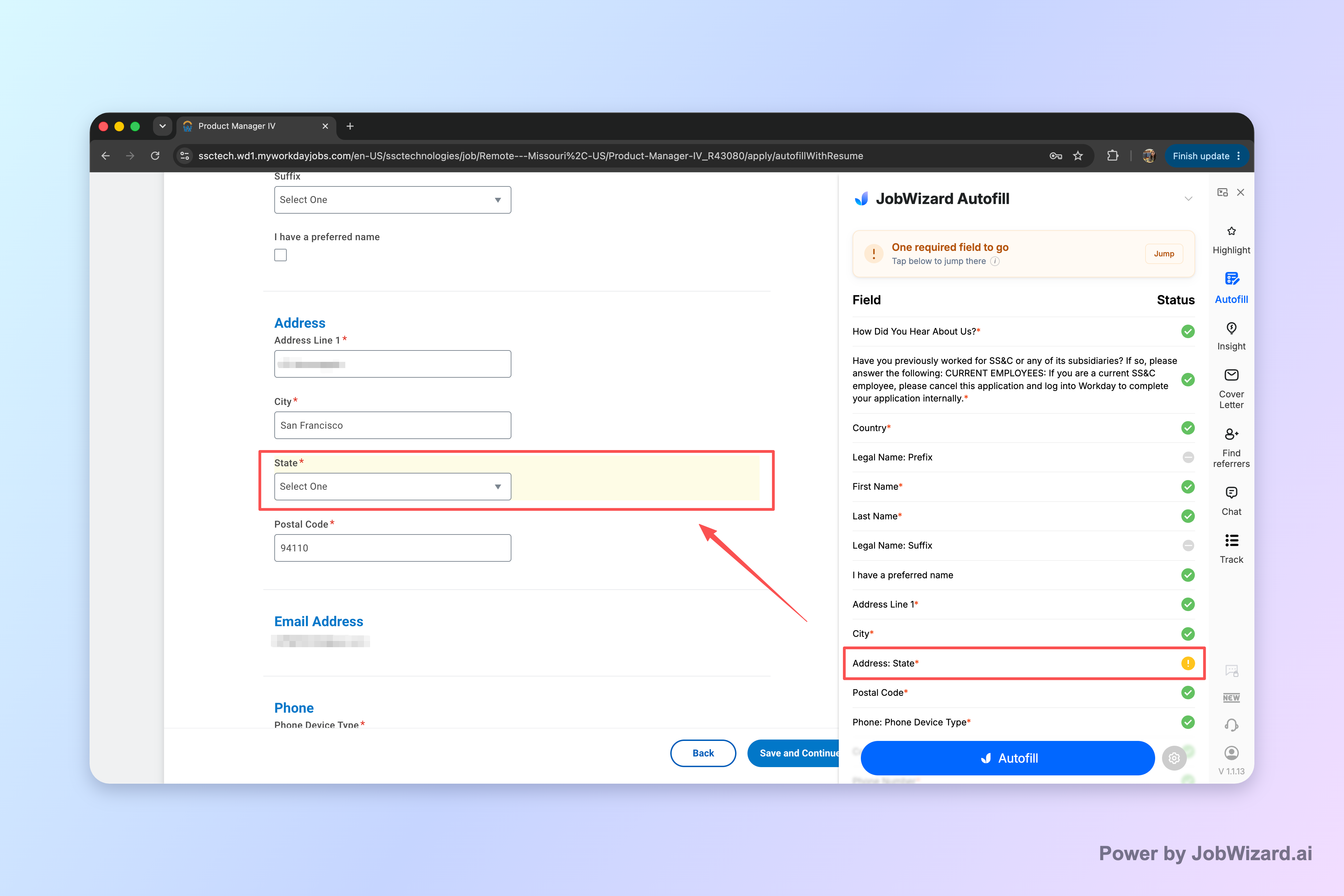
Key takeaway: If your “In Progress” feels stuck, completeness matters—use a workflow that helps you catch missing required fields before submission, then review before you submit.
What does “submitted” mean in Workday, and how does it relate to In Progress vs Under Review?
Submitted indicates you successfully sent your application, while In Progress vs Under Review describe what happens afterward in the employer’s workflow.
In many hiring systems (including Workday deployments), “submitted” means the job application reached the employer’s intake. The next statuses reflect internal steps: initial processing, review queueing, screening, and human decision-making.
So, when you see “submitted” followed by In Progress, your application is typically in motion. When it later changes to Under Review, the employer is usually farther along in assessing the candidate fit.
Key takeaway: “Submitted” confirms delivery; the status that follows tells you which stage of the employer’s process you’re likely waiting on.
Workday application status: In Progress vs Under Review — what to do next
This table turns workday in progress vs under review into clear next steps so you know what action to take (and when).
| Workday status you see | What it usually means | Recommended action |
|---|---|---|
| In Progress | Your application is received and being processed/queued before review. | Double-check that required answers are complete and aligned to the role; prepare a concise follow-up plan. |
| Under Review | Your application is actively being considered by the employer. | Keep an eye on next steps (interview request emails); if you have a contact and time has passed, send a polite follow-up. |
| Submitted (context) | Your application successfully reached the employer’s intake. | Use status changes to guide timing, not urgency panic—keep applying to other roles. |
Key takeaway: Use “In Progress” for preparation and completeness checks, and use “Under Review” for patient, professional follow-up planning.
How can I follow up after Workday shows Under Review?
A follow-up after Under Review should be short, role-specific, and respectful of the recruiter’s timeline.
Before you send anything, make sure your message adds value: a concrete detail from the job description, a relevant accomplishment, or a clear demonstration of fit. Avoid sounding like you’re demanding an update.
Copy-paste follow-up email template (edit the brackets):
Subject: {Role Title} — Application Follow-Up
Hello {Recruiter Name or Hiring Team},
I hope you’re doing well. I submitted my application for the {Role Title} position on {Approx. Date}, and I wanted to follow up because I’m very interested in the role.
Based on the job description, I’m especially excited about {specific responsibility from posting}. In my recent work at {Company}, I {1–2 sentence achievement that shows impact and relevance}.
If there’s anything else I can provide to support your review, I’d be happy to share. Thank you for your time and consideration.
Best regards,{Your Name}{Phone}{LinkedIn or Portfolio}
- Keep it brief: aim for clarity over length.
- Reference the role: include the title and approximate submission date.
- Add one proof point: a measurable accomplishment or direct match to a requirement.
- Ask one question: whether they need anything else—not “when will I hear back?”
Key takeaway: The best follow-up turns “I applied” into “here’s why I match,” while keeping tone professional.
Do this automatically with JobWizard
Skip the manual work — JobWizard's Application Tracker handles this for you. On these platforms: Workday autofill.
FAQ: workday in progress vs under review
What does “In Progress” mean on a Workday job application?
“In Progress” typically means your application has been received and the system/recruiter workflow is actively processing it—often before a final screening decision is made. The exact step varies by employer, so use it as a “still in the pipeline” sign and confirm you completed all required fields.
What does “Under Review” mean on Workday?
“Under Review” generally means someone (or a workflow) is reviewing your application for the role. It’s a closer-to-decision status than early “in progress” stages, but it still doesn’t guarantee an interview.
Is “Under Review” better than “In Progress” on Workday?
Usually, yes—“Under Review” indicates your application is being considered by a reviewer rather than only processed in the system. However, you should still treat both as “not a final outcome,” since employers can move applications around or update statuses differently.
How long does Workday take to change a status from In Progress to Under Review?
Workday doesn’t publish a single universal timeline. The update timing depends on the employer’s hiring workflow, volume of applicants, and review schedule. If it’s been a while, focus on ensuring your application is complete and use a polite follow-up.
What should I do if my Workday application stays “In Progress” for weeks?
First, confirm you didn’t miss or partially complete any required questions. Then, update your resume/LinkedIn only if changes are truly meaningful, and send a short, professional follow-up to the recruiter or hiring contact if available.
Will a status change in Workday if my application is missing required answers?
Often, yes—many Workday setups require all required fields before the application is considered complete. If something was missed, you may see a status that effectively stalls processing. Using autofill tools that help you jump to missing required fields—then reviewing before you submit—can prevent that situation.
Can JobWizard help with Workday applications so I don’t get stuck in In Progress?
JobWizard Autofill fills detected fields on supported application pages using saved profile/resume data, then you review everything and submit yourself. If a required field still needs attention, JobWizard can identify it and let you jump directly to the matching question—helping you avoid avoidable “in progress” delays caused by incomplete required answers.
Should I contact the recruiter after my Workday status shows Under Review?
Yes, if you have a hiring contact and it’s been a reasonable amount of time. Keep it concise: restate interest, highlight a relevant strength, and ask whether they need anything else. If there’s no contact info, use the employer’s normal channel if provided.
JobWizard has processed 720,000+ applications with 600,000+ autofill sessions, and autofill typically fills ~18 repetitive fields per application—while you review and submit yourself.
Ready to move faster on the application steps that matter? Try JobWizard’s Smart Autofill on your next Workday application: it helps populate detected fields using your saved profile/resume data, identifies missing required fields, and lets you review every answer before you submit.
Give it a try on your next application, then take the final minute to review everything before submitting.
Frequently Asked Questions
Track all your applications in one place
JobWizard auto-tracks status changes across Workday, Greenhouse, and every major job site — free.