Substitute Teacher Cover Letter: Use This AI-Drafted Letter + Checklist to Get Read
A strong substitute teacher cover letter explains your readiness fast—then earns a review. Use this JobWizard AI-drafted substitute teacher cover letter structure, tone checklist, and edit steps to sound like you.
Free Chrome extension
Generate this cover letter automatically
JobWizard drafts a tailored letter from your resume and the job description in seconds — free.
Substitute teacher cover letter: what it must do to get read
Your substitute teacher cover letter has one job: convince the hiring team you can step into a classroom immediately, follow lesson plans confidently, and support a smooth day for students and staff.
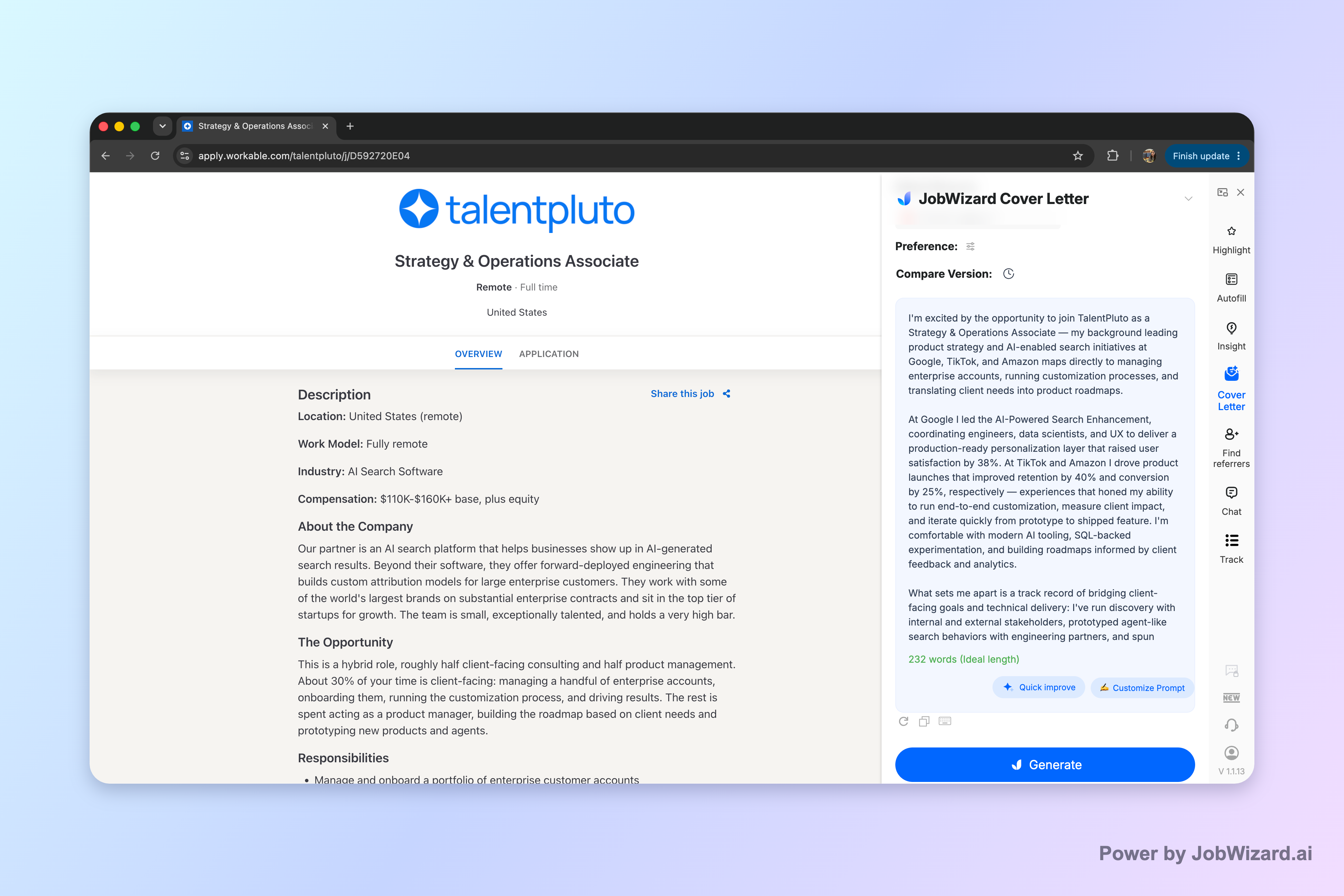
JobWizard can generate an editable first draft using your selected resume and the current job description—so you can start with strong wording, then tailor the details that only you can provide.
To stay credible (and avoid generic “AI-sounding” language), treat the draft as a foundation, not a final answer. You’ll still review every factual detail and add genuine personal information before sending.
Use this substitute teacher cover letter structure (with a ready-to-edit template)
The fastest way to write a great substitute teacher cover letter is to follow a predictable structure and keep it school-focused (not job-focused).
Below is a substitute-ready structure you can paste into your document. After the template, you’ll find a concrete example and an edit checklist to make it feel like you.
Template: substitute teacher cover letter (editable sections)
Header + greeting [Your Name] | [City, State] | [Phone] | [Email] | [LinkedIn or optional portfolio] [Date] [Principal/HR Contact Name, if listed] or “Hiring Committee” [School/District Name]
Opening (2–3 sentences) I’m excited to apply for the Substitute Teacher position with [School/District]. I’m a [certification/status, if applicable—e.g., licensed educator / education background / substitute experience] who’s comfortable stepping into new classrooms and keeping instruction moving while maintaining positive routines.
Readiness + classroom approach (3–5 sentences) When I substitute, I focus on predictable procedures from the start: reviewing the posted plan, establishing clear expectations, and using consistent transitions so students can focus on learning. I’m able to follow existing lesson plans, adapt when needed, and keep students engaged through structured activities, clear directions, and respectful redirection.
Subject/grade comfort + example proof (3–5 sentences) In previous roles/substitute assignments, I’ve supported [grade band or subjects—e.g., elementary reading and math / middle school science labs / high school English]. For example, during [brief example: “a week of coverage” or “a long-term substitute assignment”], I [what you did—e.g., kept students on pace, supported small-group instruction, ensured materials were ready, communicated updates to staff].
Communication + follow-through (2–3 sentences) I also prioritize communication: I make note of what worked, what didn’t, and any student needs so the next teacher can pick up quickly. I’m comfortable documenting progress and leaving a clear summary for staff.
Close (2–3 sentences) Thank you for considering my application. I’d welcome the opportunity to discuss how my substitute-readiness and classroom approach can support your students and teachers. I’m available to begin on [date if relevant].
Mini-example (short and realistic)
Example opening + approach I’m excited to apply for the Substitute Teacher role at [School/District]. As a substitute teacher who enjoys helping classrooms stay on track, I’m comfortable stepping in quickly and following lesson plans with calm, consistent routines. When I’m in a classroom, I start by setting expectations, reviewing the day’s schedule, and using clear directions for transitions and independent work. If something needs adjustment, I adapt without disrupting the goals of the lesson—so students stay engaged and teachers have what they need to continue.
Write faster with an AI-drafted substitute teacher cover letter—then edit like a pro
You’ll write your best substitute teacher cover letter when you combine AI drafting with deliberate human edits.
JobWizard uses your selected resume and the job description to generate an editable cover letter draft. Before generating, you can choose length, format, tone, and style, and then you can click into the draft to edit it directly. The key is what you do after the draft appears.
Workflow: from draft to final (repeatable and school-specific)
- Pick the right tone (professional and warm) so it reads like you, not like a form letter.
- Choose a focus (substitute readiness, classroom routines, and follow-through).
- Generate the first draft using your resume + the current posting.
- Edit for facts (dates, grade levels, subjects, any real long-term substitute experience).
- Replace generic claims with 1–2 concrete examples you can stand behind.
- Review before submission—especially any policies, custom questions, and any personal details you must own.
What to change after generation (the “make it yours” checklist)
- Your real classroom routines: mention the procedures you actually use (e.g., how you handle entry, transitions, and materials).
- Your coverage strengths: name the grade bands/subjects you truly feel comfortable supporting.
- Your communication style: how you leave notes for teachers; whether you use specific documentation habits.
- Your example: one paragraph can include a single “what I did + what stayed on track” story.
- Your closing availability: if you have availability constraints, state them honestly.
Where AI helps (and where you must stay human)
AI helps you move from a blank page to a strong first draft quickly. Your job is to confirm accuracy and add genuine personal details. Don’t claim higher callback rates or “guaranteed” outcomes—focus on clear readiness, specific examples, and a tone that reflects you.
Cover letter tone and format tips for substitute teacher applicants
Small tone and format choices can make your substitute teacher cover letter easier to skim and easier to trust.
Schools are busy. Hiring readers want clarity: can you follow lesson plans, keep routines consistent, and communicate clearly—without turning every sentence into a performance.
Tone: professional, calm, student-centered
- Use confident verbs (“support,” “follow,” “document,” “communicate,” “maintain”).
- Avoid overpromising: don’t imply you’ll replace the classroom teacher; frame your work as stepping in and keeping instruction moving.
- Show respect for routines: reference procedures and lesson-plan follow-through.
Format: make it skimmable
- Keep paragraphs short (2–4 sentences each).
- Use one main idea per paragraph: readiness, example, communication, close.
- Match the posting details (grade levels, subjects, or expectations mentioned).
Quick do/don’t list
| Do | Don’t |
|---|---|
| Connect your example to keeping instruction on track | List generic responsibilities without proof |
| Describe your routines (how you start the day, transitions) | Sound harsh or overly punitive |
| Customize the opening to the district/school posting | Copy/paste the same letter for every application |
| Review facts before submitting | Leave unverifiable details in the final draft |
Common substitute teacher cover letter mistakes (and how to fix them fast)
Most substitute teacher cover letter rejections come from preventable issues—usually mismatched details or unclear examples.
Mistake #1: The letter reads like a generic teacher “resume summary”
Fix: Replace vague claims (“passionate educator,” “team player”) with substitute-specific signals: following lesson plans, establishing routines quickly, and leaving helpful notes for the next teacher.
Mistake #2: No evidence of how you manage the day
Fix: Add a short, practical paragraph (2–4 sentences) on your approach to expectations, transitions, and protecting learning time.
Mistake #3: Missing personalization tied to the posting
Fix: Mirror the job description’s language lightly. If the posting emphasizes certain grades, subjects, or behavior supports, mention them in your example and closing.
Mistake #4: Too-long or too-thin
Fix: If it’s too long, cut anything that doesn’t help the reader answer “Will you be effective on day one?” If it’s too short, add one concrete example and one routine-focused sentence.
Mistake #5: Overreliance on a generated draft
Fix: Remember the limitation: the user must review facts and add genuine personal details before using the draft. Treat AI language as a first pass—your edits are what create trust.
If you want a bigger picture workflow for cover letters with AI (and how to keep your voice), use How to Write a Cover Letter with AI (Step-by-Step That Still Sounds Like You). For teacher-specific tone and structure, read Teacher Cover Letter That Gets Read: Use This AI-Helped Draft + Tone Checklist.
Do this automatically with JobWizard
Skip the manual work — JobWizard's AI Cover Letters handles this for you.
FAQ: Substitute teacher cover letter questions school hiring teams ask
What should I include in a substitute teacher cover letter?
Include (1) a direct opening tied to the district/school or grade level, (2) your substitute-readiness (classroom management approach, routines you follow, and subject comfort), (3) a few specific examples of how you keep lessons on track and communicate with staff, and (4) a confident close that invites an interview. Keep sponsorship, salary, and any policy-specific details for your final review before you send.
How do I make an AI-drafted substitute teacher cover letter sound like me?
Start with your own resume and the job posting, then choose a tone (professional and warm), length, and focus. After you generate the draft, edit: swap in your real substitute experience, replace generic claims with one or two concrete examples, and adjust phrasing so it matches how you naturally speak. Finally, review all factual details before submitting.
Should I mention classroom management in my substitute teacher cover letter?
Yes—briefly and specifically. Hiring teams want to know you can keep routines moving. Use 2–3 lines to describe your approach (clear expectations, consistent procedures, and how you handle disruptions) and connect it to protecting learning time, not to “being strict.”
What cover letter length is best for a substitute teacher application?
Aim for a concise, recruiter-friendly page length—often about half to one page—so the school can skim quickly. Prioritize the most relevant parts: your readiness to step in, your ability to follow lesson plans, and how you communicate with staff and students. Keep the draft editable and review each section before you send.
Where can I find more teacher cover letter guidance beyond this article?
Use the topic-cluster links here: “Teacher Cover Letter That Gets Read: Use This AI-Helped Draft + Tone Checklist” for tone and structure, and “How to Write a Cover Letter with AI (Step-by-Step That Still Sounds Like You)” for a repeatable workflow you can use for any role.
Next step with JobWizard: Generate a substitute teacher cover letter draft for the specific posting you’re applying to, then edit it directly—focusing on your real classroom routines, your best example, and any required application details you must verify before you submit.
Also helpful if you’re tailoring beyond substitute roles: check A standout cover letter for internal position: prove you’re ready for the next step and Cover Letter for Customer Service: a Template That Sounds Human (Plus AI Draft Steps) for additional tone and customization patterns.
Frequently Asked Questions
Generate this cover letter automatically
JobWizard drafts a tailored letter from your resume and the job description in seconds — free.