Simplify vs LinkedIn for Job Search: When Speed Wins (and When Review Matters)
Choosing between simplify vs linkedin usually comes down to speed versus control. Here’s a practical workflow that keeps you reviewing every answer before you submit.

Free Chrome extension
Find someone to refer you — automatically
JobWizard spots employees at your target companies who can refer you, right from the job page.
Last week, you found a role that looks like a near-perfect match on LinkedIn—but the application form asks for the same repetitive details you’ve entered a dozen times. You’re trying to decide between simplify vs linkedin so you can move faster, while still not wrecking your chances with sloppy copy or incorrect answers.
This guide walks you through a speed-and-control workflow: when to use an autofill approach, when to lean on LinkedIn for discovery and relationship context, and how to keep “review-before-submit” as your rule so you don’t accidentally submit the wrong thing.
What is the real difference between simplify vs linkedin for job searching?
Simplify is primarily about autofilling application forms, while LinkedIn is primarily about discovery and networking. That single distinction drives almost every choice you’ll make.
LinkedIn helps you find roles and people, see who you have in common, and build a relationship context that can improve outreach quality. Simplify-style workflows (and other autofill tools) aim to reduce repetitive form typing by filling detected fields so you can spend your limited time on what actually requires thought.
Rule of thumb: Use LinkedIn to get the “who and why,” then use autofill to get the “submit,” and review everything before you hit the final button.
Key takeaway: Treat LinkedIn as the relationship layer and autofill tools as the form-filling layer.
When does simplify vs linkedin make sense if you’re applying through Workday?
Workday is where the “repetitive fields” problem gets expensive in time, so an autofill-first workflow can be the fastest path. But you still keep control at the review step.
JobWizard’s Smart Autofill fills detected fields on supported application pages using saved profile and resume data, then you review the populated fields and submit the application yourself. If a required field still needs attention, JobWizard can identify it and let you jump to the matching question.

If you’re comparing simplify vs linkedin, this is the practical angle: LinkedIn may take you to the Workday application flow, but the time-sink is the Workday form itself. Autofill targets that form friction directly—then you handle the answers that must be truthful and role-specific.
- Before you fill: skim the role and note any must-respond items (custom questions, location constraints, eligibility).
- During fill: let the tool populate repetitive fields quickly.
- After fill: review every populated answer—especially required fields—and only then submit yourself.
Quick checklist (Workday): Verify sponsorship/work authorization fields, EEO-related answers, salary/comp prompts (if any), and every custom question word-for-word.
Key takeaway: For Workday, speed comes from autofill—control comes from your final review.
How should you use simplify vs linkedin when the job wants custom answers and eligibility details?
Any “apply faster” workflow only helps if it doesn’t tempt you to skip review of custom and eligibility questions. That’s the part that often decides whether your application feels consistent and accurate.
Smart Autofill fills detected fields, but it is not “automatic submission.” It’s designed to speed up repetitive inputs while you review what it filled. The important nuance: some questions are required and truth-dependent (work authorization, EEO, sponsorship statements, and other custom prompts).
So when you’re deciding simplify vs linkedin for a specific application, don’t ask “Which tool is faster?” Ask “Which workflow keeps me from rushing through the questions that must be correct?”
| Application item | What “fast” tools can do | Recommended action | Why it matters |
|---|---|---|---|
| Contact info & standard profile fields | Autofill from saved profile/resume data | Confirm spelling/formatting before submit | Small errors can look careless |
| Required eligibility/sponsorship questions | May populate if it matches your saved data | Double-check truthfully for this role | These are often gatekeeping inputs |
| EO/Ethnicity/Gender/other EEO fields | May populate | Review every answer carefully | Accuracy is non-negotiable |
| Custom questions (role-specific) | Usually not fully “solved” without your input | Write or tailor answers intentionally | They evaluate fit and communication |
| “Notes” or motivation fields | May prefill partial text depending on setup | Rewrite to match the job and your story | Consistency beats generic phrases |
Key takeaway: Use automation to remove typing—use your brain to make the answers correct.
When should you choose simplify-style autofill over LinkedIn “Easy Apply” style flows?
Choose an autofill workflow when the bottleneck is the application form itself—not your ability to find the job. LinkedIn can help you discover and decide; autofill helps you complete.
LinkedIn can streamline some application flows, but many roles ultimately funnel you into an external company form where you’re stuck re-entering the same details. Smart Autofill fills detected fields on supported application pages and then hands you the steering wheel for the final review and submission.
- Find quickly on LinkedIn: save roles and capture the job requirements you care about.
- Prep your “answer bank”: keep a short set of tailored responses for common custom questions.
- Autofill to reduce typing: populate repetitive fields fast on the form.
- Review-before-submit: confirm every required and truth-dependent field.
Template for your internal workflow: “Discover on LinkedIn → shortlist → draft tailored answers → autofill repetitive fields → review everything → submit.”
Key takeaway: LinkedIn is a discovery engine; autofill is a completion engine.
How does Referral Finder change the simplify vs linkedin decision for outreach?
Referral Finder helps you use LinkedIn-style networking more strategically by organizing the people to contact and giving you an outreach draft you can personalize.
Instead of jumping from profile to profile, Referral Finder organizes relevant employees by match type, including role and alumni context. It then prepares an outreach draft the user can review and personalize. The key limitations matter here: Referral Finder is not a guarantee of contact accuracy or referral outcomes, and you must add a truthful, specific reason for reaching out.
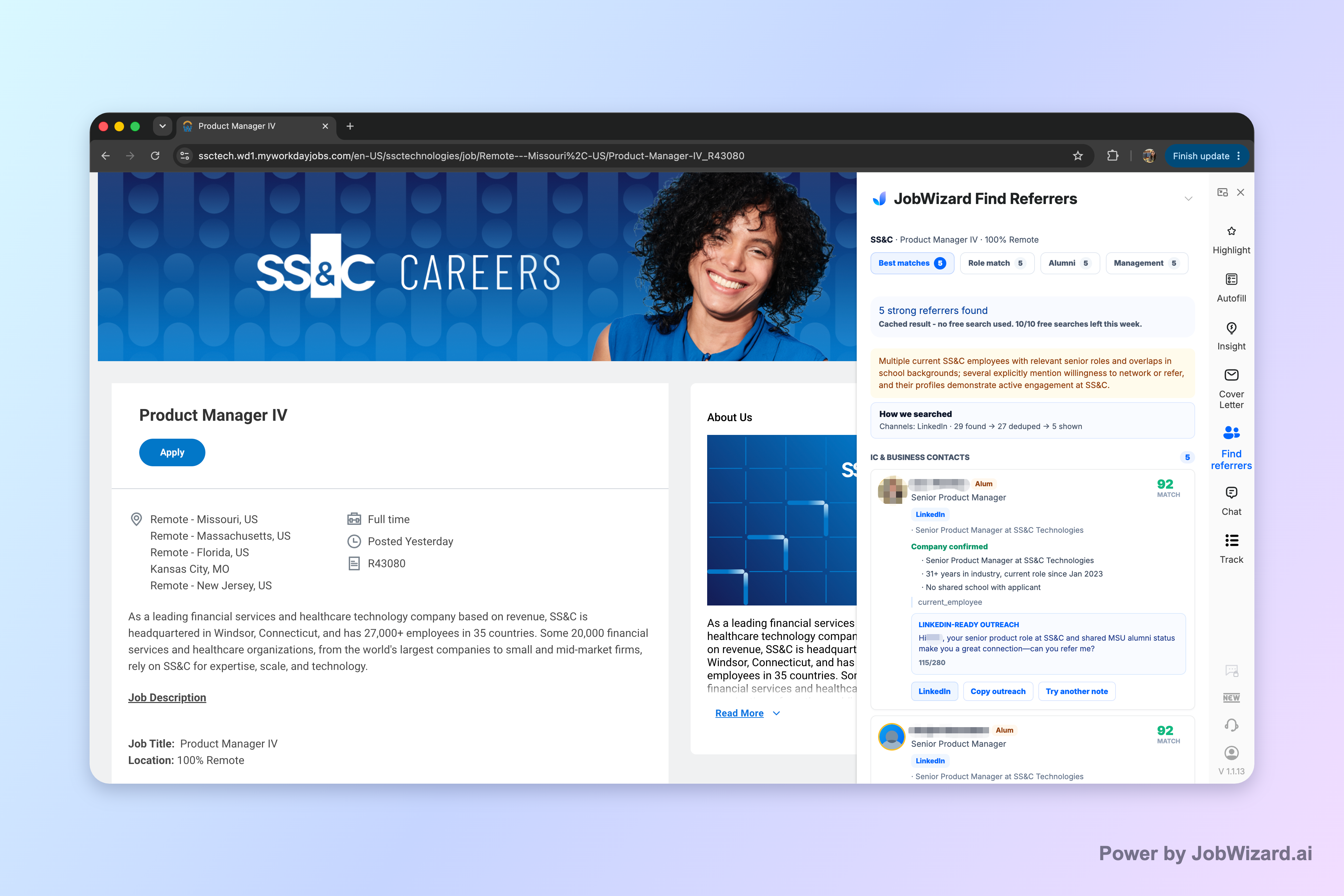
So if you’re thinking simplify vs linkedin, this is where the real advantage emerges: LinkedIn can help you find people, but Referral Finder streamlines the “who to contact next” decision and draft preparation—while keeping you responsible for the final personalized ask.
- Use it to narrow targets: pick people with relevant match context.
- Use it to draft faster: start from the organized outreach draft.
- Use it to stay truthful: personalize with a specific reason tied to you and the person.
Referral message template (copy/paste):Hi [Name]—I’m applying for the [Role Title] role at [Company]. I noticed your background in [shared context: team/project/alumni connection], and I’m especially interested in [specific detail from the role]. If you’re open to it, I’d really appreciate any guidance on the application process or whether this is a good fit. Thank you for considering!
Key takeaway: Don’t choose between networking and speed—combine them: outreach first, then autofill for applications.
What does “review-before-submit” mean when comparing simplify vs linkedin workflows?
“Review-before-submit” means you let a tool fill repetitive fields, but you verify each answer and submit the application yourself.
JobWizard’s Smart Autofill fills detected fields using saved profile/resume data and then you review the populated fields before submitting. If a required field still needs attention, JobWizard can identify it so you can jump to the matching question.
This matters because: custom questions, EEO/eligibility inputs, and any role-specific prompts still require you to confirm accuracy and tone.
In practical terms, review-before-submit is the difference between “speed with discipline” and “speed without responsibility.” When you compare simplify vs linkedin, the safest version of “faster apply” is the one that assumes you’ll read what was filled.
- Scan required fields: make sure each required question matches your situation.
- Check formatting: dates, phone formats, locations, and titles.
- Confirm personalization: any draft text should sound like you.
- Submit yourself: don’t outsource final accountability.
Key takeaway: The tool accelerates the repetitive work; you own the final submission quality.
How do JobWizard usage insights clarify simplify vs linkedin expectations for autofill?
Usage stats help set realistic expectations: autofill speeds repetitive typing, not the final truth-dependent parts of an application.
Across 720,000+ applications submitted and 600,000+ autofill sessions run through JobWizard, users typically benefit from autofill + review-before-submit rather than blind automation. On average, JobWizard autofills ~18 repetitive fields per application (typically 11–23).
Where it tends to save the most time: Of applications submitted through JobWizard, ~65% are on Workday, where autofill is where users often see the biggest efficiency gains.
It’s also helpful to understand the distribution: ~19% are Greenhouse, ~12% are Ashby, and ~4% are Lever. That distribution reinforces the same workflow lesson—applications vary, but the workflow principle stays consistent: autofill repetitive fields fast, then review before you submit.
Key takeaway: Expect autofill to reduce repetitive typing—keep your review step as the quality control.
Which should you pick first for your next job search day: simplify-style autofill or LinkedIn networking?
Start with what creates opportunities for that day, then use autofill to remove form friction. For most job seekers, that means LinkedIn networking first when your target roles benefit from referrals, and autofill second when you’re ready to apply.
If you’re building a pipeline, LinkedIn helps you find roles and relevant people. Then, when you’re ready to submit, Smart Autofill helps you fill repetitive fields and jump directly to any required field that still needs attention.
| Your priority today | Start here | Then do this | Outcome you’re optimizing |
|---|---|---|---|
| More interviews through referrals | LinkedIn outreach planning (use Referral Finder logic) | Draft a tailored outreach message and personalize | Higher-quality outreach |
| More applications with less typing | Autofill workflow prep | Autofill repetitive fields, then review every answer | Reduced time per application |
| Applying to many roles fast | Job shortlist + requirement notes | Use autofill for forms; tailor custom questions manually | Consistency + accuracy |
Key takeaway: Do networking when it unlocks leverage; do autofill when it removes repetitive work.
Do this automatically with JobWizard
Skip the manual work — JobWizard's Referral Finder handles this for you. On these platforms: JobWizard vs Simplify.
FAQ: simplify vs linkedin
Is Simplify the same as using LinkedIn to apply faster?
No. LinkedIn is a networking and job discovery platform where you may apply through LinkedIn or linked company flows. Simplify is an autofill-focused job application tool, and you still need to review what it fills before submitting.
Will Simplify or LinkedIn automatically submit applications for me?
JobWizard’s Smart Autofill fills detected fields on supported application pages, but you review the populated fields and submit the application yourself. In general, avoid assuming any tool will safely handle everything without your review—especially for custom questions and required truthful information.
What does “autofill but review before submit” mean in practice?
It means the tool speeds up repetitive fields (like contact info and standard profile details) while you actively confirm or edit any fields that matter most—sponsorship, salary, EEO, and custom questions—then you submit yourself.
How do I use a referral workflow if I’m choosing between Simplify vs LinkedIn?
Use LinkedIn for finding people, then use a referral workflow to organize matches and draft an outreach message you can personalize. With Referral Finder, you identify relevant employees and review the outreach draft, but you still add a truthful, specific reason for reaching out.
What should I double-check in application forms after any autofill tool?
Double-check required fields you must be truthful about (e.g., work authorization or sponsorship), anything about eligibility, any EEO-related answers, salary expectations if prompted, and all custom questions. If a required field needs attention, JobWizard can identify it so you can jump directly to the matching question.
Does autofill guarantee I’ll get an interview?
No. Autofill can reduce repetitive typing, but it doesn’t guarantee outcomes. You still need to tailor answers and ensure accuracy for the role and employer.
Which should I use first: LinkedIn outreach or application autofill?
If you’re expanding your network, start with outreach—especially if referrals are important for the role. Then use application autofill to reduce typing once you’re ready to submit, but always review the filled fields before submitting.
How do I write a short, effective referral message after I find someone on LinkedIn?
Start with what you’re applying for, mention one specific connection point (team, project, or shared background), and make your ask clear but low-pressure. Referral Finder can prepare an outreach draft you can review and personalize before contacting anyone.
Ready to apply faster without losing control? Try JobWizard’s Smart Autofill on your next application: let it fill repetitive fields quickly, then review every answer before you submit—plus use Referral Finder when a role benefits from targeted outreach.
Frequently Asked Questions
Find someone to refer you — automatically
JobWizard spots employees at your target companies who can refer you, right from the job page.