loopcv alternatives in 2026: choose review-first autofill (not auto-submit bots)
Searching for loopcv alternatives? Learn what goes wrong when bots auto-submit, and how review-first tools like JobWizard help you autofill while you stay in control.
Free Chrome extension
See your resume's match score for any job
JobWizard compares your resume to each job description and shows the exact keywords to add — free.
loopcv alternatives are tempting when you want to apply faster—but auto-submit bots can create avoidable mistakes that hurt your chances. If you’re comparing options right now, the most important question isn’t “which one auto-applies,” it’s “what can go wrong on the employer’s side if answers are wrong or mismatched?”
In this guide, you’ll get a clear view of what tends to go wrong with auto-submit approaches, and what “review-first” autofill should look like instead. You’ll also see how JobWizard supports a safer workflow: fill repetitive fields quickly, then you review and submit.
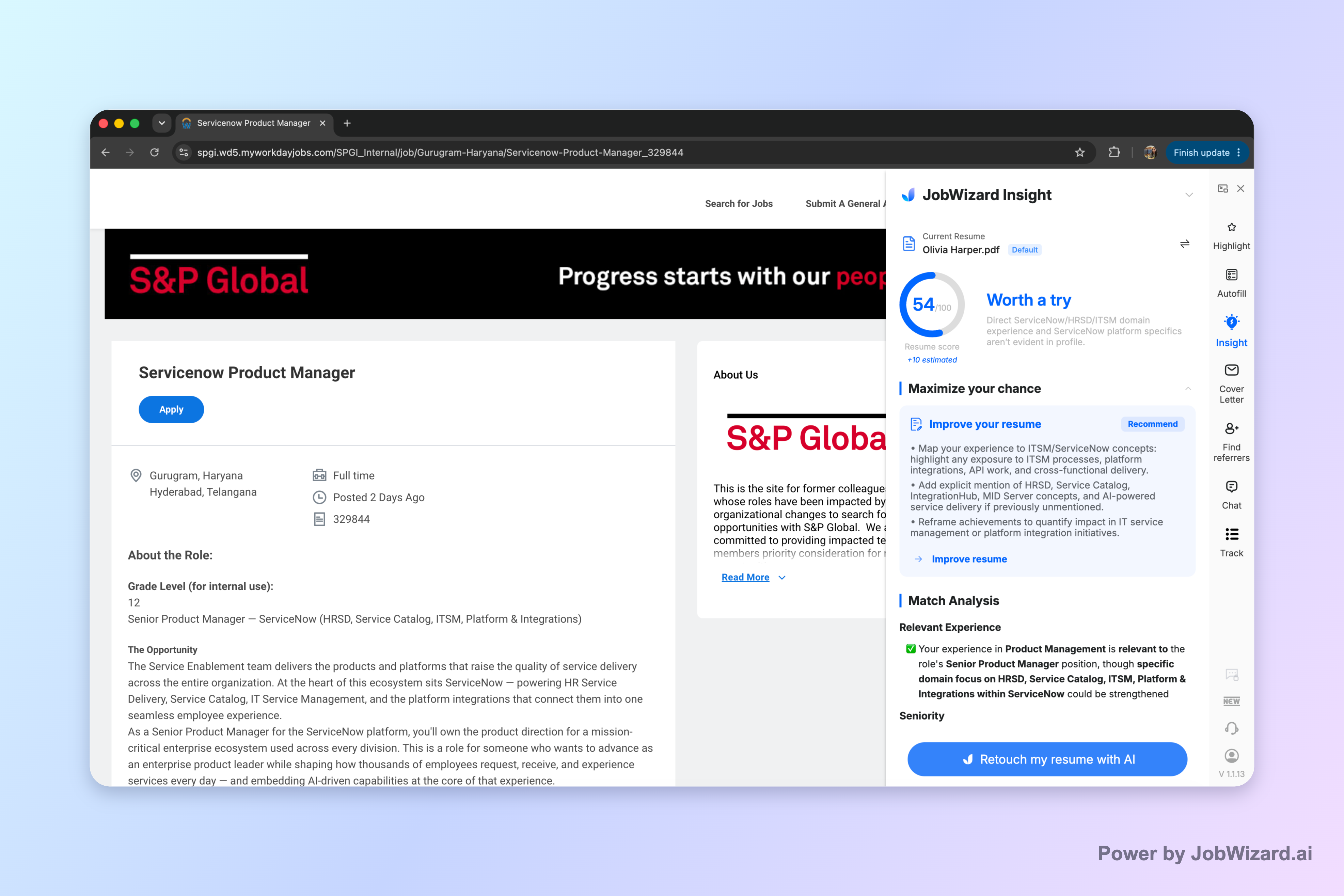
Insight’s resume vs. job description diagnosis helps you qualify before you apply by comparing your resume with the current job posting and showing an overall match score plus improvement suggestions. It can also turn the diagnosis into editable resume revision draft ideas—so you can close real resume expression gaps.
Why auto-submit bots behind “loopcv alternatives” can backfire
Auto-submit is where problems compound fast—because the tool can’t fully “know” your intent, your exact history, or how each employer phrases screening questions. Even small mismatches can be enough to knock you out of consideration.
Here are the most common failure modes when a bot submits for you (or when submission happens without meaningful review):
- Wrong screening answers: Resume-derived or default responses may not match what the employer is really asking (years of experience wording, eligibility, work authorization, location/relocation details, or role-specific requirements).
- Mismatched resume details: If your most relevant experience isn’t represented the way the application expects, the bot may populate fields inconsistently (dates, titles, tool names, or project outcomes).
- Bad first impression with “duplicate” or spam filters: Rapid, repetitive application patterns and near-identical submissions can trigger employer-side anti-spam or duplicate-application logic—especially if the content doesn’t fit the specific role.
- Reputation damage with companies you actually want: If the application you submitted contains answers that don’t reflect you, the recruiter may review you based on inaccurate info instead of the strengths you intended.
The core issue is simple: when submission is automated, the system is effectively making judgment calls on your behalf. And many “loopcv alternatives” in the auto-apply category optimize for speed over correctness.
What to look for in loopcv alternatives: review-before-submit autofill
The safer alternative pattern is autofill + your review. The best “loopcv alternatives” for quality applications support quick filling of repetitive fields, then stop and hand control back to you for the final answers.
JobWizard follows this review-first approach. It uses a Chrome extension to fill detected fields on supported application pages, and you review everything before you submit.
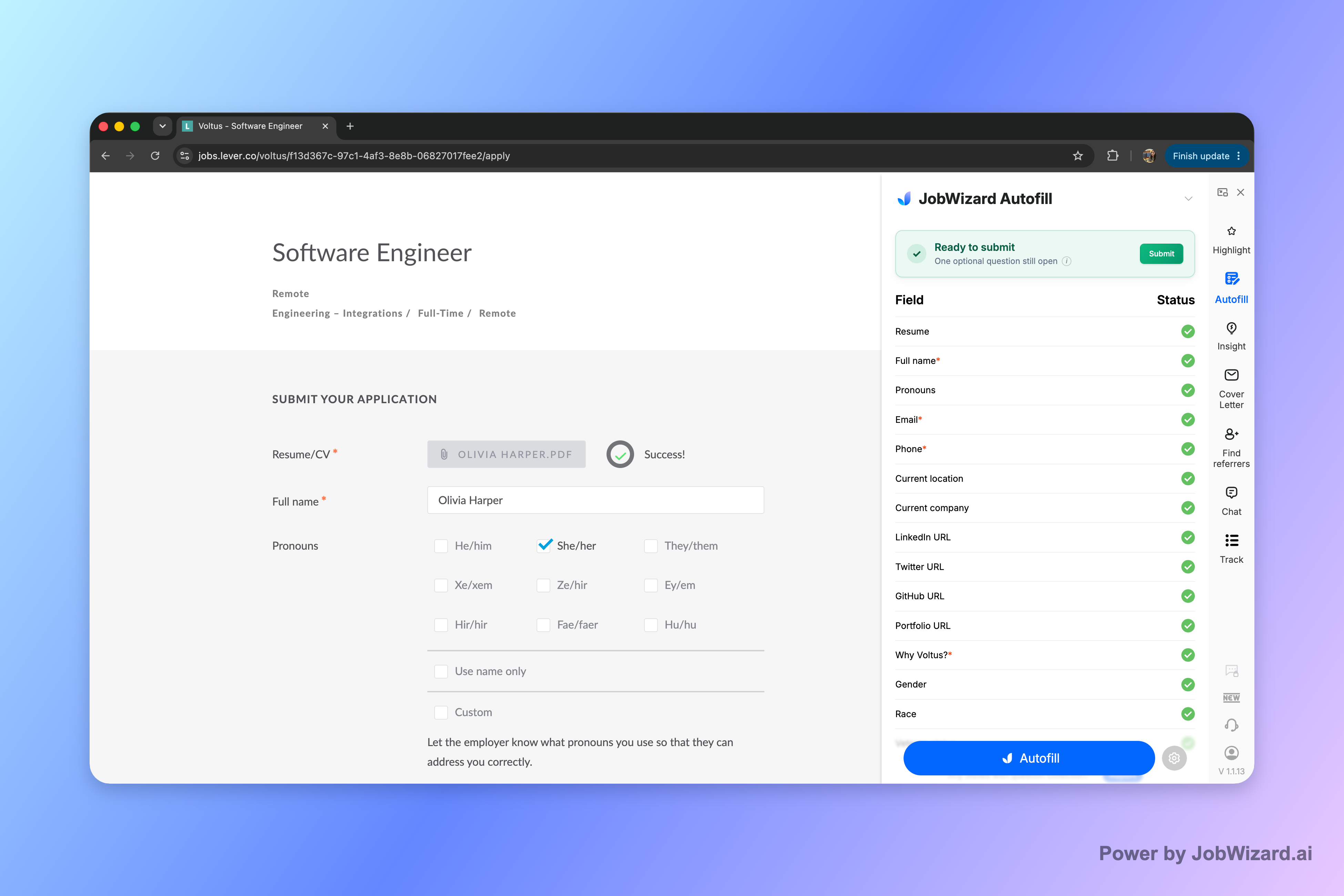
Smart Autofill fills repetitive fields while you keep control. It populates the form using saved profile and resume data, and then you submit yourself after reviewing the populated answers.
When a required field still needs attention, JobWizard can identify it and let you jump to the matching question—so you’re not guessing what needs fixing.
- Autofill the repetitive parts: Let the tool fill the fields it can detect and map quickly.
- Review before you submit: Pay special attention to screening questions and anything that could conflict with your resume.
- Keep only accurate resume-based claims: If any autofilled text doesn’t match your real experience, correct it before submission.
This workflow is the practical middle ground: you move fast on the mechanics without surrendering the final responsibility for what gets sent.
loopcv alternatives compared for resume match + application control
Not all “loopcv alternatives” solve the same problem. Some focus on submission automation, while others aim to help you prepare and fill accurately. Below is a fair, intent-based comparison of the workflow pieces that matter most.
| Option type | What it typically optimizes | Where mistakes usually happen | Fit for your goal |
|---|---|---|---|
| Auto-submit bots | Submission at scale | Screening answers, mismatched resume fields, employer filters, and credibility when answers don’t fit | Best avoided if you want high-accuracy applications you’d want a recruiter to trust |
| Review-first autofill tools (like JobWizard) | Speed up repetitive form entry while keeping you in control | You still need to verify—especially custom questions and anything you might not have in your profile | Ideal when you want faster applications without sacrificing accuracy |
| Resume match / ATS-diagnosis style features | Identify resume expression gaps relative to the job description | Over-trusting the score—so you must verify suggested edits are truthful and accurate | Good when you’re tailoring resumes and want a structured way to find gaps |
To go deeper on how review-first autofill fits into your process, start with How to Autofill Job Applications (Step-by-Step with JobWizard). If you’re specifically exploring the adjacent “auto-apply” landscape, Simplify Alternatives to Auto-Apply: Smart Autofill You Still Control (Review-First) covers the trade-offs and what to look for.
And if you’re already comparing tool ecosystems, these two reads are useful side-by-side framing: loopcv vs simplify: which one avoids bot-submission mistakes—and what to do instead and lazyapply alternatives for job seekers: autofill-then-review tools that keep you in control.
Tip: Even with review-first autofill, you’re still doing the final verification. That’s not a drawback—it’s the quality control step that keeps applications consistent.
How to choose your next loopcv alternative in under 10 minutes
Use a quick checklist to pick the loopcv alternative that matches how you actually apply—fast where it’s safe, and careful where it matters.
- Confirm the workflow: The tool should fill fields you can verify, and you should submit yourself.
- Look for job-description-aware prep: If there’s a match score/diagnosis, treat it as a guide—not a guarantee. JobWizard Insight compares your resume to the job description and flags gaps you can edit.
- Decide how you’ll handle screening: Plan to review employment eligibility, experience levels, and custom questions every time.
- Check consistency: After you revise your resume based on job gaps, make sure autofilled application answers still reflect your corrected resume.
Why this matters: JobWizard autofills an average of ~18 repetitive fields per application (typically 11–23), and you review before submitting. That combination—fast field entry plus your final check—is designed to reduce the common “bot submission” failure modes without turning you into a passive applicant.
If you want to apply faster while staying accurate, start by comparing your resume to the job description using Insight, then use Smart Autofill on your next application and review every populated answer before you hit submit.
Do this automatically with JobWizard
Skip the manual work — JobWizard's Smart Autofill handles this for you. On these platforms: JobWizard vs LoopCV.
FAQ about loopcv alternatives
What goes wrong with auto-apply bots compared to loopcv alternatives that use autofill + review?
Auto-submit bots can answer screening questions incorrectly, paste mismatched or outdated resume details, trigger employer spam or “duplicate application” rules, and damage your credibility with a company you actually want. Review-first tools autofill repetitive fields while you verify screening, EEO/salary/custom questions, and any resume-based claims before you submit.
Will a loopcv alternative guarantee ATS passage or a better match score?
No. A match score (like Insight) is not a hiring probability and doesn’t guarantee ATS passage or an interview. It’s a diagnostic to help you spot expression gaps and then edit your resume so the information stays accurate to your experience.
Is it safe to use a loopcv alternative if I still plan to review before submitting?
Yes—review-before-submit is the key safety difference. JobWizard autofills fields on supported application pages, then you review and submit. If any required field needs attention, it helps you jump to the matching question so you can correct it.
How do I use a resume match score when I’m choosing loopcv alternatives?
Start by comparing your resume against the job description. Use the match score’s improvement suggestions to identify resume expression gaps, then keep only changes that are truly accurate. Finally, run the same review step when you autofill the application so your answers stay consistent.
Ready to apply faster without handing submission control to a bot? Try JobWizard: use Insight to spot resume gaps vs. the job description, then use Smart Autofill to complete repetitive fields and review everything before you submit.
Frequently Asked Questions
See your resume's match score for any job
JobWizard compares your resume to each job description and shows the exact keywords to add — free.