JobCopilot Alternatives: Which Apply Tool Keeps You in Control?
Searching for jobcopilot alternatives? Compare auto-apply tools with review-first autofill and learn how to keep your answers accurate before you submit.

Free Chrome extension
Autofill your next job application
JobWizard is a free Chrome extension that fills applications, tracks statuses, and optimizes your resume.
How to compare jobcopilot alternatives
Choose among jobcopilot alternatives by checking what each tool automates—and what you still get to verify before an employer sees your application. Some tools are designed to automate parts of applying; others focus on helping you complete forms while you stay involved in the final review. Those approaches suit different job-search habits.
Before choosing, consider how the tool handles resume fit, screening questions, and submission. A faster application is not necessarily a better application if important answers are wrong or the resume does not match the role.
- Application workflow: Does the tool fill forms, submit applications, or support another part of the process?
- Answer control: Can you review custom questions and sensitive details before submission?
- Role fit: Can you check that the resume and answers are appropriate for each opening?
- Supported pages: Verify that the tool works on the application pages you use rather than assuming universal coverage.
For a wider look at form-filling workflows, start with our complete guide to autofilling job applications. It explains how an autofill-and-review process differs from handing an application to a bot.
What can go wrong when a bot submits applications?
Automated submission can reduce manual steps, but it may also send an application before you catch a mistake. The concern is not that every tool or automated application is careless; it is that any process with less review can make it harder to spot an answer that needs your judgment.
Common problems to consider include:
- Screening answers: A bot may not have the context to answer a role-specific question about experience, sponsorship, salary expectations, or another qualification accurately.
- Resume mismatch: A general resume may not be the right version for a particular position, especially when different roles call for different experience to be emphasized.
- Employer filters: Repeated or poorly matched submissions may be caught by an employer's screening processes. The exact effect depends on the employer and application process.
- Reputation: An inaccurate or irrelevant application can make a poor impression at a company you genuinely want to work for.
These are risks to weigh, not guaranteed outcomes. If you value speed, look for a workflow that reduces repetitive typing without removing your chance to check the answers and role fit.
Review-first jobcopilot alternatives: compare the trade-offs
A review-first tool helps with repetitive form entry while leaving the final application decisions to you. This can be a useful middle ground if you want to apply more efficiently but still want to check each application before it reaches an employer.
| Approach | Potential benefit | What to check |
|---|---|---|
| Auto-apply workflow | Can reduce hands-on steps in the application process. | How it handles role fit, custom questions, and the chance to review before submission. |
| Review-first autofill | Can fill detected form fields using saved profile and resume information. | Which pages and fields are supported, and whether you can verify answers before submitting. |
| Manual application | Gives you direct control over every answer and attachment. | How much time you want to spend repeating information across applications. |
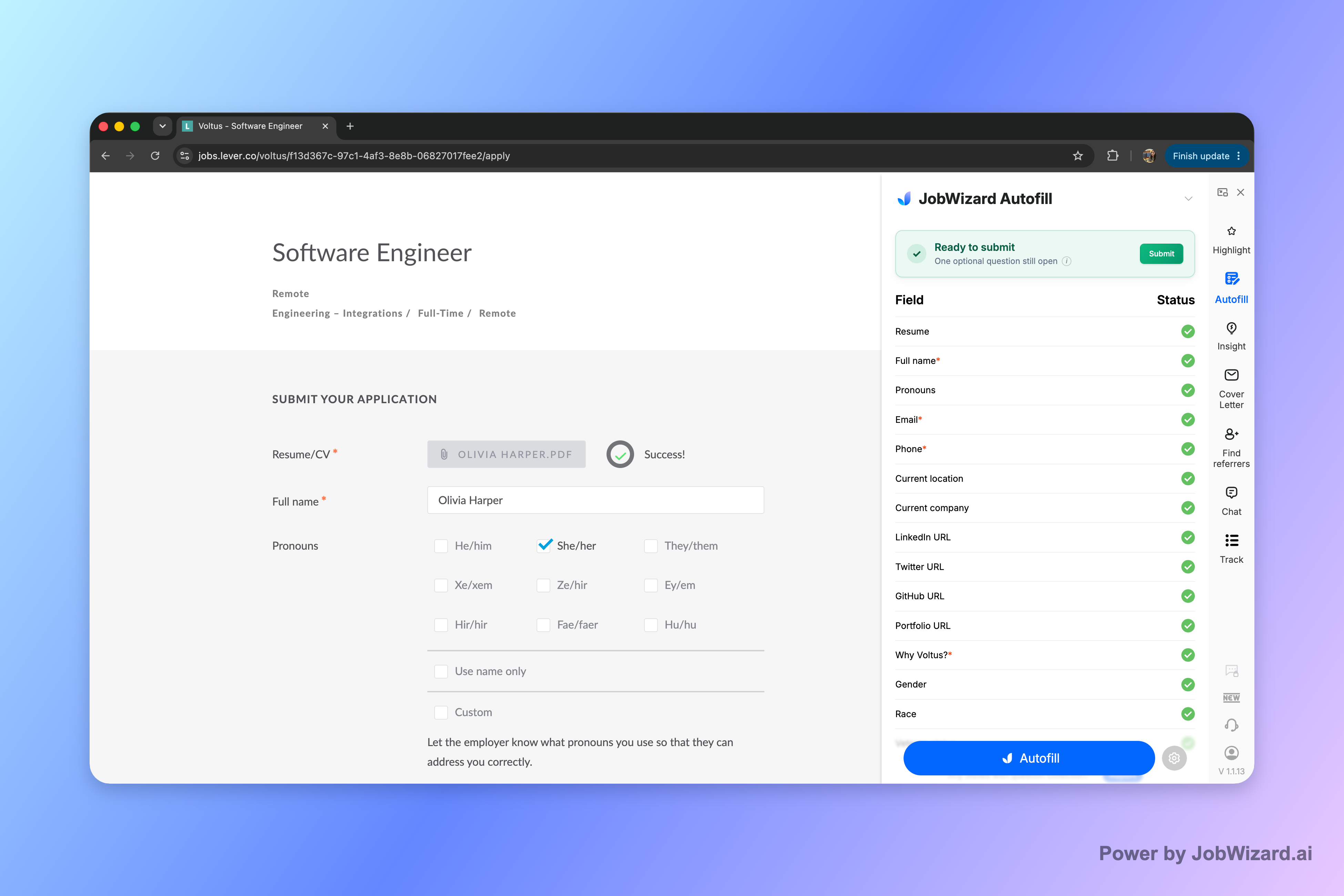
JobWizard takes the review-first autofill approach. Its Chrome extension uses saved profile and resume data to fill detected fields on supported application pages; you review the populated fields and submit the application yourself. It does not submit applications on your behalf.
If a required field still needs attention, JobWizard can identify it and let you jump to the matching question. That leaves you responsible for answers that need your judgment, rather than treating every field as interchangeable.
When comparing JobCopilot with other products, keep the comparison focused on the workflow you actually want. Our reviews of LoopCV alternatives and review-first autofill, Simplify alternatives to auto-apply, and LazyApply alternatives for job seekers offer more context on those specific choices.
How to choose and use a job application tool
Pick a tool that matches your preferred balance of speed and review. If you want a system to submit applications automatically, assess how it handles answers and role fit; if you want to stay in control, prioritize a workflow that fills repetitive information but lets you check everything yourself.
- Choose a target role: Confirm that the opening matches your goals before beginning an application.
- Check your materials: Select the resume and profile information that fit that specific role.
- Fill the form: Use autofill where available, then complete any fields that still need your input.
- Review carefully: Verify screening answers, contact details, and any sensitive or role-specific information.
- Submit yourself: Send the application only after you are satisfied that it is accurate and appropriate.
This approach keeps your judgment in the process without requiring you to retype every repeated detail. No autofill tool should be treated as proof that an application is complete or correct; check the actual fields before submitting.
Do this automatically with JobWizard
Skip the manual work — JobWizard's Smart Autofill handles this for you. On these platforms: JobWizard vs JobCopilot.
Frequently asked questions about jobcopilot alternatives
The right alternative depends on how much automation and review you want. These answers summarize the main differences to consider before choosing a job application tool.
What should I look for in jobcopilot alternatives?
Compare how each tool handles application forms, resume matching, screening questions, and final submission. Decide whether you want a tool to submit applications automatically or one that helps fill forms while you review and submit yourself.
Can JobWizard automatically submit job applications?
No. JobWizard fills detected fields on supported application pages using saved profile and resume data. You review the answers and submit the application yourself.
Why review an application instead of letting a bot submit it?
Reviewing helps you catch incorrect screening answers, a resume that does not fit the role, or other mistakes before the employer receives your application. Automated submission can save steps, but the trade-off is less opportunity to check each application first.
How does JobWizard help with application forms?
JobWizard's Chrome extension uses saved profile and resume data to fill detected fields on supported application pages. If a required field still needs attention, it can identify the field and let you jump to the matching question.
Try JobWizard Autofill on your next application to fill detected fields using saved profile and resume data, then review every answer and submit it yourself.
Frequently Asked Questions
Autofill your next job application
JobWizard is a free Chrome extension that fills applications, tracks statuses, and optimizes your resume.