LazyApply vs AIApply: Which Kind of Job-Application Automation Do You Want?
LazyApply vs AIApply comes down to how much of the application process you want a tool to handle. Compare their automation trade-offs and see when a review-first autofill workflow may fit better.

Free Chrome extension
Autofill your next job application
JobWizard is a free Chrome extension that fills applications, tracks statuses, and optimizes your resume.
LazyApply vs AIApply: What Are You Asking a Tool to Do?
LazyApply vs AIApply is a choice between job-application automation workflows, not just a race to send more applications. These tools appeal to job seekers who want help managing repetitive application work, but the important question is how each handles your information and how much control you keep before an application reaches an employer.
Because product features can change, check each tool’s current plan and workflow directly. Pay particular attention to whether it fills forms, helps prepare materials, or submits applications—and whether you can review every answer before submission.
For a broader, step-by-step look at a user-controlled workflow, start with How to Autofill Job Applications (Step-by-Step with JobWizard). It explains how autofill can reduce repetitive entry without handing over the final decision.
LazyApply vs AIApply: Compare the Trade-Offs Before You Choose
The best fit depends on the workflow each tool currently offers and how much review you want before applying. Use this comparison as a checklist, not as a claim that either product handles every application in the same way.
| What to compare | LazyApply | AIApply |
|---|---|---|
| Current application workflow | Verify which steps it automates and what requires your input. | Verify which steps it automates and what requires your input. |
| Review before submission | Confirm whether you can inspect the completed application before it is sent. | Confirm whether you can inspect the completed application before it is sent. |
| Screening and custom questions | Check how the workflow handles answers that depend on your circumstances or judgment. | Check how the workflow handles answers that depend on your circumstances or judgment. |
| Resume selection | See whether you choose or review the resume used for each role. | See whether you choose or review the resume used for each role. |
| Fit for your priorities | Consider whether its current process matches your desired balance of speed and control. | Consider whether its current process matches your desired balance of speed and control. |
Neither name alone tells you how a specific application will be completed. Before choosing, test the workflow with a role you are comfortable reviewing closely and read the product’s current explanations of its features.
If you are comparing free options, see aiapply vs resumecoach free: Which Free Option Fits Your Search?. For a focused look at AIApply’s pricing question and the difference between bot-style automation and autofill, read Does AIapply Cost Money? The Real Bot-Tool Trade-off (and the Autofill Alternative).
What Can Go Wrong When a Bot Submits for You?
Submitting without a careful review can turn a small data mismatch into an application you would not have sent yourself. Automation may save repetitive effort, but screening questions and role-specific materials often need context that a generic workflow may not have.
- Wrong screening answers: Work authorization, sponsorship, availability, or other eligibility answers can depend on your exact situation. An incorrect response can misrepresent you or screen you out.
- Mismatched resumes: A resume suited to one position may not be the version you want attached to another. Check the job title, company, and selected file before submission.
- Employer-side spam filters: Employers may filter applications they consider incomplete, repetitive, or otherwise low quality. A high-volume approach does not guarantee that an application will receive attention.
- A damaged first impression: An inaccurate or irrelevant submission can be especially costly when the employer is a company you genuinely want to join.
These are general risks of handing off application decisions, not a claim that either LazyApply or AIApply necessarily makes these mistakes. Review the actual product workflow and decide how much oversight it gives you.
For a closer discussion of what to check in a bot workflow, read Is lazyapply legit? What “auto-submit” job bots can mess up—and the safer review-first way to apply.
A Review-First Alternative: Autofill, Check, Submit
JobWizard fills detected fields on supported application pages, then leaves review and submission to you. Its Chrome extension uses saved profile and resume data to populate fields; you check the answers, make any needed corrections, and submit the application yourself. It does not submit applications on your behalf or apply while you are away.
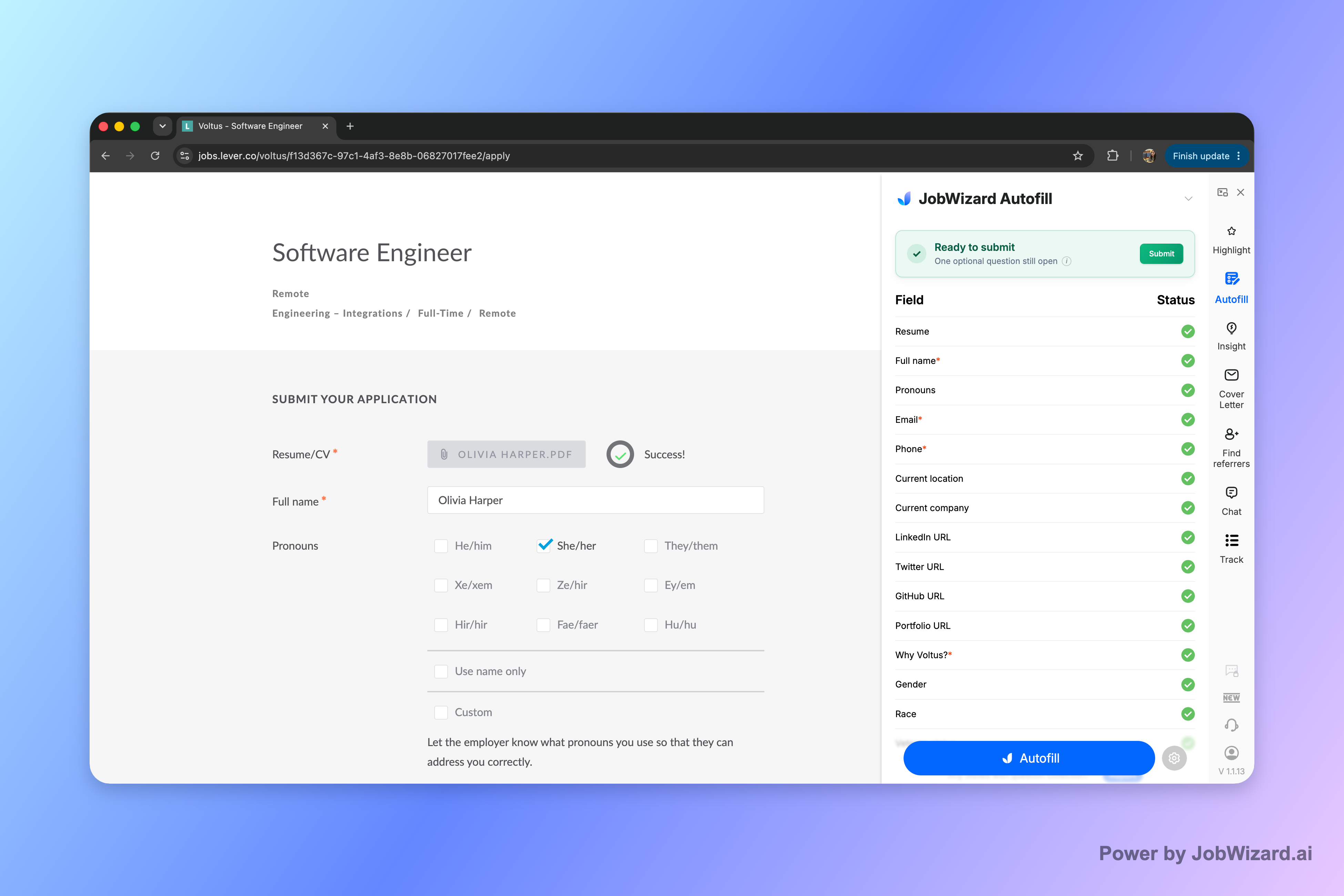
When a required field still needs attention, JobWizard can identify it and let you jump to the matching question. Autofill is not a guarantee that every field will be completed or that every application website is supported, so review the whole form before you send it.
This approach is useful when you want help with repetitive form entry but still want to decide how to answer employer-specific questions. Use it as an assistive step in your application process, not as a replacement for tailoring, checking, or choosing which roles deserve your time.
Try JobWizard Autofill on your next application: fill the repetitive fields, review every answer, and submit it yourself.
Do this automatically with JobWizard
Skip the manual work — JobWizard's Smart Autofill handles this for you. On these platforms: JobWizard vs LazyApply, JobWizard vs AIApply.
LazyApply vs AIApply FAQs
What is the main difference in LazyApply vs AIApply?
LazyApply and AIApply are job-application automation tools, but their features and workflows may differ. Check each product’s current details to see which tasks it handles and whether you review each application before submission.
Can automated job applications hurt my chances?
They can create problems if an application is submitted with an incorrect screening answer, a mismatched resume, or other details you would have changed. Employers may also use spam filters, and an avoidable mistake can affect your reputation with a company you want to join.
Does JobWizard automatically apply to jobs?
No. JobWizard autofills detected fields on supported application pages using saved profile and resume data. You review the populated fields and submit the application yourself.
How should I choose between LazyApply, AIApply, and autofill?
Compare how much control you want over each application, what questions need your judgment, and whether you want to review before submitting. If you prefer to make the final call yourself, a review-first autofill workflow may be a better fit.
Frequently Asked Questions
Autofill your next job application
JobWizard is a free Chrome extension that fills applications, tracks statuses, and optimizes your resume.