Healthcare Cover Letter That Gets Read: a Smart Draft Workflow (Plus AI-First Polish)
Learn how to write a healthcare cover letter that matches the job description—and how JobWizard can generate an editable first draft you review before sending.
Free Chrome extension
Generate this cover letter automatically
JobWizard drafts a tailored letter from your resume and the job description in seconds — free.
A healthcare cover letter that gets read needs job-specific proof, not just a generic greeting.
If your healthcare cover letter keeps getting skimmed (or ignored), it’s usually because it doesn’t prove a match to the posting—especially for patient-facing, safety, and documentation expectations. This guide shows you exactly how to write a healthcare cover letter that mirrors what the hiring team is actually hiring for, plus a practical workflow using JobWizard to generate an editable first draft you review before submitting.
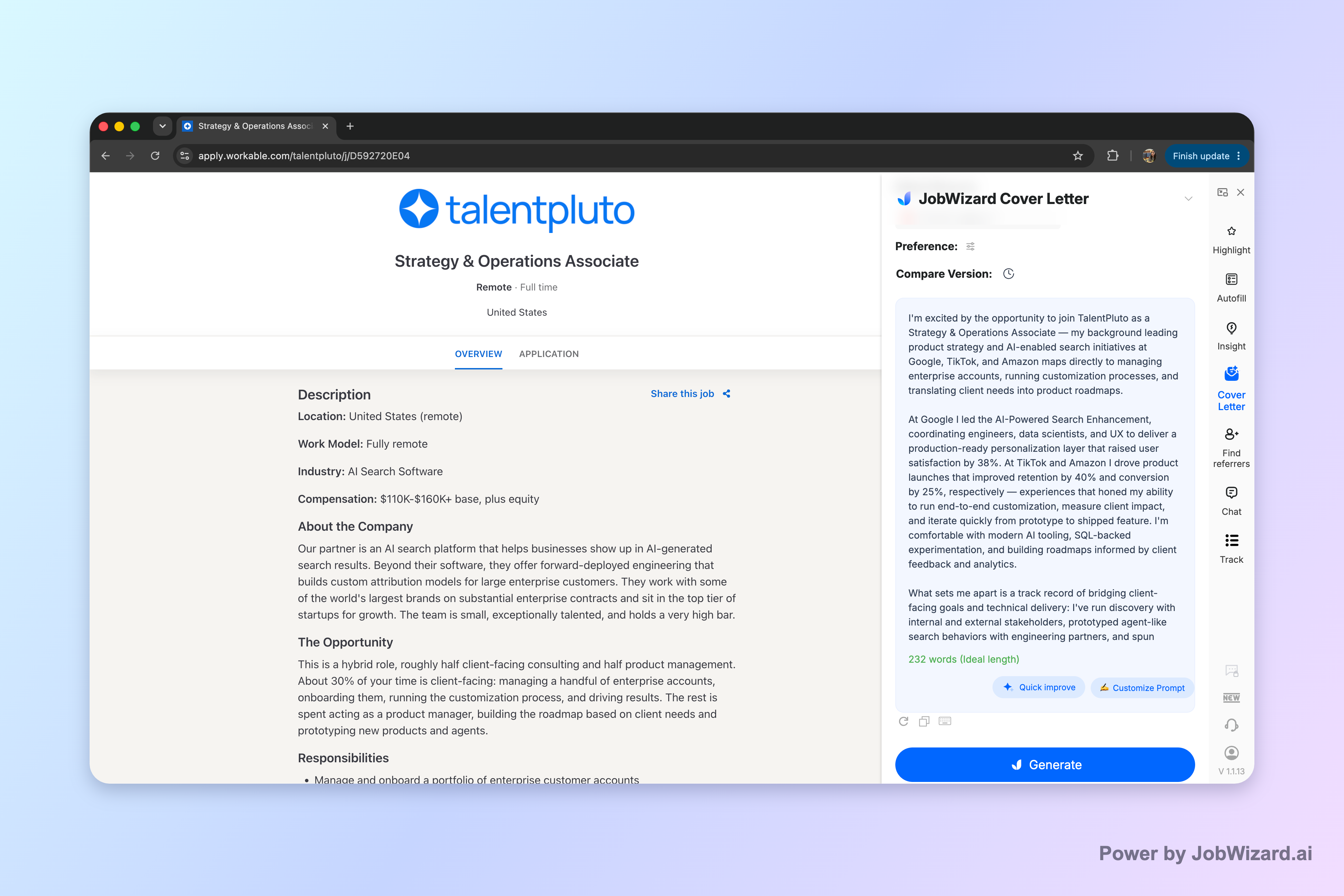
JobWizard creates an editable first draft using the selected resume and the job description on the page, so you’re not starting from a blank document. Screenshot marker ensures you can see the draft-generation moment as you learn the workflow.
Build your healthcare cover letter in the order hiring managers expect.
Most hiring managers scan for alignment in this sequence: role clarity → relevant proof → why you’ll fit the setting. When your healthcare cover letter follows that flow, it reads faster and feels more credible.
Use this template structure and fill it with job-description details (not buzzwords). Keep every claim specific enough that you could defend it in an interview.
- Opening (1–2 sentences): Name the role and setting (hospital, clinic, rehab, home health, long-term care) and state what you bring that maps to the job.
- Match the posting (2–3 sentences): Quote or paraphrase 2–3 responsibilities from the posting—then connect each to a real strength.
- Evidence (2–3 short paragraphs or 3–4 proof bullets in text form): Include outcomes you can truthfully support (accuracy, coordination, patient experience, turnaround, teamwork, training, compliance).
- Close confidently (2–3 sentences): Restate fit and invite the next step (interview/conversation). Avoid sounding desperate or vague.
What “job-specific” looks like in healthcare
Job-specific doesn’t mean you repeat the job title 10 times. It means your healthcare cover letter language tracks what they care about—often safety, documentation, and patient experience—because those show up in both clinical and administrative roles.
- If the posting emphasizes care coordination: talk about handoffs, scheduling, follow-ups, and closing the loop.
- If it emphasizes documentation/compliance: highlight accuracy, timeliness, and familiarity with required processes (only what you truly have).
- If it’s patient-facing: emphasize communication, empathy, de-escalation, and clarity.
- If it’s team-based: describe collaboration patterns (multi-disciplinary rounds, shift handover, escalation paths).
Mini example you can adapt (nursing or patient-facing roles)
Here’s a plug-in example of how to turn posting language into proof without exaggeration. Replace the bracketed parts with your real details:
Example: “I’m applying for the [RN / Patient Care Coordinator / Care Team Member] role at [facility type]. I bring a patient-centered communication style and a strong focus on safety and documentation accuracy. In my prior work, I supported [responsibility from the posting] by [real action], which helped ensure [truthful, defensible result].”
Use JobWizard to generate an editable healthcare cover letter draft—then make it yours.
JobWizard’s goal is to help you move faster on the draft so you can spend your time on what actually matters: your real story. You’re not delegating responsibility—you’re drafting with AI and then reviewing before you submit.
Step-by-step: fast draft, careful review
Use this workflow for any healthcare cover letter scenario (new grad, career switch, returning to practice, or repositioning within the same system).
- Select your resume: Choose the resume you want JobWizard to draw from.
- Use the current job description: Make sure the posting is loaded so the draft can mirror it.
- Choose what the draft should emphasize: Pick a length, format, tone, and focus that fit the application.
- Generate the first draft: JobWizard produces an editable cover letter draft.
- Edit directly before submitting: Replace any lines that need your exact details. Keep sponsorship/salary/EEO/custom questions to your own review, and verify all facts.
Reality check: Don’t expect “personalization” to be perfect automatically. JobWizard helps draft wording, but you’re responsible for reviewing facts and adding genuine personal details before you use the draft.
How to polish the draft so it doesn’t sound template-like
After generation, do a quick “healthcare specificity pass” on your healthcare cover letter. These edits change the difference between “sounds fine” and “feels true.”
- Swap generic phrases for actions: Replace “dedicated to patient care” with a concrete example of how you show that care.
- Match the setting: Hospitals and clinics often reward different rhythms than home health or rehab—reflect that.
- Confirm documentation language: Use words that align with your actual experience (accuracy, timeliness, charting habits, escalation protocols).
- Adjust tone to the role: Clinical roles often read best with calm, professional clarity; administrative roles can be more process-forward.
If you want a broader approach to drafting with AI while keeping your voice, use this guide as a companion: How to Write a Cover Letter with AI (Step-by-Step That Still Sounds Like You.
Choose the right healthcare cover letter angle for your exact role.
A healthcare cover letter can be strong for different reasons—clinical strengths, coordination strengths, or customer-service strengths—so pick one clear angle and build around it. That focus makes your letter easier to skim.
Angle 1: Clinical strength + safety mindset
For nursing and hands-on patient roles, your strongest hook is often safety and patient-centered consistency. In your healthcare cover letter, emphasize how you handle handoffs, documentation, escalation, and patient communication.
- Lead with how you keep care safe and consistent across shifts or stages.
- Include one example of preventing errors or catching issues early (only what’s accurate).
- Close with your ability to support the team’s standard of care.
Angle 2: Care coordination + communication
For case management, patient navigator, and care coordination roles, hiring teams usually look for follow-through and clarity. You’ll stand out by showing how you connect people, schedules, and next steps.
- Highlight your ability to keep patients informed and aligned with plans.
- Show how you manage referrals, updates, and follow-ups.
- Use proof points that demonstrate reliability and responsiveness.
Angle 3: Patient service + calm professionalism
For roles that are patient-facing but not always clinical (front desk, scheduling, patient relations, intake), your healthcare cover letter should read like service with competence. Keep it empathetic, structured, and solution-focused.
For a closely related template and drafting approach, see: Cover Letter for Customer Service: a Template That Sounds Human (Plus AI Draft Steps.
Angle 4: Internal move inside a healthcare organization
If you’re applying to a new role within the same organization, you can differentiate faster by proving internal readiness. Emphasize relationships, prior impact, and a clear plan for the next step.
Use this as a model for structure and language: A standout cover letter for internal position: prove you’re ready for the next step.
Angle 5: Teaching or training in healthcare settings
If the role involves precepting, training, or instruction, highlight your ability to explain clearly and support learners. Keep your healthcare cover letter grounded in how you teach, evaluate, and improve practice.
Reference: Teaching Cover Letter That Gets Interviews: Use an AI Draft, Then Make It Yours.
Do this automatically with JobWizard
Skip the manual work — JobWizard's AI Cover Letters handles this for you.
FAQ: Healthcare cover letter questions that decide whether you get to the interview stage.
What should I include in a healthcare cover letter if I don’t have direct experience?
Open with the role you’re applying for, then connect transferable skills (patient communication, documentation, safety, teamwork, scheduling) to the posting. Use one or two short proof points you *can* support, and keep details factual; if JobWizard generates wording, review it and swap in your real examples before you submit.
How long should a healthcare cover letter be?
Aim for about half a page to one page, using 3–5 short paragraphs: why you, what matches the job description, and how you’ll add value. Keep the tone professional and specific; if JobWizard generates a draft, choose the length that fits the application requirements and edit it to match your experience.
What healthcare cover letter tone works best for hospitals, clinics, and nursing roles?
Professional, calm, and patient-centered—confident without sounding generic. Mirror the posting’s priorities (quality/safety, patient experience, coordination, compliance) in your wording. If you use JobWizard’s AI cover letter draft, review the tone and ensure any claims are accurate and personal.
Should I use a template for a healthcare cover letter?
A template is a helpful structure, not a copy-and-paste replacement. Start with the job-specific responsibilities from the posting, then tailor your opening, proof points, and closing. With JobWizard, you can generate an editable first draft from your resume and the current job description—then replace any vague lines with your real details.
Can JobWizard help me draft a healthcare cover letter?
Yes. JobWizard uses your selected resume and the current job description to generate an editable healthcare cover letter first draft. You can choose length, format, tone, and focus before generating, then click into the draft and edit it directly—reviewing facts and adding genuine personal details before you use it.
Ready to draft your healthcare cover letter today? Generate an editable first draft with JobWizard and refine it with your real details.
Don’t waste another hour staring at a blank page. Start a JobWizard healthcare cover letter draft from your resume and the job description, then review and edit it to ensure every detail is factual and personal before you submit.
Next step: Create your JobWizard draft for the current healthcare job posting, edit it in place, and use it as your submission-ready starting point.
Frequently Asked Questions
Generate this cover letter automatically
JobWizard drafts a tailored letter from your resume and the job description in seconds — free.