Follow Up After 2 Weeks: Make Your Next Check-In Count
Wondering whether to follow up after 2 weeks on a job application? Use this practical plan to choose the right channel, write a brief check-in, and keep your next step visible.
Free Chrome extension
Autofill your next job application
JobWizard is a free Chrome extension that fills applications, tracks statuses, and optimizes your resume.
Decide Whether Two Weeks Is the Right Time
If you have not heard back after two weeks, a polite check-in is often reasonable—but first check the employer’s stated timeline. The right moment depends on what the posting, confirmation email, recruiter, or hiring manager told you. If they asked applicants not to contact them or said decisions would take longer, respect that instruction.
When no timeline was provided, following up after 2 weeks can show continued interest without demanding an answer. Keep expectations realistic: a follow-up is a professional courtesy, not a way to guarantee a response or change the hiring outcome.
For the wider system—what to record, when to check in, and how to keep applications from disappearing into a pile—start with How to Track Job Applications: A Practical System (JobWizard + Beyond). It is the best companion if you want to plan follow-ups across several roles rather than treat this message as a one-off.
Check these details before reaching out
- The promised date: If the employer said they would respond by a specific day, wait until that date has passed before checking in.
- The application instructions: Follow any request to use a portal or avoid contacting the hiring team.
- Your previous messages: If you already sent a follow-up, avoid sending another immediately just because you have not received a reply.
- The role’s status: Review the application portal or any recent employer messages first, since an update may already be available.
Two weeks is a useful checkpoint, not a hard rule. A clear timeline from the employer takes priority over a general rule of thumb.
Choose the Right Channel and Ask One Clear Question
Use the contact method the employer gave you, and make your request easy to answer. If a recruiter or hiring manager has been corresponding with you, reply to that email thread so the role and prior conversation remain clear. If the application went through a portal and you have no direct contact, check the portal before looking for another route.
A short email is generally a practical choice when you have a legitimate hiring contact. Keep the note focused on three points: which job you mean, that you remain interested, and whether the team can share an update or revised timeline.
What to include—and what to leave out
- Include identifying details: Use the job title and, if useful, the date you applied so the recipient can place your application.
- Restate interest briefly: Name a specific aspect of the role or organization that still appeals to you.
- Ask about timing: Request an update if one is available, or ask whether there is a revised timeline.
- Skip pressure: Avoid demanding a decision, sending a long case for your candidacy, or implying that silence has a particular meaning.
If you need help choosing the subject line, see subject line examples for a follow-up email after no response. A clear subject helps the recipient recognize the context without turning the message into an urgent-sounding demand.
Do not use an unverified phone number or personal social account just to force a reply. When there is no appropriate contact channel, the portal or the instructions in the job posting are safer, more respectful places to check.
Write a Brief Two-Week Follow-Up That Sounds Like You
A useful two-week check-in is specific, courteous, and short enough to read at a glance. You do not need to apologize for following up or explain your whole job search. A simple note can acknowledge the application, reaffirm interest, and ask about the hiring timeline.
Use this template as a starting point, then change the wording to fit your relationship with the recipient and the details you can accurately share:
Subject: Checking in on the [Job Title] roleHi [Name],I applied for the [Job Title] position on [date] and wanted to check in. I remain interested in the opportunity, especially [brief, genuine reason related to the role or organization]. If there is an update you’re able to share, or a revised timeline for next steps, I’d appreciate it.Thanks for your time,[Your Name]
Adjust the message to match your situation
- If you spoke with a recruiter: Reply in the existing thread and refer to the last conversation in one short sentence.
- If the employer gave a timeline: Say that you are checking in after the date they mentioned, rather than presenting two weeks as a deadline.
- If you have a new, relevant update: Share it in a sentence if it genuinely relates to the role, such as a completed certification the job requires.
- If you have no new information: Leave out filler. Your interest and timeline question are enough.
Before sending, verify the job title, recipient, and application date. Make sure your message does not accidentally name another company or ask for information that the employer already provided.
For a more detailed version tailored specifically to this timing, use this confident interview follow-up email after two weeks. That example focuses on a post-interview conversation; an application-only check-in should not suggest you have interviewed if you have not.
Track the Check-In and Plan What Comes Next
Record the follow-up and a sensible next step so you can manage the application without repeatedly wondering whether you already reached out. Note the date, contact method, recipient, and any response or employer-provided timeline. Then decide when you will review the application again rather than checking it impulsively.
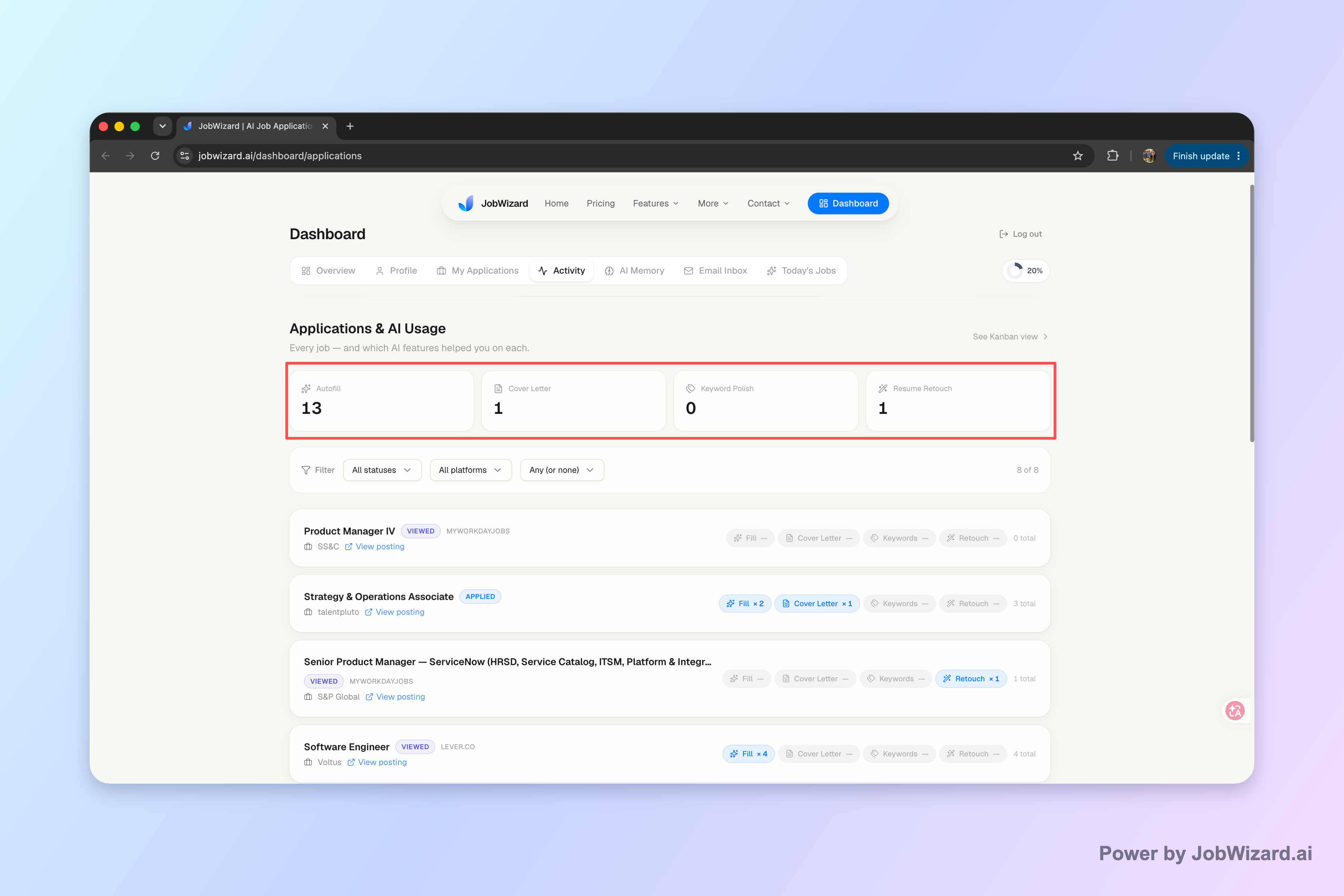
JobWizard’s Activity view shows application status and which JobWizard tools were used for each role. It can help keep the application and its next step visible in one place; it does not mean that every employer update is detected automatically.
A simple follow-up workflow
- Review the record: Confirm the role, application date, contact details, and any timeline the employer gave you.
- Send one focused check-in: Use the appropriate channel and keep the message concise.
- Log what you sent: Record the date and a brief note about the message, without copying sensitive personal information into a tracker.
- Set a review point: Use the employer’s timeline if available; otherwise, give the team time rather than following up again right away.
- Keep moving: Continue your search and follow up on other applications that have reached an appropriate point.
A tracker is especially useful when several applications are at different stages. It can distinguish “applied,” “followed up,” and “waiting for a stated decision date,” helping you choose the next action based on what you know—not on an assumption that no reply means a rejection.
If you are keeping track of multiple roles, the complete job application tracking guide offers a broader approach to organizing status and next steps. For this role, the key is to make one clear, respectful check-in and then keep the rest of your search active.
Handle No Reply Without Overfollowing
If your first message gets no response, do not interpret silence as a definite decision or send repeated notes close together. Hiring timelines can change, and the recipient may not be able to provide an update. Follow any schedule they shared and give the team reasonable time to respond.
If no timeline exists and the role remains open, you may choose to send one later, brief check-in. Keep it courteous, refer to your earlier note, and ask whether there is a new update. If you still hear nothing, focus your energy on other opportunities rather than continuing to chase the same inbox.
Keep your next move grounded in what you know
- If the posting closes later: Wait until the stated review period or relevant date has passed.
- If the portal changes: Record the status shown, but do not assume that an unclear label predicts the employer’s decision.
- If the employer says the role is on hold: Thank them for the update and note the information they provided.
- If you receive a rejection: Respond briefly if appropriate, then move the application out of your active follow-up queue.
For a step-by-step approach to a longer silence, read how to follow up after no response with a calm plan. It can help you decide whether another message makes sense or whether your time is better spent elsewhere.
Do this automatically with JobWizard
Skip the manual work — JobWizard's Application Tracker handles this for you.
Frequently Asked Questions
Use these answers as a starting point, then defer to any instructions or timeline the employer gave you. A good follow-up stays professional, respects the recipient’s process, and leaves you with a practical next step.
Should I follow up after 2 weeks on a job application?
Yes, a brief, courteous check-in is usually reasonable after two weeks if the employer has not shared a different timeline. Reaffirm your interest, ask whether there is an update, and make it easy for the recipient to reply. If the posting says not to contact the team or gives a later date, follow that guidance instead.
What should I say when I follow up after 2 weeks?
Mention the role and application date, briefly restate your interest, and ask whether the team can share an update on the hiring timeline. Keep the note concise and polite, and avoid asking for a decision or implying that the employer owes you a response.
Is it better to email or call after 2 weeks?
Use the contact method the employer provided. If you applied through a portal and have no recruiter or hiring manager contact, check the portal for updates rather than searching for personal contact information or calling a general number without a clear reason.
What if I get no response to my two-week follow-up?
Give the team time to respond and follow any timeline they have shared. If there is no new information, one later, concise check-in may be appropriate; otherwise, keep applying elsewhere and update your tracker so the application does not stall your search.
Keep your application and next step together. Use JobWizard’s Activity view to see application status and which tools you used for each role, then decide when and how to make your next check-in.
Frequently Asked Questions
Autofill your next job application
JobWizard is a free Chrome extension that fills applications, tracks statuses, and optimizes your resume.