Deloitte Cover Letter: A High-Impact Structure + AI Draft You Can Edit
Write a Deloitte cover letter that sounds like you. Use an editable AI draft workflow to stay specific, credible, and ready for review.
Free Chrome extension
Generate this cover letter automatically
JobWizard drafts a tailored letter from your resume and the job description in seconds — free.
Make your Deloitte cover letter feel specific in the first 6–8 lines
If you want your deloitte cover letter to be read (not skimmed into the “maybe” pile), start with a clear reason you’re a match for the exact role—then back it up with examples from your resume. That’s the fastest way to signal credibility and save you from looking like a template.
A strong Deloitte cover letter usually does three things quickly: (1) names what you’ll do in plain terms, (2) shows proof you’ve done similar work, and (3) closes with a confident next step. Keep sponsorship/salary/EEO/custom questions separate—your cover letter is for narrative fit.
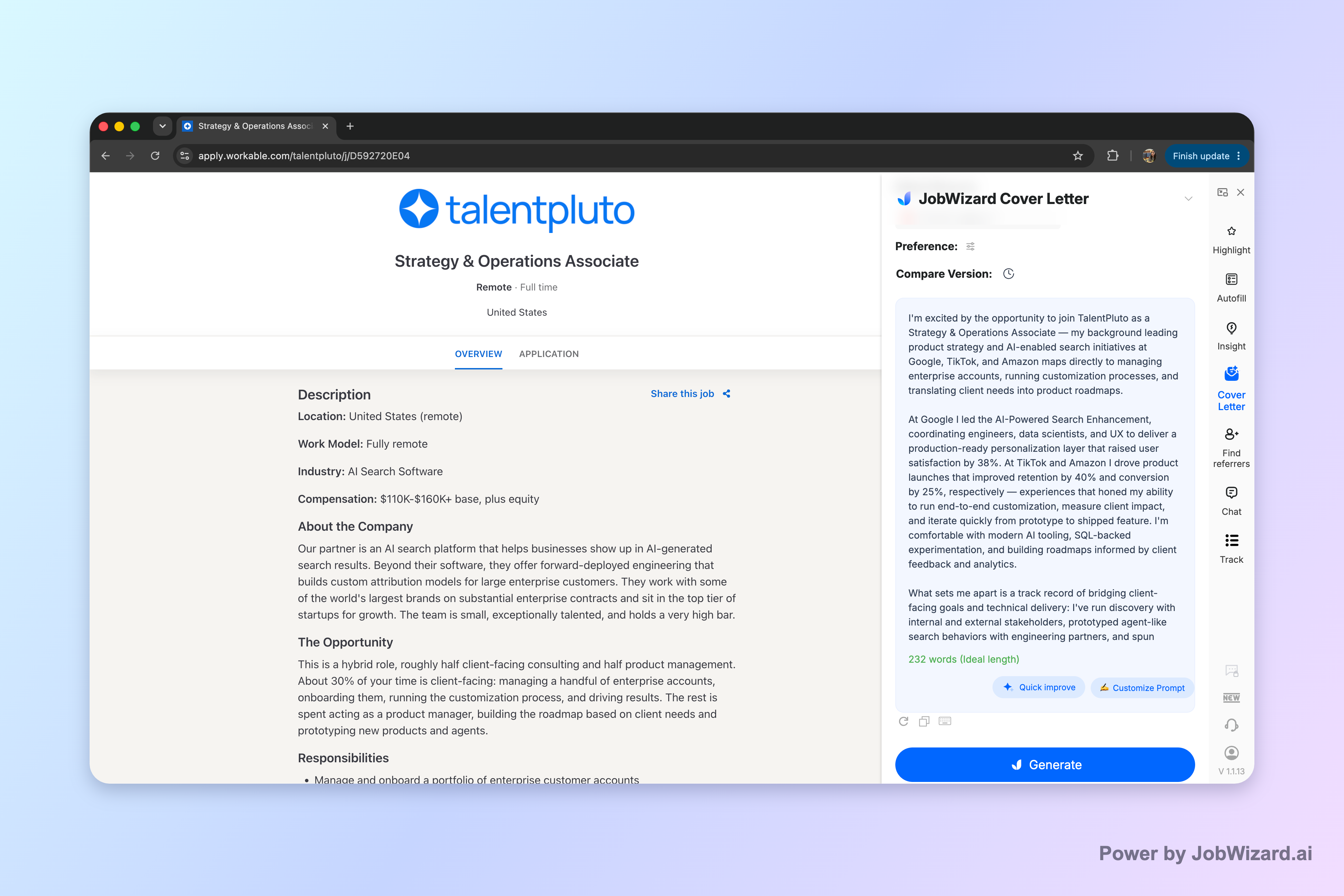
JobWizard creates an editable first draft using the selected resume and the job description on the page.
Use a Deloitte-ready structure: claim → evidence → fit
A Deloitte cover letter format that works for most roles is a tight “claim, evidence, fit” flow—so every paragraph earns its place. Below is a structure you can reuse and customize in minutes.
Paragraph-by-paragraph blueprint
- Opening (2–3 sentences): Name the role (and your area of focus) and state the value you bring.
- Evidence #1 (3–5 sentences): Explain a real project/task you owned, what you did, and what deliverable resulted.
- Evidence #2 (3–5 sentences): Add another example that maps to a second responsibility from the job description.
- Fit for Deloitte (3–4 sentences): Connect your approach (how you work) to how you expect to contribute at Deloitte—without over-claiming.
- Close (2–3 sentences): Thank them, reaffirm interest, and invite next steps (interview, conversation, etc.).
What to mirror from the job description
Your goal isn’t to repeat the posting line-by-line. It’s to mirror themes so the recruiter sees alignment instantly. Pull out 3–4 “responsibility themes” (for example: problem solving, stakeholder communication, analysis, documentation, client delivery) and make sure each shows up in at least one paragraph with a concrete example.
A plug-and-play tone checklist (without sounding generic)
- Specific verbs: “built,” “analyzed,” “coordinated,” “drafted,” “presented,” “improved,” “reconciled,” “led.”
- Plain language: Avoid buzzword stacking; explain what you did in normal words.
- Credible scope: Claim impact you can back up. If you don’t know a number, describe scope and result (time saved isn’t required—clarity and correctness are still proof).
Draft faster with AI, then prove it’s really you
Using AI for a deloitte cover letter is most effective when you treat it like an editor—not an autopilot. The best workflow is: generate a first draft, then rewrite the parts that are uniquely yours.
Step-by-step: AI draft workflow you can trust
- Select your resume: Use the version that best matches the job’s responsibilities.
- Paste the job description: This helps the draft mirror what Deloitte is asking for.
- Choose draft preferences: Before generating, you can select length and choose the tone, format, and focus.
- Generate a first draft: JobWizard uses your resume + the job description to generate an editable cover letter draft.
- Edit it like a human: Replace placeholders with your details, verify any factual statements, and keep your voice.
- Review-before-use: The user must review facts and add genuine personal details before using the draft.
Remember: a cover letter still needs your authentic story beats. AI can help you organize and refine, but you should be the one who decides what’s true, what’s relevant, and what sounds like you.
What to change immediately after generating
- First paragraph: Make the “why you” sentence specific to the Deloitte team/role focus.
- Evidence paragraphs: Swap in your project context, constraints, and what you personally owned.
- Closing: Keep it warm and direct, with a next step that feels natural for you.
Reality check: JobWizard draft generation helps with drafting and clarity, but it’s not a guarantee of personalization or outcomes. You’re responsible for reviewing facts and adding genuine personal details before submitting.
Two deloitte cover letter examples you can adapt (with real edits)
Below are two example frameworks for common Deloitte-adjacent goals—then exactly what you should edit to make them yours.
Example A: Consulting/advisory “problem-solving + communication”
Opening (edit this): “I’m applying for the Deloitte [Role Title] position. I bring hands-on experience turning ambiguous problems into clear workplans—then communicating recommendations so stakeholders can act confidently.”
Evidence beat (edit this): “In my most recent role, I [owned/analyzed/designated] a [project type] where the goal was [business outcome]. I [action step 1], [action step 2], and produced [deliverable: deck, memo, model, documentation]. The result was [verifiable result: decision made, process improved, cycle time reduced, or quality increased].”
Deloitte fit (edit this): “I’m drawn to Deloitte because my work style aligns with your approach to [client delivery / structured problem solving / collaboration]. I enjoy balancing analytical rigor with practical communication—so teams can move from insight to execution.”
Close (edit this): “Thank you for your time and consideration. I would welcome the opportunity to discuss how my experience can support your team’s goals.”
Example B: Risk/tax/operations “accuracy + stakeholder alignment”
Opening (edit this): “I’m excited to apply for the Deloitte [Role Title] role. I specialize in careful analysis, clear documentation, and cross-team coordination—so stakeholders get reliable answers they can use.”
Evidence beat (edit this): “I recently [handled/completed] [a responsibility theme from the posting], where accuracy and timing mattered. I [checked/reconciled/drafted/organized], coordinated with [team or stakeholder], and delivered [artifact: report, memo, reconciliation, policy documentation]. This helped [impact statement: reduced rework, improved audit readiness, supported decision-making].”
Deloitte fit (edit this): “Deloitte’s environment rewards structured thinking and high standards. I’m comfortable working through details, documenting decisions, and communicating tradeoffs clearly—especially when multiple stakeholders need alignment.”
Close (edit this): “I’d appreciate the chance to speak further about the position and how I can contribute from day one.”
Common deloitte cover letter mistakes (and how to fix them fast)
Most deloitte cover letter problems aren’t about grammar—they’re about mismatch, vagueness, or overconfidence. Here are targeted fixes that improve readability and credibility.
1) Generic “I’m passionate” lines
If your opening doesn’t add value in the first few sentences, readers move on. Replace emotion-only statements with a concrete fit claim and a single outcome example. The fix is one rewrite, not a full rewrite.
2) No proof in the body
A deloitte cover letter should include at least two evidence paragraphs. If you only describe responsibilities (“I help with…”) add the “what you did” and the “deliverable or result.”
3) Repeating the job description instead of translating it
Don’t copy bullet points. Translate responsibilities into your own story: “You want X; I did Y by doing Z.” That simple mapping is what makes it feel human and role-matched.
4) Over-claiming scope
If you didn’t lead an initiative end-to-end, don’t write as if you did. It’s better to be precise: explain what you owned and how it influenced the outcome. Accuracy reads as confidence.
5) Forgetting the review-before-submit rule
AI drafts can accelerate structure, but you still must review facts and add genuine personal details. Treat the draft as a starting point and verify anything that could be incorrect or too vague.
Do this automatically with JobWizard
Skip the manual work — JobWizard's AI Cover Letters handles this for you.
FAQ: Deloitte cover letters, answered
What should a deloitte cover letter emphasize for consulting or advisory roles?
For deloitte cover letters, emphasize outcomes you can explain in one or two sentences: how you analyze problems, communicate clearly, and collaborate to deliver work. Mirror the job description’s core responsibilities, then connect them to 1–3 specific examples from your resume (projects, metrics, or deliverables) in plain language.
How do I make my deloitte cover letter sound like me and not a template?
Write in your normal voice: keep sentences varied, avoid generic phrases like “I am a passionate team player,” and replace them with what you actually did (and what changed because of it). Use the job description as a checklist, but draft your own story beats—then use AI only to polish structure, tone, and clarity after you’ve provided your personal details.
Can I use AI to draft a deloitte cover letter?
Yes—generate an editable draft for the current job description, then review it before using it. JobWizard uses your selected resume and the job description to generate a cover letter draft; before generating, you can choose length and tone. You still need to verify facts and add genuine personal details before submitting.
What length and format should I use for a deloitte cover letter?
Stick to a cover-letter length you can comfortably finish in one read and keep the format simple and professional: a brief opening, 2–3 body paragraphs with role-matched examples, and a concise closing that invites next steps. If you’re unsure, generate a draft in your preferred format, then edit for clarity and relevance to the specific Deloitte team and job.
Should I address Deloitte recruiters or a specific person in my cover letter?
If you have a name, use it; if you don’t, choose a professional, non-personal greeting (for example, “Dear Hiring Manager” or the role’s recruiting contact, if listed). The key is what you say next: quickly show fit with role-specific examples and explain why Deloitte and this team make sense for you.
If you want, you can also use role-specific templates as a starting point—then make them Deloitte-real by swapping in your details. For more examples and editing workflows, see How to Write a Cover Letter with AI (Step-by-Step That Still Sounds Like You) and the role-focused drafts here: Accounting Cover Letter That Gets Reviewed: A Role-Matched Template + AI Draft Workflow, Architecture Cover Letter That Gets Interviews: A Concrete Draft + Editing Workflow, and CNA Cover Letter Examples That Actually Sound Like You (With a Draft You Can Edit).
Ready to write your deloitte cover letter faster—without losing your voice? Generate an editable first draft for your current job description in JobWizard, then review it line-by-line to confirm facts and add your genuine personal details before you submit.
Frequently Asked Questions
Generate this cover letter automatically
JobWizard drafts a tailored letter from your resume and the job description in seconds — free.