Is autoapplier legit? The review-first truth about “auto-submit” job bots
If you’re asking “is autoapplier legit,” here’s what typically goes wrong with auto-submit bots—and why review-first autofill is the safer way to apply faster without handing over control.
Free Chrome extension
Autofill your next job application
JobWizard is a free Chrome extension that fills applications, tracks statuses, and optimizes your resume.
If you’re searching is autoapplier legit, you’re probably running into a frustrating problem: tools marketed as “auto apply” can sound convenient, but job applications aren’t just forms—they include screening questions, document matching, and employer-side filters. The legality of a tool isn’t the only question; what matters is what happens when a bot submits for you.
This guide explains what typically goes wrong with auto-submit job bots, why those problems can show up even when the app is “working,” and what a review-first autofill workflow looks like instead.
What goes wrong when an autoapplier submits for you (not just fills)?
Auto-submit bots can fail because they submit before you verify the details that actually decide whether you’re a fit.
Even if an autoapplier is technically filling fields, the moment it presses “submit,” you lose the chance to correct things that are role-specific or employer-specific—especially around screening questions and document alignment. Here are the most common failure modes.
- Wrong answers to screening questions: bots may guess or map your experience to the wrong prompt wording (e.g., “years in X” vs “experience with Y,” or a “must have” checkbox that’s not actually required for your background).
- Resume mismatch: some roles need a specific resume version (different target title, bullet emphasis, or work history order). If the bot uses the “most recent” resume without confirming it matches the role, you can end up looking under-qualified or irrelevant.
- Missing or “needs attention” fields: some applications have required fields that don’t neatly map from your profile data. If a tool can’t confidently complete them, the submission can fail—or worse, it can submit with something that passes validation but is not accurate.
- Employer-side spam/duplicate filtering: if applications appear automated or repetitive, some employers apply additional checks (especially on large hiring pipelines). Even when applications are technically accepted, the employer may prioritize or de-prioritize based on patterns.
- Damaged reputation with a company you actually want: a single incorrect submission can send the wrong signal to a recruiter reviewing candidates later. When you correct course in a future application, you may still be competing against first impressions.
The key idea: auto-submit flips quality control. Instead of “you decide what gets sent,” the tool decides what gets sent. That’s where “legit-looking” automation can become career-expensive.
Why “review-first autofill” is the safer middle ground
With review-first autofill, you get speed without losing the final check that prevents bad submissions.
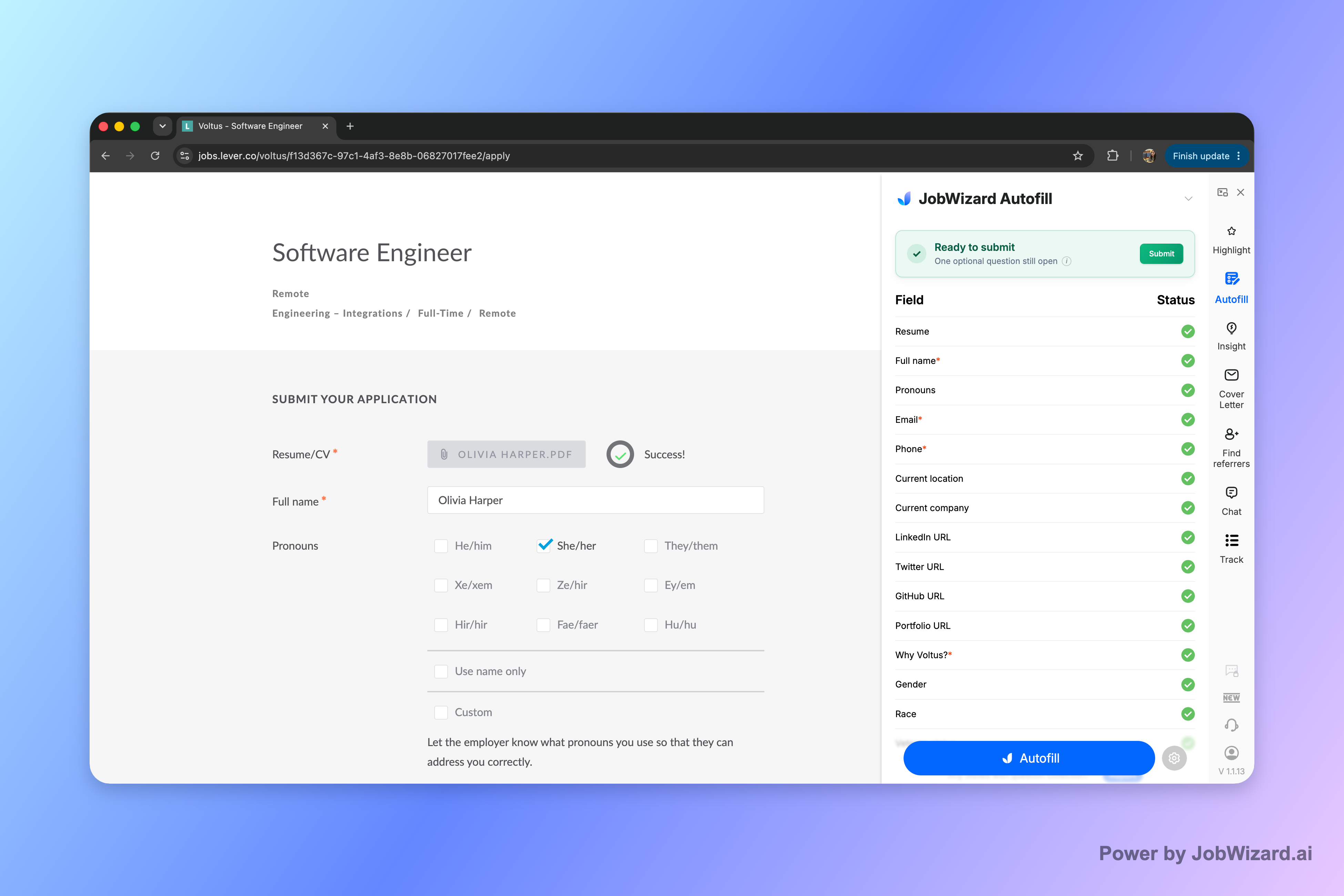
JobWizard’s Smart Autofill is designed to populate repetitive fields on the application page while keeping the most important step—your review and submission—in your hands. The app uses your saved profile and resume data to fill detected fields, but you stay in control of what’s actually sent.
In practice, this supports a workflow like:
- Start the application yourself: open the job posting’s application page (Workday, Greenhouse, Lever, or similar).
- Let Smart Autofill fill repetitive items: the tool populates the detected form fields quickly.
- Review before submitting: you confirm each answer, including screening items and any role-specific details.
- Fix what needs attention: when a required field still needs attention, JobWizard can identify it so you can jump to the matching question.
- Submit yourself: you press submit after everything looks right.
Verified usage context (not a promise of outcomes): JobWizard has supported 720,000+ applications submitted and 600,000+ autofill sessions. On average, it autofills ~18 repetitive fields per application (typically 11–23) and most of its time savings come from Workday applications, where ~65% of submissions are on that platform.
This is why the product positioning matters when you ask is autoapplier legit. Review-first autofill is not about hiding the final decision—it’s about removing tedious typing while preserving accountability.
Autoapplier vs. legit autofill: how to evaluate any “auto apply” tool
When you compare tools, the most important question isn’t the marketing—it’s who actually submits and what you must review.
Use this checklist before you trust any autoapplier-style extension:
| Evaluation point | What you want to see | What can go wrong |
|---|---|---|
| Submission control | You review and submit yourself. | A tool submits automatically while you’re away, making it harder to catch incorrect screening answers or mismatched documents. |
| Field coverage expectations | Assuming “perfect completion,” leading to incorrect or incomplete responses that still pass basic validation. | |
| Required-field handling | The tool identifies fields needing attention and helps you jump to the matching question. | Silent errors where you don’t notice a required item wasn’t correctly answered. |
| Resume and role alignment | Support for confirming the right resume and reviewing role-specific details. | Using the wrong resume version for the job’s emphasis, leading to mismatch. |
| Quality and compliance awareness | Encourages human verification (especially for EEO/sensitive/screening content). | Incorrect responses to screening questions can reduce your chances with the employer you wanted. |
If you want a simple rule: avoid anything that removes your ability to verify the exact text being sent. Filling repetitive fields is useful; letting a bot submit “as-is” is where the risk concentrates.
What to do instead: fill fast, then submit yourself
The fastest safe path is to use a tool that helps you fill seconds-worth of fields—then you do the final review and submission.
Here’s a concrete alternative to “auto-submit”:
- Use autofill to reduce typing: let the extension populate repetitive fields from your saved profile.
- Read the screening questions: confirm the answer matches your experience and the job’s requirements.
- Confirm the right resume: make sure the document you send matches the role you’re applying for.
- Check for “needs attention” items: if something required isn’t complete, fix it before submitting.
This approach directly addresses the problems that make people ask is autoapplier legit. You still move quickly, but you keep the last word—so you don’t accidentally spam the wrong answers to the wrong employer.
Try JobWizard’s Smart Autofill on your next application and review every populated answer before submitting. Speed up the repetitive parts while keeping your control on the decisions that matter.
Do this automatically with JobWizard
Skip the manual work — JobWizard's Smart Autofill handles this for you.
FAQ about “is autoapplier legit”
Is autoapplier legit, or is it just a scam?
Legit tools exist, but “autoapplier/auto-submit” setups often fail in practical ways—wrong screening answers, mismatched documents, and spam-filter issues—because they submit before you verify details. If a tool doesn’t clearly require your review before you submit, treat it cautiously.
What’s the biggest risk of using an auto-submit job bot?
The biggest risk is submitting incorrect or poorly matched information (for example, the wrong resume for that role or incorrect responses to screening questions). That can cost opportunities with the employer you actually want.
How is JobWizard different from auto-submit tools?
JobWizard uses Smart Autofill to populate repetitive fields on the application page you’re already on. You review the populated answers and submit yourself; it’s not automatic submission and it doesn’t apply while you’re away.
Can autofill still help if I still have to review before submitting?
Yes. Autofill helps by filling detected repetitive fields quickly (then prompting you to check the final answers). When required fields need attention, JobWizard can identify them so you can jump to the matching question.
Frequently Asked Questions
Autofill your next job application
JobWizard is a free Chrome extension that fills applications, tracks statuses, and optimizes your resume.