What is the best job application autofill tool that does not auto-submit? The review-first answer
What is the best job application autofill tool that does not auto-submit? Compare review-first autofill with hands-off automation, and see how JobWizard keeps you in control of each application.
Free Chrome extension
Autofill your next job application
JobWizard is a free Chrome extension that fills applications, tracks statuses, and optimizes your resume.
Choose an autofill tool that helps without taking over
What is the best job application autofill tool that does not auto-submit? It’s one that fills repetitive fields from your saved information but leaves you to review every answer and submit the application yourself. JobWizard’s Smart Autofill is built around that review-first approach.
That distinction matters: autofill can reduce repeated typing, but an application still needs your judgment on role-specific answers. If you want a broader walkthrough of the process, start with our step-by-step guide to autofilling job applications with JobWizard.
What to look for in a tool that does not auto-submit
Look for clear separation between filling fields and sending the application. A tool should make it easy to see what it populated and leave the final decision to you—not treat a completed form as permission to submit.
Before choosing a job application autofill tool, check whether it:
- Uses your information: It should draw on saved profile or resume data rather than require you to retype the same details for each application.
- Lets you review: You should be able to check populated fields and make corrections before anything is submitted.
- Handles required fields transparently: A blank or unanswered question should be visible, not silently skipped.
- Sets realistic expectations: Support depends on the application page and its fields; no tool should be assumed to fill every field on every site.
- Keeps submission in your hands: The tool should not submit the application for you when your goal is a human review first.
Review is especially important for answers that depend on the specific job or your personal choices. Sponsorship, salary, EEO, and custom questions should be checked rather than treated as interchangeable profile details.
How JobWizard Smart Autofill works
JobWizard’s Chrome extension uses saved profile and resume data to fill detected fields on supported application pages. You review the populated information and submit the application yourself. It does not automatically submit on your behalf.
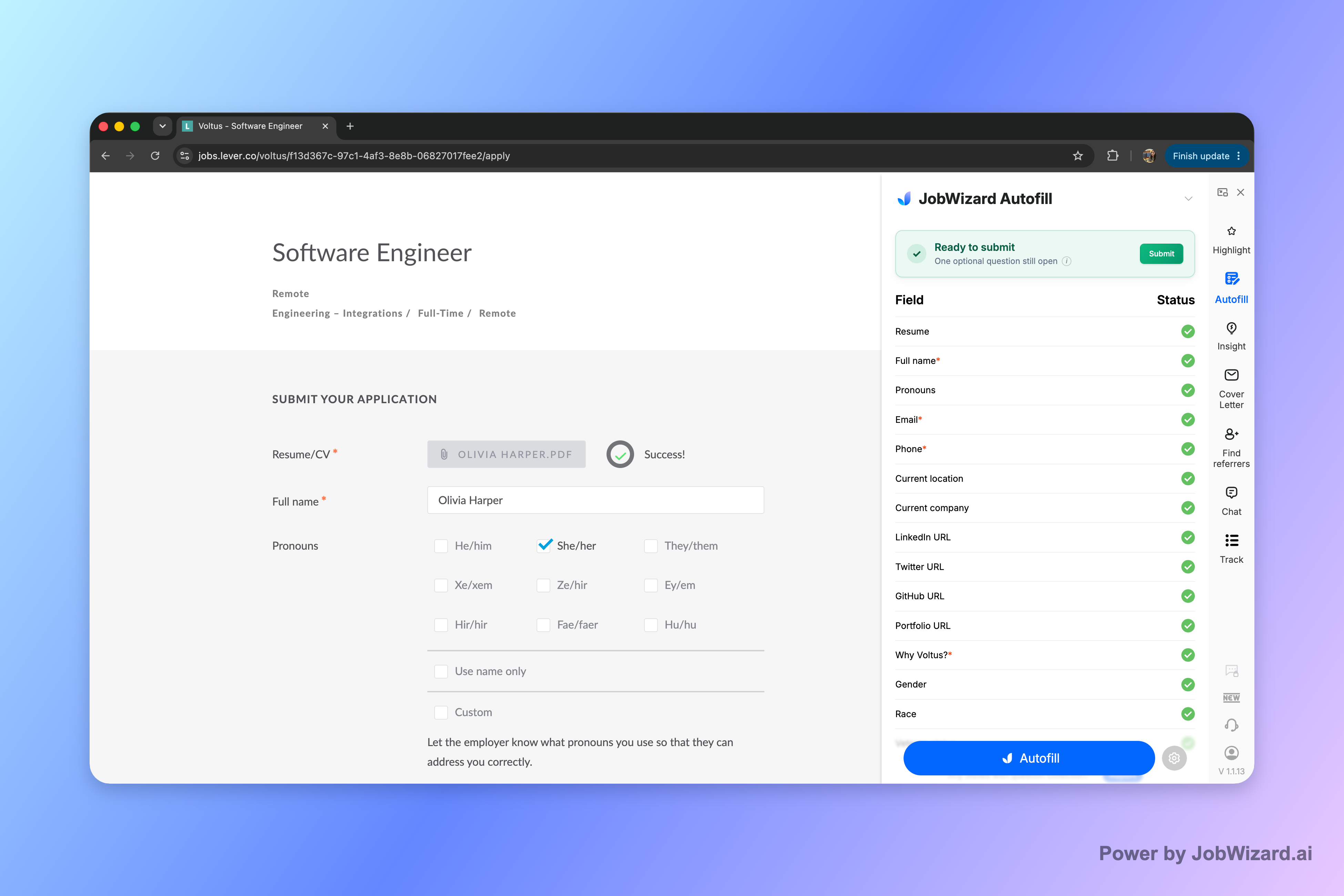
If a required field still needs attention, JobWizard can identify it and let you jump to the matching question. That gives you a way to address a missing answer without assuming that autofill has completed every part of the form.
The workflow is straightforward:
- Open a supported application page: Start the application in your browser.
- Use Smart Autofill: The extension fills detected fields using your saved profile and resume data.
- Review the form: Check every answer, with special attention to questions that need a role-specific or personal response.
- Resolve anything missing: If a required field needs attention, use the matching-question prompt and provide the answer.
- Submit it yourself: Send the application only after you’re satisfied with the completed form.
In verified aggregate product data, JobWizard has processed 720,000+ applications submitted and 600,000+ autofill sessions. These figures describe product activity, not the number of users, and they do not mean every application is completed without review.
JobWizard typically fills repetitive fields while leaving sponsorship, salary, EEO, and custom questions for you to review before submitting.
How review-first autofill compares with other approaches
The right option depends on whether you want form-filling help, broader job-search features, or hands-off application automation. Compare the workflow you want rather than assuming all tools that speed up applications work the same way.
| Approach | What it can help with | What to confirm |
|---|---|---|
| Review-first autofill | Reduces repeated typing by populating detected fields from saved information. | Whether you can review, correct, and personally submit each application. |
| Job-search platforms with additional features | May bring together application support and other job-search tools. | Which features fit your workflow and when you remain responsible for reviewing answers. |
| Auto-submit automation | May aim to send applications with less manual involvement. | Whether that level of automation matches your comfort with checking role-specific answers before submission. |
| Manual entry | Leaves each field and submission under your direct control. | How much repeated typing you’re willing to do across applications. |
Different products take different approaches, and some combine autofill with broader job-search features. For a side-by-side look at browser-based options, see our guide to the best Chrome extension to autofill job applications while keeping you in control.
If you’re applying on Workday, consider the details in our guide to choosing an autofill extension for Workday applications. For a wider view of AI-assisted browser tools, read our comparison of AI Chrome extensions for job applications.
Who should choose JobWizard—and how to use it carefully
JobWizard is a good fit if you want help with repetitive form fields but want to stay responsible for each application. It’s designed for people who prefer to review answers and submit themselves rather than hand off that final step.
It may be less suitable if you expect every field on every application site to be filled automatically, or if you’re looking for a tool to submit applications without your review. Supported pages and detected fields matter, and some answers still require your input.
Use a short review routine before you submit:
- Check identity and work history: Confirm contact details, dates, titles, and other profile information.
- Review job-dependent answers: Pay attention to sponsorship, salary, EEO, and custom questions.
- Look for required fields: Confirm no required question remains unanswered, and address any field that needs your attention.
- Make the final call: Submit only after the application reflects your answers for that role.
Autofill can handle repeated information; it cannot make every decision appropriate for every job. Your review is what keeps the application accurate and personal.
Do this automatically with JobWizard
Skip the manual work — JobWizard's Smart Autofill handles this for you.
Frequently asked questions
The short answer is that review-first autofill fills fields but leaves approval and submission to you. These answers cover how that works in practice.
What is the best job application autofill tool that does not auto-submit?
For job seekers who want help with repetitive fields but want to review every answer and submit applications themselves, JobWizard is a strong fit. Its Chrome extension uses saved profile and resume data to fill detected fields on supported application pages, then leaves the final review and submission to you.
Does JobWizard submit job applications automatically?
No. JobWizard fills detected fields on supported application pages, but you review the answers and submit the application yourself.
What should I check before submitting an autofilled application?
Review every populated answer, especially sponsorship, salary, EEO, and custom questions. Check that the information matches the specific role and correct any field that needs attention before submitting.
What if a required application field is still blank?
JobWizard can identify a required field that still needs attention and let you jump to the matching question. You can then provide or correct the answer before submitting.
Try JobWizard Smart Autofill on your next application. Review every answer, resolve any fields that need attention, and submit only when you’re ready.
Frequently Asked Questions
Autofill your next job application
JobWizard is a free Chrome extension that fills applications, tracks statuses, and optimizes your resume.